1.1What is MQTT
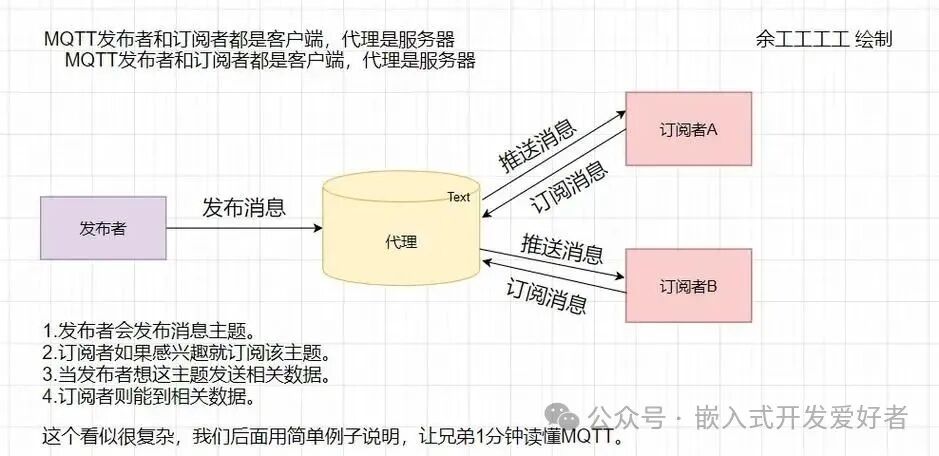
MQTT (Message Queuing Telemetry Transport) is a lightweight messaging protocol based on the publish/subscribe model. It is built on top of the TCP/IP protocol and was released by IBM in 1999, with the latest version being v3.1.1. The greatest advantage of MQTT is its ability to provide real-time and reliable messaging services for remote devices with minimal code and limited bandwidth. As a low-overhead, low-bandwidth messaging protocol, MQTT has wide applications in the Internet of Things (IoT), small devices, and mobile applications.
As is well known, the TCP/IP reference model can be divided into four layers: application layer, transport layer, network layer, and link layer. TCP and UDP are located in the transport layer, while common protocols in the application layer include HTTP, FTP, SSH, etc. The MQTT protocol operates on top of TCP, making it an application layer protocol. Therefore, wherever the TCP/IP protocol stack is supported, MQTT can be used, such as with the ESP8266 WiFi module.
1.2MQTT Packet Format
In the MQTT protocol, an MQTT packet consists of the following parts:
|
Fixed Header (Fixed header) + Variable Header (Variable header) + Payload (Payload) |
lFixed Header (Fixed header): Present in all MQTT packets, indicating the packet type and the grouping class flag of the packet.
lVariable Header (Variable header): Present in some MQTT packets, the existence and specific content of the variable header depend on the packet type.
lPayload (Payload): Present in some MQTT packets, it is essentially the message body, indicating the specific content received by the client.
1.2.1Fixed Header (Fixed header)
The MQTT fixed header is at least two bytes long. The first byte contains the packet type (Message Type) and QoS level flags. The second byte starts with the remaining length field, which is the total length of the variable header and payload that follows, and this field can be up to four bytes long. The structure is shown in Table 21.2.1:
Table 21.2.1 Header Structure
|
Bit |
7 |
6 |
5 |
4 |
3 |
2 |
1 |
0 |
|
Byte1 |
|
Different Types |
||||||
|
Byte2… |
Remaining Length (excluding fixed header, this field can occupy up to 4 bytes) |
1.2.1.1MQTT Packet Types
Location: byte1àbits7~4.
Equivalent to a 4-bit unsigned value, types are shown in Table 21.2.1.1:
Table 21.2.1.1 Packet Types
|
Name |
Value |
Direction |
Description |
|
Reserved |
0 |
— |
Reserved |
|
CONNECT |
1 |
Client to Server |
Client requests to connect to the server |
|
CONNACK |
2 |
Server to Client |
Connection acknowledgment |
|
PUBLISH |
3 |
Bi-directional |
Publish message |
|
PUBACK |
4 |
Bi-directional |
Publish acknowledgment |
|
PUBREC |
5 |
Bi-directional |
Publish received (guarantees that part 1 has arrived) |
|
PUBREL |
6 |
Bi-directional |
Publish release (guarantees that part 2 has arrived) |
|
PUBCOMP |
7 |
Bi-directional |
Publish complete (guarantees that part 3 has arrived) |
|
SUBSCRIBE |
8 |
Client to Server |
Client requests to subscribe |
|
SUBACK |
9 |
Server to Client |
Subscription acknowledgment |
|
UNSUBSCRIBE |
10 |
Client to Server |
Request to unsubscribe |
|
UNSUBACK |
11 |
Server to Client |
Unsubscribe acknowledgment |
|
PINGREQ |
12 |
Client to Server |
PING request |
|
PINGRESP |
13 |
Server to Client |
PING response |
|
DISCONNECT |
14 |
Client to Server |
Disconnect |
|
Reserved |
15 |
— |
Reserved |
1.2.1.2Flags
Location: byte1àbits3~0
In message types that do not use flags, the flags are treated as reserved bits. If an invalid flag is received, the receiver must close the network connection.
Flag-related descriptions are shown in Table 21.2.1.3:
Table 21.2.1.3 Flag Descriptions
|
Packet |
Flag |
Bit 3 |
Bit 2 |
Bit 1 |
Bit 0 |
|
CONNECT |
Reserved |
0 |
0 |
0 |
0 |
|
CONNACK |
Reserved |
0 |
0 |
0 |
0 |
|
PUBLISH |
MQTT 3.1.1 Usage |
DUP1 |
QoS2 |
QoS2 |
RETAIN3 |
|
PUBACK |
Reserved |
0 |
0 |
0 |
0 |
|
PUBREC |
Reserved |
0 |
0 |
0 |
0 |
|
PUBREL |
Reserved |
0 |
0 |
1 |
0 |
|
PUBCOMP |
Reserved |
0 |
0 |
0 |
0 |
|
SUBSCRIBE |
Reserved |
0 |
0 |
1 |
0 |
|
SUBACK |
Reserved |
0 |
0 |
0 |
0 |
|
UNSUBSCRIBE |
Reserved |
0 |
0 |
1 |
0 |
|
UNSUBACK |
Reserved |
0 |
0 |
0 |
0 |
|
PINGREQ |
Reserved |
0 |
0 |
0 |
0 |
|
PINGRESP |
Reserved |
0 |
0 |
0 |
0 |
|
DISCONNECT |
Reserved |
0 |
0 |
0 |
0 |
|
Reserved |
Reserved |
Reserved |
Reserved |
Note: The CONNACK message has no payload.
1.3.8.4PUBACK Message Summary
The PUBACK message summary is shown in Table 21.3.8.4:
Table 21.3.8.4 PUBACK Message Summary
|
Fixed Header |
||||||||
|
|
Bit 7 |
Bit 6 |
Bit 5 |
Bit 4 |
Bit 3 |
Bit 2 |
Bit 1 |
Bit 0 |
|
Byte1 |
MQTT Packet Type (4) |
Reserved |
||||||
|
0 |
1 |
0 |
0 |
0 |
0 |
0 |
0 |
|
|
Byte2 |
Remaining Length (2) |
|||||||
|
0 |
0 |
0 |
0 |
0 |
0 |
1 |
0 |
1.3.9PINGREQ – Heartbeat Request
The client sends a PINGREQ message to the server. It is used to:
1. Inform the server that the client is still alive when no other control messages have been sent from the client to the server.
2. Request the server to send a response confirming that it is still alive.
3. Use the network to confirm that the network connection has not been interrupted.
1.3.9.1PINGREQ Message Fixed Header
The PINGREQ fixed header is shown in Table 21.3.9.1:
Table 21.3.9.1 PINGREQ Fixed Header
|
Fixed Header |
||||||||
|
|
Bit 7 |
Bit 6 |
Bit 5 |
Bit 4 |
Bit 3 |
Bit 2 |
Bit 1 |
Bit 0 |
|
Byte1 |
MQTT Packet Type (12) |
Reserved |
||||||
|
1 |
1 |
0 |
0 |
0 |
0 |
0 |
0 |
|
|
Byte2 |
Remaining Length (0) |
|||||||
|
0 |
0 |
0 |
0 |
0 |
0 |
0 |
0 |
Note: The PINGREQ message has no variable header and payload.
The server must send a PINGRESP message in response to the client’s PINGREQ message.
1.3.10PINGRESP – Heartbeat Response
The server sends a PINGRESP message in response to the client’s PINGREQ message, indicating that the server is still alive.
1.3.10.1PINGRESP Message Fixed Header
The PINGRESP fixed header is shown in Table 21.3.10.1:
Table 21.3.10.1 PINGRESP Fixed Header
|
Fixed Header |
||||||||
|
|
Bit 7 |
Bit 6 |
Bit 5 |
Bit 4 |
Bit 3 |
Bit 2 |
Bit 1 |
Bit 0 |
|
Byte1 |
MQTT Packet Type (13) |
Reserved |
||||||
|
1 |
1 |
0 |
1 |
0 |
0 |
0 |
0 |
|
|
Byte2 |
Remaining Length (0) |
|||||||
|
0 |
0 |
0 |
0 |
0 |
0 |
0 |
0 |
Note: The PINGRESP message has no variable header and payload.
1.3.11DISCONNECT – Disconnect
The DISCONNECT message is the last control message sent from the client to the server, indicating that the client is disconnecting normally.
1.3.11.1DISCONNECT Message Fixed Header
The DISCONNECT fixed header is shown in Table 21.3.11.1:
Table 21.3.11.1 DISCONNECT Fixed Header
|
Fixed Header |
||||||||
|
|
Bit 7 |
Bit 6 |
Bit 5 |
Bit 4 |
Bit 3 |
Bit 2 |
Bit 1 |
Bit 0 |
|
Byte1 |
MQTT Packet Type (14) |
Reserved |
||||||
|
1 |
1 |
1 |
0 |
0 |
0 |
0 |
0 |
|
|
Byte2 |
Remaining Length (0) |
|||||||
|
0 |
0 |
0 |
0 |
0 |
0 |
0 |
0 |
Note: The DISCONNECT message has no variable header and payload.