Boot+Cloud Project Learning: macrozheng.com
When developing projects, even if it’s a monolithic application, we inevitably need to call external services. At this point, we will use HTTP client tools. Previously, I used HttpUtil from Hutool, which, while easy to get started with, can be quite cumbersome! Today, I want to share a more user-friendly HTTP client tool,
<span>Retrofit</span>, which allows you to initiate requests simply by declaring interfaces, eliminating repetitive operations like connection and result parsing, making it quite elegant!
Introduction
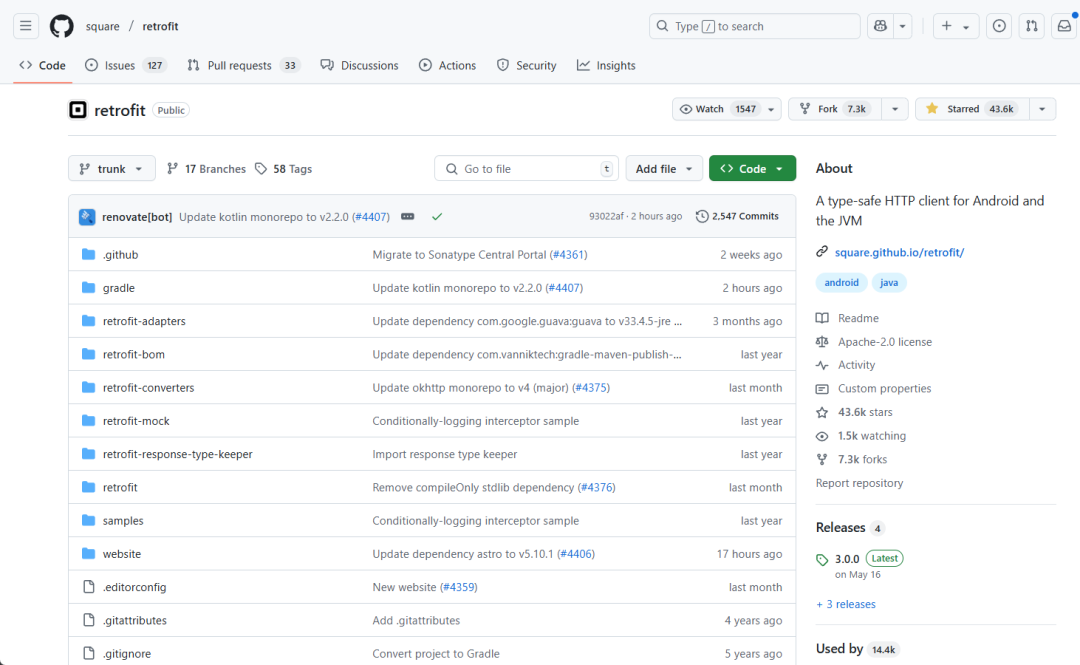
Retrofit is a type-safe HTTP client tool suitable for <span>Android</span> and <span>Java</span>, with over <span>43k+</span> stars on GitHub. Its biggest feature is that it supports initiating HTTP requests through interfaces, similar to how we use Feign to call microservice interfaces.
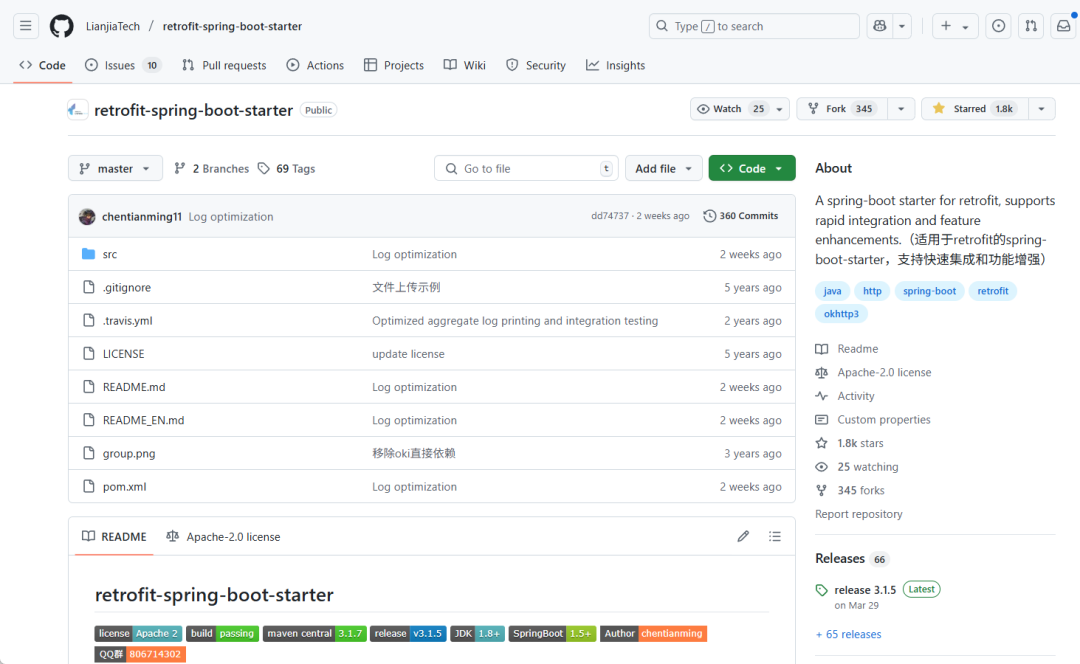
Spring Boot is the most widely used Java development framework, but Retrofit does not provide a dedicated Starter. Therefore, a developer created <span>retrofit-spring-boot-starter</span>, which implements rapid integration of Retrofit with the Spring Boot framework and supports many functional enhancements, greatly simplifying development. Today, we will use this third-party Starter to operate Retrofit.
Usage
Using Retrofit in Spring Boot is very simple, let’s experience it below.
Dependency Integration
With the support of the third-party Starter, integrating Retrofit requires just one step: add the following dependency.
<!-- Retrofit related dependencies -->
<dependency>
  <groupId>com.github.lianjiatech</groupId>
  <artifactId>retrofit-spring-boot-starter</artifactId>
  <version>${retrofit-start.version}</version>
</dependency>
Basic Usage
We will explain the basic usage of Retrofit by calling the interface from the mall e-commerce practical project.
Here is a brief introduction to the mall project, which is an e-commerce system based on SpringBoot3 + Vue (with 60K stars on GitHub), supporting multiple modules and the latest microservice architecture of 2024, deployed using Docker and K8S. It includes a front-end mall project and a back-end management system, capable of supporting a complete order process! It covers functions such as products, orders, shopping carts, permissions, coupons, members, payments, etc.!
- Boot Project: https://github.com/macrozheng/mall
- Cloud Project: https://github.com/macrozheng/mall-swarm
- Tutorial Website: https://www.macrozheng.com
Project Demo: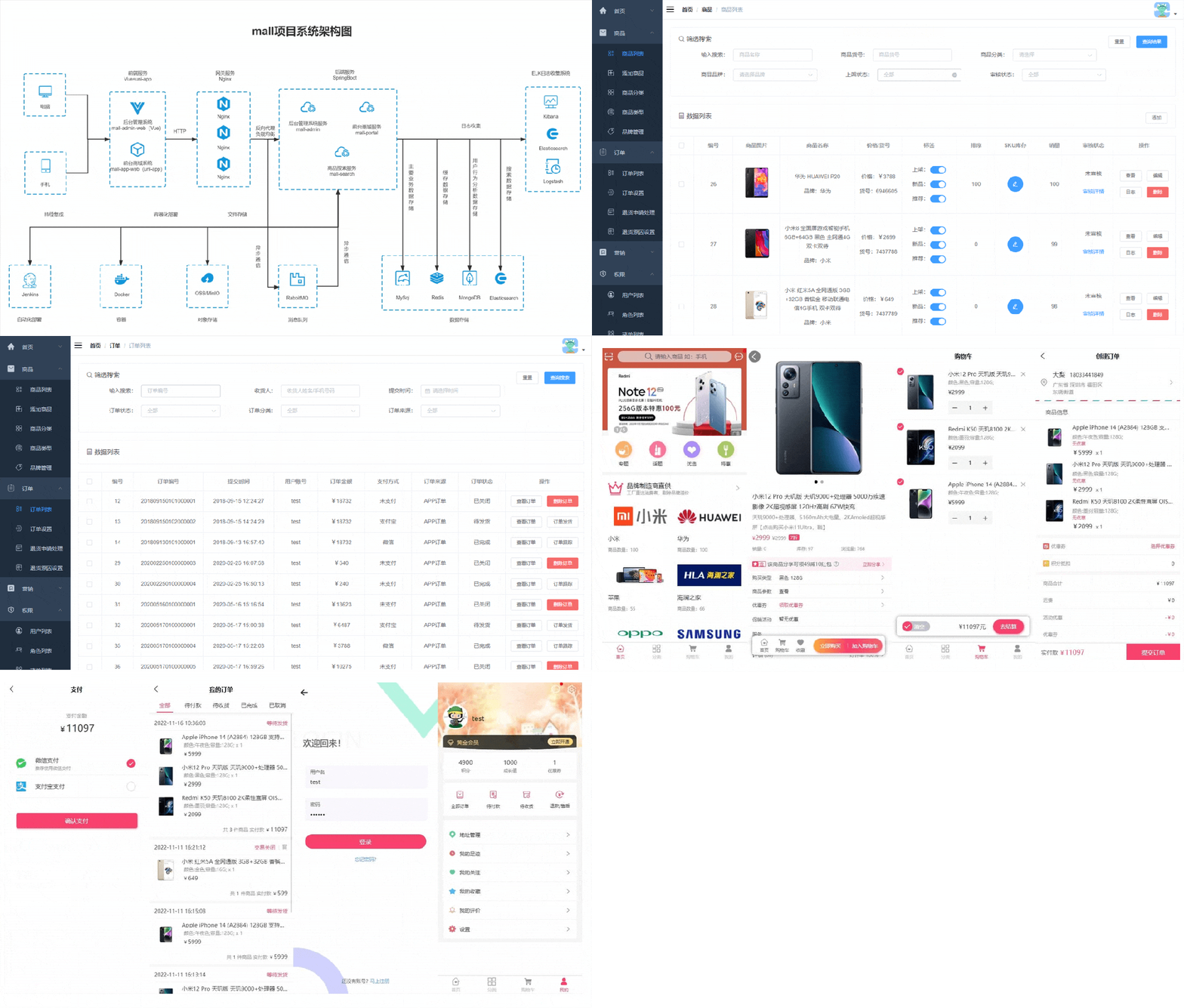
- First, we need to run the back-end service of the mall project,
<span>mall-admin</span>, where we will call the login interface and the product brand management interface. You can open the API documentation to check: http://localhost:8080/swagger-ui/index.html
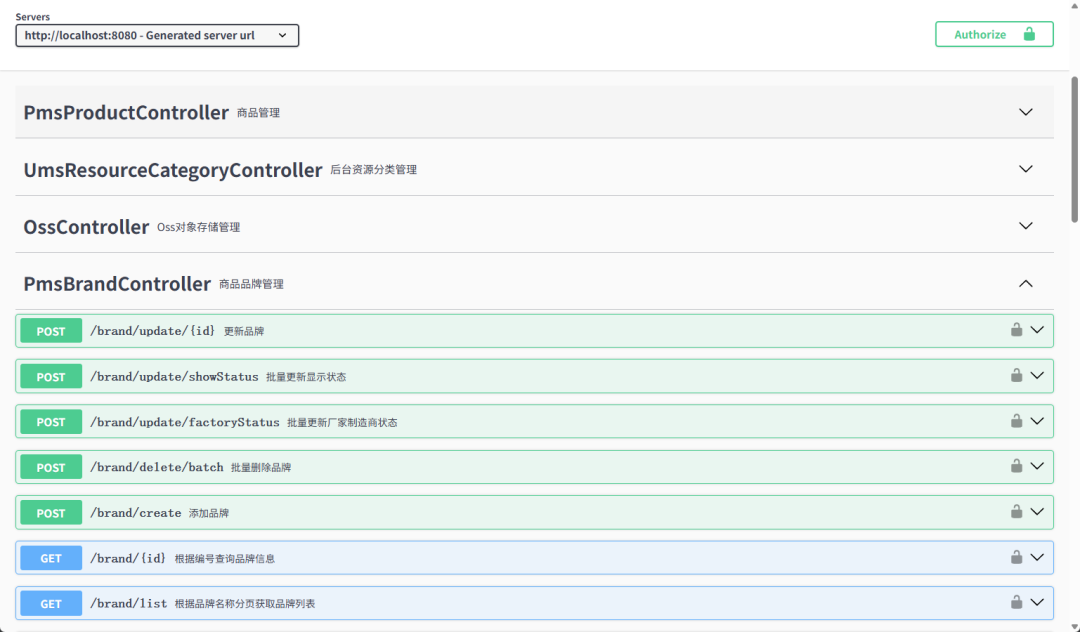
- Let’s first call the login interface. In the project’s
<span>application.yml</span>configuration file, add the service address for<span>mall-admin</span>;
remote:
  baseUrl: http://localhost:8080/
- Then, declare a Retrofit client using
<span>@RetrofitClient</span>. Since the login interface is accessed via POST, we will pass the JSON request parameters in the body, using the<span>@POST</span>and<span>@Body</span>annotations;
/**
 * @auther macrozheng
 * @description Define Http interface for calling remote UmsAdmin service
 * @date 2025/6/24
 * @github https://github.com/macrozheng
 */
@RetrofitClient(baseUrl = "${remote.baseUrl}")
public interface UmsAdminApi {

  @POST("admin/login")
  CommonResult<LoginResult> login(@Body LoginParam loginParam);
}
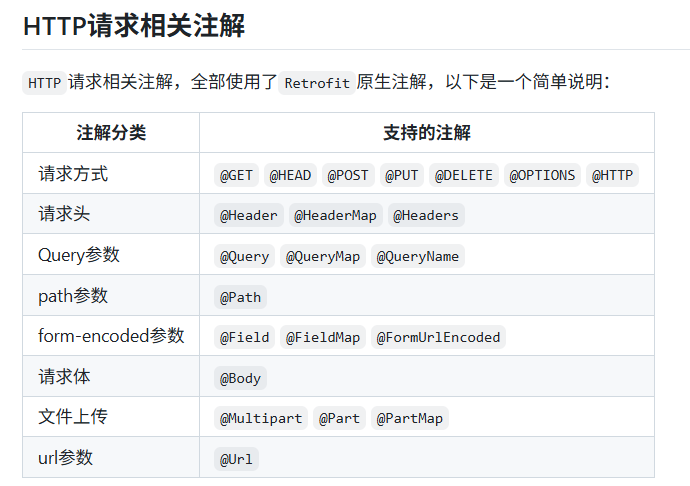
- If you are not quite sure what these annotations do, just look at the table below to understand better. For more details, you can refer to the official Retrofit documentation;
- Next, inject
<span>UmsAdminApi</span>into the Controller and then call it;
/**
 * @auther macrozheng
 * @description Retrofit remote call test interface
 * @date 2025/6/24
 * @github https://github.com/macrozheng
 */
@Tag(name = "RetrofitController", description = "Retrofit remote call test interface")
@RestController
@RequestMapping("/retrofit")
public class RetrofitController {

@Autowired
private UmsAdminApi umsAdminApi;
@Autowired
private TokenHolder tokenHolder;

@Operation(summary = "Call remote login interface to get token")
@PostMapping(value = "/admin/login")
public CommonResult<LoginResult> login(@RequestParam String username, @RequestParam String password) {
    CommonResult<LoginResult> result = umsAdminApi.login(new LoginParam(username, password));
    LoginResult loginResult = result.getData();
    if (result.getData() != null) {
      tokenHolder.putToken(loginResult.getTokenHead() + " " + loginResult.getToken());
    }
    return result;
  }
}
- To facilitate subsequent calls to interfaces that require login authentication, I created a class called
<span>TokenHolder</span>to store the token in the session;
/**
 * @auther macrozheng
 * @description Login token storage (in Session)
 * @date 2025/6/24
 * @github https://github.com/macrozheng
 */
@Component
public class TokenHolder {
/**
   * Add token
   */
public void putToken(String token) {
    RequestAttributes ra = RequestContextHolder.getRequestAttributes();
    HttpServletRequest request = ((ServletRequestAttributes) ra).getRequest();
    request.getSession().setAttribute("token", token);
  }

/**
   * Get token
   */
public String getToken() {
    RequestAttributes ra = RequestContextHolder.getRequestAttributes();
    HttpServletRequest request = ((ServletRequestAttributes) ra).getRequest();
    Object token = request.getSession().getAttribute("token");
    if(token!=null){
      return (String) token;
    }
    return null;
  }
}
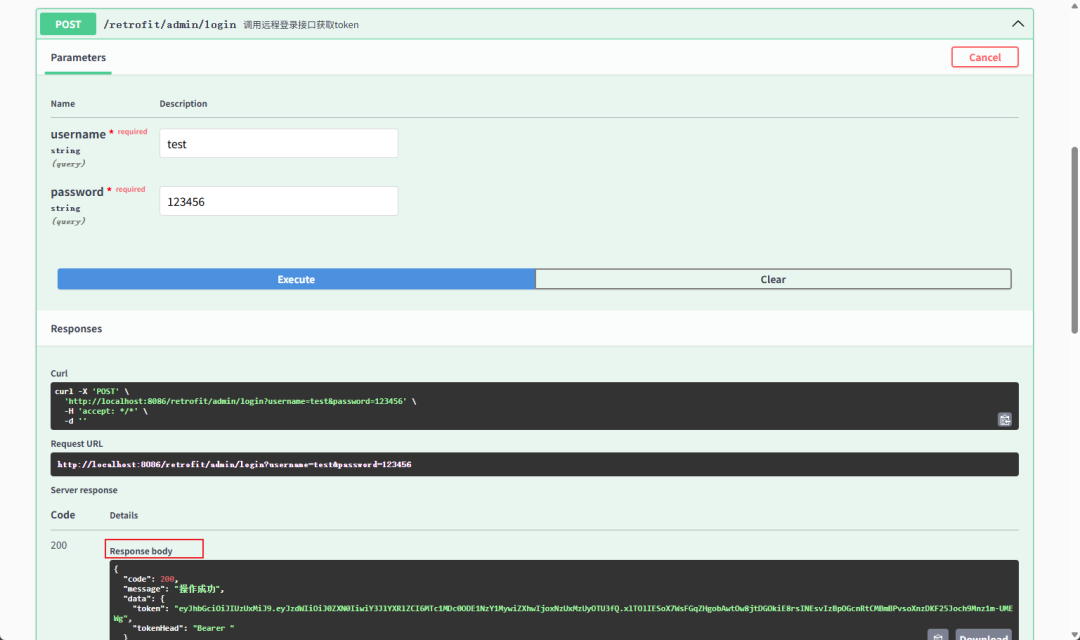
- Next, we will test using Swagger to call the interface and obtain the token returned by the remote service. Access the address: http://localhost:8086/swagger-ui/index.html
Annotation-based Interceptor
Since the product brand management interface requires adding a login authentication header to access normally, we can use the annotation-based interceptor in Retrofit to achieve this.
- First, create an annotation-based interceptor
<span>TokenInterceptor</span>that extends<span>BasePathMatchInterceptor</span>, and then in the<span>doIntercept</span>method, add the<span>Authorization</span>header to the request;
/**
 * @auther macrozheng
 * @description Interceptor to add login Token header to requests
 * @date 2025/6/24
 * @github https://github.com/macrozheng
 */
@Component
public class TokenInterceptor extends BasePathMatchInterceptor {
@Autowired
private TokenHolder tokenHolder;

@Override
protected Response doIntercept(Chain chain) throws IOException {
    Request request = chain.request();
    if (tokenHolder.getToken() != null) {
      request = request.newBuilder()
              .header("Authorization", tokenHolder.getToken())
              .build();
    }
    return chain.proceed(request);
  }
}
- Create a client to call the brand management interface
<span>PmsBrandApi</span>, using the<span>@Intercept</span>annotation to configure the interceptor and the interception path;
/**
 * @auther macrozheng
 * @description Define Http interface for calling remote PmsBrand service
 * @date 2025/6/24
 * @github https://github.com/macrozheng
 */
@RetrofitClient(baseUrl = "${remote.baseUrl}")
@Intercept(handler = TokenInterceptor.class, include = "/brand/**")
public interface PmsBrandApi {
@GET("brand/list")
  CommonResult<CommonPage<PmsBrand>> list(@Query("pageNum") Integer pageNum, @Query("pageSize") Integer pageSize);

@GET("brand/{id}")
CommonResult<PmsBrand> detail(@Path("id") Long id);

@POST("brand/create")
CommonResult create(@Body PmsBrand pmsBrand);

@POST("brand/update/{id}")
CommonResult update(@Path("id") Long id, @Body PmsBrand pmsBrand);

@GET("brand/delete/{id}")
CommonResult delete(@Path("id") Long id);
}
- Then, inject the
<span>PmsBrandApi</span>instance into the Controller and add methods to call the remote service;
/**
 * @auther macrozheng
 * @description Retrofit remote call test interface
 * @date 2025/6/24
 * @github https://github.com/macrozheng
 */
@Tag(name = "RetrofitController", description = "Retrofit remote call test interface")
@RestController
@RequestMapping("/retrofit")
public class RetrofitController {

@Autowired
private UmsAdminApi umsAdminApi;

@Operation(summary = "Call remote interface to paginate query brand list")
@GetMapping(value = "/brand/list")
public CommonResult<CommonPage<PmsBrand>> listBrand(@RequestParam(value = "pageNum", defaultValue = "1") Integer pageNum,
                                                      @RequestParam(value = "pageSize", defaultValue = "3") Integer pageSize) {
    return pmsBrandApi.list(pageNum, pageSize);
  }

@Operation(summary = "Call remote interface to get details of brand with specified id")
@GetMapping(value = "/brand/{id}")
public CommonResult<PmsBrand> brand(@PathVariable("id") Long id) {
    return pmsBrandApi.detail(id);
  }

@Operation(summary = "Call remote interface to add brand")
@PostMapping(value = "/brand/create")
public CommonResult createBrand(@RequestBody PmsBrand pmsBrand) {
    return pmsBrandApi.create(pmsBrand);
  }

@Operation(summary = "Call remote interface to update brand information with specified id")
@PostMapping(value = "/brand/update/{id}")
public CommonResult updateBrand(@PathVariable("id") Long id, @RequestBody PmsBrand pmsBrand) {
    return pmsBrandApi.update(id,pmsBrand);
  }

@Operation(summary = "Call remote interface to delete brand with specified id")
@GetMapping(value = "/delete/{id}")
public CommonResult deleteBrand(@PathVariable("id") Long id) {
    return  pmsBrandApi.delete(id);
  }
}
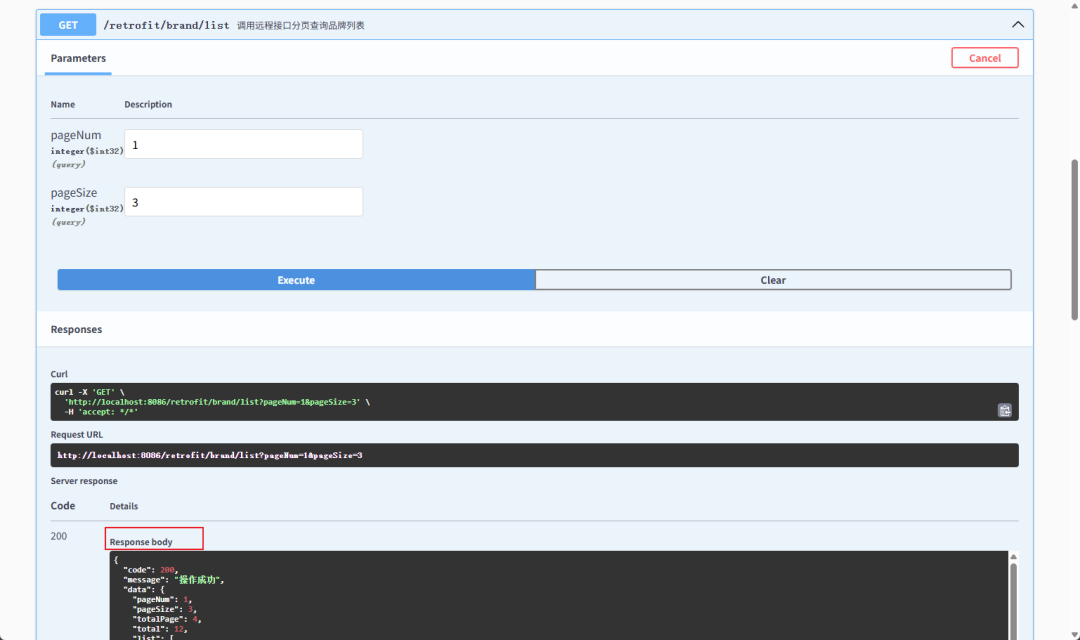
- Test the interface in Swagger and find that it can be successfully called.
Global Interceptor
If you want to add a request header to all requests, you can use a global interceptor.
Create a <span>SourceInterceptor</span> class that extends the <span>GlobalInterceptor</span> interface, and then add the <span>source</span> request header in the Header.
/**
 * @auther macrozheng
 * @description Global interceptor to add source header to requests
 * @date 2025/6/24
 * @github https://github.com/macrozheng
 */
@Component
public class SourceInterceptor implements GlobalInterceptor {

@Override
public Response intercept(Chain chain) throws IOException {
    Request request = chain.request();
    Request newReq = request.newBuilder()
            .addHeader("source", "retrofit")
            .build();
    return chain.proceed(newReq);
  }
}
Configuration
Retrofit has many configurations. Below, we will discuss the three most commonly used configurations: logging, global timeout, and global request retry.
Logging
- By default, Retrofit uses the
<span>basic</span>logging strategy, which prints very simple logs;

- We can modify the
<span>retrofit.global-log.log-strategy</span>property in<span>application.yml</span>to<span>body</span>to print the most comprehensive logs;
retrofit:
  # Global log configuration
  global-log:
    # Enable log printing
    enable: true
    # Global log printing level
    log-level: info
    # Global log printing strategy
    log-strategy: body
- After modifying the log printing strategy, the log information becomes more comprehensive;
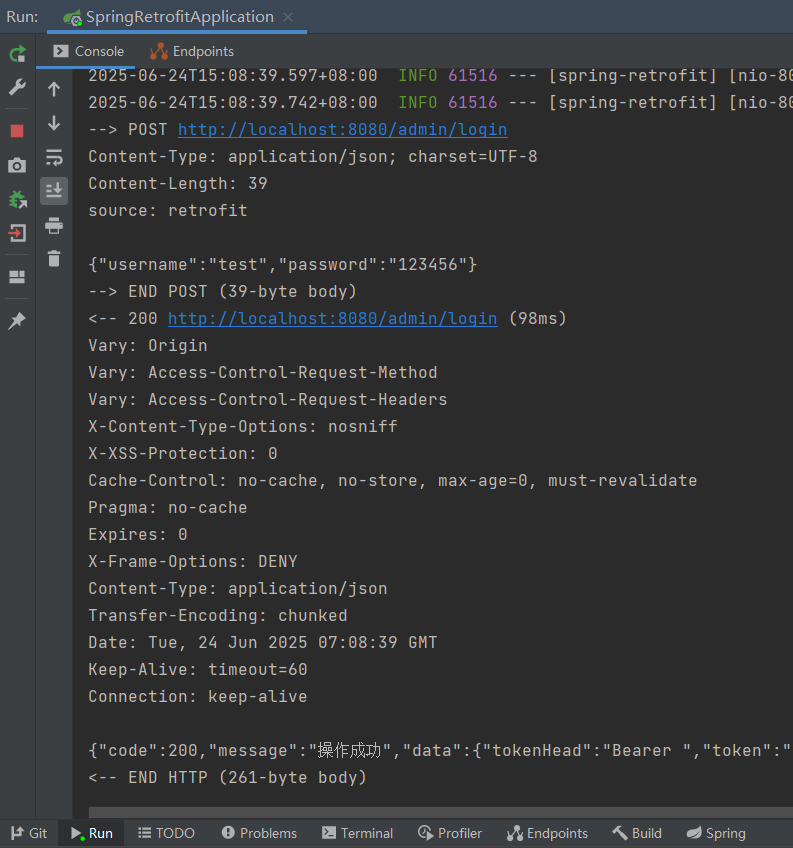
- Retrofit supports four logging strategies;
- NONE: No logging;
- BASIC: Only logs request records;
- HEADERS: Logs request records, request and response header information;
- BODY: Logs request records, request and response header information, request and response body information.
Global Timeout
Sometimes we need to modify the request timeout for Retrofit, which can be achieved through the following configuration.
retrofit:
  # Global timeout configuration
  global-timeout:
    # Global connection timeout
    connect-timeout-ms: 3000
    # Global read timeout
    read-timeout-ms: 3000
    # Global write timeout
    write-timeout-ms: 35000
    # Global complete call timeout
    call-timeout-ms: 0
Global Request Retry
<span>retrofit-spring-boot-starter</span>supports request retries, which can be implemented through the following configuration.
retrofit:
  # Global retry configuration
  global-retry:
    # Enable global retry
    enable: true
    # Global retry interval
    interval-ms: 100
    # Global maximum retry count
    max-retries: 2
    # Global retry rules
    retry-rules:
      - response_status_not_2xx
      - occur_exception
- The retry rules
<span>retry-rules</span>support the following three configurations. - RESPONSE_STATUS_NOT_2XX: Retry when the response status code is not 2xx;
- OCCUR_IO_EXCEPTION: Retry when an IO exception occurs;
- OCCUR_EXCEPTION: Retry when any exception occurs.
Conclusion
Today, we experienced Retrofit, and compared to using HttpUtil, it is indeed much more elegant! Initiating HTTP requests through interfaces is no longer exclusive to Feign; with Retrofit, we can also use this method in monolithic applications. Of course, the functionality provided by <span>retrofit-spring-boot-starter</span> goes far beyond this; it also supports inter-service calls and circuit breaking, so interested friends can explore it further!
References
Official Documentation: https://github.com/LianjiaTech/retrofit-spring-boot-starter
Project Source Code Address
https://github.com/macrozheng/spring-examples/tree/master/spring-retrofit
On GitHub, the microservice practical project mall-swarm has <span>11K stars</span>, and the complete video tutorial (latest version of 2024) is here! The complete tutorial <span>is about 26 hours long, consisting of 59 episodes</span>. If you want to learn the latest microservice technology stack and improve your <span>microservice project development capabilities</span>, you might want to check it out. Below is the overall architecture diagram of the project; interested friends can click the link to join the mall-swarm video tutorial.
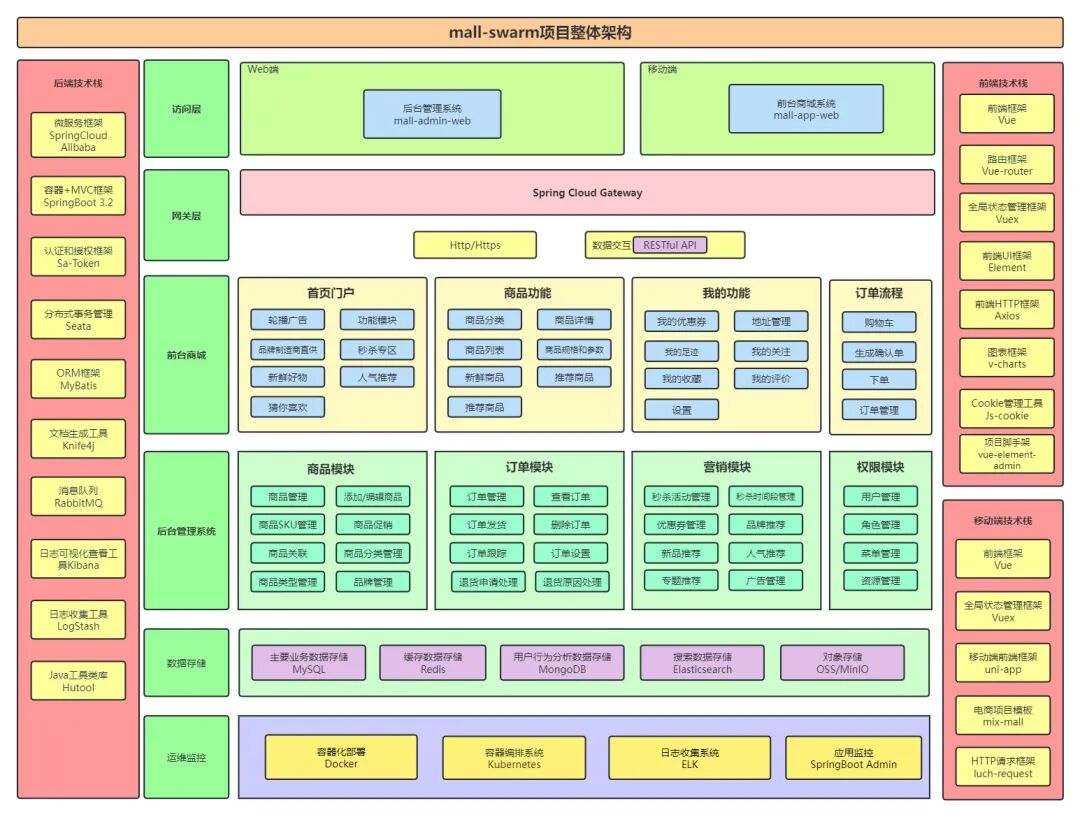
The complete video tutorial content is very comprehensive, covering core components of Spring Cloud, practical microservice projects, Kubernetes container deployment, etc. You can also click the link to learn more about the mall-swarm video tutorial.