
In enterprise network construction, switches act as “traffic hubs,” connecting computers, servers, printers, and other devices, with their performance directly impacting office efficiency and data security. As a leading brand in the networking equipment field, Cisco switches are the preferred choice for many enterprises due to their stable performance and rich features. However, with numerous models and complex parameters, how can one select the right one? Today, we will provide you with practical tips for selecting Cisco switches to help you avoid pitfalls!
1. Clarify Your Needs: Understand “What You Need”
Before purchasing, ask yourself three questions to avoid blindly pursuing high-end models:
- What is the scale of the network? A small office (10-50 people) may only need a few gigabit access switches; medium to large enterprises (over 100 people) should consider a hierarchical architecture with core switches + aggregation switches + access switches, such as using the Cisco Catalyst 9600 series as the core, paired with the Catalyst 9300 series for aggregation, and the Catalyst 9200 series for the access layer.
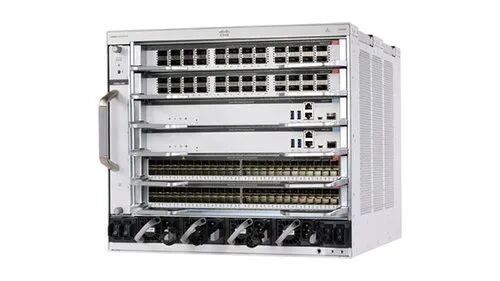
- Cisco Catalyst 9600 Series Switches

- Cisco Catalyst 9300 Series Switches
 Cisco Catalyst 9200 Series Switches
- How high is the bandwidth requirement? For regular office tasks (web browsing, file transfers), a gigabit switch is sufficient; if it involves high-definition video conferencing, large data transfers, or server cluster connections, an upgrade to 10G or even 40G/100G switches is necessary, such as the Cisco Nexus series data center switches, which can easily handle high bandwidth scenarios.
- Do you need special features? For example, do you need PoE (Power over Ethernet) to power IP phones or cameras? The Cisco Catalyst 9300 series supports PoE+, with a maximum power of 30W per port, meeting the needs of most devices; do you need security protection? Switches with Cisco TrustSec functionality can achieve port security and access control to prevent unauthorized devices from connecting.
2. Focus on Core Parameters: These “Hard Indicators” Determine Performance
You don’t need to understand all parameters, but you must pay attention to these core indicators:
- Port Quantity and Type: Choose the number of ports based on the number of devices (24-port and 48-port are mainstream), and also pay attention to the interface type – electrical ports (RJ45) are used for connecting regular devices, while optical ports (SFP/SFP+) are used for long-distance transmission or high-bandwidth links, such as the Cisco Catalyst 9400 series, which supports flexible port expansion and can be paired with optical modules as needed.
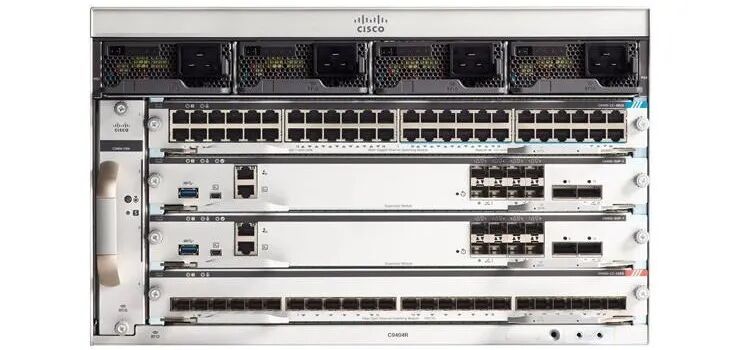
- Cisco Catalyst 9400 Series Switches
- Backplane Bandwidth and Forwarding Rate: These two parameters determine the data processing capability of the switch; the higher the values, the better. Insufficient backplane bandwidth can lead to network congestion, and inadequate forwarding rate can affect data transmission efficiency. When purchasing, ensure that these two parameters can cover the total maximum bandwidth of all ports.
- Redundancy and Reliability: In critical business scenarios (such as finance and healthcare), redundancy design must be considered, such as choosing models that support dual power supplies and dual engines (like the Cisco Catalyst 9600 series), so that if one component fails, the other can seamlessly take over, avoiding network interruptions.
3. Consider Scalability: Leave Room for Future “Upgrades”
Enterprise networks will expand as business grows, so when purchasing, avoid the awkward situation of “going all out” but being unable to upgrade:
- Prioritize Modular Design: Modular switches (like the Cisco Catalyst 9400) can expand the number of ports or upgrade functions by adding service cards, making them more flexible than fixed-port switches, suitable for expansion needs in the next 3-5 years.
- Support for Next-Generation Technologies: Choose models that support Wi-Fi 6, 400G Ethernet, and SDN (Software Defined Networking), such as the Cisco Catalyst 9000 series, which supports DNA Center intelligent management and can achieve functional iteration through software upgrades, avoiding rapid obsolescence of equipment.
4. Adapt to Scenarios: Choose the Right “Specialized Model” for Different Industries
Cisco switches cover a wide range of scenarios, and targeted selection is more efficient:
- Small and Medium Enterprise Office: The Cisco Catalyst 9200 series is recommended for its high cost-performance ratio, supporting gigabit access and basic security features, meeting daily office needs.
- Data Center: The Nexus series is the first choice, such as the Nexus 9000 series, which supports high-density 10G / 40G ports and is compatible with virtualization technologies, capable of handling large-scale data processing.
- Industrial Environment: Cisco IE series switches (such as the IE 4000) are resistant to vibration and have wide temperature operating capabilities, suitable for network deployment in harsh environments like factories and mines.
5. After-Sales and Service: The “Invisible Guarantee” of Big Brands
Cisco, as an international brand, has a mature after-sales service system, but attention should still be paid when purchasing:
- Does it provide factory warranty?: Prioritize purchasing through legitimate channels to ensure a 3-5 year factory warranty, avoiding refurbished or gray market products.
- Is technical support timely?: Confirm whether the supplier can provide localized technical support, such as configuration guidance and troubleshooting, which is crucial for small and medium enterprises with insufficient network technology reserves.
- Does it include software licenses?: Some features (such as advanced security and cloud management) require separate software licenses, so ask what permissions are included when purchasing to avoid additional costs later.
Conclusion: The Best Choice is What Suits You
There is no “standard answer” for selecting Cisco switches; the key is to match the model with your scale, bandwidth requirements, and future plans. Remember: do not blindly pursue high prices, do not overlook scalability, focus on core parameters, and pair with reliable suppliers to select switches that meet current needs and support future development.

If you are still struggling with specific models, feel free to leave a comment with your enterprise scale and needs, and we will recommend suitable solutions for you!
#CiscoSwitches #EnterpriseNetworking #NetworkEquipmentSelection
-End-