In the simulation process, when encountering transient large deformations, material failure, and other situations, ANSYS’s explicit dynamics analysis can be utilized to resolve these issues. The ANSYS explicit dynamics module includes three types: Explicit Dynamics, ANSYS AUTODYN, ANSYS LS-DYNA.
This article will briefly introduce the specific operations of these three modules through an example.
Example Problem Description: A metal cylinder rapidly penetrates a metal plate. The goal is to solve for the maximum stress during the penetration process and the deformation in the direction of penetration. The simulation results will be calculated and compared using different simulation modules.
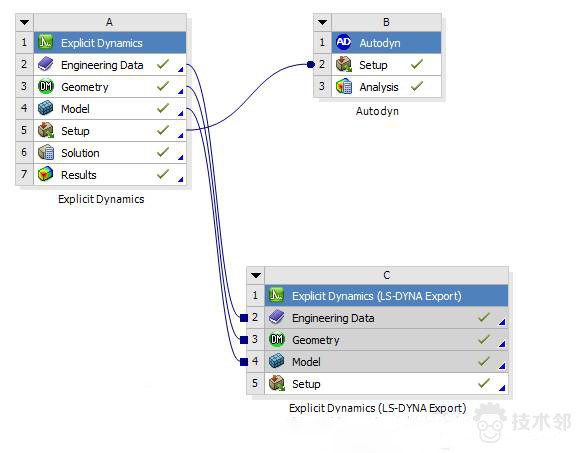
The analysis flowchart is as follows. A, B, and C correspond to the three modules mentioned above. These three modules establish data sharing to avoid redundant pre-processing operations, thus improving simulation efficiency.
The analysis tree is as follows:
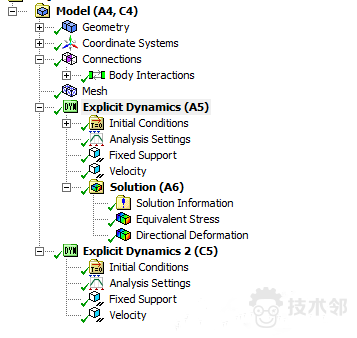
1. Explicit Dynamics
The material addition and geometric modeling are skipped…
Loading condition: Fixed constraints on the eight edges of the metal plate, and the metal cylinder moves at a speed of 300 m/s.
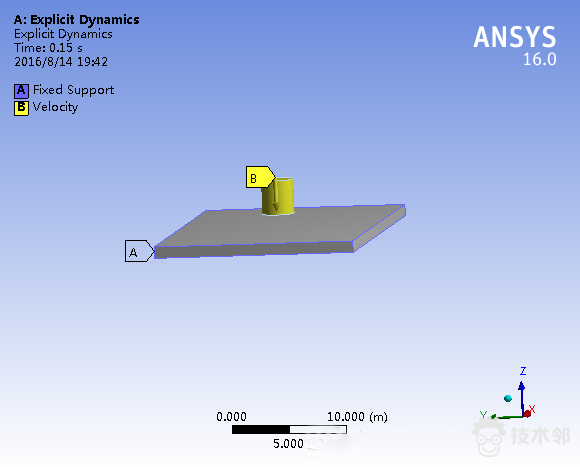
Note that the maximum number of cycles in the analysis settings and the end time should be set reasonably and not too large. A value that is too large can lead to excessive computation time.
The equivalent stress and deformation results are shown in the figures below:
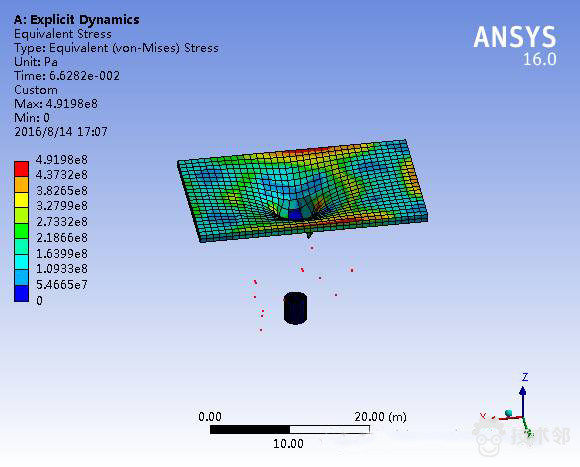
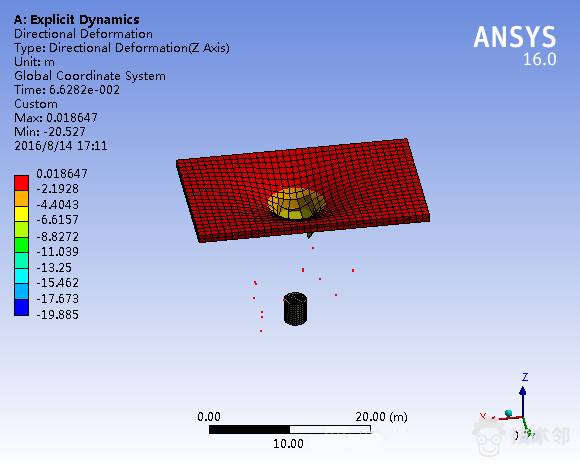
The maximum equivalent stress is 4.9e8, and the maximum deformation in the Z-axis direction is 20.52 m.
2. AUTODYN
ANSYS AUTODYN software has an interactive graphical interface that is different from Explicit Dynamics. The main interface is shown in the figure below.
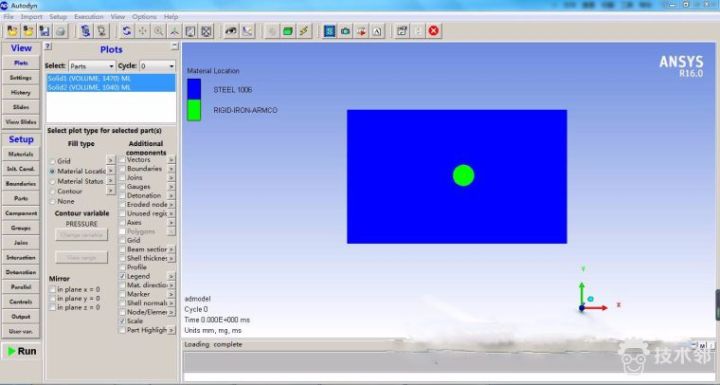
In AUTODYN software, no additional pre-processing is required! Because it has already established data sharing with Explicit Dynamics, you just need to click RUN! This is the advantage of process-based analysis, which greatly reduces the workload.
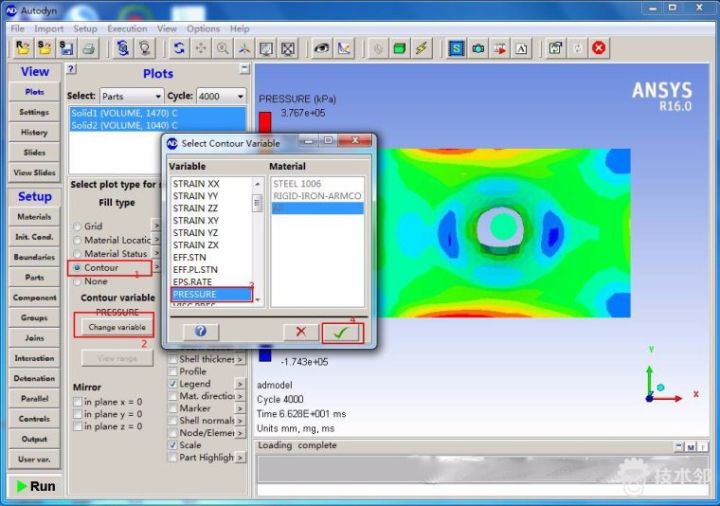
Below is the post-processing: obtaining stress data. According to the steps in the figure: 1. Select the type of contour plot, 2. Bring up the contour variable dialog box, 3. Click on the corresponding variable, 4. Check it. The process for obtaining the deformation contour plot is similar.
The simulation result screenshot is as follows:
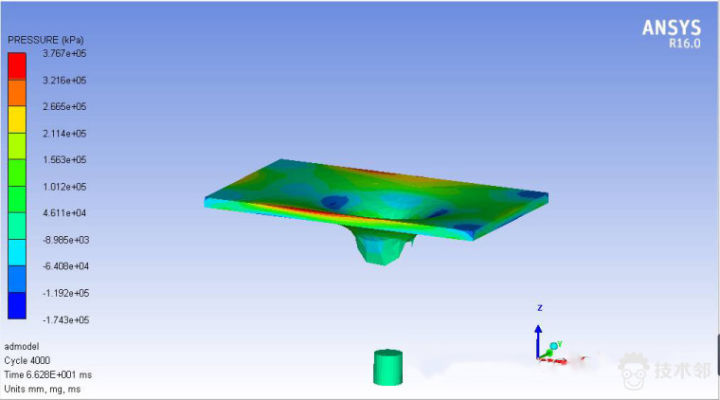
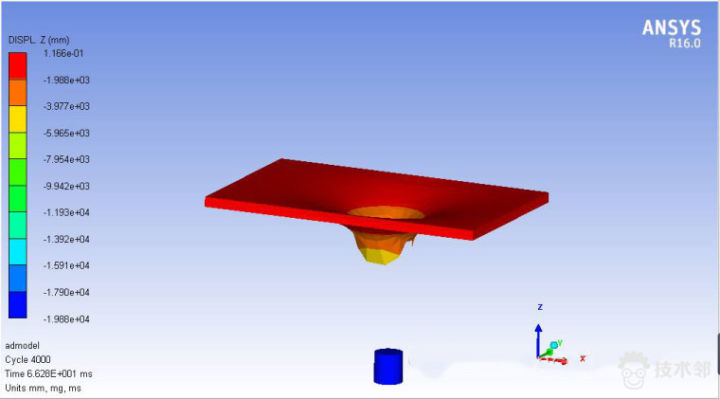
The maximum equivalent stress is 3.8e8, and the maximum deformation in the Z-axis direction is 19.88 m.
Comparing the analysis results from the two modules, the equivalent stress differs slightly, while the deformation differs very little.
3. ANSYS LS-DYNA
Overall, the simulation operation process using this module is divided into three steps:
(1) In Explicit Dynamic (LS-DYNA Export), pre-processing is done to prepare the input file *.k for LS-DYNA.
(2) Use ANSYS APDL PRODUCT LAUNCHER to call the LS-DYNA solver and input the *.k file path for solving. (Note that the *.k file path cannot contain Chinese characters).
(3) Use LS-PREPOST for post-processing. (LS-PREPOST post-processing program is generally located at aANSYS Inc/v16.0/ansys/bin/win64)
Since the author does not have this post-processing program in their installation path, the analysis process will not be demonstrated here. Please refer to the relevant materials for further information.
Note: If you have any questions or encounter unsolvable difficulties during your study or practice, feel free to ask in the Technical Neighbors Q&A channel, where numerous experts will answer you promptly.

About Technical Neighbors:
Technical Neighbors is an expert platform aimed at the manufacturing industry, integrating hundreds of thousands of application-oriented technical experts in engineering fields to provide on-demand paid expert consulting services for 5 million manufacturing enterprises nationwide, and offering social-style vocational skills training for 50 million engineering professionals. The service scope covers over 20 industries and more than 200 engineering specialties, including automotive engineering, civil engineering, mechanical electronics, materials engineering, biomedical, aerospace, marine engineering, defense industry, energy and chemical industries, etc.
Since its operation, Technical Neighbors has attracted more than 5,000 application-oriented technical experts and 1 million registered members, solving technical problems for over 2,000 companies, including internationally renowned manufacturers such as Siemens and ANSYS. It has produced millions of academic and application discussions, teaching cases, and knowledge, establishing a good reputation and influence in the engineering sector. It is currently the most visited and highly active engineering technology expert social platform, covering the widest range of engineering fields.