Overview
We all know that the stack is located in RAM, and now the RAM of MCUs is relatively large (tens to hundreds of K), so the allocated stack is also sufficiently large, and many people do not pay much attention to the size of this stack.
However, in the past, the RAM of MCUs was relatively small, even less than 1K, so previous engineers were more concerned about the size of the stack.
For small projects, we may not need to care about the stack size.
However, if the project becomes large, you need to pay attention, if your stack size is set unreasonably, it is very likely to lead to a Fault.
To know how large the stack should be, you need to understand the role of the stack, let’s further understand the stack below.
About the Stack
Let’s first look at two classic pieces of knowledge.
1. Memory Allocation of a Program
The memory occupied by a program compiled by C/C++ is divided into the following parts:
Stack Area: Automatically allocated and released by the compiler, storing function parameter values, local variable values, etc. Its operation is similar to the stack in data structures.
Heap Area: Generally allocated and released by the programmer; if the programmer does not release it, it may be reclaimed by the OS at the end of the program. Note that this is different from the heap in data structures, and the allocation method is similar to a linked list.
Global Area (Static Area): The storage of global variables and static variables is in one block; initialized global variables and static variables are in one area, while uninitialized global variables and uninitialized static variables are in an adjacent area. Released by the system after the program ends.
Constant String Area: Constant strings are stored here and released by the system after the program ends.
Program Code Area: Stores the binary code of the function body.
2. Classic Example Program
int a = 0;              // Global Initialization Area
char *p1;               // Global Uninitialized Area
main(){  int b;                // Stack  char s[] = "abc";     // Stack  char *p2;             // Stack  char *p3 = "123456";  //123456\0 in Constant Area, p3 on Stack.  static int c =0; // Global (Static) Initialization Area  p1 = (char *)malloc(10);  p2 = (char *)malloc(20);   // Allocated 10 and 20 bytes in heap area.  strcpy(p1, "123456");      //123456\0 in Constant Area, compiler may optimize it to the same place as p3 points to "123456".}
MCU Stack
From the above description, we can see how memory is occupied by the heap and stack in the code.
Many people may still not understand, so let’s relate this to the development process of STM32 and discuss the content related to the stack.
1. How to Set the Stack Size of STM32?
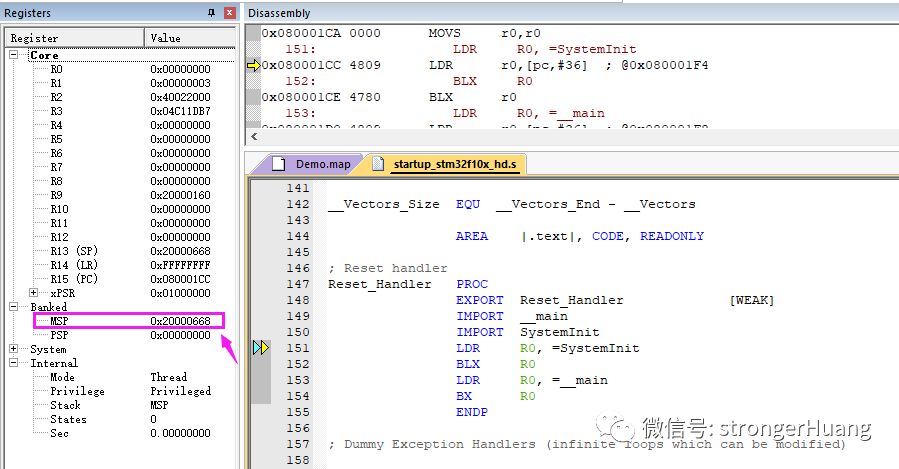
This issue is discussed in the article “What is the Startup Process of STM32?” regarding MDK-ARM, IAR EWARM, and the method of setting stack size using STM32CubeMX.
2. Stack
The default setting value for STM32F1 is 0x400, which is 1K in size.
Stack_Size EQU 0x400
void Fun(void){ char i; int Tmp[256]; //...}
void HAL_GPIO_Init(GPIO_TypeDef *GPIOx, GPIO_InitTypeDef *GPIO_Init)
Heap_Size EQU 0x200
Analyzing RAM Usage with Keil