1. Introduction
<span>__main__</span> is a special name in Python that identifies the top-level execution environment. It is used in the following two main scenarios:
- When a module is executed as the entry point of a program, its
<span>__name__</span>attribute is set to<span>'__main__'</span>. - In Python packages, the
<span>__main__.py</span>file is used to provide the command-line interface for the package.
Understanding the mechanism of <span>__main__</span> is crucial for writing reusable and testable Python code.
2. <span><span>__name__ == '__main__'</span></span> Mechanism
2.1 Definition and Principle
-
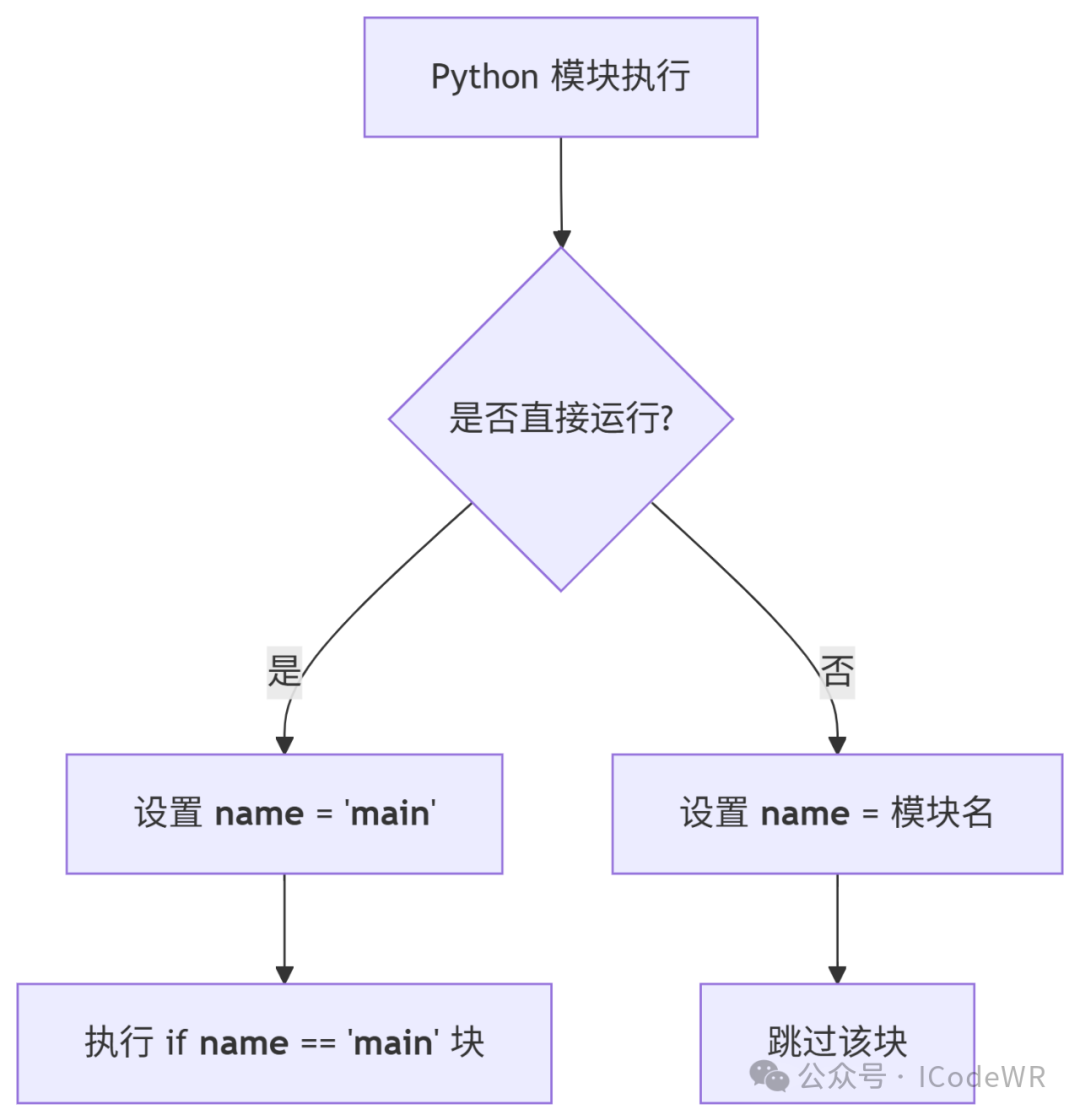
<span>__name__</span>is a built-in attribute that every Python module has. - When a module is imported,
<span>__name__</span>is set to the name of the module (including the package path). - When a module is executed directly,
<span>__name__</span>is set to<span>'__main__'</span>. -
<span>if __name__ == '__main__'</span>is a common Python idiom used to determine if the current module is being executed directly.
2.2 Usage Example
# example.py
def hello():
    print("Hello from example module!")

if __name__ == '__main__':
    print("This module is being run directly.")
    hello()
Comparison of Execution Methods:
| Execution Method | Output Result |
|---|---|
<span>python example.py</span> |
<span>This module is being run directly.</span><span>Hello from example module!</span> |
<span>import example</span> |
No output (unless <span>example.hello()</span> is called) |
2.3 Programming Tips
- Encapsulate the main logic in a
<span><span>main()</span></span>function to avoid global variable pollution. - Use
<span><span>sys.exit(main()) </span><span> to return an exit status code for easier script integration.</span></span> - Avoid writing too much code in the
<span><span>if __name__ == '__main__'</span></span>block to maintain the testability of the module.
3. <span><span>__main__.py</span></span> Usage in Packages
3.1 Definition and Purpose
<span>__main__.py:</span>is a special file in Python packages.- When running a package using the
<span>python -m package_name</span>command, Python will execute the<span>__main__.py</span>file in that package.
3.2 Example Project Structure
my_package/
├── __init__.py
├── __main__.py
└── utils.py
<span>__main__.py</span> Example:
# my_package/__main__.py
import sys
from .utils import greet

def main():
    name = sys.argv[1] if len(sys.argv) > 1 else "World"
    greet(name)

if __name__ == '__main__':
    main()
Execution Method:
python -m my_package Alice
Output: <span>Hello, Alice!</span>
3.3 Notes
- Avoid using
<span>if __name__ == '__main__'</span><span> in </span><code><span>__main__.py</span>as this file is typically not imported. - Use relative imports (e.g.,
<span>from .utils import greet</span>) to reference modules within the package.
4. <span><span>import __main__</span></span> Usage
4.1 Definition and Principle
<span>import __main__:</span>allows a module to access the namespace of the current top-level execution environment.- It can be used to check or modify variables defined in the top-level environment.
4.2 Example
# inspector.py
import __main__

def check_main_has_attr(attr):
    return hasattr(__main__, attr)

def get_main_attr(attr):
    return getattr(__main__, attr, None)
Usage Example:
# script.py
from inspector import check_main_has_attr, get_main_attr

my_var = "I'm in __main__"

if __name__ == '__main__':
    print(check_main_has_attr('my_var'))  # True
    print(get_main_attr('my_var'))        # "I'm in __main__"
4.3 Notes
- Use with caution to avoid breaking module encapsulation.
- Mainly used for debugging or dynamic interaction scenarios.
5. Flowchart:<span><span>__main__</span></span> Execution Flow
6. Table:<span><span>__name__</span></span> Value Scenarios
| Scenario | <span>__name__ Value</span> |
|---|---|
| Directly running a module | <span>'__main__'</span> |
| Importing a module | Module name (e.g., <span>'mymodule'</span>) |
| Interactive environment | <span>'__main__'</span> |
<span>python -c Execute code</span> |
<span>'__main__'</span> |
7. Functions and Classes Explained
7.1 <span>sys.exit()</span>
- Prototype:
<span><span>sys.exit([arg])</span></span> - Functionality: Exits the Python interpreter.
- Parameters:
<span><span>arg</span></span><span> can be an integer or a string (representing an error message).</span> - Return Value: None.
- Application: Commonly used for returning status codes in scripts.
import sys

def main():
    return 0  # Successful exit

if __name__ == '__main__':
    sys.exit(main())
8. Application Example
# cli_tool.py
import argparse

def main():
    parser = argparse.ArgumentParser(description="A simple CLI tool.")
    parser.add_argument('name', help="Your name")
    args = parser.parse_args()
    print(f"Hello, {args.name}!")

if __name__ == '__main__':
    main()
Execution:
python cli_tool.py Alice
Output: <span>Hello, Alice!</span>
9. Application Extensions
9.1 Using <span>__main__</span> in Unit Tests
Can use <span>if __name__ == '__main__'</span><span> to run tests directly in the test module:</span>
# test_mymodule.py
import unittest

class TestMyModule(unittest.TestCase):
    def test_example(self):
        self.assertEqual(1 + 1, 2)

if __name__ == '__main__':
    unittest.main()
Execution:
python test_mymodule.py
10. Learning Summary
<span>__main__ <span> is the identifier for the top-level execution environment in Python.</span></span><span>if __name__ == '__main__' <span> is used to distinguish whether a module is imported or executed directly.</span></span><span>__main__.py <span> allows packages to be run directly via </span></span><code><span><span>python -m</span></span>.- Using
<span>import __main__</span>allows access to the top-level namespace, but should be used with caution. - Combining
<span>argparse</span>and<span>sys.exit()</span>can build robust command-line tools.
Appendix: PEP8 Style Code Example
"""Example module: Demonstrating the usage of __main__."""

import sys

def main() -> int:
    """Main function, returns exit code."""
    print("Running as main!")
    return 0

if __name__ == '__main__':
    sys.exit(main())
Author Bio: ICodeWR, a developer focused on technology and programming, a half product manager, and a lifelong learner who regularly shares practical programming tips and project experience. Continuously learning, adapting to change, recording details, reflecting, and growing.
Important Note: This article mainly records my learning and practice process, and the content or opinions expressed are solely my personal views, which I believe may not be entirely correct. Please do not follow if you disagree.