Using <span>SpringBoot</span> to directly initiate <span>HTTP</span> requests with <span>okhttp</span>, <span>httpClient</span>, or <span>RestTemplate</span> is cumbersome and inconvenient for unified management. Therefore, I recommend a lightweight HTTP client framework suitable for <span>SpringBoot</span> projects: <span>retrofit-spring-boot-starter</span>, which is very easy to use and provides many enhanced features. The project has currently been updated to version <span>2.2.2</span> and will continue to be iterated and optimized.
GitHub project address:
https://github.com/LianjiaTech/retrofit-spring-boot-starter
Gitee project address:
https://gitee.com/lianjiatech/retrofit-spring-boot-starter
Introduction
<span>Retrofit</span> is a type-safe HTTP client for <span>Android</span> and <span>Java</span>, with its biggest feature being its support for initiating HTTP requests via interfaces. However, <span>Retrofit</span> does not officially support quick integration with the <span>spring-boot</span> framework, so we developed <span>retrofit-spring-boot-starter</span>.
<span>retrofit-spring-boot-starter</span> achieves rapid integration of <span>Retrofit</span> with the <span>spring-boot</span> framework and supports many enhanced features, greatly simplifying development.
Features
- Custom injection of OkHttpClient
- Annotation-based interceptors
- Connection pool management
- Logging
- Request retries
- Error decoders
- Global interceptors
- Circuit breaker and degradation
- HTTP calls between microservices
- Call adapters
- Data converters
Quick Start
Include Dependency
<dependency>
    <groupId>com.github.lianjiatech</groupId>
    <artifactId>retrofit-spring-boot-starter</artifactId>
    <version>2.2.2</version>
</dependency>
Define HTTP Interface
The interface must be marked with the <span>@RetrofitClient</span> annotation! HTTP-related annotations can refer to the official documentation: Retrofit official documentation.
https://square.github.io/retrofit/
@RetrofitClient(baseUrl = ${test.baseUrl})
public interface HttpApi {

    @GET(person)
    Result<Person> getPerson(@Query(id) Long id);
}
Inject and Use
Simply inject the interface into other services to use!
@Service
public class TestService {

    @Autowired
    private HttpApi httpApi;

    public void test() {
        // Initiate HTTP request through httpApi
    }
}
HTTP Request Related Annotations
<span>HTTP</span> request related annotations all use <span>retrofit</span> native annotations. For detailed information, refer to the official documentation, below is a simple explanation.

Configuration Item Description
<span>retrofit-spring-boot-starter</span> supports multiple configurable properties to handle different business scenarios. You can modify them as needed, specific descriptions are as follows:
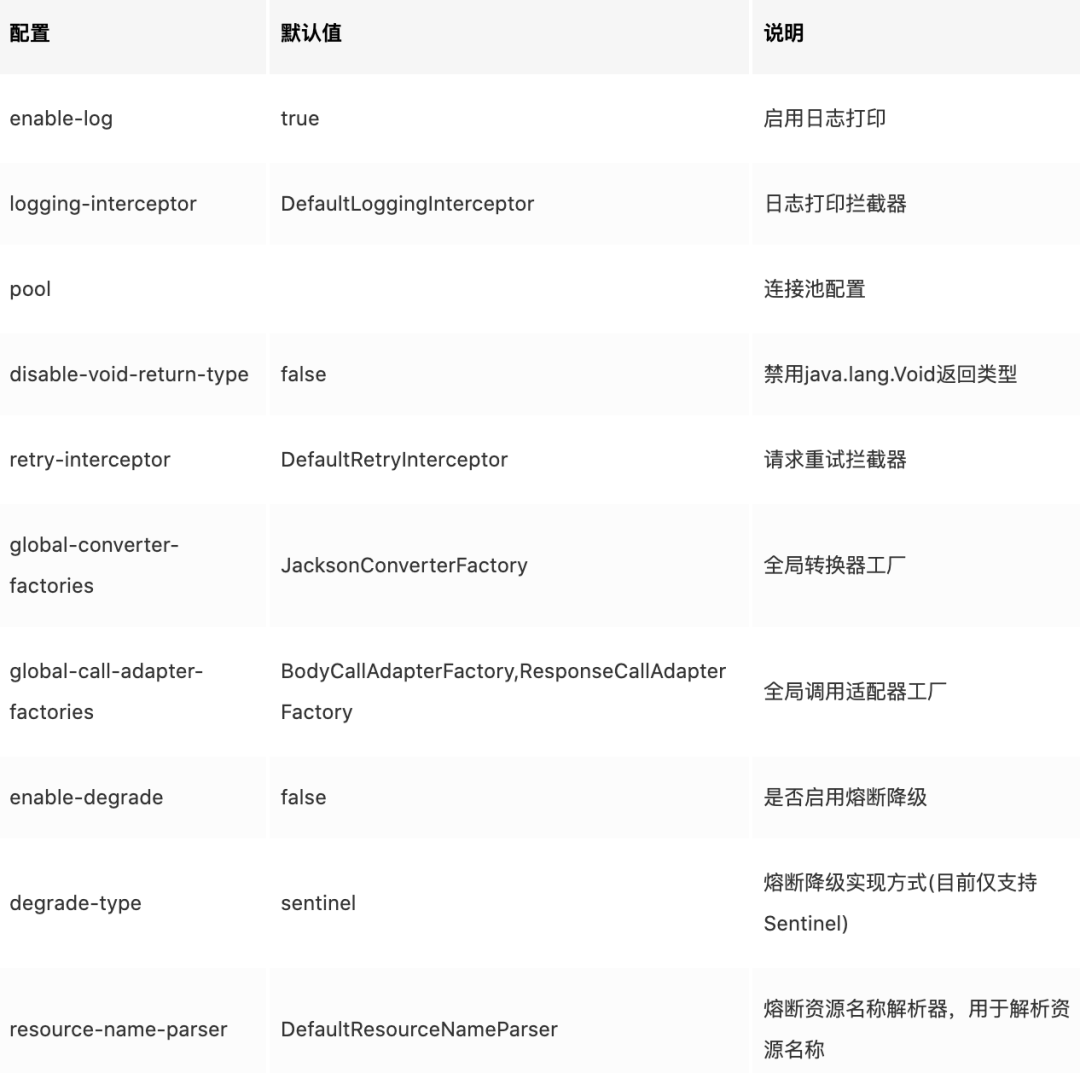
<span>yml</span> configuration method:
retrofit:
  enable-response-call-adapter: true
# Enable logging
enable-log: true
# Connection pool configuration
  pool:
    test1:
      max-idle-connections: 3
      keep-alive-second: 100
    test2:
      max-idle-connections: 5
      keep-alive-second: 50
# Disable void return type
disable-void-return-type: false
# Logging interceptor
  logging-interceptor: com.github.lianjiatech.retrofit.spring.boot.interceptor.DefaultLoggingInterceptor
# Retry interceptor
  retry-interceptor: com.github.lianjiatech.retrofit.spring.boot.retry.DefaultRetryInterceptor
# Global converter factories
  global-converter-factories:
    - retrofit2.converter.jackson.JacksonConverterFactory
# Global call adapter factories
  global-call-adapter-factories:
    - com.github.lianjiatech.retrofit.spring.boot.core.BodyCallAdapterFactory
    - com.github.lianjiatech.retrofit.spring.boot.core.ResponseCallAdapterFactory
# Enable circuit breaker degradation
enable-degrade: true
# Circuit breaker implementation type
  degrade-type: sentinel
# Circuit breaker resource name parser
  resource-name-parser: com.github.lianjiatech.retrofit.spring.boot.degrade.DefaultResourceNameParser
Advanced Features
Custom Injection of OkHttpClient
In most cases, dynamically creating the <span>OkHttpClient</span> object through the <span>@RetrofitClient</span> annotation properties can meet most usage scenarios. However, in some cases, users may need to customize the <span>OkHttpClient</span>. In this case, you can define a static method that returns the type <span>OkHttpClient.Builder</span> on the interface to achieve this. The code example is as follows:
@RetrofitClient(baseUrl = http://ke.com)
public interface HttpApi3 {

    @OkHttpClientBuilder
    static OkHttpClient.Builder okhttpClientBuilder() {
        return new OkHttpClient.Builder()
                .connectTimeout(1, TimeUnit.SECONDS)
                .readTimeout(1, TimeUnit.SECONDS)
                .writeTimeout(1, TimeUnit.SECONDS);
    }

    @GET
    Result<Person> getPerson(@Url String url, @Query(id) Long id);
}
The method must be marked with the
<span>@OkHttpClientBuilder</span>annotation!
Annotation-based Interceptors
Often, we want certain HTTP requests under a specific interface to execute unified interception logic. To support this functionality, <span>retrofit-spring-boot-starter</span> provides annotation-based interceptors, achieving URL path-based matching interception. The steps to use are mainly divided into 2 steps:
- Inherit
<span>BasePathMatchInterceptor</span>to write the interceptor; - Use
<span>@Intercept</span>to annotate the interface. If you need to configure multiple interceptors, simply annotate multiple<span>@Intercept</span>annotations on the interface!
Below is an example of how to use an annotation-based interceptor to append a timestamp to a specified request URL.
Inherit <span>BasePathMatchInterceptor</span> to Write the Interceptor
@Component
public class TimeStampInterceptor extends BasePathMatchInterceptor {

    @Override
    public Response doIntercept(Chain chain) throws IOException {
        Request request = chain.request();
        HttpUrl url = request.url();
        long timestamp = System.currentTimeMillis();
        HttpUrl newUrl = url.newBuilder()
                .addQueryParameter(timestamp, String.valueOf(timestamp))
                .build();
        Request newRequest = request.newBuilder()
                .url(newUrl)
                .build();
        return chain.proceed(newRequest);
    }
}
Use <span>@Intercept</span> to Annotate the Interface
@RetrofitClient(baseUrl = ${test.baseUrl})
@Intercept(handler = TimeStampInterceptor.class, include = {/api/**}, exclude = /api/test/savePerson)
public interface HttpApi {

    @GET(person)
    Result<Person> getPerson(@Query(id) Long id);

    @POST(savePerson)
    Result<Person> savePerson(@Body Person person);
}
The above <span>@Intercept</span> configuration indicates: intercept requests under the <span>HttpApi</span> interface at the <span>/api/**</span> path (excluding <span>/api/test/savePerson</span>) using the <span>TimeStampInterceptor</span>.
Extend Annotation-based Interceptors
Sometimes, we need to dynamically pass some parameters into the intercept annotation and then use these parameters during interception. In such cases, we can extend to implement a custom intercept annotation. The custom intercept annotation must be marked with <span>@InterceptMark</span> and must include the properties include(), exclude(), handler(). The steps to use are mainly divided into 3 steps:
- Custom intercept annotation
- Inherit
<span>BasePathMatchInterceptor</span>to write the interceptor - Use the custom intercept annotation on the interface;
For example, if we need to dynamically add accessKeyId and accessKeySecret signature information in the request header to initiate an HTTP request normally, we can define a signing interceptor annotation <span>@Sign</span> to achieve this. Below is an example of the custom <span>@Sign</span> intercept annotation.
Custom <span>@Sign</span> Annotation
@Retention(RetentionPolicy.RUNTIME)
@Target(ElementType.TYPE)
@Documented
@InterceptMark
public @interface Sign {
    /**
     * Secret key
     * Supports placeholder configuration.
     *
     * @return
     */
    String accessKeyId();

    /**
     * Secret
     * Supports placeholder configuration.
     *
     * @return
     */
    String accessKeySecret();

    /**
     * Interceptor matching path
     *
     * @return
     */
    String[] include() default {/**};

    /**
     * Interceptor exclusion matching, exclude specified paths from interception
     *
     * @return
     */
    String[] exclude() default {};

    /**
     * Interceptor class that handles this annotation
     * Prioritize obtaining the corresponding Bean from the spring container, if not found, use reflection to create one!
     *
     * @return
     */
    Class<? extends BasePathMatchInterceptor> handler() default SignInterceptor.class;
}
There are two points to note about extending the <span>custom intercept annotation</span>:
<span>Custom intercept annotation</span>must be marked with<span>@InterceptMark</span>.- The annotation must include
<span>include(), exclude(), handler()</span>property information.
Implement <span>SignInterceptor</span>
@Component
public class SignInterceptor extends BasePathMatchInterceptor {

    private String accessKeyId;

    private String accessKeySecret;

    public void setAccessKeyId(String accessKeyId) {
        this.accessKeyId = accessKeyId;
    }

    public void setAccessKeySecret(String accessKeySecret) {
        this.accessKeySecret = accessKeySecret;
    }

    @Override
    public Response doIntercept(Chain chain) throws IOException {
        Request request = chain.request();
        Request newReq = request.newBuilder()
                .addHeader(accessKeyId, accessKeyId)
                .addHeader(accessKeySecret, accessKeySecret)
                .build();
        return chain.proceed(newReq);
    }
}
The values of the <span>accessKeyId</span> and <span>accessKeySecret</span> fields will be automatically injected based on the values of <span>@Sign</span>‘s <span>accessKeyId()</span> and <span>accessKeySecret()</span>. If the <span>@Sign</span> specifies a placeholder string, the configuration property value will be used for injection. Additionally, the <span>accessKeyId</span> and <span>accessKeySecret</span> fields must provide <span>setter</span> methods.
Use on the Interface <span>@Sign</span>
@RetrofitClient(baseUrl = ${test.baseUrl})
@Sign(accessKeyId = ${test.accessKeyId}, accessKeySecret = ${test.accessKeySecret}, exclude = {/api/test/person})
public interface HttpApi {

    @GET(person)
    Result<Person> getPerson(@Query(id) Long id);

    @POST(savePerson)
    Result<Person> savePerson(@Body Person person);
}
This way, signature information will be automatically added to requests to the specified URL.
Connection Pool Management
By default, all HTTP requests sent through <span>Retrofit</span> will use the default connection pool of <span>max-idle-connections=5 keep-alive-second=300</span>. Of course, we can also configure multiple custom connection pools in the configuration file and specify which one to use through the <span>@RetrofitClient</span>’s <span>poolName</span> property. For example, if we want all requests under a certain interface to use the <span>poolName=test1</span> connection pool, the code implementation is as follows:
- Configure the connection pool.
retrofit:
    # Connection pool configuration
    pool:
        test1:
        max-idle-connections: 3
        keep-alive-second: 100
        test2:
        max-idle-connections: 5
        keep-alive-second: 50
- Specify the connection pool to use through the
<span>@RetrofitClient</span>’s<span>poolName</span>property.
@RetrofitClient(baseUrl = ${test.baseUrl}, poolName=test1)
public interface HttpApi {

    @GET(person)
    Result<Person> getPerson(@Query(id) Long id);
}
Logging
In many cases, we want to log HTTP request details. The logging can be globally controlled by the <span>retrofit.enableLog</span> configuration. For each interface, logging can be controlled by the <span>@RetrofitClient</span>’s <span>enableLog</span>, and the logging level and strategy can be specified through <span>logLevel</span> and <span>logStrategy</span>. <span>retrofit-spring-boot-starter</span> supports 5 logging levels (<span>ERROR</span>, <span>WARN</span>, <span>INFO</span>, <span>DEBUG</span>, <span>TRACE</span>) with the default being <span>INFO</span>; it supports 4 logging strategies (<span>NONE</span>, <span>BASIC</span>, <span>HEADERS</span>, <span>BODY</span>), with the default being <span>BASIC</span>. The meanings of the 4 logging strategies are as follows:
<span>NONE</span>: No logs.<span>BASIC</span>: Logs request and response lines.<span>HEADERS</span>: Logs request and response lines and their respective headers.<span>BODY</span>: Logs request and response lines and their respective headers and bodies (if present).
<span>retrofit-spring-boot-starter</span> uses the <span>DefaultLoggingInterceptor</span> to perform the actual logging functionality, which is based on the native <span>HttpLoggingInterceptor</span> of <span>okhttp</span>. Of course, you can also implement your own logging interceptor by inheriting from <span>BaseLoggingInterceptor</span> (for specific implementation, refer to the <span>DefaultLoggingInterceptor</span> implementation), and then configure it in the configuration file.
retrofit:
  # Logging interceptor
  logging-interceptor: com.github.lianjiatech.retrofit.spring.boot.interceptor.DefaultLoggingInterceptor
Request Retries
<span>retrofit-spring-boot-starter</span> supports request retry functionality, simply add the <span>@Retry</span> annotation to the interface or method.<span>@Retry</span> supports retry count <span>maxRetries</span>, retry interval <span>intervalMs</span>, and retry rules <span>retryRules</span> configuration. The retry rules support three configurations:
<span>RESPONSE_STATUS_NOT_2XX</span>: Retry when the response status code is not<span>2xx</span>.<span>OCCUR_IO_EXCEPTION</span>: Retry when an IO exception occurs.<span>OCCUR_EXCEPTION</span>: Retry when any exception occurs.
By default, retries are automatically performed when the response status code is not <span>2xx</span> or an IO exception occurs. If needed, you can also inherit from <span>BaseRetryInterceptor</span> to implement your own request retry interceptor and configure it.
retrofit:
  # Request retry interceptor
  retry-interceptor: com.github.lianjiatech.retrofit.spring.boot.retry.DefaultRetryInterceptor
Error Decoder
When an HTTP request error occurs (including exceptions or response data not meeting expectations), the error decoder can decode the HTTP-related information into a custom exception. You can specify the current interface’s error decoder in the <span>@RetrofitClient</span> annotation’s <span>errorDecoder()</span>. Custom error decoders need to implement the <span>ErrorDecoder</span> interface:
/**
 * Error decoder. ErrorDecoder.
 * When an exception occurs in the request or an invalid response result is received, the HTTP related information is decoded into the exception,
 * and the invalid response is determined by the business itself.
 *
 * @author 陈添明
 */
public interface ErrorDecoder {

    /**
     * When the response is invalid, decode the HTTP information into the exception, invalid response is determined by business.
     * @param request  request
     * @param response response
     * @return If it returns null, the processing is ignored and the processing continues with the original response.
     */
    default RuntimeException invalidRespDecode(Request request, Response response) {
        if (!response.isSuccessful()) {
            throw RetrofitException.errorStatus(request, response);
        }
        return null;
    }

    /**
     * When an IO exception occurs in the request, the HTTP information is decoded into the exception.
     * @param request request
     * @param cause   IOException
     * @return RuntimeException
     */
    default RuntimeException ioExceptionDecode(Request request, IOException cause) {
        return RetrofitException.errorExecuting(request, cause);
    }

    /**
     * When the request has an exception other than the IO exception, the HTTP information is decoded into the exception.
     * @param request request
     * @param cause   Exception
     * @return RuntimeException
     */
    default RuntimeException exceptionDecode(Request request, Exception cause) {
        return RetrofitException.errorUnknown(request, cause);
    }
}
Global Interceptors
Global Application Interceptors
If we need to perform unified interception processing on all HTTP requests in the system, we can customize and implement a global interceptor <span>BaseGlobalInterceptor</span> and configure it as a <span>bean</span> in the <span>spring</span> container! For example, if we want all HTTP requests initiated in the system to carry source information.
@Component
public class SourceInterceptor extends BaseGlobalInterceptor {
    @Override
    public Response doIntercept(Chain chain) throws IOException {
        Request request = chain.request();
        Request newReq = request.newBuilder()
                .addHeader(source, test)
                .build();
        return chain.proceed(newReq);
    }
}
Global Network Interceptors
Simply implement the <span>NetworkInterceptor</span> interface and configure it as a <span>bean</span> in the <span>spring</span> container to support automatic weaving of global network interceptors.
Circuit Breaker and Degradation
In a distributed service architecture, performing circuit breaking and degradation on unstable external services is one of the important measures to ensure high availability of services. Since the stability of external services cannot be guaranteed, when external services are unstable, response times will increase. Consequently, the response time for the caller will also increase, leading to thread accumulation, which may eventually exhaust the caller’s thread pool, causing the entire service to become unavailable. Therefore, we need to perform circuit breaking and degradation on unstable weak dependency service calls to temporarily cut off unstable calls, preventing local instability from causing an overall service avalanche.
<span>retrofit-spring-boot-starter</span> supports circuit breaker and degradation functionality, based on Sentinel. Specifically, it supports circuit breaker resource self-discovery and annotation-based degradation rule configuration. To use circuit breaker and degradation, simply perform the following operations:
1. Enable Circuit Breaker and Degradation Functionality
By default, the circuit breaker and degradation functionality is turned off, and the corresponding configuration items need to be set to enable it.:
retrofit:
  # Enable circuit breaker and degradation
  enable-degrade: true
  # Circuit breaker implementation type (currently only supports Sentinel)
  degrade-type: sentinel
  # Resource name parser
  resource-name-parser: com.github.lianjiatech.retrofit.spring.boot.degrade.DefaultResourceNameParser
The resource name parser is used to implement user-defined resource names, with the default configuration being <span>DefaultResourceNameParser</span>, corresponding to the resource name format of <span>HTTP_OUT:GET:http://localhost:8080/api/degrade/test</span>. Users can inherit from the <span>BaseResourceNameParser</span> class to implement their own resource name parser.
Additionally, since the circuit breaker and degradation functionality is optional, enabling it requires users to manually introduce the Sentinel dependency:
<dependency>
    <groupId>com.alibaba.csp</groupId>
    <artifactId>sentinel-core</artifactId>
    <version>1.6.3</version>
</dependency>
2. Configure Degradation Rules (Optional)
<span>retrofit-spring-boot-starter</span> supports annotation-based configuration of degradation rules through the <span>@Degrade</span> annotation. The <span>@Degrade</span> annotation can be configured on interfaces or methods, with method-level configuration taking precedence.
@Retention(RetentionPolicy.RUNTIME)
@Target({ElementType.METHOD, ElementType.TYPE})
@Documented
public @interface Degrade {

    /**
     * RT threshold or exception ratio threshold count.
     */
    double count();

    /**
     * Degrade recover timeout (in seconds) when degradation occurs.
     */
    int timeWindow() default 5;

    /**
     * Degrade strategy (0: average RT, 1: exception ratio).
     */
    DegradeStrategy degradeStrategy() default DegradeStrategy.AVERAGE_RT;
}
If the application project already supports configuring degradation rules through a configuration center, the annotation-based configuration method can be ignored.
3. Set Fallback or FallbackFactory in <span>@RetrofitClient</span> (Optional)
If <span>@RetrofitClient</span> does not set <span>fallback</span> or <span>fallbackFactory</span>, when a circuit breaker is triggered, a <span>RetrofitBlockException</span> exception will be thrown directly. Users can customize the return value of methods when a circuit breaker is triggered by setting <span>fallback</span> or <span>fallbackFactory</span>. The <span>fallback</span> class must be an implementation of the current interface, and the <span>fallbackFactory</span> must be an implementation of <span>FallbackFactory<T></span>, with the generic parameter type being the current interface type. Additionally, the <span>fallback</span> and <span>fallbackFactory</span> instances must be configured as <span>Bean</span> in the <span>Spring</span> container.
<span>fallbackFactory</span> differs from <span>fallback</span> mainly in that it can perceive the cause of each circuit breaker trigger (cause). Below is a reference example:
@Slf4j
@Service
public class HttpDegradeFallback implements HttpDegradeApi {

    @Override
    public Result<Integer> test() {
        Result<Integer> fallback = new Result<>();
        fallback.setCode(100)
                .setMsg(fallback)
                .setBody(1000000);
        return fallback;
    }
}
@Slf4j
@Service
public class HttpDegradeFallbackFactory implements FallbackFactory<HttpDegradeApi> {

    /**
     * Returns an instance of the fallback appropriate for the given cause
     *
     * @param cause fallback cause
     * @return an instance that implements the retrofit interface.
     */
    @Override
    public HttpDegradeApi create(Throwable cause) {
        log.error("Circuit breaker triggered!", cause.getMessage(), cause);
        return new HttpDegradeApi() {
            @Override
            public Result<Integer> test() {
                Result<Integer> fallback = new Result<>();
                fallback.setCode(100)
                        .setMsg(fallback)
                        .setBody(1000000);
                return fallback;
            }
        };
    }
}
HTTP Calls Between Microservices
To enable microservice calls, the following configuration is required:
Configure <span>ServiceInstanceChooser</span> as a <span>Spring</span> Container <span>Bean</span>
Users can implement the <span>ServiceInstanceChooser</span> interface themselves to complete the service instance selection logic and configure it as a <span>Bean</span> in the <span>Spring</span> container. For <span>Spring Cloud</span> applications, <span>retrofit-spring-boot-starter</span> provides the <span>SpringCloudServiceInstanceChooser</span> implementation, and users only need to configure it as a <span>Spring</span> Bean.
@Bean
@Autowired
public ServiceInstanceChooser serviceInstanceChooser(LoadBalancerClient loadBalancerClient) {
    return new SpringCloudServiceInstanceChooser(loadBalancerClient);
}
Use <span>@Retrofit</span>’s <span>serviceId</span> and <span>path</span> properties to achieve HTTP calls between microservices
@RetrofitClient(serviceId = ${jy-helicarrier-api.serviceId}, path = /m/count, errorDecoder = HelicarrierErrorDecoder.class)
@Retry
public interface ApiCountService {
}
Call Adapters and Data Converters
Call Adapters
<span>Retrofit</span> can adapt <span>Call<T></span> objects to the return value types of interface methods through call adapters <span>CallAdapterFactory</span>. <span>retrofit-spring-boot-starter</span> extends two <span>CallAdapterFactory</span> implementations:
<span>BodyCallAdapterFactory</span>
- Enabled by default, can be disabled by configuring
<span>retrofit.enable-body-call-adapter=false</span>. - Synchronously executes HTTP requests, adapting the response body content to instances of the interface method’s return value type.
- Besides
<span>Retrofit.Call<T></span>,<span>Retrofit.Response<T></span>, and<span>java.util.concurrent.CompletableFuture<T></span>, other return types can use this adapter.
<span>ResponseCallAdapterFactory</span>
- Enabled by default, can be disabled by configuring
<span>retrofit.enable-response-call-adapter=false</span>. - Synchronously executes HTTP requests, adapting the response body content to
<span>Retrofit.Response<T></span><span> returns.</span> - If the method’s return value type is
<span>Retrofit.Response<T></span>, this adapter can be used.
Retrofit automatically selects the corresponding <span>CallAdapterFactory</span> for adaptation based on the method’s return value type! In addition to Retrofit’s default <span>CallAdapterFactory</span>, it supports various forms of method return value types:
<span>Call<T></span>: Does not perform adaptation, directly returns the<span>Call<T></span>object<span>CompletableFuture<T></span>: Adapts the response body content to return a<span>CompletableFuture<T></span>object<span>Void</span>: Can use<span>Void</span>if the return type is not a concern. If the HTTP status code is not 2xx, an error is thrown directly!<span>Response<T></span>: Adapts the response content to return a<span>Response<T></span>object- Any other Java type: Adapts the response body content to return a corresponding Java type object, if the HTTP status code is not 2xx, an error is thrown directly!
    /**
     * Call<T>
     * Does not perform adaptation, directly returns Call<T> object
     * @param id
     * @return
     */
    @GET(person)
    Call<Result<Person>> getPersonCall(@Query(id) Long id);

    /**
     *  CompletableFuture<T>
     *  Adapts the response body content to return a CompletableFuture<T> object
     * @param id
     * @return
     */
    @GET(person)
    CompletableFuture<Result<Person>> getPersonCompletableFuture(@Query(id) Long id);

    /**
     * Void
     * Can use Void if the return type is not a concern. If the HTTP status code is not 2xx, an error is thrown directly!
     * @param id
     * @return
     */
    @GET(person)
    Void getPersonVoid(@Query(id) Long id);

    /**
     *  Response<T>
     *  Adapts the response content to return a Response<T> object
     * @param id
     * @return
     */
    @GET(person)
    Response<Result<Person>> getPersonResponse(@Query(id) Long id);

    /**
     * Any other Java type
     * Adapts the response body content to return a corresponding Java type object, if the HTTP status code is not 2xx, an error is thrown directly!
     * @param id
     * @return
     */
    @GET(person)
    Result<Person> getPerson(@Query(id) Long id);
We can also extend our own <span>CallAdapter</span> by inheriting from <span>CallAdapter.Factory</span>!
<span>retrofit-spring-boot-starter</span> supports configuring global call adapter factories through <span>retrofit.global-call-adapter-factories</span>, the factory instance is prioritized to be obtained from the Spring container, and if not obtained, it is created via reflection. The default global call adapter factories are <span>[BodyCallAdapterFactory, ResponseCallAdapterFactory]</span>!
retrofit:
  # Global call adapter factories
  global-call-adapter-factories:
    - com.github.lianjiatech.retrofit.spring.boot.core.BodyCallAdapterFactory
    - com.github.lianjiatech.retrofit.spring.boot.core.ResponseCallAdapterFactory
For each Java interface, you can also specify the <span>CallAdapter.Factory</span> used by the current interface through the <span>@RetrofitClient</span> annotation’s <span>callAdapterFactories()</span>, and the specified factory instance is still prioritized to be obtained from the Spring container.
Note: If the <span>CallAdapter.Factory</span> does not have a public no-argument constructor, please manually configure it as a <span>Bean</span> object in the <span>Spring</span> container!
Data Converters
<span>Retrofit</span> uses <span>Converter</span> to convert objects marked with the <span>@Body</span> annotation into request bodies and to convert response body data into a <span>Java</span> object. You can choose from the following types of <span>Converter</span>:
- Gson: com.squareup.Retrofit:converter-gson
- Jackson: com.squareup.Retrofit:converter-jackson
- Moshi: com.squareup.Retrofit:converter-moshi
- Protobuf: com.squareup.Retrofit:converter-protobuf
- Wire: com.squareup.Retrofit:converter-wire
- Simple XML: com.squareup.Retrofit:converter-simplexml
- JAXB: com.squareup.retrofit2:converter-jaxb
<span>retrofit-spring-boot-starter</span> supports configuring global data converter factories through <span>retrofit.global-converter-factories</span>, the converter factory instance is prioritized to be obtained from the Spring container, and if not obtained, it is created via reflection. The default global data converter factory is <span>retrofit2.converter.jackson.JacksonConverterFactory</span>, and you can directly configure the <span>jackson</span> serialization rules through <span>spring.jackson.*</span>, for configuration reference: Customize the Jackson ObjectMapper
https://docs.spring.io/spring-boot/docs/2.1.5.RELEASE/reference/htmlsingle/#howto-customize-the-jackson-objectmapper
retrofit:
  # Global call adapter factories
  global-call-adapter-factories:
    - com.github.lianjiatech.retrofit.spring.boot.core.BodyCallAdapterFactory
    - com.github.lianjiatech.retrofit.spring.boot.core.ResponseCallAdapterFactory
For each Java interface, you can also specify the <span>Converter.Factory</span> used by the current interface through the <span>@RetrofitClient</span> annotation’s <span>converterFactories()</span>, and the specified converter factory instance is still prioritized to be obtained from the Spring container.
Note: If the <span>Converter.Factory</span> does not have a public no-argument constructor, please manually configure it as a <span>Bean</span> object in the <span>Spring</span> container!
Conclusion
<span>retrofit-spring-boot-starter</span> is a lightweight <span>HTTP</span> client framework suitable for <span>SpringBoot</span> projects, which has been stably running online for over a year and has been adopted by several external companies. Interested friends can give it a try.