It is assumed that everyone has learned about inter-task communication. If you haven’t, don’t worry; you can check out the previous content. In the context of inter-task communication, we are generally waiting for an event to occur. But what if we need to wait for multiple events? Surely, none of you here are without a driver’s license, right? For those of you with a license, what are the steps you take when driving? First, you walk around the car, then enter the cockpit, fasten your seatbelt, start the engine, shift gears, release the brake, and press the accelerator before the car can move, right? This means that the preceding events must be satisfied before we can hit the road. Remember to obey traffic rules!
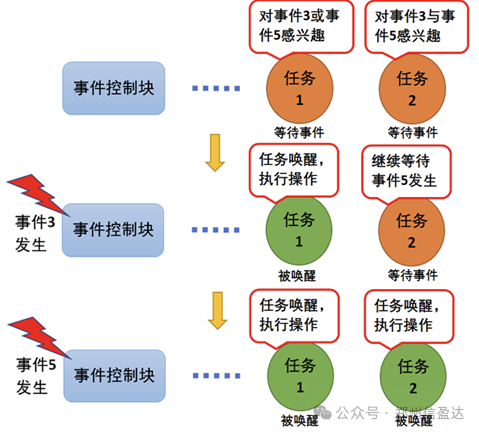
In FreeRTOS, this model also exists. If we consider the car moving as a task, then to execute this task, various events must be satisfied. Events serve as a key mechanism for implementing communication and synchronization between tasks, primarily used for synchronizing multiple tasks. However, event communication can only be of event types, with no data transmission. Unlike semaphores, it can achieve one-to-many and many-to-many synchronization. That is, a task can wait for multiple events to occur: it can be woken up to handle an event when any one of the events occurs, or it can be woken up to handle an event only after several events have occurred. Similarly, multiple tasks can synchronize multiple events.
So how do we use this in the FreeRTOS operating system? First, everyone needs to understand the basic concept of events.

1.The Essence and Composition of Events
In FreeRTOS, events can be viewed as a collection of multi-bit binary flags. Each bit has an independent state, which can be “1” (set) or “0” (cleared). These bits can be controlled by tasks to set or clear them. This multi-bit design allows an event to simultaneously represent multiple different conditions or state information.
For example, we can define an 8-bit event where bit 0 indicates “data ready”, bit 1 indicates “processing complete”, bit 2 indicates “resource available”, and so on. By setting and checking these bits, tasks can quickly understand the changes in various conditions within the system.

2.Storage and Management of Event Groups
The storage and management of event groups in memory is the foundation for implementing event functionality. Each event group requires only a small amount of RAM to save the state of the event group. FreeRTOS typically allocates a contiguous block of memory for the event group to store its state information.
In this memory area, each bit corresponds to an event bit in the event group. To improve access efficiency, specific data structures and algorithms may be used to quickly manipulate these bits.
At the same time, FreeRTOS is also responsible for managing the creation, deletion, and resource recovery of event groups to ensure the rational use and effective allocation of system resources.
3.State Changes of Event Bits
The state changes of event bits are one of the core operations of the event mechanism. Tasks can set (set) or clear (reset) event bits through specific functions.
When a task needs to notify other tasks that a certain condition has occurred, it can set the corresponding event bit. When that condition is no longer valid or needs to be reset, it can be cleared.
This state change occurs in real-time and can be immediately perceived by other tasks waiting for that event bit.
4.Tasks Waiting for and Responding to Events
Tasks can wait for specific states of event bits by calling specific functions. For example, a task can wait for a certain event bit to be set or wait for a combination of multiple event bits to meet specific conditions.
During the waiting process, the task will be blocked, allowing CPU resources to be given to other executable tasks. Once the state of the waited event bits meets the conditions, the blocked task will be woken up and regain CPU time to continue executing subsequent operations.
This waiting and response mechanism ensures that tasks can cooperate in the expected order and conditions, avoiding unnecessary polling and wasting CPU resources.
5.Event Priority and Scheduling
In FreeRTOS, events themselves do not have directly associated priorities. However, the use of events is closely related to the priority and scheduling mechanism of tasks.
When a high-priority task is waiting for an event, and that event occurs, the system will prioritize waking up this high-priority task to handle the related operations.
This priority-based scheduling combined with events ensures that critical tasks can respond to events and execute critical operations in a timely manner, thereby ensuring the real-time performance and reliability of the system.
After understanding these basic concepts, we can use the corresponding functions. First, let’s understand the applications and advantages of events.
6.Application Scenarios and Advantages of Events
6.1 Task Synchronization
Sequential Execution of Tasks
In some systems, multiple tasks need to be executed in a specific order. For example, task A must complete its operations before task B starts. Through events, task A can set an event bit upon completion, and task B will wait for this event bit to be set before starting execution.
Startup Condition Synchronization
Assuming there is a complex system initialization process involving multiple subtasks. Each subtask sets an event bit after completing its initialization part. When all necessary event bits are set, it indicates that the entire system initialization is complete, and subsequent main tasks can be started.
6.2 Condition Triggering
Multi-condition Combination Triggering
In a monitoring system, it may be necessary to monitor multiple parameters simultaneously. For example, temperature exceeding a threshold, pressure below a lower limit, and abnormal current. An event bit can be assigned for each condition, and when any one or more of these conditions are met, the corresponding event bit can be set to trigger subsequent processing tasks.
External Event Response
When the system interacts with external devices, certain state changes of external devices can be mapped to event bits. For example, when specific serial data, network packets, or specific signals from sensors are received, the corresponding event bit can be set to trigger internal tasks for processing.
6.3 Resource Sharing Coordination
Resource Allocation and Release
When multiple tasks compete for limited shared resources, such as memory blocks or hardware devices, events can be used to indicate the availability of resources. When resources are available, the corresponding event bit is set, and waiting tasks are woken up to acquire resources for operation.
Resource Usage Notification
In some cases, when a task uses shared resources to complete operations, it needs to notify other related tasks. This can be achieved by setting an event bit to notify other tasks for subsequent processing or updates.
6.4 Advantages of Events
Low overhead and efficiency. Compared to other communication and synchronization mechanisms, such as message queues and semaphores, event operations typically have lower memory overhead and faster execution speed. This is because events are simply bit operations that do not require complex data structures and large memory allocations.
Flexibility. Events can simultaneously represent multiple different conditions and states. Through combinations of bit masks, very flexible communication and synchronization patterns can be achieved. An event group can cover various different but related conditions, reducing the number of synchronization objects that need to be created and managed in the system.
Ease of understanding and use. The concept of events is relatively simple and intuitive, making it easier for developers to understand and use events for inter-task communication and synchronization. This helps improve code readability and maintainability.
After hearing so many application scenarios, how can we implement them? You must be eager to know, so let’s introduce the functions used for events.

7.Common Operations Functions for Events and Detailed Explanations
7.1 Creating Event Groups
The EventGroupCreate() function is used to create a new event group in FreeRTOS. Its main function is to allocate the required memory space for the event group and initialize the related data structures and state information, without requiring parameters.
When the event group is successfully created, this function returns a handle of type EventGroupHandle_t, and subsequent operations on the event group will be performed through this handle. If the creation fails due to insufficient memory or other reasons, the function will return NULL.
In practical applications, this function is usually called during the system initialization phase or before tasks need to use the event group for communication and synchronization.
7.2 Setting Event Bits
EventBits_t xEventGroupSetBits(EventGroupHandle_t xEventGroup, const EventBits_t uxBitsToSet );This function is used to set specified event bits in the event group.
xEventGroup: This is the handle of the event group to be operated on, which determines which event bits belong to the event group to be set.
uxBitsToSet: This is a bit mask indicating the event bits to be set to “1” (set).
EventBits_t: Returns the value of the event group at the time xEventGroupSetBits() is called.
7.3 Clearing Event Bits
EventBits_t xEventGroupClearBits(EventGroupHandle_t xEventGroup, const EventBits_t uxBitsToClear );This function is used to clear (reset) specified event bits in the event group.
The parameters are similar to those of xEventGroupSetBits(), determining which event bits to clear through the specified event group handle and bit mask.
The return value is also a bit mask indicating the event bits that were set before the clearing operation.
7.4 Waiting for Event Bits
EventBits_t xEventGroupWaitBits(EventGroupHandle_t xEventGroup, const EventBits_t uxBitsToWaitFor, const BaseType_t xClearOnExit, const BaseType_t xWaitForAllBits, TickType_t xTicksToWait );This function is the core function for tasks to wait for specific event bits in the event group to meet conditions.
xEventGroup: The handle of the event group to wait for.
uxBitsToWaitFor: Specifies the bit mask of the event bits to wait for.
xClearOnExit: A boolean value; if pdTRUE, the event bits that have met the conditions will be cleared upon successful return; if pdFALSE, they will not be cleared.
xWaitForAllBits: A boolean value; if pdTRUE, it will return only when all specified event bits are set; if pdFALSE, it will return as soon as any one of the specified event bits is set.
xTicksToWait: Specifies the timeout period for waiting, in system clock ticks. If the conditions are not met within the specified time, the function will return.
The return value is a bit mask containing the event bits that were set at the end of the wait.
7.5 Application Example

Next, I will give you a more detailed and complex example of using events in FreeRTOS, demonstrating how multiple tasks can collaborate through events on a simulated production line:
In this example:
We define an event group productionEventGroup to coordinate various tasks on the production line.
The production task taskProduction simulates the production process of products and sets the EVENT_BIT_PRODUCT_READY event bit upon completion.
The packaging task taskPackaging waits for the EVENT_BIT_PRODUCT_READY event bit, and upon receiving it, performs the packaging operation and sets the EVENT_BIT_PACKAGING_COMPLETE event bit.
The shipping task taskShipping waits for the EVENT_BIT_PACKAGING_COMPLETE event bit to prepare for shipping and sets the EVENT_BIT_SHIPPING_READY event bit.
The monitoring task taskMonitoring waits for the EVENT_BIT_SHIPPING_READY event bit to monitor the shipping status.
EventGroupHandle_t productionEventGroup; // Define event handle productionEventGroup = xEventGroupCreate(); // Create event group if (productionEventGroup != NULL) // If creation is successful, return handle, if failed return NULL { printf("Event group created successfully"); }In this way, we have created an event group for our use, and we just need to operate on the handle.
Next, we will define all the event bits that we will set in the tasks and call the functions to set and wait for event bits.
#define EVENT_BIT_PRODUCT_READY (1 << 0) #define EVENT_BIT_PACKAGING_COMPLETE (1 << 2) #define EVENT_BIT_SHIPPING_READY (1 << 3) void taskProduction(void) { while(1) { .... xEventGroupSetBits(xEventGroup, EVENT_BIT_PRODUCT_READY); }} void taskPackaging(void) { while(1) { xEventGroupWaitBits(xEventGroup, EVENT_BIT_PRODUCT_READY, pdTRUE, pdFALSE, xTicksToWait); ... xEventGroupSetBits(xEventGroup, EVENT_BIT_PACKAGING_COMPLETE); }} void taskShipping(void) { while(1) { xEventGroupWaitBits(xEventGroup, EVENT_BIT_PACKAGING_COMPLETE, pdTRUE, pdFALSE, xTicksToWait); ... xEventGroupSetBits(xEventGroup, EVENT_BIT_SHIPPING_READY); }} void taskMonitoring(void) { while(1) { xEventGroupWaitBits(xEventGroup, EVENT_BIT_SHIPPING_READY, pdTRUE, pdFALSE, xTicksToWait); ... }} Through this event passing and task collaboration, we simulate a simple yet complete production line process, demonstrating the application and role of events in complex systems. Next, I will discuss some precautions for usage.

8.Precautions for Using Events
8.1 Consistency of Event States
In a multi-task environment, due to concurrent execution of tasks, multiple tasks may operate on event bits simultaneously. To ensure the consistency and correctness of event states, careful handling of read and write operations on event bits is necessary to avoid race conditions and data inconsistency issues.
Mutexes or atomic operations can be used to protect critical operations on event bits, ensuring that only one task can modify them at a time.
8.2 Timeout Handling
When tasks use the EventGroupWaitBits() function to wait for event bits, it is important to set a reasonable timeout period. If the timeout is set too long, it may cause tasks to be blocked for an extended period, affecting the real-time performance and responsiveness of the system; if the timeout is set too short, it may cause tasks to be frequently woken up due to timeouts, wasting CPU resources.
Carefully evaluate and choose an appropriate timeout period based on the actual application scenario and system requirements, and perform appropriate error handling and recovery operations when timeouts occur.
8.3 Memory Management
Creating event groups and operating on event bits consume a certain amount of memory resources. In resource-constrained embedded systems, it is important to closely monitor memory usage to avoid memory leaks or insufficient memory issues due to excessive event groups or frequent event operations.
When an event group is no longer needed, use the corresponding function to delete and recover resources in a timely manner to free up occupied memory.
8.4 Misuse of Events
Although events are a very useful communication and synchronization mechanism, overusing them or using them in inappropriate scenarios may increase the complexity of system design and reduce code readability and maintainability.
When designing systems, choose the most appropriate communication and synchronization methods based on specific needs and relationships between tasks, such as semaphores, message queues, etc., or combine multiple mechanisms to achieve optimal system performance and architecture.
9.Conclusion
The event mechanism in FreeRTOS provides a powerful and flexible tool for embedded system development to achieve communication and synchronization between tasks. By deeply understanding the basic principles of events, mastering the relevant operation functions, and reasonably designing and using them in conjunction with actual application scenarios, we can build efficient, reliable, and well-performing embedded systems.
During the use of events, always pay attention to following best practices and precautions to fully leverage their advantages and avoid potential issues. As embedded technology continues to evolve and application demands become increasingly complex, a deep understanding and innovative application of the FreeRTOS event mechanism will bring more possibilities and value to our development work.
After all this learning, I believe you have gained a deep understanding of the use of events. Without further ado, let’s get practicing!