“
Reading this article will take about 3 minutes.
”
Recently, I wanted to upgrade my website’s protocol to HTTP/2, as it was previously HTTP/1.1.
Since my website loads many resources in parallel, HTTP/2 improves upon HTTP/1.1 by allowing all connections to share a single TCP connection, and there is no limit on the number of simultaneous connections under the same domain, resulting in better loading speeds compared to HTTP/1.1.
For more benefits of HTTP/2, you can refer to this article: https://blog.fundebug.com/2019/03/07/understand-http2-and-http3/, which explains it thoroughly and also discusses HTTP/3, known as QUIC.
Main Topic
Without further ado, let’s get to the point. I want to upgrade one of my websites to HTTP/2, and all my websites are served based on Kubernetes, with domain resolution done through Nginx Ingress. So how can I specifically upgrade one website to HTTP/2?
The most important configuration is here: https://kubernetes.github.io/ingress-nginx/user-guide/nginx-configuration/configmap/. By modifying the Ingress Controller, we can control the HTTP/2 toggle.
So how does this ConfigMap relate to Ingress?
The answers are as follows:
- Ingress configures which domain forwards to which backend for processing.
- Ingress requires an Ingress Controller to function.
- Each Ingress Controller corresponds to a ConfigMap that configures the behavior of the current Nginx server.
Before configuration, all websites were using the same Ingress Controller, and the corresponding ConfigMaps were identical.
Therefore, to enable HTTP/2 for a specific website without affecting others, we need to use a separate ConfigMap, which requires a new Ingress Controller.
Thus, both HTTP/1.1 and HTTP/2 correspond to their own sets of Ingress Controller and ConfigMap configurations.
This clarifies the thought process.
Next, I need to create a new Ingress Controller. All my websites are in the namespace ‘scrape’, so I will directly use helm to create a Nginx Ingress suite under the scrape namespace, naming it ingress-nginx3 (since there is already ingress-nginx2 in other namespaces, I followed the naming convention):
helm install ingress-nginx3 -n scrape ingress-nginx/ingress-nginx
For more details, refer to: https://kubernetes.github.io/ingress-nginx/deploy/
Once done, we can observe that a corresponding ConfigMap has been generated:
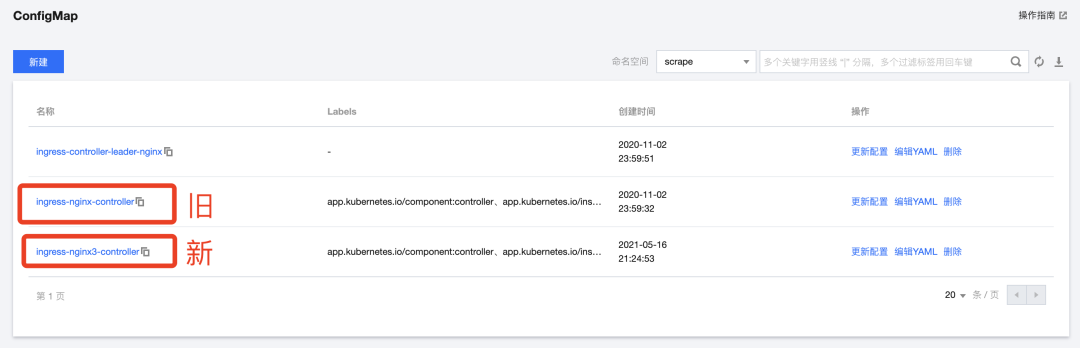
Here is what the yaml file looks like:
apiVersion: v1
kind: ConfigMap
metadata:
  annotations:
    meta.helm.sh/release-name: ingress-nginx3
    meta.helm.sh/release-namespace: scrape
  creationTimestamp: "2021-05-16T13:24:53Z"
  labels:
    app.kubernetes.io/component: controller
    app.kubernetes.io/instance: ingress-nginx3
    app.kubernetes.io/managed-by: Helm
    app.kubernetes.io/name: ingress-nginx
    app.kubernetes.io/version: 0.46.0
    helm.sh/chart: ingress-nginx-3.30.0
  managedFields:
  - apiVersion: v1
    manager: Go-http-client
    operation: Update
    time: "2021-05-16T13:24:53Z"
  - apiVersion: v1
    manager: tke-apiserver
    operation: Update
    time: "2021-05-16T13:46:33Z"
  name: ingress-nginx3-controller
  namespace: scrape
  resourceVersion: "2694665147"
  selfLink: /api/v1/namespaces/scrape/configmaps/ingress-nginx3-controller
  uid: bd60849d-be4c-4efa-9196-b00e8a4e2f8b
Here we need to specifically add the HTTP/2 configuration:
apiVersion: v1
+ data:
+  use-http2: "true"
kind: ConfigMap
metadata:
...
Additionally, there are many other ConfigMap configurations available in the official documentation: https://kubernetes.github.io/ingress-nginx/user-guide/nginx-configuration/configmap/
Here, I will directly set use-http2 to true.
“
There is a strange issue; the documentation states that use-http2 is true by default, but for some reason it did not work until I added this.
”
OK, save the yaml file, and this configuration work is mostly complete.
Next, we just need to change the domain resolution address to the Ingress Controller of the newly created Nginx Ingress suite, which will automatically create a Load Balancer behind the Ingress Controller, corresponding to a public IP. Just change the domain resolution address accordingly.
I am upgrading spa16.scrape.center, so I will only resolve the A record for spa16.
After changing it, wait a moment and ping to verify.
Results
The final upgraded HTTP/2 example website is as follows: https://spa16.scrape.center/, and the loading Network panel is as follows:
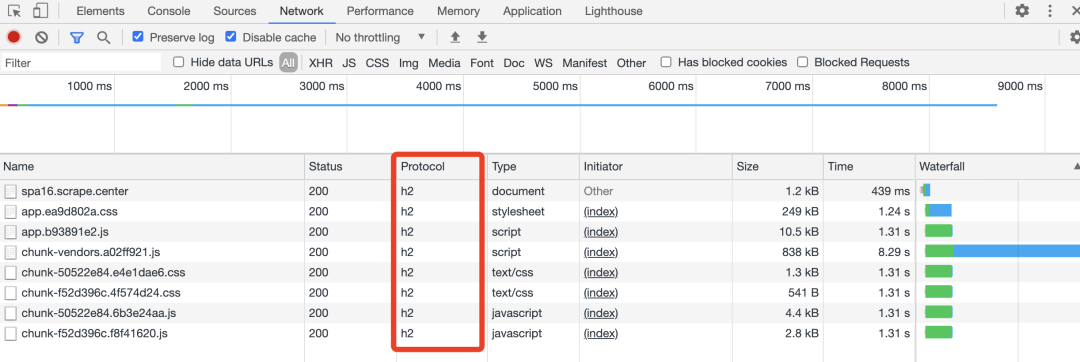
You can see that the Protocol is h2, which means HTTP/2.
On the other hand, the website that has not been upgraded, located at: https://spa15.scrape.center/, shows the following in the Network panel:
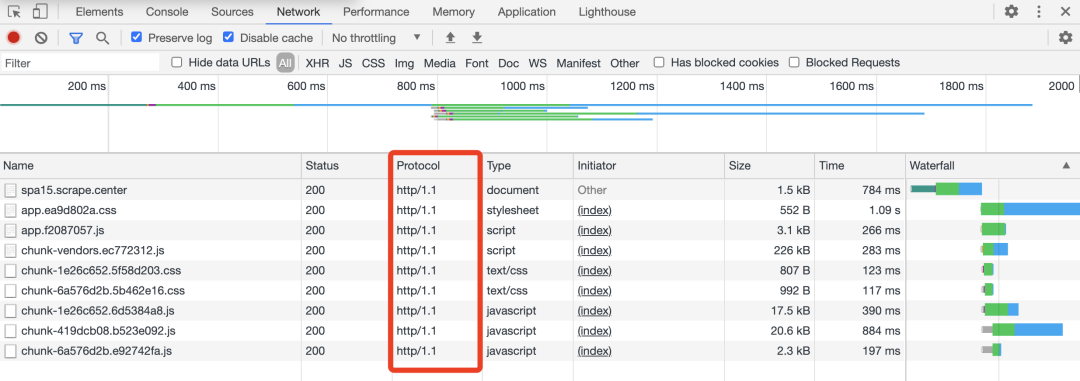
Here, the Protocol is still http/1.1, indicating HTTP/1.1.
From the Waterfall, you can also see the difference between the two. Since HTTP/1.1 in Chrome can only handle 6-8 connections simultaneously, the loading of the last two chunk files is delayed, whereas HTTP/2 does not have this issue. Isn’t the Waterfall neat? This is one of the advantages of HTTP/2.
OK, this is actually one of the example websites for crawlers, so everyone can try crawling it~
Postscript
Some friends may ask, is it enough to just change the Ingress configuration? Does the Docker image using HTTP/1.1 still work?
Yes! From my verification, it is sufficient to change only the last layer of the Ingress configuration to HTTP/2. The Docker services behind the Ingress can remain unchanged; there is no need to modify the image, change Nginx configuration, or specifically adjust HTTPS. Just enabling HTTP/2 support at the last layer is enough.
Comfortable!
Author: Cui QingcaiFormatting: Cui Qingcai
The Code Technical Exchange Group is open now! The group includes employees from leading domestic companies and students from universities both domestically and abroad, with experienced programmers and newcomers just starting out. The learning atmosphere is excellent! If you want to join, please add my WeChat “mekingname” and note “fan group” (no ads, serious inquiries only!)~

Share this great article with friends~