We meticulously refine each article: deep thinking, precise testing, and a rigorous creative process to ensure that every piece of content withstands practical scrutiny. This is ourcreative guideline, and a solemn commitment to our readers’ time—ensuring that every minute you spend yields insights that solve real problems.。
Specific Use and Common Understanding of MCP
MCP (Model Context Protocol) is an open protocol proposed and developed by OpenAI. Its core goal is to standardize the interaction between AI models and external tools, data sources, and services. Compared to HTTP, this interaction can be understood as a prototype of a specific encapsulation of a task.
Main Components of MCP
The invocation of the MCP protocol primarily occurs between the MCP client and the MCP server. The MCP client is generally written by the user and complies with the MCP standard, coordinating the interaction between the MCP server and the LLM. It is responsible for initiating and managing the connection with the MCP server.
The MCP server can be simply understood as a collection of tools and resources. These tools and resources provide specific callable tools and resources to the LLM through the MCP client or AI Agent, while also informing the client about these tools and resources.
The following will explain the invocation relationships between System Prompt, agent tools, user prompt, function calling, and AI agent from the perspectives of traditional tool invocation methods and MCP tool invocation methods, to gain a deeper understanding of their similarities and differences:
Traditional Tool Invocation Method
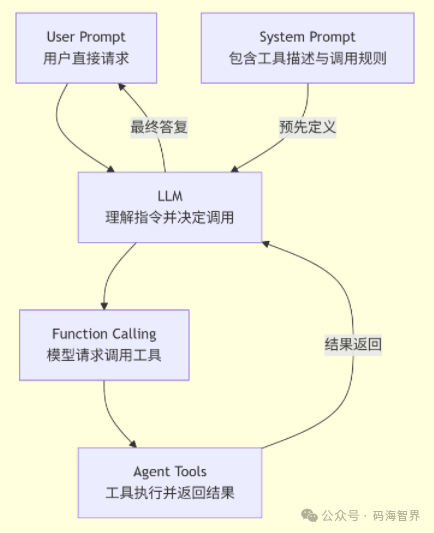
In the traditional method, all tools must be pre-defined in the System Prompt. The LLM decides which tool to invoke and what parameters to use through the Function Calling mechanism. After receiving the structured invocation request from the LLM, the AI Agent locally calls the corresponding Agent Tool and returns the result to the AI Agent, which then returns the result to the LLM, allowing the LLM to integrate the information and provide a response.
However, the drawback of this approach is that it can only utilize known tools, and any newly developed tools require reorganization of the application, which is quite cumbersome.
Invoking Tools via MCP
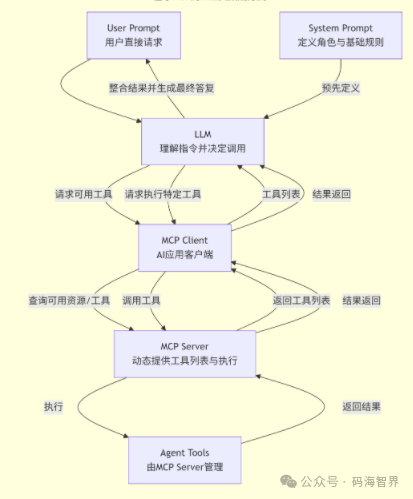
In this method, the System Prompt only defines basic rules, while the agent/MCP Client connects to one or more MCP Servers at startup and queries the list of all tools provided by the MCP Server. The LLM thinks based on the System Prompt and User Prompt. When it needs a tool, it recognizes that these tools are managed by MCP. The LLM issues commands through Function Calling, and the Agent/MCP Client forwards this command to the corresponding MCP Server for execution via the MCP protocol. The MCP Server runs the specific Agent Tool in its environment and returns the result to the agent/MCP Client through the MCP protocol, which is then processed by the large model LLM to form the final result.
Relationship Between MCP and HTTP
MCP is not a new transport protocol intended to replace HTTP, but rather an application layer standard built on top of foundational protocols like HTTP.
For Example
HTTP is more like the standard for manufacturing basic materials such as bricks, cement, and steel. While these materials can be used to build houses, each house needs to be built from scratch, which is cumbersome. In contrast, MCP is like the standardized framework and interface specifications for prefabricated houses; once this framework standard is produced, houses can be quickly constructed.
Discussion
Recently, many fans have been inquiring about MCP, and the author has indeed experienced its benefits during recent development. It not only saves our development workload but also offers great flexibility. Therefore, related questions have been collected and summarized for everyone’s reference.
Dear fans, if you encounter any issues during your work or study, we can discuss them in the comments section, or you can join the knowledge community for learning. In any case, the author is here to answer any questions.Finally, thank you all for your recommendations, likes, and shares!!!
Recommended Reading
-
•「18」Detailed Process of Deploying RAGflow on Ubuntu
-
•「17」Installing Dify Plugin in Offline Environment, Simple and Convenient!
-
•「16」This Might Be the Most Reasonable Way to Upgrade Dify Offline in Linux Systems | Full Process of Upgrading Dify in Ubuntu in Intranet Environment
•「15」Comprehensive Guide to Avoiding Pitfalls in Installing Docker on Ubuntu and Deploying Dify | Detailed Listing of Every Issue and Solution
•「14」Implementing Precise Recall with Dify External RAGFlow Knowledge Base | This Might Be the Most Detailed Case!
•「13」Showcasing the Entire Process of Upgrading Dify to Version 1.7.0, Removing Model Thinking Content from Workflow | Usage of Dify Code Execution Nodes
•「12」It’s Really Competitive! This Time Dify Upgraded to 1.6.0, Suddenly Introducing the Popular MCP Solution!
•「11」Why Dify May Not Be the Best Choice, but It Is Currently the Most Suitable Application Development Platform?
•「10」Offline and Online Deployment Methods for RAGFlow with Docker | Strategies for Changing Docker Image Locations and Download Acceleration!
-
•「9」If Dify 1.4.0 Was a Visual Change, Then Upgrading to Dify 1.5.0 Is a Core Confirmation
-
•「8」Ultimate Solution for Local Deployment of Large Models with vLLM+DeepSeek, Detailed Beyond Imagination!
-
•「7」Integrating vLLM into Dify Platform for Model and Application Connection
-
•「6」Easily Applying File Upload Questioning Functionality in Practice with vLLM+Dify+Local DeepSeek | This Article Suffices for Combining Files to Answer Questions!
-
•「5」Easily Applying File Upload Questioning Functionality in Practice with vLLM+Dify+Local DeepSeek | This Article Suffices for Combining Files to Answer Questions!
-
•「4」Ultimate Solution for Knowledge Base Intelligent Agents! Detailed Operations for Connecting Ollama+BGE-M3 with Vllm+Dify+Local DeepSeek Large Models
-
•「3」Dify Upgrade Unsuccessful? Just Do This Step Right, Upgrading Is Really Simple!
-
•「2」Real-Time Voice Recognition | Speech to Text | Ultimate Solution for Deploying Recommended Voice Models!
-
•「1」Best Combination for Intelligent Agent Applications, A Comprehensive Guide to Avoiding Pitfalls in Deploying Dify and RAGFlow on One Host | Practical Nanny-Level Record