Do you want yourPCBto transform from dull and gray to vibrant and colorful? The colorful silkscreen feature of JialichuangEDA is definitely your best choice, allowing you to say goodbye to monotonous white silkscreen and easily achieve this stunning transformation! However, no matter how cool the design is, if there are issues during the ordering process, all your efforts will be in vain. In the field ofPCB design, the silkscreen layer is not only an intuitive carrier of component parameters and location information but also a unique stage for engineers to showcase their creativity and personality. Today, this guide will discuss the entire process from design to ordering.
1.Colorful Silkscreen Design: The “Visual Business Card”
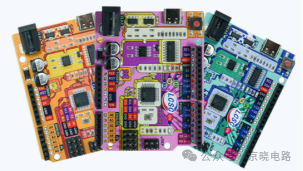
Colorful silkscreen, as an innovative process for surface treatment of PCBs, uses a combination of various colored inks to print patterns, text, and identification information, completely overturning the traditional black-and-white silkscreen visual presentation. This process not only clearly distinguishes component layouts and functional areas through color differences, significantly enhancing thePCB information readability and fault diagnosis efficiency, but also plays a unique role in creative electronic development and product prototype display. Developers can incorporate personalized elements such as brand Logos and artistic patterns into the silkscreen design, making the PCB both functional and visually appealing, becoming an important carrier for enhancing product recognition and brand memory.
 2.Steps to Design Colorful Silkscreen Using Jialichuang EDA 1. Enable Colorful Silkscreen Feature
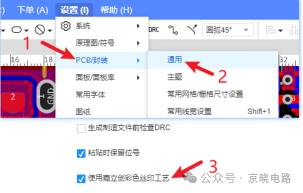
After opening the PCB design interface, click on the top menu bar “Settings”>“PCB/Package”>“General”. Scroll down to find the option to use “Jialichuang Colorful Silkscreen Process” and check it, then click “Apply”.
2. Import Colorful Images
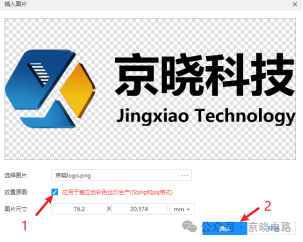
Click on the top menu bar“Place”>“Image”, or “File”>“Import”>“Image”. Check “Apply to Jialichuang Colorful Silkscreen Production”, supporting PNG and JPG formats, with a size limit of 2M or less. By default, it will be placed on the top silkscreen layer; if you want the produced PCB to appear on the back, you need to place the image on the bottom silkscreen layer.
3. Set Component Silkscreen Color
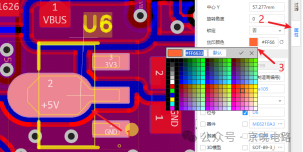
Select the component or component attribute that needs to be modified, in the right-side pop-up property panel, find the “Silkscreen Color” option, and you can customize the color in the “Color Selection Box”.
4. Set Board Silkscreen Color
Click on a blank area of the canvas, and you can find the colorful silkscreen related settings in the right-side PCB property panel. It includes two types of color configurations:
① Top/Bottom Board Color: This base color will serve as the underlying color for printing, ensuring that the subsequent colorful silkscreen perfectly blends with the base color.
② Top/Bottom Silkscreen Color: Set the printing color for component designators and outline lines placed on the top or bottom. If a specific silkscreen color is set in a component attribute, that color will override the default base color setting and take precedence.
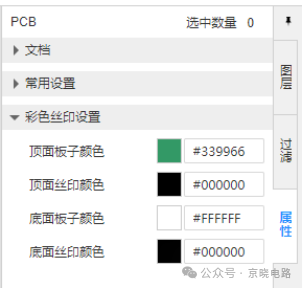 5. Preview Colorful Silkscreen
Click on the top menu bar“View”>“3D Preview”, in the preview interface, click on the right-side property panel, change the silkscreen process to colorful silkscreen, and you can see the colorful silkscreen effect diagram.
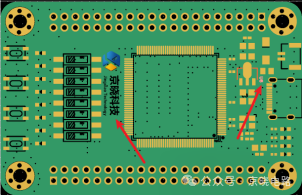
3.Important Considerations for PCB Ordering
When ordering colorful silkscreen PCBs from Jialichuang, three key process settings must be emphasized: the solder mask color must be selected as white, the pad plating must specify the gold immersion process, and the character process must choose Jialichuang EDA colorful silkscreen, so that diverse colors can be presented, adding personalized identification to the PCB. Aside from these special settings, the rest of the ordering process, such as uploading Gerber files, filling in board thickness, quantity, and other parameters, remains consistent with the standard PCB ordering steps and can be completed as usual.
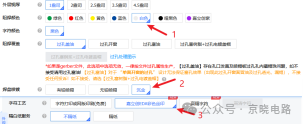
4.Conclusion
Jialichuang EDA’s colorful silkscreen provides convenience for creating personalized PCBs. By mastering the key points and techniques of colorful silkscreen design, carefully checking before ordering, and strictly following the ordering process, you can create colorful silkscreen PCBs that are both functional and aesthetically pleasing. Whether for creative projects by electronics enthusiasts or professional product development, these tools can help achieve unique designs.
 END
END Scan to Follow
Focusing on high-speed PCB design, quality assurance
Technical Support: Xiao Jing
 Scan to Follow
Focusing on high-speed PCB design, quality assurance
Jing Xiao Public Account