
For game engine developers and maintainers, how to efficiently, conveniently, and cost-effectively maintain the engine, allowing for rapid optimization and functional updates, while ensuring its build system is compatible with multiple development platforms and tools, is an age-old challenge.
At GDC 2023, KK, an engine programmer from NetEase Games’ team for “EVE Echoes”, shared how they leveraged open source software for targeted optimizations of their self-developed engine NeoX, achieving good results.
Below are excerpts from the presentation
(Translated and organized from the English presentation)
Hello everyone, the topic I will share today is “The Help of Open Source Software in Engine Development”. This presentation is divided into two parts: the first part is how to use open source software to optimize traditional engines; the main content here is how we migrated the engine to the open source build system Bazel. By utilizing Bazel, we significantly reduced build time and improved development efficiency.
In the second part, I will also share our experiences on how to better collaborate with the open source community learned during this process.
Through this presentation, I hope to show you that open source tools are extremely powerful. They can greatly enhance the development efficiency of game engines. More importantly, in some cases, open source software is almost indispensable. The nature of open source allows us to modify the tools themselves to meet the special and complex needs we encounter in game development.
Let me start with the background: I come from the “EVE Echoes” team. This is a sci-fi space game developed in collaboration between NetEase and CCP Games, using NetEase’s self-developed engine NeoX.
Many blockbuster games under NetEase also use the NeoX engine for development, such as “LifeAfter” and “Identity V”, etc. The NeoX engine has a long and successful history at NetEase, but like many other codebases with a long history, NeoX inevitably carries some “technical debt”. The technology in the gaming industry is evolving rapidly, and to keep up with the times, the EVE team has gradually updated and iterated the engine since last year.
1 Why Use Open Source Software Bazel to Optimize Traditional Engines
First, what we need to do is optimize build time.
NeoX is a feature-rich cross-platform game development engine, but this comes with relatively long build times. For example, on a Windows machine equipped with a six-core Core i7 processor, the complete build time for our engine is 27 minutes. On a Macbook Pro with a 4-core Core i7, the build time for the iOS version is 24 minutes. The build time for the Android platform is similar. If we update some rendering-related code, the incremental build time is about 14 minutes.
Imagine, a simple renderer change takes 14 minutes to see results, which greatly affects our development efficiency. Therefore, before a large-scale code refactor, we hope to first optimize the build time.
Compared to the large engine, the “EVE Echoes” team has a relatively small development team; we do not have independent sub-teams responsible for different target platforms, so we hope the new build system can work across all platforms.
Challenges Faced
Here are the challenges we face. The main target platforms for “EVE Echoes” are iOS and Android, while our primary development platform is Windows; since EVE Echoes is an MMORPG, we also need to compile some engine code on the server side, which is the Linux platform, such as the core combat logic. In other words, we have iOS, Android, Windows, and Linux as four different target platforms.
To build iOS applications, we need to use macOS, which is also our main Android build platform. Along with Windows and Linux, we have three different host platforms.
Game development is often very complex, so we need debugging and analysis tools provided by integrated development environments (IDEs) such as Xcode, Android Studio, and Visual Studio, thus the new build system needs to integrate with various IDEs, and the generated binaries must be debuggable and performance analyzable within these IDEs.
In terms of programming languages, we mainly use C++, and the engine uses some Java code for interaction with the Android system. Similarly, we also have Objective C code for iOS integration.
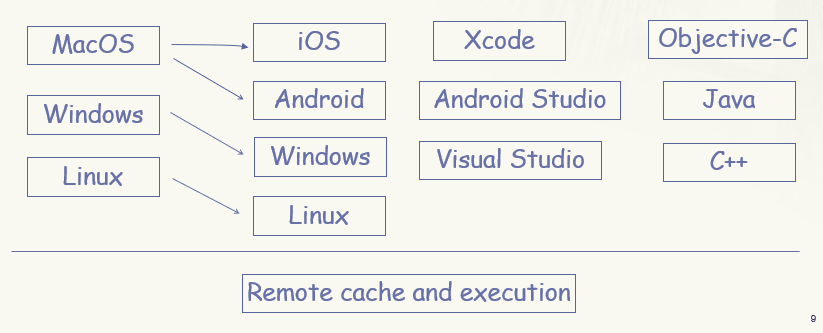
We need a new build system that can be compatible with three operating systems, target four platforms for building our engine, integrate with multiple IDEs, and support the three programming languages we use.
Most importantly, the build system needs to support remote caching or remote execution to reduce build time. Considering all the above conditions, this seems like an impossible task.
Open Source Build Tool Bazel
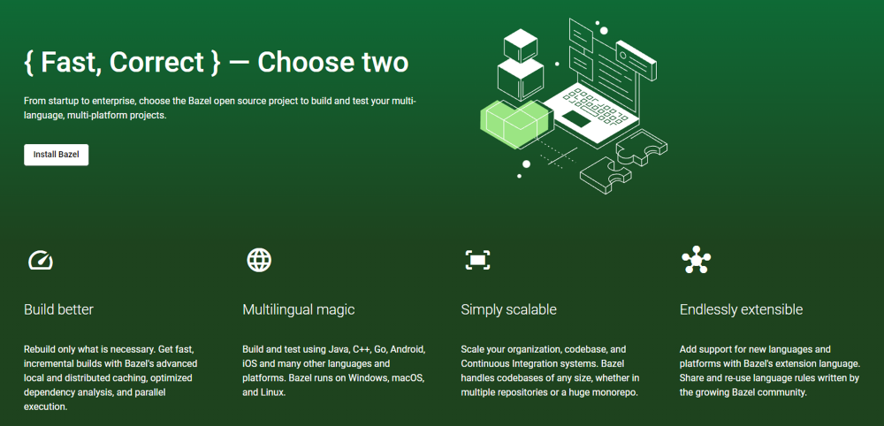
After some research, we discovered the open source build system Bazel developed by Google. The homepage of Bazel states: build and test Java, C++, Android, iOS, Go, and various other language platforms, running on Windows, macOS, and Linux. This tool is almost tailor-made for us.
And indeed it was, with Bazel’s remote caching, we successfully reduced the complete build time on the Windows platform from 27 minutes to 4 minutes. Thanks to faster SSDs, the complete build time for iOS and Android can even be further shortened to 2.5 minutes, which significantly helps with our continuous integration tasks (CI jobs).
Moreover, remote execution can effectively reduce incremental build times; for example, the build time for iOS platform after modifications to the render was reduced from 14 minutes to 4 minutes. Notably, this build was completed by a “compilation cluster” consisting of three Mac Minis. If we add more devices to this “cluster”, we can further improve incremental build efficiency.
On the other hand, considering such a complex usage scenario, you can imagine that even the best open source tools are difficult to use directly out of the box, so in the following presentation, I will introduce our complete journey of migrating to Bazel.
2 How to Migrate the Engine to Open Source Software Bazel
Before that, let me briefly introduce how Bazel works.
How Bazel Works
In a Bazel project, we use files named BUILD or BUILD.Bazel to describe build targets.
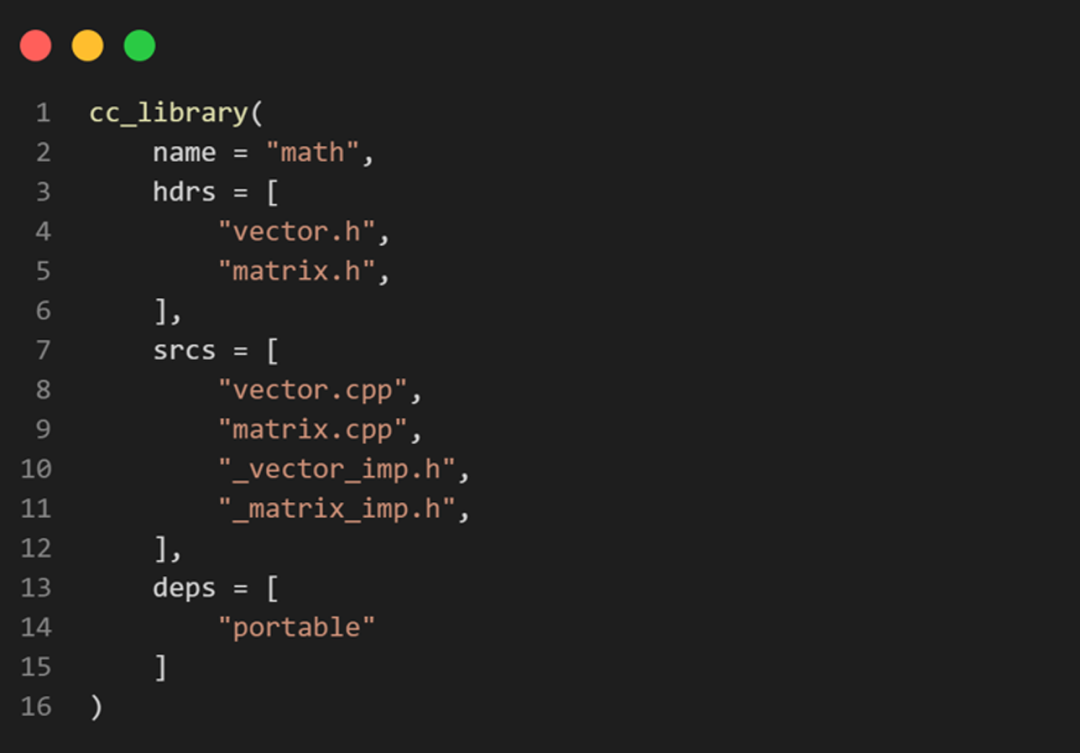
This is a build file for building a small math library.
• cc_library indicates that this is a build target for a C or C++ library.
• We set its name to “math”, and other build targets that want to link this library can do so by adding this “math” library to their deps attribute.
• The hdrs attribute contains all header files.
• The srcs attribute contains all source files.
• This “math” library itself also has a dependency, which is “portable”, used to handle cross-platform development logic.
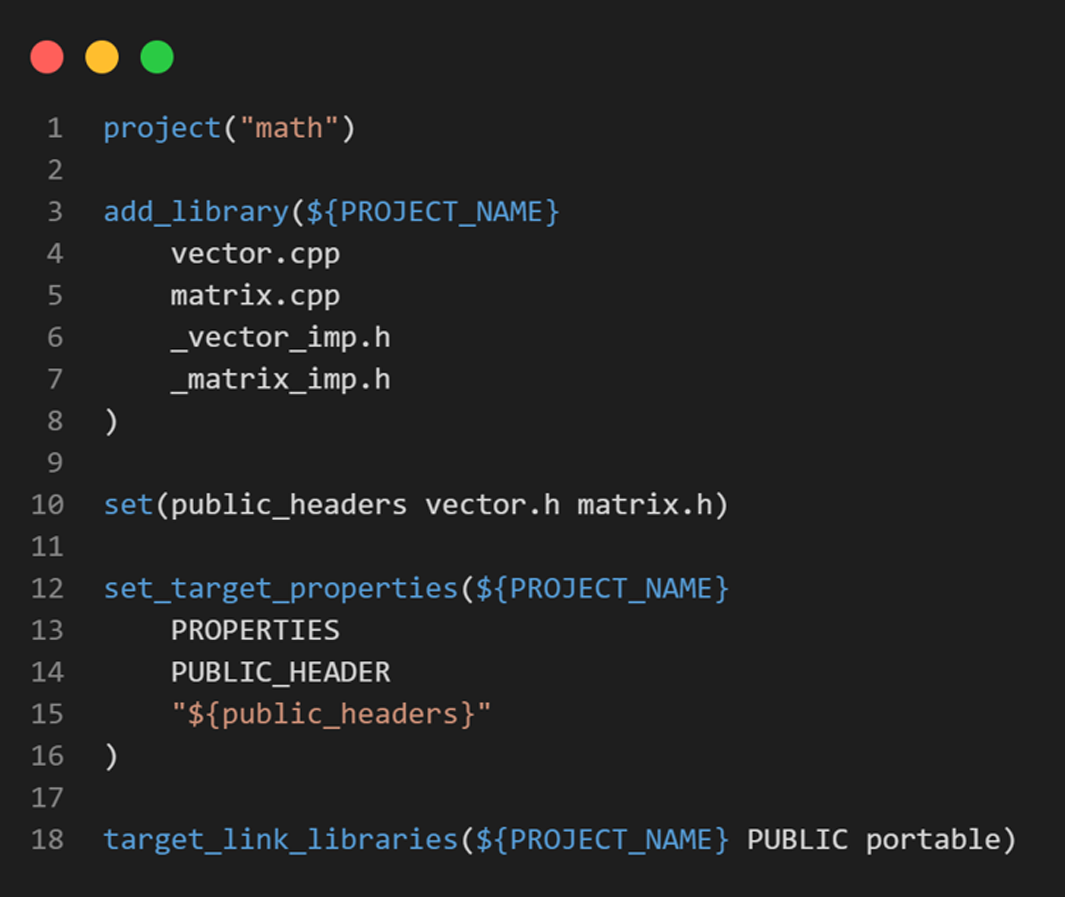
Most people are more familiar with CMake, which corresponds to the CMakeLists.txt file; you can compare it with Bazel’s BUILD file.
The language used in the BUILD file is a dialect of Python: Starlark. The uniqueness of Bazel’s build files lies in their declarative nature; we cannot use imperative commands in BUILD files.
Bazel is designed this way primarily to ensure the “repeatability” of builds, meaning that for the same input, the same output will always be obtained. This is an important prerequisite for Bazel to correctly cache your build results. For example, if the build process depends on the “date” command, even with the same input files, the build results will differ each time, and thus Bazel cannot cache the results for you.

Another unique feature of Bazel is the Sandbox mechanism. To explain this, assume our project has multiple implementations of containers. We define two cc_library, one is hashmap and the other is set. We define them separately to minimize incremental build times.
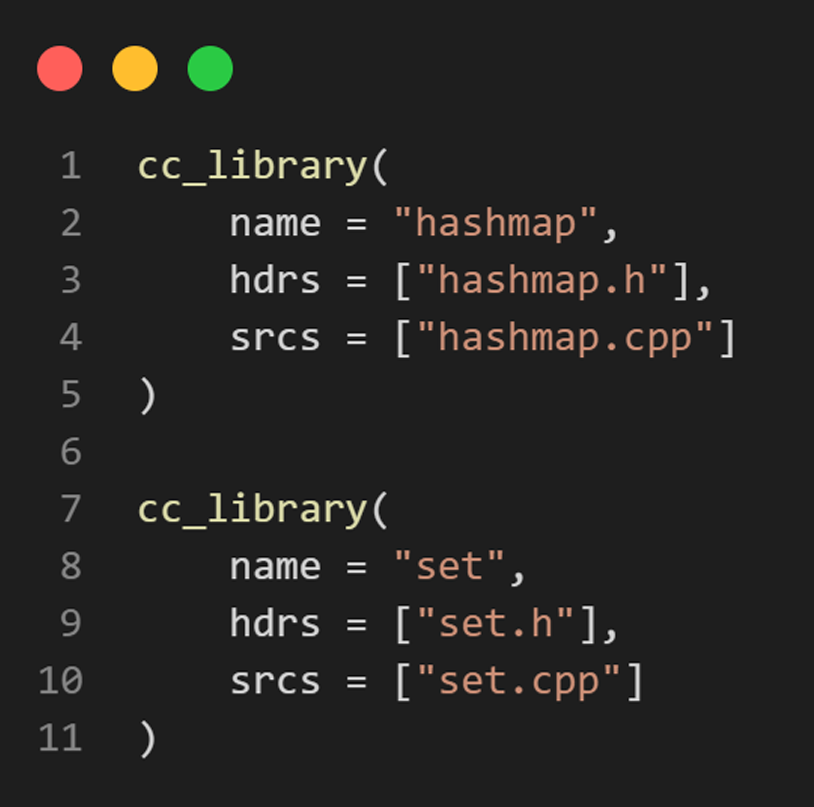
When compiling hashmap, Bazel does not compile directly in the source directory but instead creates a sandbox directory, links the hashmap header and source files to that directory, and then compiles in the sandbox directory.
This prevents code from accidentally including unlisted header files, which is crucial for correct incremental builds, especially concerning remote caching.
For instance, if we accidentally included set.h in hashmap.cpp and used some of its functions, with the sandbox mechanism, the compilation will fail because set.h cannot be found in the sandbox. Without the sandbox mechanism, the compilation would succeed, but when set.h is updated in the future, the build system would not know that hashmap needs to be recompiled, potentially leading to incorrect build results.
This is the information we currently need to know about Bazel.
Migrating the Build System to Bazel
Here is our plan for migrating the build system to Bazel.
• First, we create all the build files so that we can use Bazel to build our engine.
• Next, we try to integrate Bazel with all three of the integrated development environments we are using.
• Finally, we set up a remote server for remote caching and execution.
Before using Bazel, we used CMake to generate native Visual Studio, Xcode, and Android Studio projects to build our engine. We mainly used Conan to manage third-party library dependencies. Our goal was to seamlessly migrate the build system from CMake to Bazel without affecting development progress.
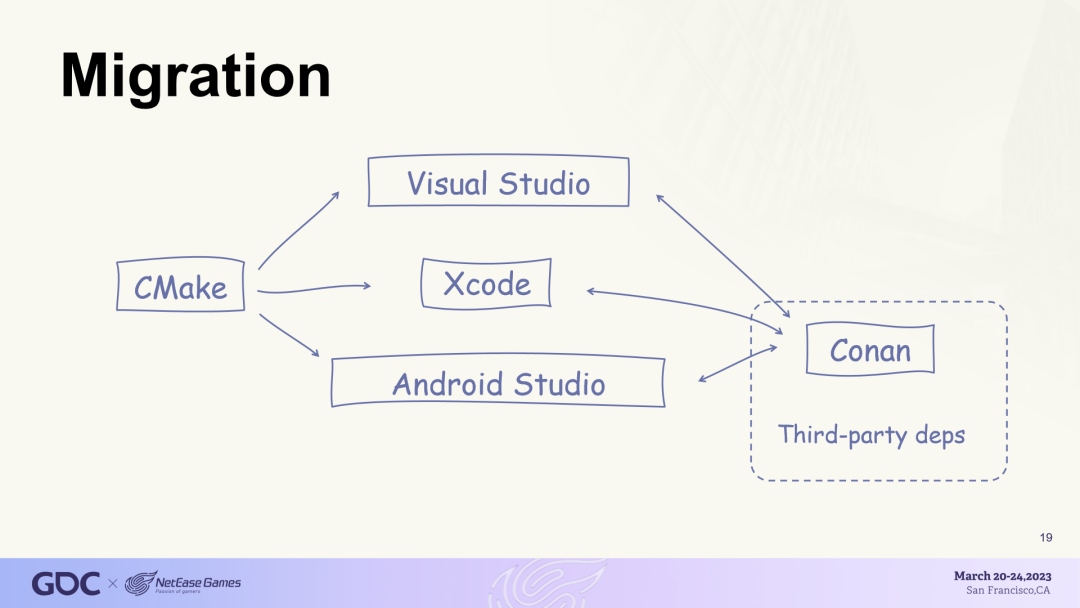
We started from the bottom nodes of the dependency tree. The following diagram is a simplified version of our engine’s internal dependency tree. At the top is an executable target named client. It depends on other libraries, such as “world” and “render”.
At the bottom of the dependency tree are the general utility lib (general tool library) and portable lib (portable library). Since they have no further internal dependencies, they can be easily built in Bazel.
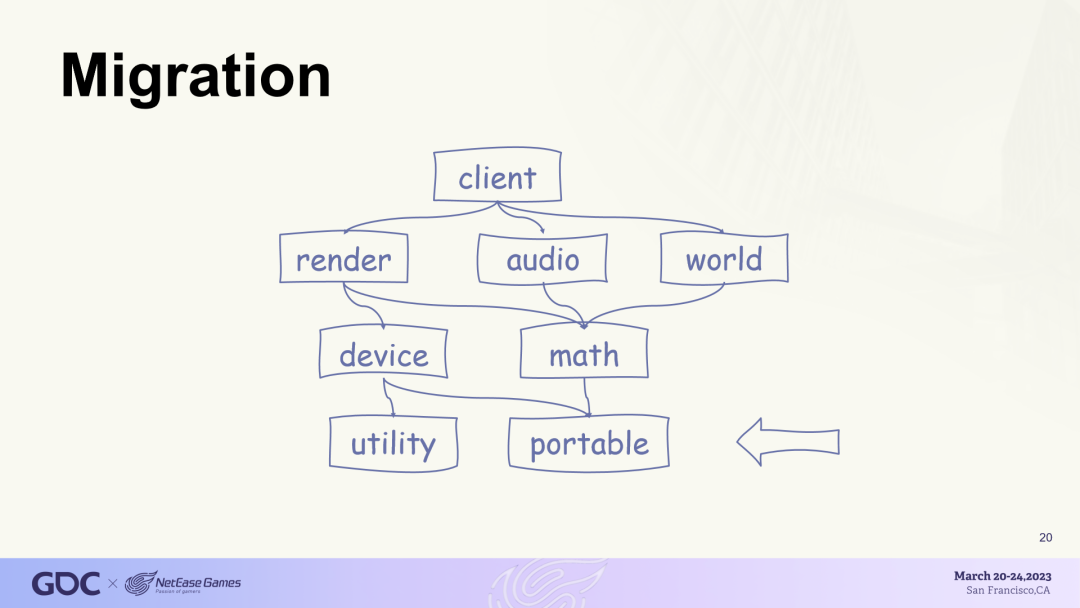
We first wrote the build file for portable and compiled it using Bazel.
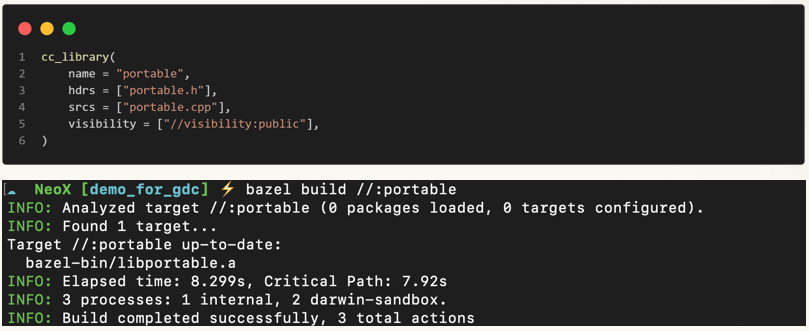
After successfully building portable with Bazel, we need to allow other targets in the CMake project to link to it.
This requires using CMake’s “IMPORTED” library. We can import the binaries generated by Bazel into the CMake project. This way, other libraries in the CMake project can link to it.
We also want to automatically trigger Bazel builds in the CMake project.
Here we use add_custom_target, which defines a custom target that triggers the bazel build command when this target is built. We set the IMPORTED library portable to depend on this custom target portable_bazel_build, so that whenever we need to import portable, the related bazel build command will be executed.
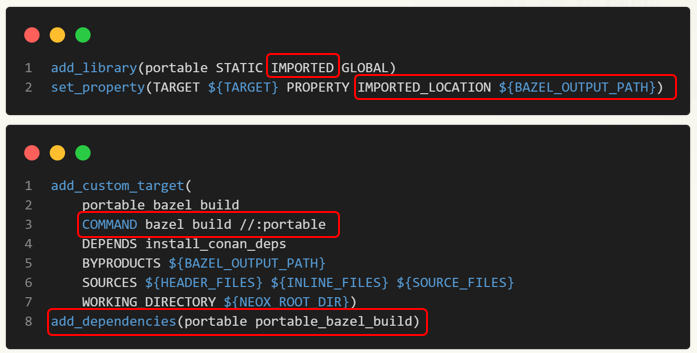
Now we can build “Portable” in Bazel and successfully link it to the CMake project. What we need to do is repeat this process from the bottom up until the entire engine can be compiled using Bazel.
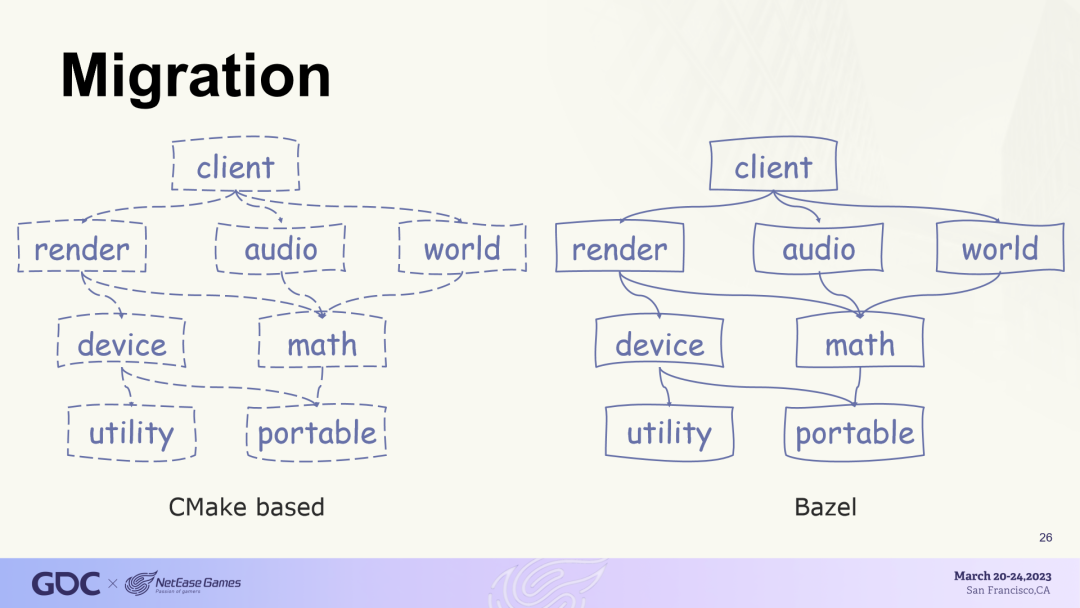
Migration process diagram
In practice, the first problem we encountered actually came from Conan, not Bazel itself.
When building with Bazel, we also need third-party dependencies. In theory, we could use Bazel to compile all our third-party dependencies directly from source, and Bazel is well-suited for this model. However, we did not have much time to write Bazel build files for all our dependencies. Additionally, the NeoX engine team was already using Conan to manage all third-party dependencies and upgrades, and we did not want to spend extra time maintaining third-party dependencies separately, so we needed to achieve integration between Bazel and Conan.
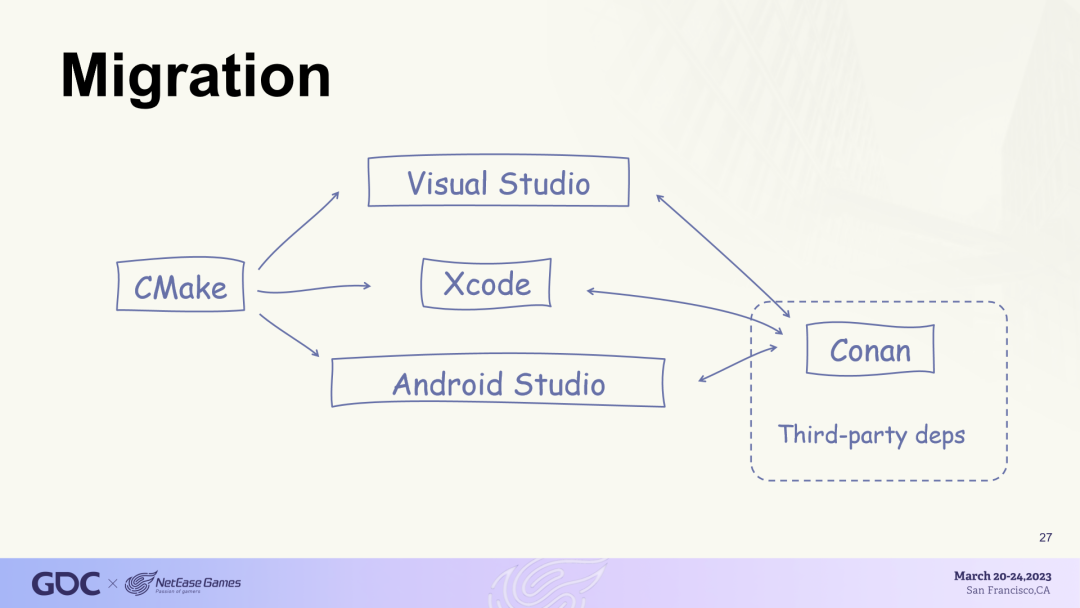
Fortunately, Conan provides a Bazel build generator. Like CMake, Bazel also supports importing precompiled libs using cc_import.
The Bazel build generator for Conan works as follows. First, it reads all dependencies from the Conan configuration file. Next, it downloads all the required libraries from the server and stores them on disk. Then the generator automatically generates corresponding BUILD files for all third-party libraries. This way, you can use them in your Bazel project.
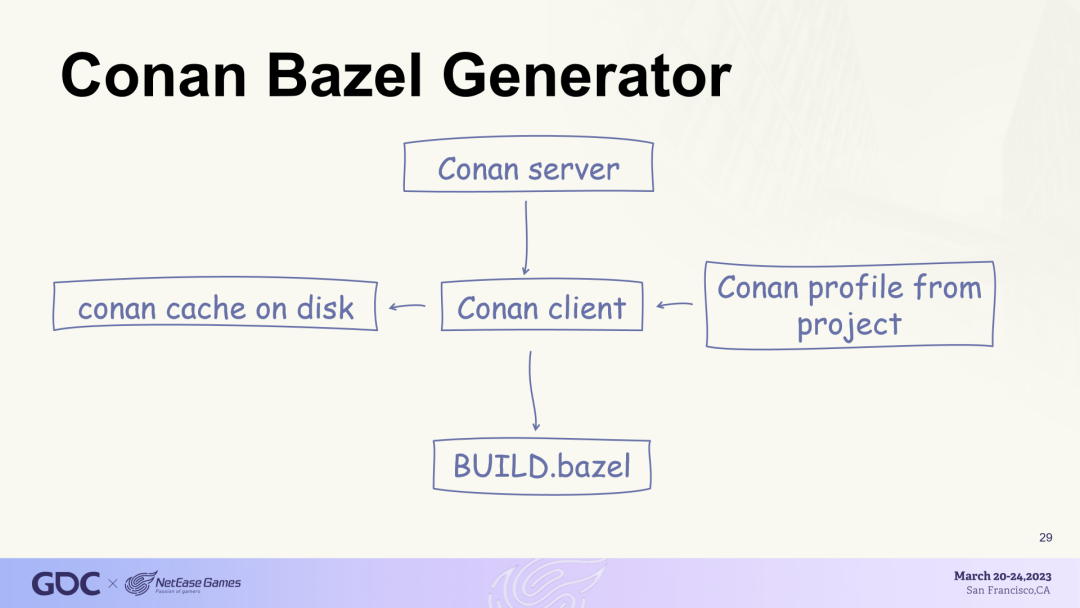
Unfortunately, the Bazel build generator was still in experimental stages at the time and could not correctly generate BUILD files for some of our dependencies.
If Conan were not open source, we would need software vendors to solve this problem. Considering that using both Conan and Bazel is not a common requirement, we might have to wait a long time for this issue to be resolved, or it might never be fixed. Even in the best-case scenario, our entire migration progress would be affected.
Fortunately, since Conan is an open source tool, we can fix bugs ourselves.
For instance, one specific issue we encountered was that when importing DLL libraries, we needed to set another property called “interface_library”.
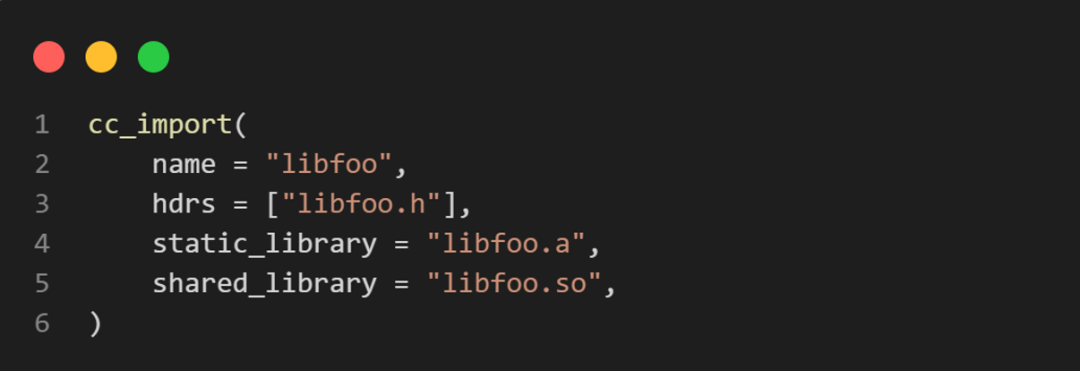
Adding it was actually quite easy, so we created a merge request (Pull Request, hereafter referred to as PR).
We also fixed another issue related to the parsing of lib file paths.
After fixing the Bazel build generator, the migration work progressed smoothly. Most of the problems we encountered were related to the engine itself. Two months later, we obtained the first engine fully built with Bazel.
Integrating Bazel into Integrated Development Environments
Now we need to integrate Bazel into our integrated development environments.
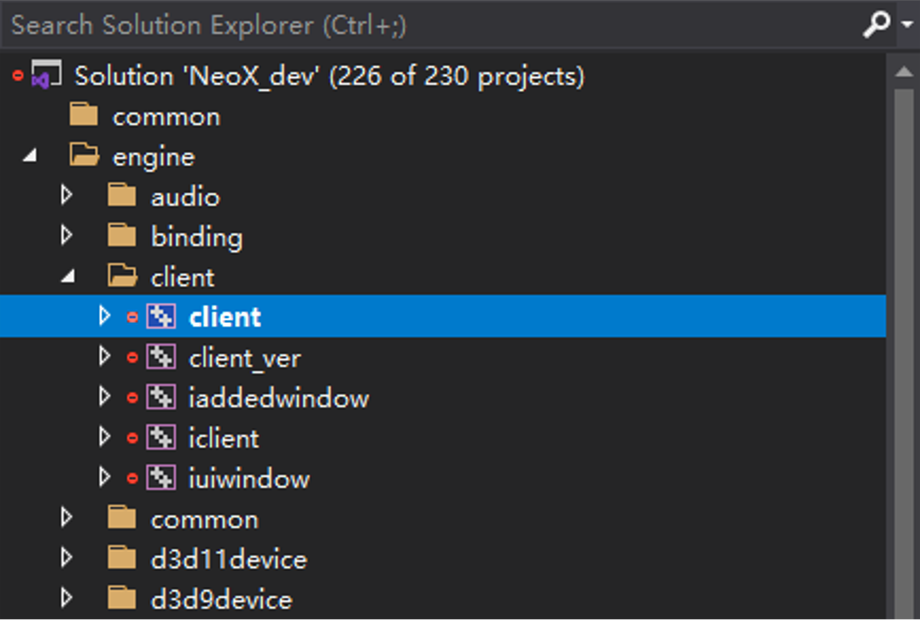
For Visual Studio projects, we used an open source tool called Lavender. Lavender generates a Visual Studio project containing all source files and compiler parameters. However, the actual build is done by calling Bazel commands. This is the Visual Studio project file generated by Lavender. The project is still built with Bazel, but Visual Studio can correctly obtain the locations of the source code and generated libraries, allowing for debugging and analysis of the libraries.
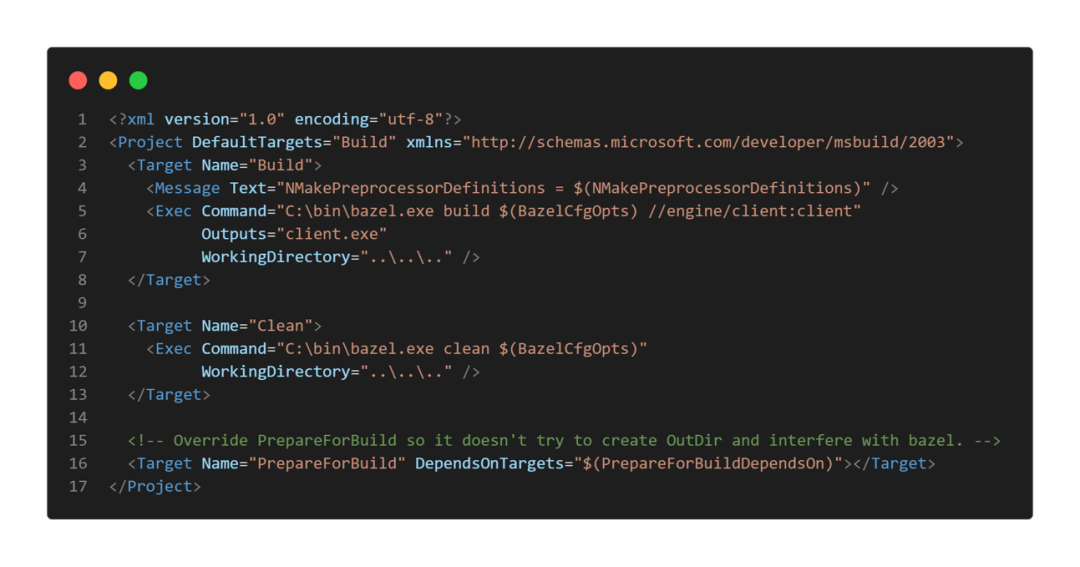
We also provided all preprocessor definitions and header file search paths to ensure Code Intelligence works properly.
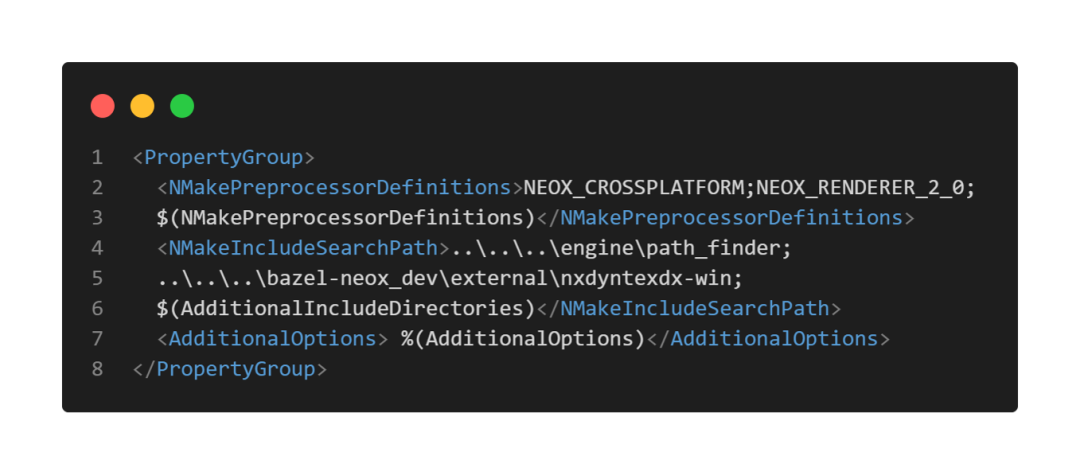
Unfortunately, Lavender is no longer maintained and has some bugs. For example, in some cases, Code Intelligence may not work properly. However, as we reach this point in the presentation, I believe some audience members may have guessed that since Lavender is open source, we can fix these bugs ourselves.
In fact, there is already a PR for the bug related to Code Intelligence in the original repository. So we created a fork (personal project branch) and merged the contents of the corresponding branch. Additionally, we made some minor updates, such as organizing folder structures in Visual Studio according to the Bazel project hierarchy. After modifications, we resolved Lavender’s issues. This is the Visual Studio project generated by Lavender.
For Xcode projects, there is a similar tool called Tulsi. Its functionality is similar to Lavender. In the Xcode project generated by Tulsi, the compilation is still done through Bazel. Notably, Tulsi has recently been replaced by a more powerful tool called rules_xcodeproj, but we are still using Tulsi for now.
The only issue we encountered on Xcode was debugging remote compilation libraries, which I will discuss in detail when I talk about remote execution.
Bazel operates slightly differently in Android Studio.
Google and IntelliJ collaborate to maintain an open source IntelliJ Bazel plugin. This plugin allows us to import Bazel projects into all IntelliJ integrated development environments, including Android Studio. The working principle is simple and straightforward.
We also encountered similar remote compilation library debugging issues in Xcode and resolved them in a similar manner.
Remote Caching and Execution
Now, we can build the engine in Bazel and debug it using integrated environments. The last issue to discuss is remote caching and execution.
Regarding remote caching and remote execution, I think Bazel’s open source strategy is quite clever. Google did not directly open source a Bazel remote server, I believe this is because the Bazel server used internally by Google relies on a lot of Google’s internal infrastructure, making it difficult to open source directly. Even if Google managed to do it, this server would be too complex for the vast majority of Bazel users.
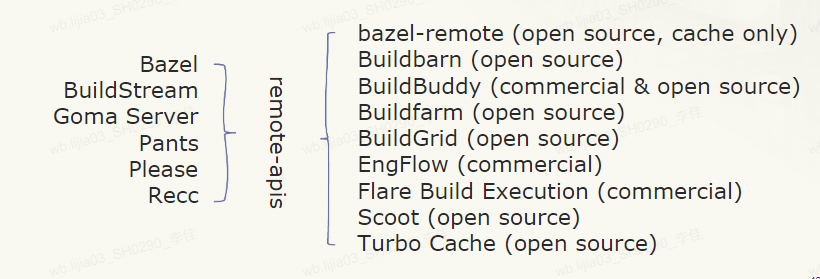
Google’s strategy is to open source the remote API. Bazel uses this API to communicate with remote servers for remote caching and execution. Anyone can use this API to create their own remote servers.
I personally think this is a very successful strategy, and many remote servers have already been implemented, many of which are open source. When we tried to add remote caching to the project, we successfully set up a cache-only server using bazel-remote in a very short time.
On the other hand, other build systems have also started using Bazel’s remote API, which means these build systems can communicate with any of these remote servers via the remote API.
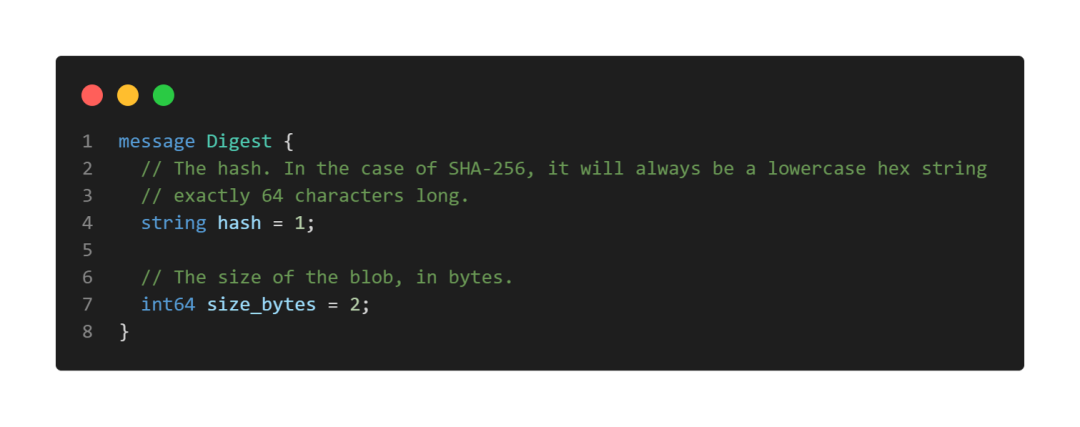
Bazel’s remote API is very concise. The API protocol is based on gRPC, and the documentation is very detailed. In fact, I had to delete a lot of comments to create the screenshot below.
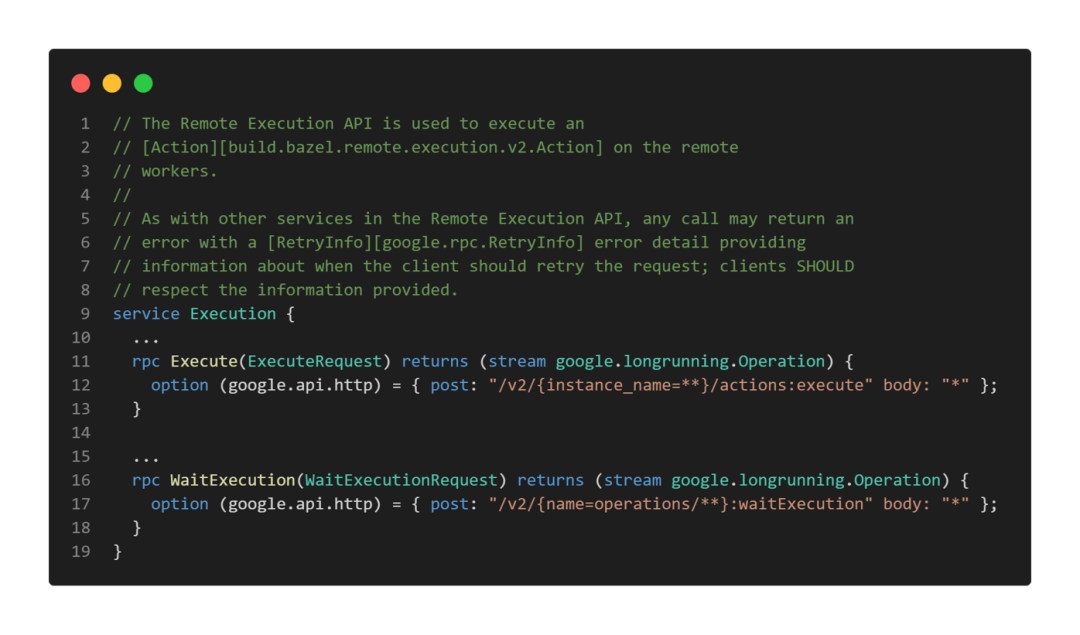
The services currently mainly provided by Bazel’s remote API include: execution service (Execution) for accepting execution requests, and cache service (action) for storing build operation results. Note that it does not store the actual output files generated by the build (artifacts), only references to them.
Output files and input files are stored together in content-addressable storage (Content-addressable storage (CAS)).
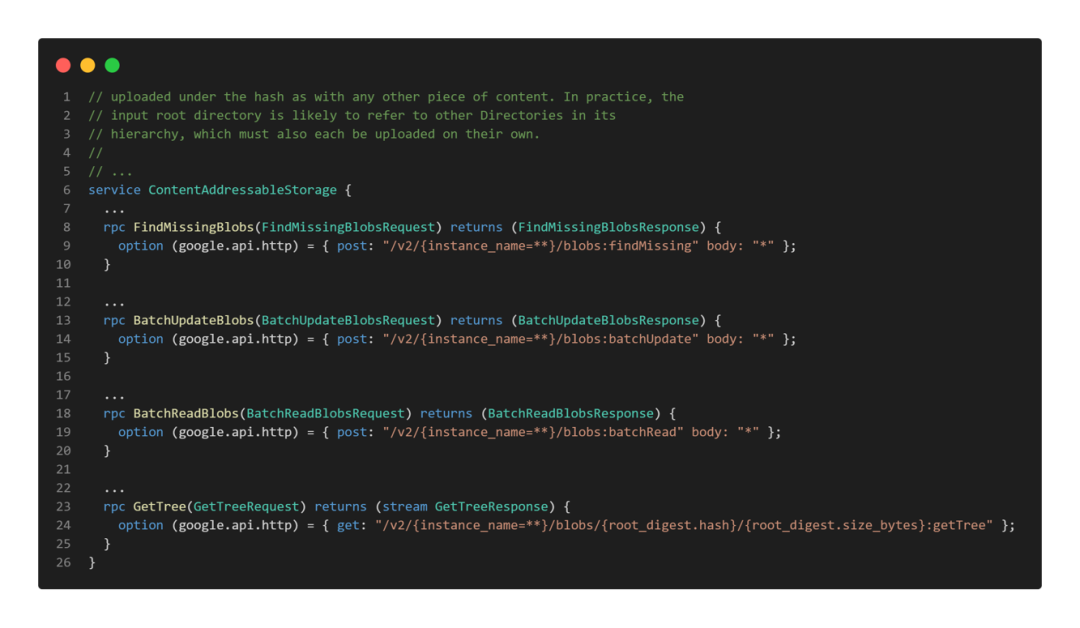
Each file is referenced by a digest. The digest consists of the hash value of the file and the file size (in bytes).
If a remote server is set up, when attempting to build a target, the Bazel client will first inquire the action cache service whether there is already a cache. If there is, the Bazel client will attempt to download cached results from content-addressable storage based on the file references in the cache. If the cache is missing or the download fails, the Bazel client will upload all input files to content-addressable storage and then request remote execution of the build target.
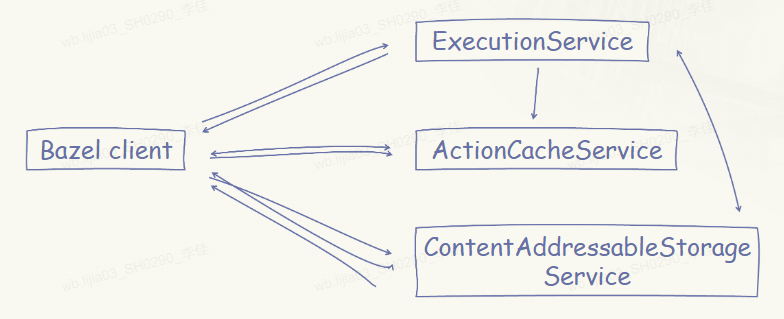
The execution service will retrieve all input files from content-addressable storage, execute the build command, then upload all generated results to content-addressable storage, upload the operation results to the action cache service, and then return the results to the Bazel client.
Finally, the Bazel client downloads all output files from content-addressable storage.
Remote servers can also choose to only implement ActionCache and ContentAddressCache services, in which case we would have a server that only provides caching functionality, and in this situation, the Bazel client is responsible for building the target and uploading the results.
As I mentioned earlier, we completed the deployment of the caching server in a very short time. We used bazel-remote, a caching server written in Go.
By using remote caching, much of the time during the build process can be saved, especially for automated tasks targeting continuous integration. For example, our clang-tidy average check time was reduced from about 40 minutes to 7 minutes. However, we still hope to further reduce incremental build times through remote execution.
Deploying remote execution is somewhat more complex. For caching, we only need a server to provide all output results generated during the build and do not care what platform these requests are executed on.
For remote execution, we must pay attention to the execution platform of these operations. We need to use remote workers to execute these actions on different platforms, which means we need a remote server that can support MacOS, Windows, and Linux simultaneously.
Most Bazel users come from the internet industry, and Linux is currently the most commonly used system in internet development environments. Therefore, most remote servers currently support Linux. Since MacOS is also often used for building iOS applications, some remote servers also support MacOS. However, we have not been so lucky with the Windows platform. The application of Bazel on Windows is relatively few, and remote execution is even less used.
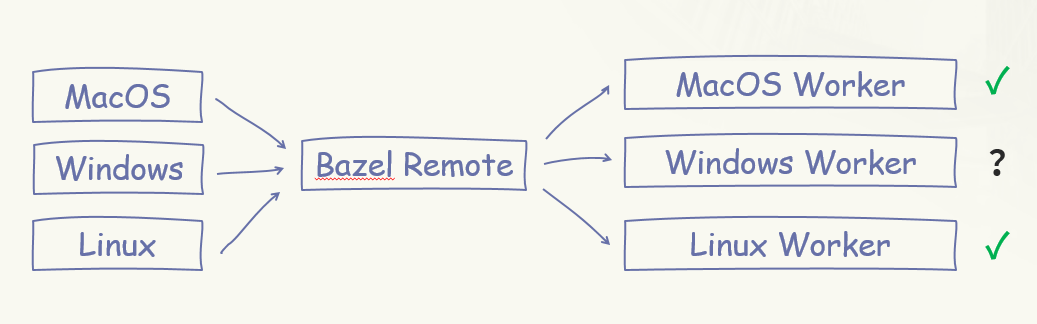
We tried using Buildbarn, an open source remote server written in Go.
One advantage of Buildbarn is that it can support multiple types of workers. It uses a FUSE (Filesystem in Userspace)-based worker on Linux, and an NFSv4 (Network File System version 4)-based worker on MacOS. Both use a virtual file system (VFS).
VFS-based workers have a significant advantage: they only fetch source files that are actually needed for compilation. What does this mean? Suppose we have such a math library and a compilation unit named “render.cpp” that depends on the math library but only needs to include matrix.h. When we use a VFS-based remote worker, as the name suggests, the worker generates a virtual file system for that compilation action and does not actually download any files from content-addressable storage. Only when the compiler needs to actually open a file does VFS fetch the corresponding file from content-addressable storage.
This way, remote execution workers can greatly reduce the time required to set up all input files for the compilation operation. Without VFS, the worker executing the compilation operation would need to fetch all files that could potentially be used as source code. This is why Buildbarn supports a third type of worker: the local worker. However, when dealing with large projects like NeoX, each compilation operation requires a significant amount of time to download all input files, making remote server solutions impractical.
Unfortunately, Buildbarn does not have VFS-based workers on Windows. Windows itself has a very good VFS API called ProjFS. Microsoft implemented GitVFS using it. However, since Windows is not the most commonly used build environment in web industry development, there is no corresponding available implementation for Buildbarn on Windows.
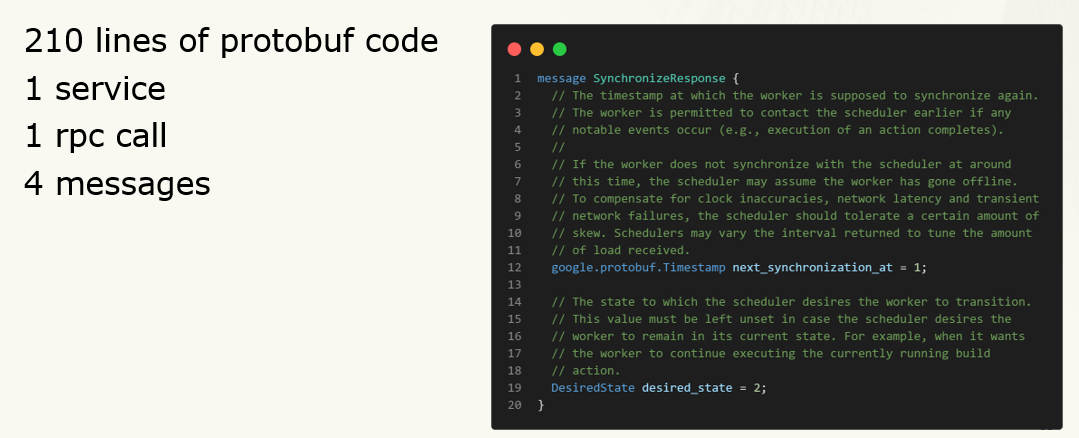
Fortunately, Buildbarn is an open source tool. Since it supports multiple workers, it has a very clear API for interaction between workers and task schedulers. Like the remote API, this API is also based on the gRPC protocol and has very well-defined documentation. It consists of only 210 lines of Protobuf code, one Service, one remote call protocol (RPC), and four message definitions. This means we can build a custom worker ourselves.
Currently, there are commercial remote build services that support Windows on the market, and we believe they can provide excellent services. However, at this stage, we prefer to use open source software because we can modify open source software to meet any of our needs. Therefore, we decided to build our own Windows worker.
We often use Python programming internally, so this worker was also built using Python. Our first version of the worker did not implement VFS but learned from another Bazel server, Buildfarm, to cache input directories so that we do not have to re-download the entire input tree each time. We ultimately built a worker with 2840 lines of Python code, excluding comments, blank lines, and tests. Of course, this solution is not perfect. After all, the first time we build the project, it still takes some time to fetch a large number of source files. However, using this worker to accelerate builds is entirely sufficient for us.
3 About Open Source Tools
We are using more open source tools to help us develop the engine.
For instance, we use clang-format to automatically format engine code; utilize AddressSanitizer (ASan) to detect memory access errors. Most of our continuous integration pipelines run on Kubernetes clusters. We also extensively use Jenkins for continuous integration. Many of our internal services are built using FastAPI.
The focus of this presentation is not to introduce a specific open source software, as different projects have different needs and require different tools. We aim to share our project experience to demonstrate how open source software can help game development and encourage everyone to try using open source software.
Before I got involved in this project, we had little experience collaborating with the open source community. Although we used many open source libraries and tools, we had not previously engaged much with the open source community. Through this experience, we also learned a lot about how to collaborate with the open source community, so we want to share this with everyone, hoping it can help you better integrate into the open source community.
♦ Be Bold to Ask Questions.As the saying goes, “There are no stupid questions, only stupid answers.” It is perfectly normal to need others to answer your doubts. Many open source software have dedicated mailing lists or Slack channels for newcomers, so if you have any questions about an open source software, feel free to ask in those places.
♦ It is very common for questions not to receive quick replies; this does not mean the community does not welcome you. Many people dedicate their time outside of work to build the open source community, and they may not have enough time to answer your questions promptly, which is perfectly normal. If one of your questions goes unanswered, please do not be discouraged, and do not hesitate to ask when you have new questions.
♦ Do not miss any opportunity to explore open source tools; many open source software may not perfectly meet your needs, or may not be plug-and-play. But open source means you can update and modify the tools at any time to meet your needs. Therefore, when a tool does not meet your needs, consider looking at its source code and implementation; perhaps you can add new features to it.
♦ Finally, after fixing bugs or implementing new features, remember to give back to the community; in fact, doing so is greatly beneficial to yourself. Many open source tools are continuously updated, and some updates may break the new features you added. If you contribute that feature back to the open source community and add some unit tests, it greatly reduces the likelihood of that feature being broken in future updates. In any case, contributing resources to the open source community is always a good thing. When you create a fork based on a project and develop nice new features, please try to give that functionality back to the community.
♦ Like your questions, your submitted PRs may also not be reviewed or merged in a timely manner. Do not be discouraged. If you really cannot make your code public to the open source community, try establishing a pipeline within the project to regularly (e.g., daily) fetch the latest upstream code and merge it into your internal fork, and then run this pipeline to see if it passes your internal tests. This way, if updates to the upstream code cause your code to fail, you will know immediately. You can even use tools like “git bisect” to find out which code changes caused your code to fail. Then you can promptly report your issue to the upstream project so they can fix it before the next version. This approach is beneficial for your fork in future updates.
That concludes my presentation for today. I hope this sharing allows everyone to feel the power of open source tools and understand the critical role they play in workflows.
You can modify open source tools to meet a variety of special needs. If you are already using some open source tools, remember to interact more in the community, ask questions, and create Pull Requests. As open source tools become more powerful, let your projects continue to optimize.
Finally, I would like to thank the entire “EVE Echoes” team for their patience, support, and suggestions throughout this journey.
I would also like to thank the NeoX engine team for their valuable advice.Lastly, I want to thank the open source community. Without these amazing open source communities, we would not have been able to accomplish this daunting task.
*To learn more about GDC insights, please stay tuned to us!~