
✦ ✦ ✦ ✦ ✦ ✦ ✦ ✦
As a programmer who frequently interacts with the web, understanding these protocols is essential.
This article will introduce the differences and basic concepts of these protocols. It may not be limited to frontend knowledge but also includes some operational and protocol-related knowledge, hoping to provide readers with some insights. Please point out any inaccuracies.
1 The Ancestor of the Web: HTTP
Full Name: HyperText Transfer Protocol (HTTP).
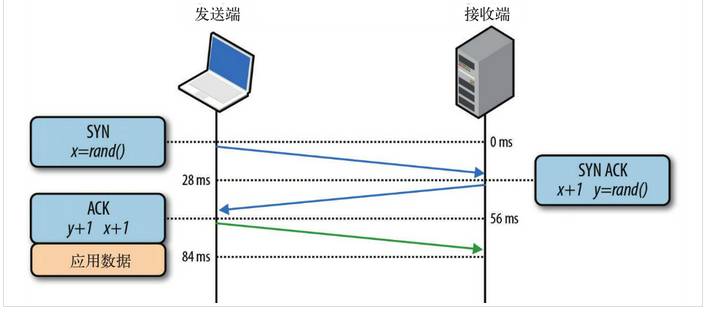
With the advent of computer networks and browsers, HTTP 1.0 emerged, operating at the application layer of computer networks. HTTP is built on top of the TCP protocol, so the bottlenecks and optimization techniques of the HTTP protocol are based on the characteristics of the TCP protocol itself, such as the three-way handshake for establishing a TCP connection and the four-way handshake for disconnecting, as well as the RTT delay time incurred with each connection establishment.
2 HTTP and Modern Browsers
When HTTP was first established, it was primarily designed to transmit HyperText Markup Language (HTML) documents from web servers to client browsers.
This means that for the frontend, the HTML pages we write will be hosted on our web servers, and users access the URL to retrieve the displayed content. However, since the advent of Web 2.0, our pages have become more complex, not just simple text and images, but also incorporating CSS and JavaScript to enrich our page displays.
With the emergence of AJAX, we gained another method to fetch data from the server, all of which are based on the HTTP protocol. Similarly, in the mobile internet era, our pages can run in mobile browsers, but compared to PCs, the network conditions on mobile devices are more complex, prompting us to deeply understand and continuously optimize HTTP.
3 Basic Optimizations for HTTP
The factors affecting an HTTP network request mainly include two: bandwidth and latency.
Bandwidth: If we were still in the dial-up internet stage, bandwidth could be a significant issue affecting requests. However, with the current infrastructure, bandwidth has greatly improved, and we no longer worry about speed being affected by bandwidth; thus, only latency remains.
Latency:
-
Browser Blocking (HOL blocking): The browser may block requests for various reasons. A browser can only have 4 connections to the same domain at the same time (this may vary depending on the browser engine). If the maximum connection limit is exceeded, subsequent requests will be blocked.
-
DNS Lookup: The browser needs to know the target server’s IP to establish a connection. The system that resolves domain names to IPs is DNS. This can usually be optimized by utilizing DNS caching.
-
Establishing Connection: HTTP is based on the TCP protocol, and the browser can only send the HTTP request message during the third handshake, achieving a true connection. However, these connections cannot be reused, leading to each request undergoing three handshakes and slow start. The three-way handshake significantly impacts high-latency scenarios, while slow start greatly affects large file requests.
4 Differences Between HTTP 1.0 and HTTP 1.1
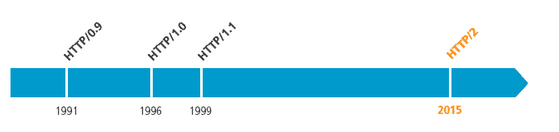
HTTP 1.0 was first used on the web in 1996, primarily for simple web pages and network requests, while HTTP 1.1 began to be widely used in major browsers in 1999 and is currently the most widely used HTTP protocol. The main differences are:
-
Cache handling: In HTTP 1.0, caching was primarily determined by the If-Modified-Since and Expires headers, while HTTP 1.1 introduced more caching control strategies such as Entity tag, If-Unmodified-Since, If-Match, If-None-Match, and more options for controlling caching strategies.
-
Bandwidth optimization and network connection usage: In HTTP 1.0, there were instances of bandwidth wastage, such as when a client only needed part of an object, but the server sent the entire object and did not support resuming downloads. HTTP 1.1 introduced the range header, allowing requests for only a portion of a resource, returning a 206 (Partial Content) status code, facilitating developers’ choices to fully utilize bandwidth and connections.
-
Error notification management: HTTP 1.1 added 24 new error status response codes, such as 409 (Conflict) indicating a conflict with the current state of the requested resource; 410 (Gone) indicating that a resource has been permanently deleted from the server.
-
Host header handling: In HTTP 1.0, each server was assumed to be bound to a unique IP address, so the URL in the request message did not convey the hostname. However, with the development of virtual hosting technology, multiple virtual hosts can exist on a single physical server (Multi-homed Web Servers) sharing an IP address. HTTP 1.1 requires both request and response messages to support the Host header, and a request without a Host header will result in a 400 Bad Request error.
-
Persistent connections: HTTP 1.1 supports persistent connections and request pipelining, allowing multiple HTTP requests and responses to be sent over a single TCP connection, reducing the overhead and latency of establishing and closing connections. In HTTP 1.1, the default is Connection: keep-alive, which mitigates the drawback of HTTP 1.0 requiring a new connection for each request. Below are common HTTP 1.0 examples:

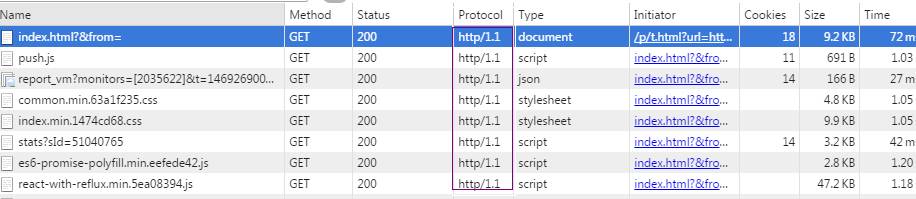
The differences are illustrated in the following image:

5 Issues with HTTP 1.0 and HTTP 1.1
-
As mentioned earlier, HTTP 1.x requires a new connection for each data transmission, which undoubtedly increases latency, especially on mobile devices.
-
HTTP 1.x transmits all content in plaintext, making it impossible for clients and servers to verify each other’s identities, which compromises data security.
-
HTTP 1.x carries large headers, increasing transmission costs, and the headers rarely change with each request, especially increasing user traffic on mobile devices.
-
Although HTTP 1.x supports keep-alive to mitigate the latency caused by multiple connection establishments, excessive use of keep-alive can also place significant performance pressure on the server. For services that frequently request a single file (e.g., image hosting sites), keep-alive can severely impact performance as it maintains unnecessary connections for extended periods after a file is requested.
6 The Emergence of HTTPS
To address the above issues, Netscape created HTTPS in 1994, implementing it in the Netscape Navigator browser.
Initially, HTTPS was used with SSL; as SSL evolved into TLS (they are essentially the same thing, just different names), the latest HTTPS was formally established by RFC 2818 published in May 2000.
In simple terms, HTTPS is the secure version of HTTP, and due to the increasing demand for security today, both Chrome and Firefox strongly support the use of HTTPS on websites, and Apple has mandated the use of HTTPS for data transmission in apps starting with iOS 10, indicating that HTTPS is imperative.
7 Differences Between HTTPS and HTTP
-
HTTPS requires obtaining a certificate from a CA, and generally, free certificates are rare and often require payment.
-
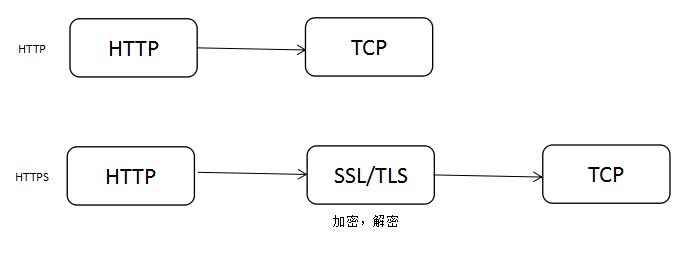
HTTP operates over TCP, transmitting all content in plaintext, while HTTPS operates over SSL/TLS, which runs on top of TCP, encrypting all transmitted content.
-
HTTP and HTTPS use completely different connection methods and ports; the former uses port 80, while the latter uses port 443.
-
HTTPS effectively prevents operator hijacking, addressing a significant issue of interception.
8 Transitioning from HTTP to HTTPS
If a website intends to switch entirely from HTTP to HTTPS, the following points should be considered:
-
Install a CA certificate; most certificates require payment. Here are two recommended certificate purchasing websites: 1) Let’s Encrypt, which is free, quick, and supports multiple domains (not wildcard), with three commands for instant signing and exporting of certificates. The downside is that it has a three-month validity period and needs to be renewed. 2) Comodo PositiveSSL, which is paid but relatively stable.
-
After purchasing the certificate, configure your domain on the certificate provider’s website, download the certificate, configure your web server, and modify your code accordingly.
-
HTTPS may reduce user access speed. The SSL handshake and HTTPS can slow down speed to some extent, but with proper optimization and deployment, the impact of HTTPS on speed can be acceptable. In many scenarios, HTTPS speed can be comparable to HTTP, and if using SPDY, HTTPS can even be faster than HTTP.
-
While HTTPS may reduce access speed, the more pressing concern is the CPU load on the server. The extensive key algorithm calculations in HTTPS consume significant CPU resources, and only with sufficient optimization can the machine costs of HTTPS remain manageable.
9 Using SPDY to Accelerate Your Website
In 2012, Google proposed the SPDY protocol, prompting a positive reevaluation and resolution of the inherent issues in older versions of the HTTP protocol. SPDY can be seen as a hybrid of HTTPS and HTTP, primarily addressing:
-
Reducing latency: To tackle the high latency of HTTP, SPDY elegantly employs multiplexing. Multiplexing allows multiple request streams to share a single TCP connection, resolving the HOL blocking issue, reducing latency, and improving bandwidth utilization.
-
Request prioritization: Multiplexing introduces a new challenge where critical requests may be blocked due to shared connections. SPDY allows setting priorities for each request, ensuring that important requests are responded to first. For example, when a browser loads a homepage, the HTML content should be prioritized, followed by various static resource files and scripts, ensuring users see webpage content as quickly as possible.
-
Header compression: As mentioned earlier, HTTP 1.x headers often contain redundant information. Choosing an appropriate compression algorithm can reduce the size and number of packets.
-
Encrypted protocol transmission based on HTTPS significantly enhances the reliability of data transmission.
-
Server push: With SPDY-enabled webpages, for instance, if my webpage requests a style.css file, the server will push the style.js file to the client simultaneously. When the client later attempts to fetch style.js, it can retrieve it directly from the cache without making another request. SPDY structure diagram:
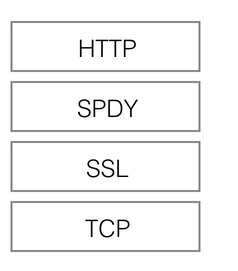
SPDY operates beneath HTTP, above TCP and SSL, allowing for easy compatibility with older versions of the HTTP protocol (encapsulating HTTP 1.x content into a new frame format) while utilizing existing SSL functionality.
Compatibility:
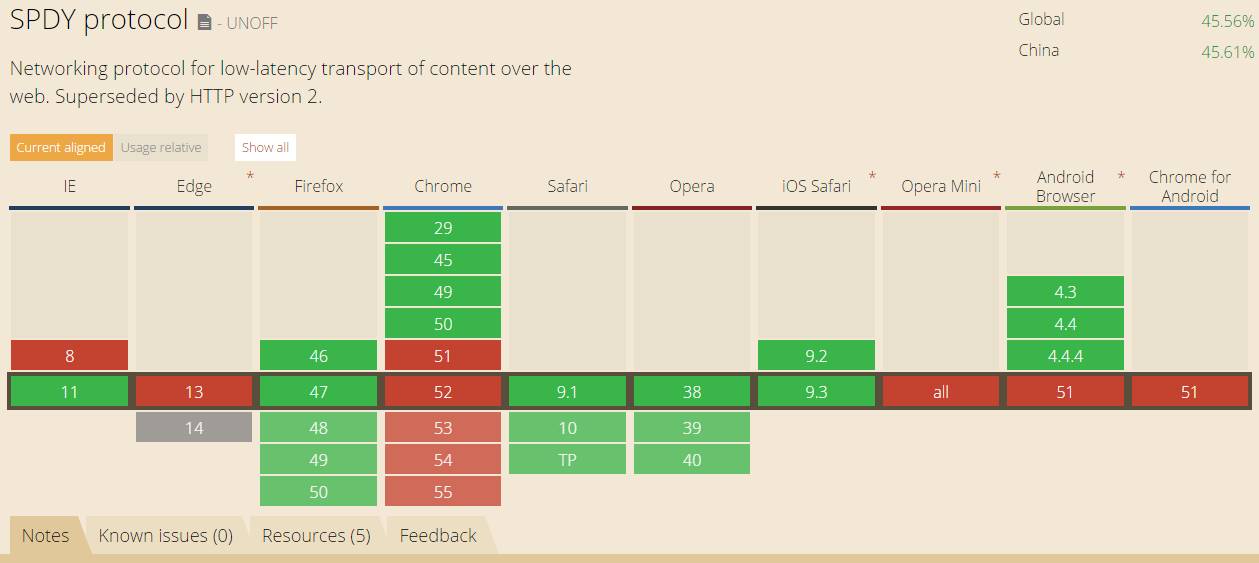
10 The Past and Present of HTTP 2.0
As the name suggests, with HTTP 1.x, the emergence of HTTP 2.0 was a natural progression. HTTP 2.0 can be considered an upgraded version of SPDY (originally designed based on SPDY), but there are still differences between HTTP 2.0 and SPDY, mainly in the following two aspects:
-
HTTP 2.0 supports plaintext HTTP transmission, while SPDY enforces the use of HTTPS.
-
HTTP 2.0 uses the HPACK compression algorithm for message headers, whereas SPDY uses DEFLATE.
11 New Features of HTTP 2.0
-
New binary format: HTTP 1.x parsing is based on text. Text-based protocols have inherent flaws due to the diversity of text representations, necessitating many considerations for robustness. Binary, on the other hand, only recognizes combinations of 0s and 1s. Based on this consideration, HTTP 2.0’s protocol parsing adopts a binary format, making it easier and more robust.
-
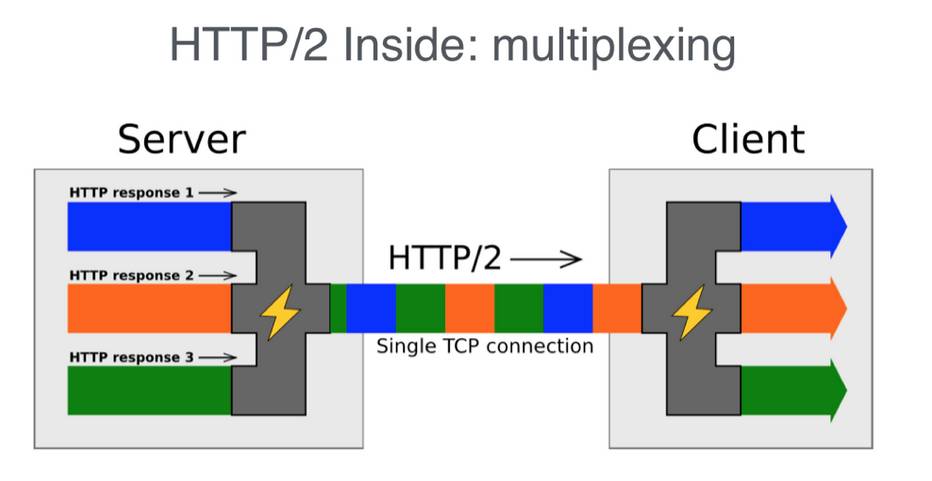
Multiplexing: Each request corresponds to a connection-sharing mechanism. Each request has an ID, allowing multiple requests to be mixed together on a single connection. The receiver can reassign requests to their respective server requests based on the request ID. Multiplexing principle diagram:
-
Header compression: As previously mentioned, HTTP 1.x headers often contain excessive information and are repeatedly sent. HTTP 2.0 uses encoders to reduce the size of headers that need to be transmitted. Both parties cache a copy of the header fields table, avoiding redundant header transmission and reducing the size that needs to be sent.
-
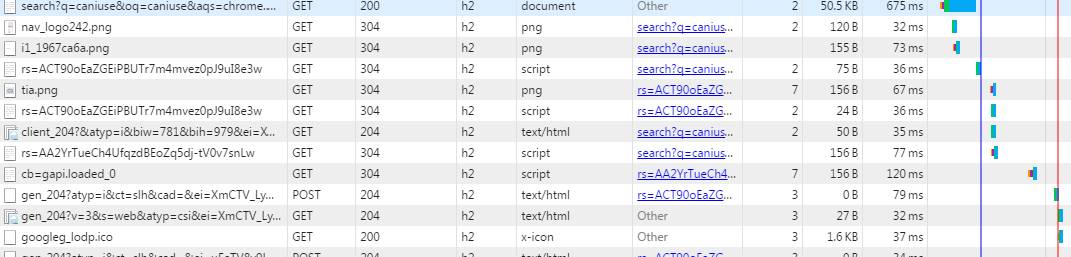
Server push: Like SPDY, HTTP 2.0 also features server push functionality. Currently, many websites have enabled HTTP 2.0, such as YouTube and Taobao. You can check if H2 is enabled using the Chrome console:
For more information about HTTP 2.0, you can refer to: HTTP 2.0 Wonderful Daily Life and the official website of HTTP 2.0.
The differences between HTTP 2.0 and HTTP 1.x can be summarized in the following image:

12 Upgrading to HTTP 2.0
Compared to upgrading to HTTPS, transitioning to HTTP 2.0 is somewhat simpler. You may need to consider the following issues:
-
As mentioned earlier, HTTP 2.0 can support non-HTTPS, but mainstream browsers like Chrome and Firefox still only support HTTP 2.0 deployed over TLS. Therefore, to upgrade to HTTP 2.0, it is advisable to first implement HTTPS.
-
Once your website has upgraded to HTTPS, upgrading to HTTP 2.0 becomes much easier. If you are using NGINX, you can simply enable the corresponding protocol in the configuration file. Refer to the NGINX white paper and the official guide for configuring HTTP 2.0.
-
What about the original HTTP 1.x? You need not worry; HTTP 2.0 is fully compatible with the semantics of HTTP 1.x. For browsers that do not support HTTP 2.0, NGINX will automatically provide backward compatibility.
13 Conclusion
-
The above discusses some basic theories regarding HTTP, HTTP 2.0, SPDY, and HTTPS. Some content has not been explored in depth, and readers can refer to the links for more details.
-
Some optimization methods for HTTP 1.x, such as file merging and compression, resource CDN, JS, and CSS optimization, are also applicable to HTTP 2.0 and HTTPS, so web frontend optimization should continue.
-
In today’s rapidly evolving web landscape, some technologies must keep pace with the times. Just as Apple announced that iOS 10 must use HTTPS, the revolution of web protocols has already begun. For better performance and superior methods, it’s time to start upgrading.
✦ ✦ ✦ ✦ ✦ ✦ ✦ ✦
Further Reading (click the title):
Overview of Web Instant Messaging Technologies
10 Suggestions for Improving Application Performance by 10 Times
Written by: AlloyTeam Original: http://www.alloyteam.com/2016/07/httphttp2-0spdyhttps-reading-this-is-enough/

Click “Read Original“ for more
Featured Articles
↓↓↓