As an experienced microcontroller developer, I know well the convenience that the I2C bus brings to development, but I have also been tormented by the “big problem” of I2C address conflicts. Today, let’s talk about how to easily solve this annoyance with the TCA9548A, this “tool”.
What Is an I2C Address Conflict?
Imagine you are developing an environmental monitoring system that requires four identical temperature and humidity sensors. These sensors communicate via I2C, but they have fixed I2C addresses, all set to 0x40. What to do? If connected directly, the microcontroller cannot distinguish which sensor it is communicating with! This is a typical I2C address conflict.
TCA9548A to the Rescue
The TCA9548A is designed to solve this problem. It acts like an 8-port I2C “switch”, allowing the microcontroller to communicate with up to eight devices that have the same I2C address through it.
Working Principle
- The TCA9548A itself is an I2C device with its own address (default is 0x70)
- It has 8 channels, each of which can connect to one I2C device
- The microcontroller first sends a byte to the TCA9548A to tell it which channel to communicate with
- The TCA9548A will then “forward” the microcontroller’s I2C signal to the specified channel
In this way, even if the I2C addresses of the eight devices are the same, we can communicate with them separately!
Hardware Connection
Microcontroller SDA <-----> TCA9548A SDA
Microcontroller SCL <-----> TCA9548A SCL
TCA9548A SD0 <-----> Device 1 SDA
TCA9548A SC0 <-----> Device 1 SCL
TCA9548A SD1 <-----> Device 2 SDA
TCA9548A SC1 <-----> Device 2 SCL
... (other channels similar)
Note: Don’t forget to power the TCA9548A (usually 3.3V or 5V) and connect its GND to the system common ground!
Code Implementation
Using Arduino as an example, here is how to use the TCA9548A to control multiple OLED displays:
#include <Wire.h>
#include <Adafruit_GFX.h>
#include <Adafruit_SSD1306.h>

#define SCREEN_WIDTH 128
#define SCREEN_HEIGHT 64
#define OLED_ADDR   0x3C
#define TCA9548A_ADDR 0x70

Adafruit_SSD1306 display(SCREEN_WIDTH, SCREEN_HEIGHT, &Wire, -1);

void selectTCAChannel(uint8_t channel) {
  Wire.beginTransmission(TCA9548A_ADDR);
  Wire.write(1 << channel);
  Wire.endTransmission();
}

void setup() {
  Wire.begin();

  // Initialize 4 OLED screens
  for (int i = 0; i < 4; i++) {
    selectTCAChannel(i);
    if(!display.begin(SSD1306_SWITCHCAPVCC, OLED_ADDR)) {
      Serial.println(F("SSD1306 allocation failed"));
      for(;;);
    }
    display.clearDisplay();
    display.setTextSize(2);
    display.setTextColor(WHITE);
    display.setCursor(0, 0);
    display.print("OLED ");
    display.println(i+1);
    display.display();
  }
}

void loop() {
  // You can update different OLED display content here
}
Practical Application Case
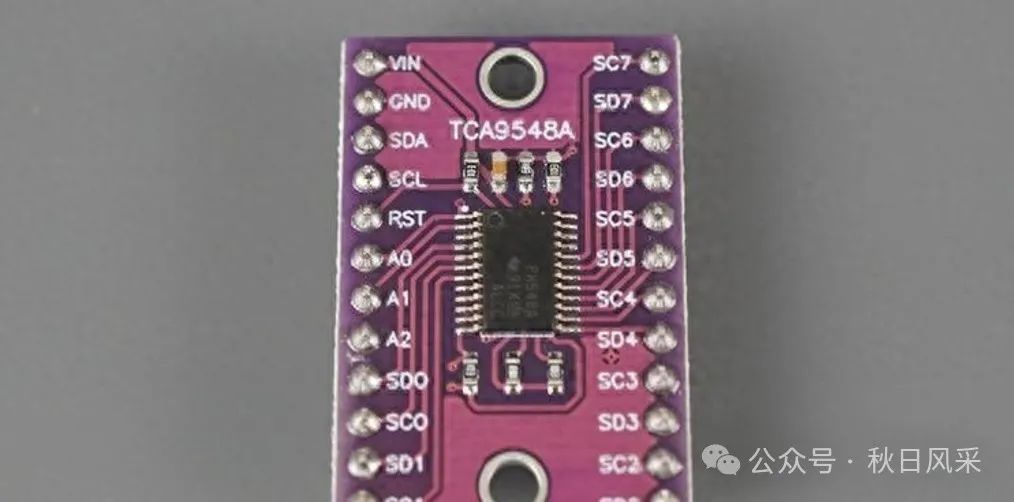
In a multi-sensor weather station project, I successfully connected the TCA9548A to:
- 4 BME280 temperature and humidity sensors (I2C addresses are all 0x76)
- 2 TSL2561 light sensors (I2C addresses are all 0x39)
- 1 DS3231 real-time clock module (I2C address 0x68)
- 1 AT24C32 EEPROM (I2C address 0x57)
This was previously impossible due to the address conflicts of six devices!
Common Problems and Solutions
-
Unable to Communicate with TCA9548A Check if the power and ground are connected correctly. Ensure that the A0-A2 pins are connected correctly to set the right I2C address.
-
Device on a Certain Channel Not Responding Try swapping channels to rule out issues with the device itself. Check if the SDA and SCL connections on that channel are loose.
-
Unstable Communication Add a 100nF decoupling capacitor near each I2C device. Check if proper pull-up resistors (typically 2-10kΩ) are added to the I2C bus.
Note: Although the TCA9548A is powerful, it can introduce a slight delay to the I2C bus. Use it with caution in situations requiring high real-time performance.
Practical Recommendations
- When drawing circuit diagrams, give each TCA9548A a unique identifier for easier reference in the code.
- Use macro definitions in the code to manage the channel numbers of each connected device for better readability.
- Consider using interrupts or polling to periodically switch channels for “parallel” reading of multiple devices.
- During testing, use a logic analyzer to observe the I2C signals, which can quickly pinpoint communication issues.
Mastering the TCA9548A allows you to easily handle various complex I2C device combinations. I hope this article helps you take fewer detours on your microcontroller development journey. Give it a try, and I believe you will discover more interesting applications!