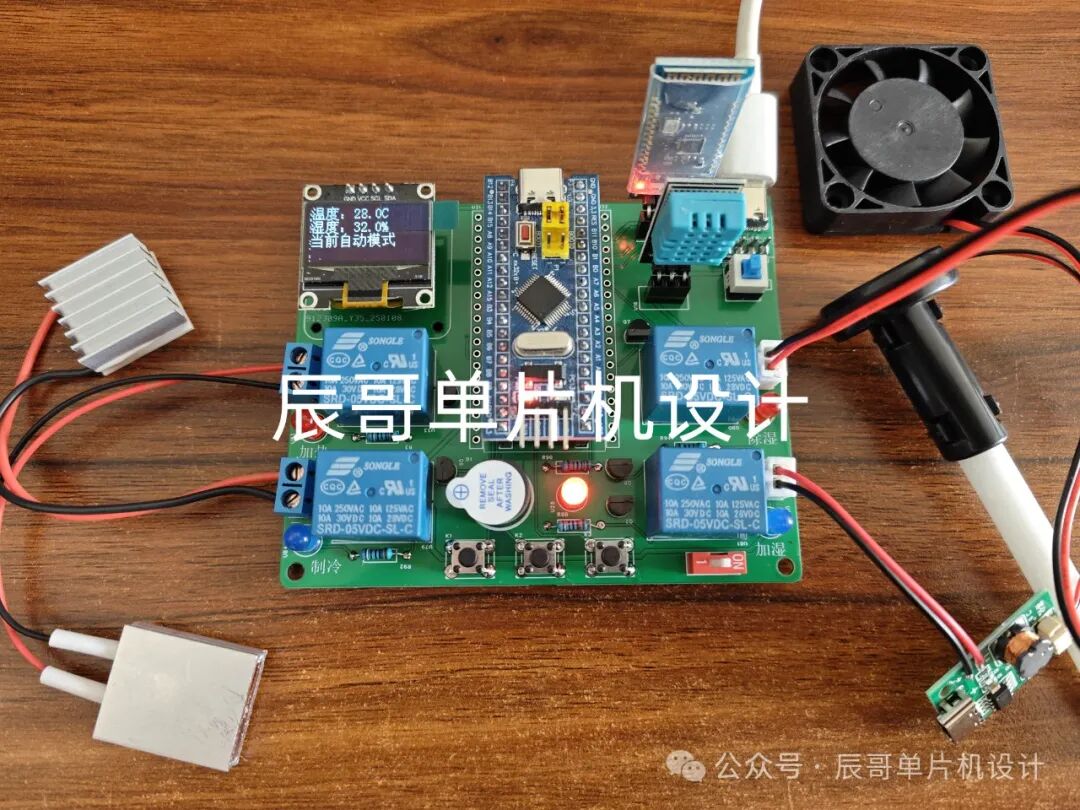
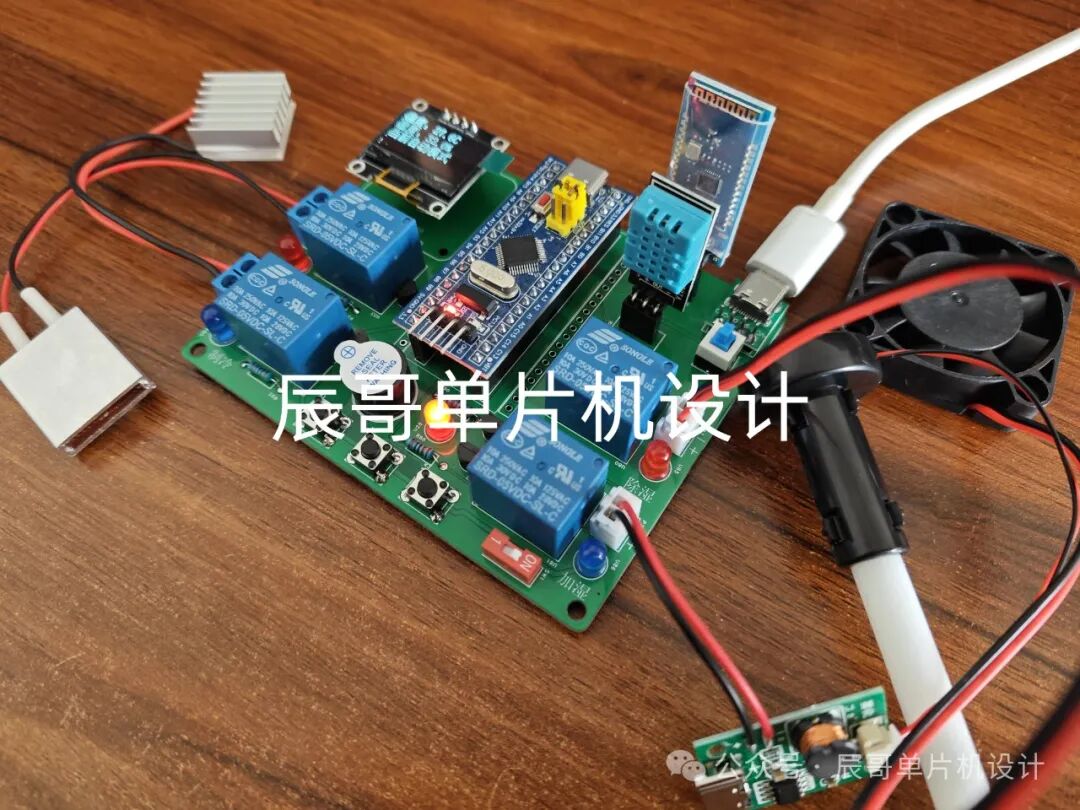
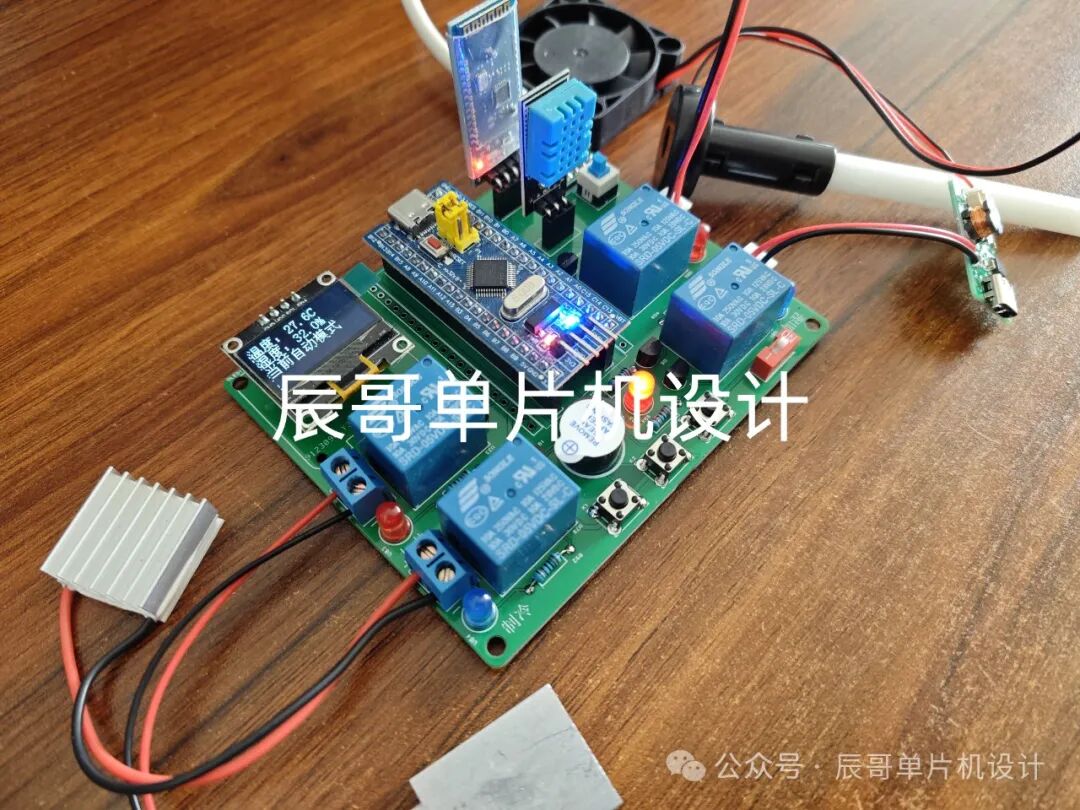
Product images of the project:
Bilibili video link:
https://www.bilibili.com/video/BV1dGfiY2E6N/?share_source=copy_web&vd_source=097fdeaf6b6ecfed8a9ff7119c32faf2
(See the end of the article for resource sharing)
01
—
Project Introduction
1. Function Details
STM32 Smart Constant Temperature Box
The functions are as follows:
-
Obtains temperature and humidity through DHT11. When the set temperature and humidity are exceeded, it performs heating, cooling, humidifying, dehumidifying, and sound-light alarm.
-
Sets the upper and lower limits of temperature and humidity through buttons.
-
Displays data on OLED.
-
Remotely sends data to a mobile app via Bluetooth, allowing the app to control heating, cooling, humidifying, and dehumidifying.
2. Bill of Materials
-
STM32F103C8T6 Microcontroller
-
OLED Screen
-
DHT11 Temperature and Humidity Sensor
-
BT04A Bluetooth Module
-
Relay
-
Active Buzzer
-
Heating Plate
-
Cooling Plate
-
Fan Module
-
Humidifier Module
-
LED Light
02
—
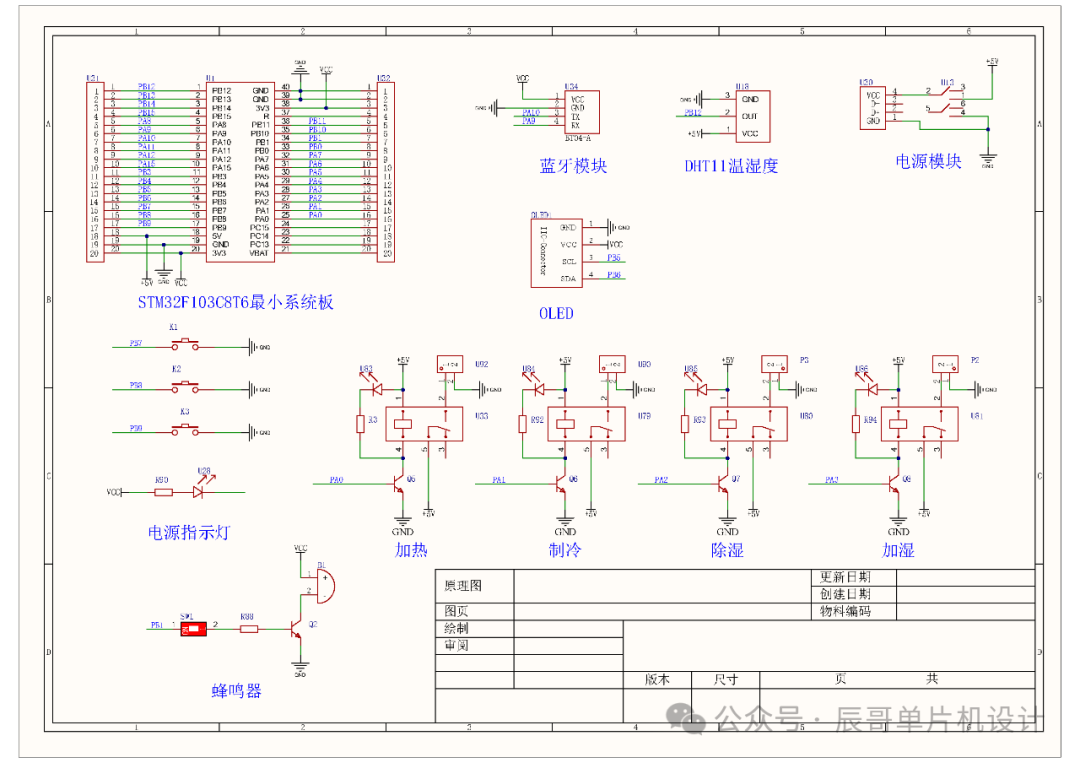
Schematic Design
03
—
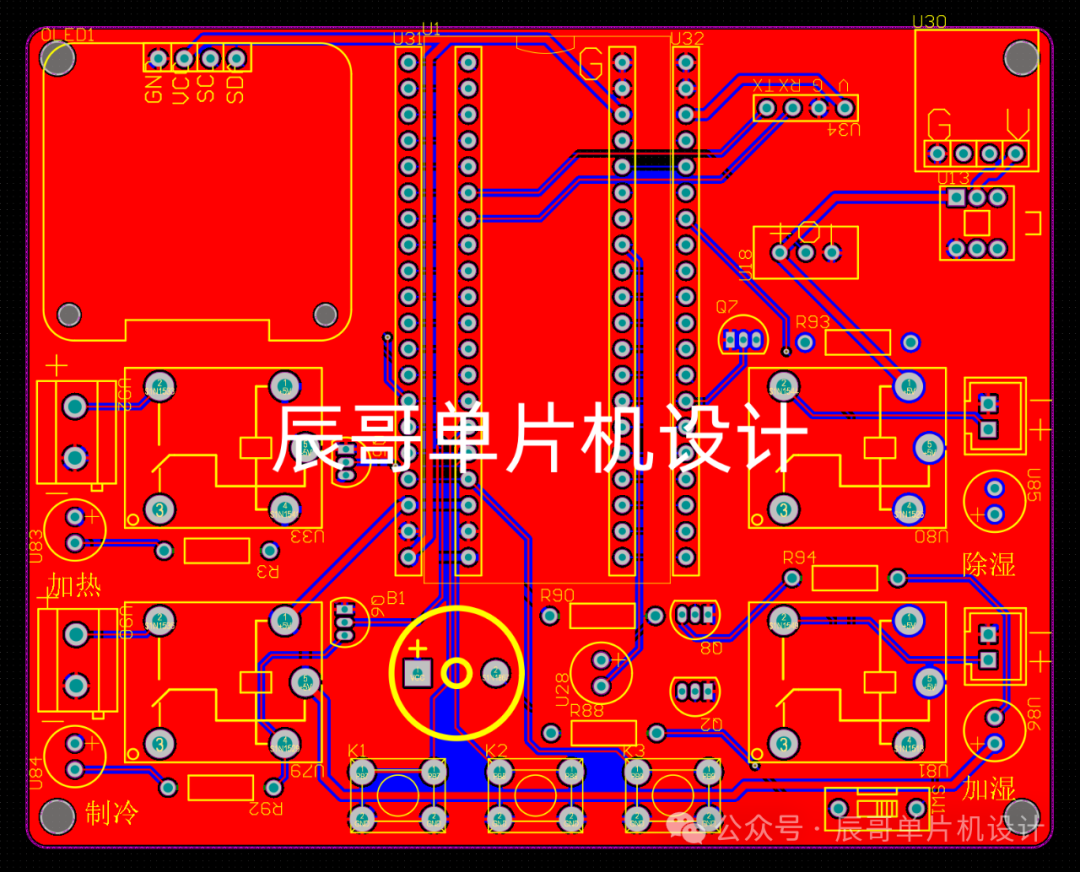
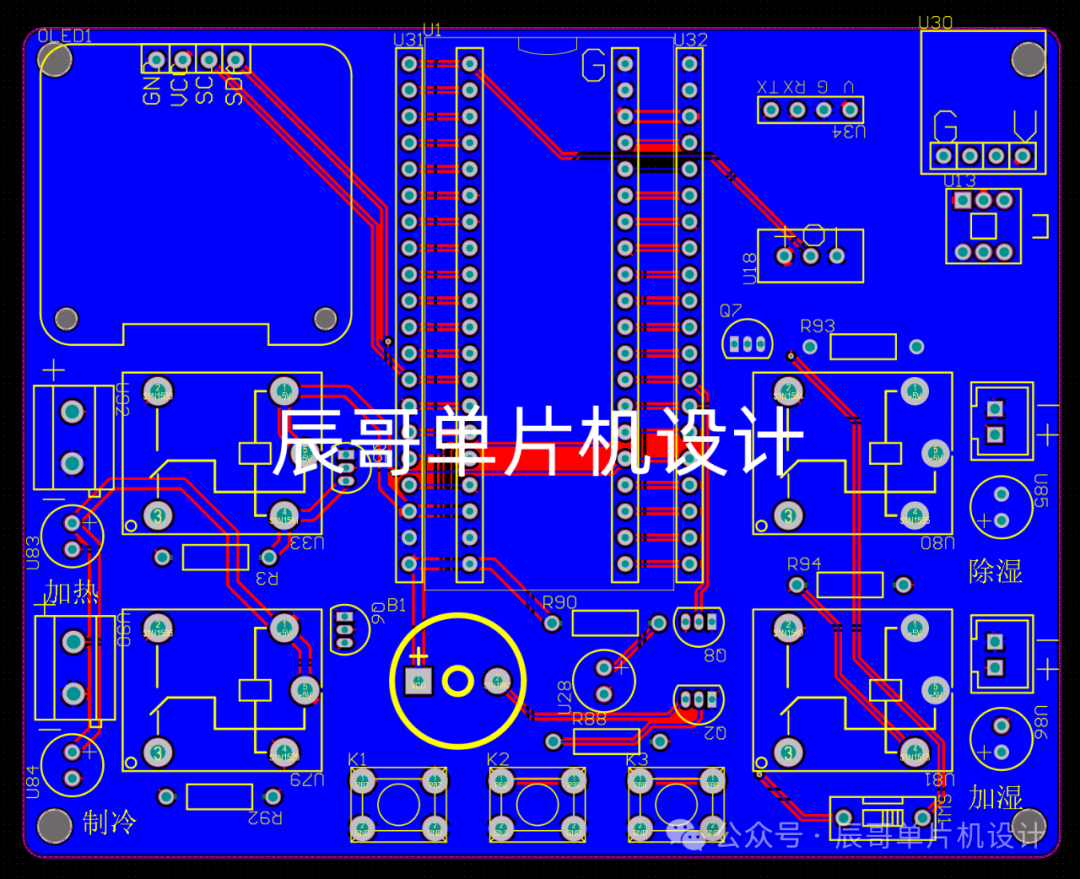
PCB Hardware Design
PCB Diagram
04
—
Program Design
#include "sys.h"
#include "stdio.h"
#include "string.h"
#include "stdlib.h"
#include "math.h"
#include "delay.h"
#include "gpio.h"
#include "key.h"
#include "oled.h"
#include "usart.h"
#include "dht11.h"
int main(void){
NVIC_PriorityGroupConfig(NVIC_PriorityGroup_2); // Configure interrupt priority group
Delay_Init(); // Delay initialization
Gpio_Init(); // IO initialization
Key_Init(); // Key initialization
Oled_Init(); // OLED initialization
Oled_Clear_All(); // Clear screen
Usart1_Init(9600); // Serial port 1 initialization, for Bluetooth communication
Oled_ShowString(1,5,"DHT11"); // DHT11 temperature and humidity sensor initialization
Oled_ShowCHinese(2,2,"Initializing");
while(DHT11_Init()); // Clear screen
Delay_ms(1000);
Delay_ms(1000);
Oled_Clear_All();
while(1) {
key_num = Chiclet_Keyboard_Scan(0); // Key scan
if(key_num != 0) { // If a key is pressed
switch(key_num) {
case 1: // Key 1: Switch interface
flag_display++;
if(flag_display >= 5)
flag_display = 0;
Oled_Clear_All();
break;
case 2: // Key 2: Increase key
switch(flag_display) {
case 0: // Interface 0: Switch to manual mode
flag_mode = 1;
break;
case 1: // Interface 1: Increase max temperature
if(temp_max < 99)
temp_max++;
break;
case 2: // Interface 2: Increase min temperature
if(temp_min < temp_max-1)
temp_min++;
break;
case 3: // Interface 3: Increase max humidity
if(humi_max < 99)
humi_max++;
break;
case 4: // Interface 4: Increase min humidity
if(humi_min < humi_max-1)
humi_min++;
break;
default:
break;
}
break;
case 3: // Key 3: Decrease key
switch(flag_display) {
case 0: // Interface 0: Switch to automatic mode
flag_mode = 0;
break;
case 1: // Interface 1: Decrease max temperature
if(temp_max > temp_min+1)
temp_max--;
break;
case 2: // Interface 2: Decrease min temperature
if(temp_min > 0)
temp_min--;
break;
case 3: // Interface 3: Decrease max humidity
if(humi_max > humi_min+1)
humi_max--;
break;
case 4: // Interface 4: Decrease min humidity
if(humi_min > 0)
humi_min--;
break;
default:
break;
}
break;
default:
break;
}
}
if(flag_display == 0) { // Measurement interface
if(time_num % 10 == 0) { // Approximately every 2 seconds, get temperature and humidity
Dht11_Get_Temp_Humi_Value(&temp_value,&humi_value);
}
if(time_num % 20 == 0) { // Bluetooth upload temperature and humidity data
UsartPrintf(USART1,"Temp:%d.%dC\r\nHumi:%d.%d%%\r\n",temp_value/10,temp_value%10,humi_value/10,humi_value%10);
}
}
switch(flag_display) { // Display different interfaces based on different display mode flags
case 0: // Interface 0: Measurement interface, display temperature and humidity values, mode
Oled_ShowCHinese(1, 0, "Temperature:");
sprintf(display_buf,"%d.%dC ",temp_value/10,temp_value%10);
Oled_ShowString(1, 6, display_buf);
Oled_ShowCHinese(2, 0, "Humidity:");
sprintf(display_buf,"%d.%d%% ",humi_value/10,humi_value%10);
Oled_ShowString(2, 6, display_buf);
if(flag_mode == 0)
Oled_ShowCHinese(3,0,"Current Automatic Mode");
else
Oled_ShowCHinese(3,0,"Current Manual Mode");
break;
case 1: // Interface 1: Display set max temperature
Oled_ShowCHinese(1,0,"Set Max Temperature");
if(time_num % 5 == 0) {
sprintf(display_buf,"%d ",temp_max);
Oled_ShowString(2, 7, display_buf);
}
if(time_num % 10 == 0) {
Oled_ShowString(2, 7, " ");
}
break;
case 2: // Interface 2: Display set min temperature
Oled_ShowCHinese(1,0,"Set Min Temperature");
if(time_num % 5 == 0) {
sprintf(display_buf,"%d ",temp_min);
Oled_ShowString(2, 7, display_buf);
}
if(time_num % 10 == 0) {
Oled_ShowString(2, 7, " ");
}
break;
case 3: // Interface 3: Display set max humidity
Oled_ShowCHinese(1,0,"Set Max Humidity");
if(time_num % 5 == 0) {
sprintf(display_buf,"%d ",humi_max);
Oled_ShowString(2, 7, display_buf);
}
if(time_num % 10 == 0) {
Oled_ShowString(2, 7, " ");
}
break;
case 4: // Interface 4: Display set min humidity
Oled_ShowCHinese(1,0,"Set Min Humidity");
if(time_num % 5 == 0) {
sprintf(display_buf,"%d ",humi_min);
Oled_ShowString(2, 7, display_buf);
}
if(time_num % 10 == 0) {
Oled_ShowString(2, 7, " ");
}
break;
default:
break;
}
if(flag_display == 0) { // Measurement interface
if(flag_mode == 0) { // If in automatic mode
if(temp_value > temp_max*10) // If temperature exceeds max value, turn on cooling
{
RELAY_ZL = 1;
RELAY_JR = 0;
alarm_temp = 1;
}
else if(temp_value < temp_min*10) // If temperature is less than min value, turn on heating
{
RELAY_ZL = 0;
RELAY_JR = 1;
alarm_temp = 1;
}
else // If within set limits, turn off heating and cooling
{
RELAY_ZL = 0;
RELAY_JR = 0;
alarm_temp = 0;
}
if(humi_value > humi_max*10) // If humidity exceeds max value, turn on dehumidifying
{
RELAY_CS = 1;
RELAY_JS = 0;
alarm_humi = 1;
}
else if(humi_value < humi_min*10) // If humidity is less than min value, turn on humidifying
{
RELAY_CS = 0;
RELAY_JS = 1;
alarm_humi = 1;
}
else // If within set limits, turn off humidifying and dehumidifying
{
RELAY_CS = 0;
RELAY_JS = 0;
alarm_humi = 0;
}
if(alarm_temp == 1 || alarm_humi == 1) // If there is an exception, sound-light alarm
{
if(time_num % 5 == 0)
{
LED = ~LED;
BEEP = ~BEEP;
}
}
else
{
LED = 0;
BEEP = 0;
}
}
else // Manual mode, turn off sound-light alarm
{
alarm_humi = 0;
alarm_temp = 0;
LED = 0;
BEEP = 0;
}
if(USART1_WaitRecive() == 0) // If data is received
{
switch (usart1_buf[0]) // Determine what data is received
{
case 'A': // Turn on heating, switch to manual mode
flag_mode = 1;
jr_flag++;
if(jr_flag%2==1)
{
RELAY_JR = 1;
RELAY_ZL = 0;
zl_flag = 0;
}
else
RELAY_JR = 0;
break;
case 'B': // Turn off heating, switch to manual mode
flag_mode = 1;
zl_flag++;
if(zl_flag%2==1)
{
RELAY_JR = 0;
RELAY_ZL = 1;
jr_flag = 0;
}
else
RELAY_ZL = 0;
break;
case 'C': // Turn on dehumidifying, switch to manual mode
flag_mode = 1;
cs_flag++;
if(cs_flag%2==1)
{
RELAY_CS = 1;
RELAY_JS = 0;
js_flag = 0;
}
else
RELAY_CS = 0;
break;
case 'D': // Turn off dehumidifying, switch to manual mode
flag_mode = 1;
js_flag++;
if(js_flag%2==1)
{
RELAY_CS = 0;
RELAY_JS = 1;
cs_flag = 0;
}
else
RELAY_JS = 0;
break;
case 'E': // Switch to automatic mode
flag_mode = 0;
break;
default:
break;
}
USART1_Clear();
}
}
else // Setting interface, turn off all relays, sound-light alarm
{
RELAY_JR = 0;
RELAY_ZL = 0;
RELAY_CS = 0;
RELAY_JS = 0;
LED = 0;
BEEP = 0;
}
time_num++; // Increment timing variable
Delay_ms(10);
if(time_num %10 == 0)
LED_SYS = ~LED_SYS;
if(time_num >= 5000)
{
time_num = 0;
}
} 05
—
Experimental Results
Resource Sharing (Baidu Cloud)
https://pan.baidu.com/s/18wELv5drWmbVpHOb9jtLlw?pwd=xjge Extraction code: xjge
(Or scan the QR code below to obtain) Purchase the physical product by scanning the QR code below