JSON documents are ubiquitous on the Internet, and servers spend a considerable amount of time parsing these documents. We aim to accelerate the parsing of JSON itself as much as possible using commonly used SIMD instructions while performing full validation (including character encoding).

Performance Results
Simdjson uses fewer instructions than the state-of-the-art parser RapidJSON by three-quarters and is fifty percent less than sajson. To our knowledge, simdjson is the first fully validated JSON parser running at gigabytes per second on commercial processors.
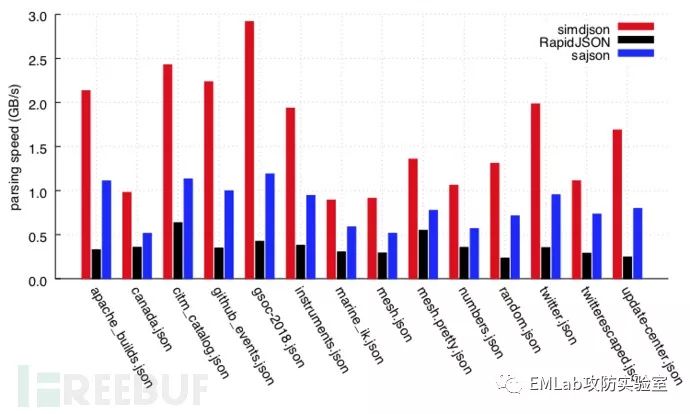
On Skylake processors, the parsing speeds (in GB/s) of various parsers on the twitter.json file are as follows.
| Parser | GB/s |
|---|---|
| simdjson | 2.2 |
| RapidJSON Encoding Validation | 0.51 |
| RapidJSON Encoding Validation, In-Place | 0.71 |
| sajson (In-Situ, Dynamic) | 0.70 |
| sajson (In-Situ, Static) | 0.97 |
| dropbox | 0.14 |
| FASTJSON | 0.26 |
| gason | 0.85 |
| ultrajson | 0.42 |
| jsmn | 0.28 |
| cJSON | 0.34 |
Requirements
We support platforms such as Linux or macOS and Windows through Visual Studio 2017 or later;
Processors with AVX2 (i.e., Intel processors with Haswell microarchitecture released in 2013 and AMD processors with Zen microarchitecture released in 2017);
Recent C++ compilers (e.g., GNU GCC or LLVM CLANG or Visual Studio 2017), we assume C++ 17. GNU GCC 7 or higher or LLVM’s clang 6 or higher.
License
This code is provided under the Apache License 2.0.
On Windows, we use windows/dirent_portable.h (outside our library code) to build some tools.
Code Examples
#include "simdjson/jsonparser.h"

/...

const char * filename = ... //

// Use any method you want to get the string of the JSON document
std::string_view p = get_corpus(filename);
ParsedJson pj;
pj.allocateCapacity(p.size()); // Allocate memory to parse p.size() bytes
const int res = json_parse(p, pj); // Parse, returns 0 on success
// Parsing complete!
if (res != 0) {
     // You can access the error message using the "simdjson/simdjson.h" header
   std::cout << "Error parsing:" << simdjson::errorMsg(res) << std::endl;
}
// You can safely delete the string content
free((void *)p.data());
// ParsedJson document can be used here
// js can be used with other json_parse calls.
If you don’t mind the memory overhead of allocating for each new JSON document, you can also use a simpler API:
#include "simdjson/jsonparser.h"

/ ...
const char * filename = ... //
std::string_view p = get_corpus(filename);
ParsedJson pj = build_parsed_json(p);  // Perform parsing
// At this point you no longer need p, you can do aligned_free((void *)p.data())
if( ! pj.isValid() ) {
     // An error occurred
}
Usage: Simple Version
For usage, see the file “amalgamation_demo.cpp” in the “singleheader” repository. It does not require a specific build system: just copy the files from the project into the include path. Then, you can include them very easily:
#include <iostream>
#include "simdjson.h"
#include "simdjson.cpp"
int main(int argc, char *argv[]) {
  const char * filename = argv[1];
  std::string_view p = get_corpus(filename);
  ParsedJson pj = build_parsed_json(p); // do the parsing
  if( ! pj.isValid() ) {
    std::cout << "not valid" << std::endl;
  } else {
    std::cout << "valid" << std::endl;
  }
  return EXIT_SUCCESS;
}
We need hardware support for AVX2 instructions. You must ensure that the compiler is instructed to use these instructions as needed. Under compilers like GNU GCC or LLVM clang, the flag -march=native is sufficient for the latest Intel processors (Haswell or better). For binary portability, you can also specify Haswell directly (-march=haswell). You may also use flags -mavx2 -mbmi2. In Visual Studio, you need to locate x64 and add the flag /arch:AVX2.
Note: In some setups, it may be necessary to pre-compile simdjson.cpp instead of including it.
Usage (Using Old Makefile on Linux or macOS)
Requirements: Recent clang or gcc, and make. We recommend at least using GNU GCC / G++ 7 or LLVM clang 6. Systems like Linux or macOS are needed.
Testing:
make
make test
To run benchmarks:
make parse
./parse jsonexamples/twitter.json
On Linux, the parse command provides a detailed analysis of performance counters.
Run comparative benchmarks (against other parsers):
make benchmark
Usage (Using CMake on Linux or macOS)
Requirements: We need the latest version of cmake. On macOS, the easiest way to install cmake might be using brew【https://brew.sh/】 and then typing
brew install cmake
On Linux, a similar Brew【https://linuxbrew.sh/】 can also work in the same way.
You need a recent compiler like clang or gcc. We recommend at least using GNU GCC / G++ 7 or LLVM clang 6. For example, you can use brew to install the latest compiler:
brew install gcc@8
Optional: You need to tell cmake which compiler you want to use by setting the CC and CXX variables. Under bash, you can do this with commands like export CC=gcc-7 and export CXX=g++-7.
Build: In the project repository, do the following:
mkdir build
cd build
cmake ..
make
make test
By default, it builds a shared library (e.g., libsimdjson.so on Linux).
You can build a static library:
mkdir buildstatic
cd buildstatic
cmake -DSIMDJSON_BUILD_STATIC=ON ..
make
make test
In some cases, you may want to specify the compiler, especially if the default compiler on the system is too old. You can do this as follows:
brew install gcc@8
mkdir build
cd build
export CXX=g++-8 CC=gcc-8
cmake ..
make
make test
Usage (Using Visual Studio on Windows with CMake)
We assume you have a standard Windows PC with at least Visual Studio 2017 and an x64 processor that supports AVX2 (Intel Haswell or higher from 2013).
Get the simdjson code from GitHub, for example, by cloning it using GitHub Desktop;
Install CMake【https://cmake.org/download/】. When installing, ensure that
cmakeis available from the command line. Choose the latest version of cmake;Create a subdirectory in simdjson, for example,
VisualStudio;Using the shell, navigate to this newly created directory;
cmake -DCMAKE_GENERATOR_PLATFORM=x64 ..in theVisualStudiorepository type shell. (Or, if you want to build a DLL, you can use the commandcmake -DCMAKE_GENERATOR_PLATFORM=x64 -DSIMDJSON_BUILD_STATIC=OFF ..)The last command creates a Visual Studio solution file (e.g.,
simdjson.sln) in the newly created directory. Open this file in Visual Studio. You should now be able to build the project and run tests. For example, in theSolution Explorerwindow (which can be obtained from theViewmenu), right-click onALL_BUILDand selectBuild. To test the code, still in theSolution Explorerwindow, selectRUN_TESTSand chooseBuild.
Usage (Using vcpkg on Windows, Linux, and MacOS)
Users of vcpkg on Windows, Linux, and MacOS【https://github.com/Microsoft/vcpkg】 can download and install simdjson with a command in their preferred shell.
On Linux and MacOS:
$ ./vcpkg install simdjson
This will build and install simdjson as a static library.
On Windows (64-bit):
.
cpkg.exe install simdjson:x64-windows
This will build and install simdjson as a shared library.
.
cpkg.exe install simdjson:x64-windows-static
This will build and install simdjson as a static library.
These commands will also print instructions on how to use the library with MSBuild or CMake-based projects.
If you find that the version of simdjson included with vcpkg is outdated, feel free to report it to the community by submitting an issue or creating a PR.
Tools
json2json mydoc.json
parses the document, constructs the model, and then dumps the result back to standard outputjson2json -d mydoc.json
parses the document, constructs the model, and then dumps the model (as a tape) to standard output. The tape format is described in the accompanying filetape.mdminify mydoc.json` shrinks the JSON document and outputs the result to standard output. Minifying means removing unnecessary whitespace characters.
Scope
We provide a fast parser. It fully validates the input according to various specifications. The parser builds a useful immutable (read-only) DOM (Document Object Model) that can be accessed later.
To simplify engineering, we make some assumptions:
We support UTF-8 (and ASCII), nothing else (no Latin, no UTF-16). We do not consider this a real limitation because we believe no serious application needs to handle JSON data without ASCII or UTF-8 encoding;
All strings in JSON documents can contain up to 4294967295 bytes (4GB) in UTF-8. To enforce this constraint, we refuse to parse documents that exceed 4294967295 bytes (4GB). This should accommodate most JSON documents;
We assume AVX2 support is available on all recent mainstream x86 processors produced by AMD and Intel. Support for non-x86 processors is not included, but we plan to support ARM processors (help requested);
If a failure occurs, we only report the failure without indicating the nature of the problem. (This can be easily improved without affecting performance);
We allow duplicate keys within objects where the specification permits (other parsers like sajson do the same);
Performance is optimized for JSON documents ranging from tens of kilobytes to several megabytes: performance issues must parse many small JSON documents or one really large JSON document are different.
Our goal is not to provide a general-purpose JSON library. Libraries like RapidJSON offer more than just parsing; they also help you generate JSON and provide various other convenient features. We only parse documents.
Features
The input string is unmodified (parsers like sajson and RapidJSON use the input string as a buffer).
We parse integers and floating-point numbers as separate types, allowing us to support large 64-bit integers in [-9223372036854775808,9223372036854775808], such as Java long or C/C++ long long. Not all parsers support 64-bit integers in parsers that differentiate between integers and floating-point numbers. (For example, sajson rejects JSON files with integers greater than or equal to 2147483648. FreeJSON will parse files containing excessively long integers like 18446744073709551616 as floating-point numbers.) When we cannot represent an integer as a signed 64-bit value, we reject the JSON document.
Full UTF-8 validation is performed during parsing (parsers like fastjson, gason, and dropbox json11 do not perform UTF-8 validation); these numbers are fully validated (parsers like gason and ultrajson will accept [0e+] as valid JSON); unescaped characters in string content are validated (parsers like fastjson and ultrajson accept unescaped newlines and tabs in strings).
Architecture
The parser operates in two stages:
Stage 1. (Token Discovery) Quickly identifies structural elements, strings, etc. We validate UTF-8 encoding at that stage.
Stage 2. (Structure Building) Involves constructing an ordered “tree” (materialized as a tape) to traverse the data. Strings and numbers are parsed at this stage.
Navigating the Parsed Document
Here is a code example that dumps the parsed JSON back to a string:
   ParsedJson::iterator pjh(pj);
    if (!pjh.isOk()) {
      std::cerr << " Could not iterate parsed result. " << std::endl;
      return EXIT_FAILURE;
    }
    compute_dump(pj);
    //
    // where compute_dump is :

void compute_dump(ParsedJson::iterator &pjh) {
  if (pjh.is_object()) {
    std::cout << "{";
    if (pjh.down()) {
      pjh.print(std::cout); // must be a string
      std::cout << ":";
      pjh.next();
      compute_dump(pjh); // let us recurse
      while (pjh.next()) {
        std::cout << ",";
        pjh.print(std::cout);
        std::cout << ":";
        pjh.next();
        compute_dump(pjh); // let us recurse
      }
      pjh.up();
    }
    std::cout << "}";
  } else if (pjh.is_array()) {
    std::cout << "[";
    if (pjh.down()) {
      compute_dump(pjh); // let us recurse
      while (pjh.next()) {
        std::cout << ",";
        compute_dump(pjh); // let us recurse
      }
      pjh.up();
    }
    std::cout << "]";
  } else {
    pjh.print(std::cout); // just print the lone value
  }
}
The following function will find all user.id integers:
void simdjson_traverse(std::vector<int64_t> &answer, ParsedJson::iterator &i) {
  switch (i.get_type()) {
  case '{':
    if (i.down()) {
      do {
        bool founduser = equals(i.get_string(), "user");
        i.next(); // move to value
        if (i.is_object()) {
          if (founduser && i.move_to_key("id")) {
            if (i.is_integer()) {
              answer.push_back(i.get_integer());
            }
            i.up();
          }
          simdjson_traverse(answer, i);
        } else if (i.is_array()) {
          simdjson_traverse(answer, i);
        }
      } while (i.next());
      i.up();
    }
    break;
  case '[':
    if (i.down()) {
      do {
        if (i.is_object_or_array()) {
          simdjson_traverse(answer, i);
        }
      } while (i.next());
      i.up();
    }
    break;
  case 'l':
  case 'd':
  case 'n':
  case 't':
  case 'f':
  default:
    break;
  }
}
In-Depth Comparison
If you want to understand how various parsers validate a given JSON file:
make allparserscheckfile
./allparserscheckfile myfile.json
For performance comparison:
make parsingcompetition
./parsingcompetition myfile.json
For a broader comparison:
make allparsingcompetition
./allparsingcompetition myfile.json
*References
https://github.com/lemire/simdjson
Compiled by Zhou Datao, please indicate the source from FreeBuf.COM when reprinting