↓Recommended Follow↓
[Editor’s Note] Do you have old Android phones gathering dust in the corner of your house? Why not give them a chance to turn waste into treasure? Check out this guide on transforming them into a Ruby Web server!
Surely you have an old Android phone, right? Every year, a huge amount of electronic waste is thrown away. In developed countries, the average person discards a phone every few years, and discarded phones are the largest source of electronic waste.
I have an old Motorola G5 Cedric gathering dust in the corner, so I decided to do something with it. Now, I’m using it to run a Puma Web server hosting a simple Sinatra application.
Before diving deeper, you might wonder: is there any practical use for this? An old Android phone may not have very high performance, but neither does an AWS t2.nano server. I haven’t deployed any ‘real’ code on Android yet, but even the cheapest phones generally have quad-core or even octa-core CPUs, with at least 2GB of RAM, so theoretically the phone’s performance is almost on par with cutting-edge cloud servers (for example, t2.nano only has 512MB of RAM).
Of course, the phone’s processor is ARM, while cloud servers are typically x86; memory management is also entirely different. But we’re just making a rough estimate here.
Anyway, the purpose of this article is to introduce how to turn an Android device into a Web server or anything else.
Install Termux
First, we need to set up a Linux environment on the phone. Termux is a terminal emulator and Linux environment that runs on Android, and it can be downloaded directly from the Google Play Store. No configuration is needed after installation.
Set Up SSH
You definitely don’t want to input a lot of commands on the small screen of your phone, so let’s set up SSH for remote login to Termux.
There are several methods to achieve this, but I think the most convenient is through software called Dropbear.
First, run the following on Android:
pkg upgrade
pkg install dropbear
You can choose between password authentication or public key authentication. While public key authentication is recommended, password authentication is the simplest for a trial. Run the following commands:
passwd
New password:
Retype new password:
New password was successfully set.
Tip: You can install a terminal multiplexer like tmux or screen. This makes it very convenient to run programs via SSH:
pkg install tmuxNext, test the connection from your desktop or laptop:
ssh android-ip-address -p 8022Set Static IP Address for Android
Go to WiFi settings, disable DHCP, and assign a static IP address to the phone.
This step is necessary so that the router doesn’t assign a new address to the phone every few days. Otherwise, the configuration will be quite troublesome.
Install Ruby, Bundler, Sinatra, and Puma
Sinatra is a lightweight web application framework, and Puma is a web server.
Ruby is just Ruby!
Of course, Sinatra and Puma are just suggestions; you can even run a full Rails application on your phone. Just avoid using the default Rails development server WEBrick, as it is single-process and single-threaded, making it unsuitable for production environments (though it’s fine for small testing environments).
Run the following on Android:
pkg install ruby
gem install sinatra puma
Install Nginx
Nginx is a web server, reverse proxy, and load balancer. While configuring it for multiple servers is the most efficient way to distribute requests among several servers, it works very well on our phone server as well. It has built-in DDoS protection and can serve static files.
Run the following on Android:
pkg install nginxNext, a little trick is needed to make nginx work with Puma. This configuration (https://gist.github.com/ctalkington/4448153) is very good. Copy nginx.conf and change appdir to the root directory of your web application. In my configuration, I changed it to /data/data/com/termux/files/home/android-sinatra.
Set Up Port Forwarding
If you want the web server to be accessible over the internet, you need to set up port forwarding on your router to direct incoming requests to the newly configured Android web server.
The specific method depends on your router. You can refer to this article (https://www.noip.com/support/knowledgebase/general-port-forwarding-guide/).
Configure Dynamic DNS
Most people’s public IP addresses are dynamic. Therefore, setting up a Dynamic DNS (DDNS) service is crucial, as it provides you with a static domain name that automatically forwards requests to your dynamic public IP address.
There are several free DDNS services. I use no-ip, and everything has been fine so far. Just remember that you need to ‘update’ the domain every month.
After setting up DDNS, you need to configure your router to periodically notify the DDNS service of its IP address. The specific method depends on the router model.
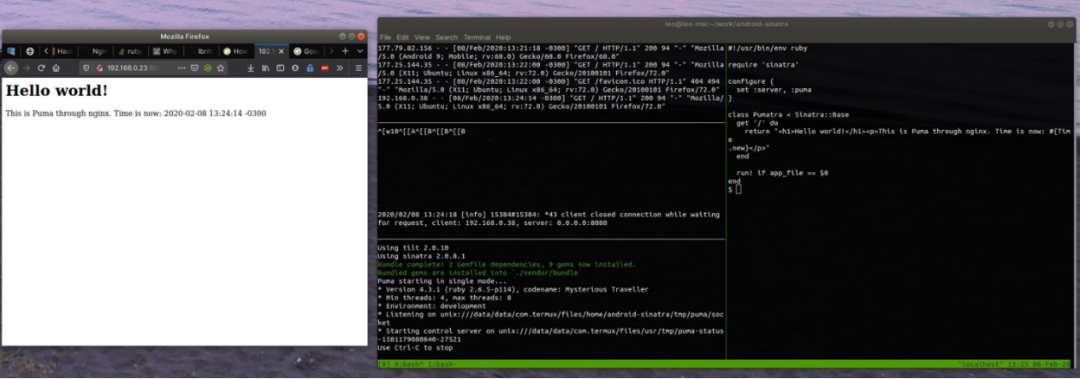
Run Hello World!
Load Testing
You can use the HTTP load testing software Siege to simulate real-world usage. Below is the performance of Siege running on my server, which supports 3 concurrent users (in the real world, this should be set larger):
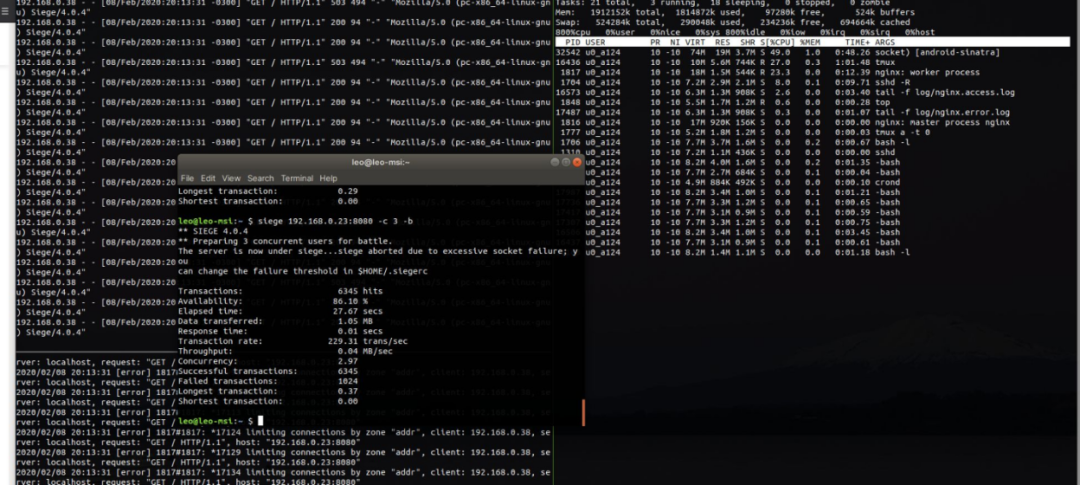
The numbers in the screenshot don’t mean much, as the response from our web application is just a timestamp, which is no more than 100 characters, but it’s enough to prove that our server can handle a small number of concurrent users.
Postscript: Security
The internet is very dangerous. If you really want to run a server, you must consider these issues.
After running this server for a few hours, various crawlers have already come in. Most are harmless search engine crawlers, but some are not here for good, like these two requests:
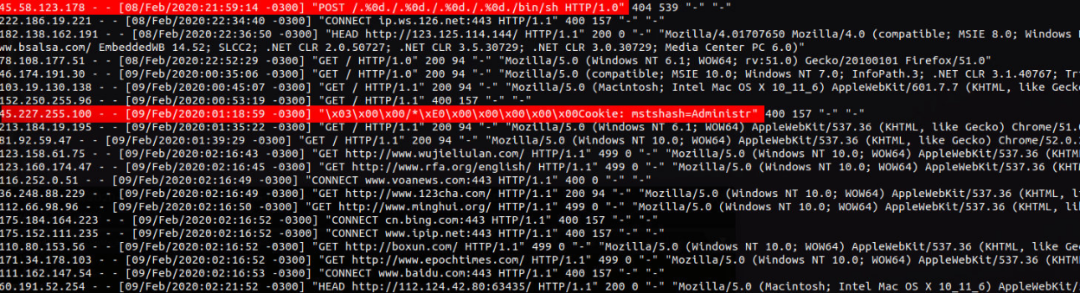
So, make sure all software is up to date, monitor access logs regularly, and follow nginx’s security guidelines.
Author: Leonardo Brito
Original: https://lbrito1.github.io/blog/2020/02/repurposing-android.html
Translator: CSDN – Wan Yue
– EOF –
Add the WeChat account of the homepage master, not only will your Linux skills improve +1

The homepage master will also share Linux-related tools, resources and selected technical articles on personal WeChat, occasionally sharing some interesting activities, job referrals and how to use technology for side projects

Add WeChat to open a window
Recommended Reading Click the title to jump
1. How does an “antique” Nokia feature phone run Linux?
2. Why can’t we create products like JetBrains in China?
3. Developers receive fake offers with “extra benefits,” causing the company to lose nearly $625 million!
Did you gain something from this article? Please share it with more people
Recommended to follow ‘Linux Enthusiasts’ to enhance your Linux skills
Likes and views are the biggest support ❤️