Recently, I started working with the Raspberry Pi, a small yet powerful ARM-based computer board, which is the smallest board in the world capable of running an operating system. I have a Raspberry Pi 4B and have explored various applications of the Raspberry Pi. Recently, AI smart hardware has become quite popular, and the desktop smart robot sector has seen a variety of competing products. I came across the Emo desktop robot online.Emo is a personal companion robot based on the Raspberry Pi 4, combining fashion and innovation. It is not just a robot; it is a living entity with a unique personality and emotions, setting it apart from other robots.I replicated it and will first show the results, starting with an opening animation reminiscent of The Matrix, fully showcasing the technological effects.Appearance Printing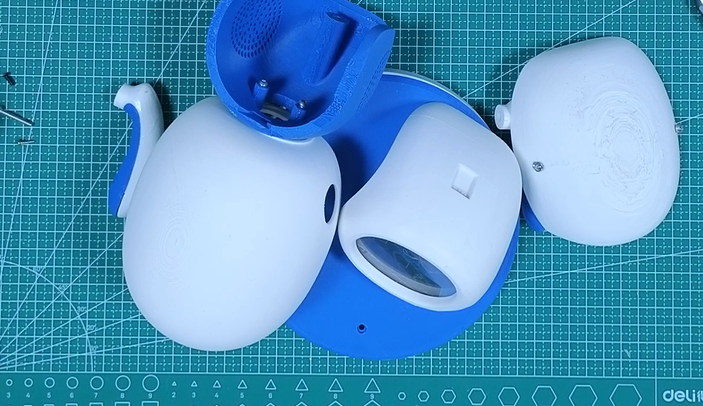 The robot’s exterior was 3D printed using bamboo filament.I chose PLA as the 3D printing material, printing each component separately.Upon printing, I found that the robot is still relatively large overall (mainly because the Raspberry Pi, despite being small, still has a certain size, and the body part accommodating the Raspberry Pi determines that the overall size cannot be too small).Hardware Components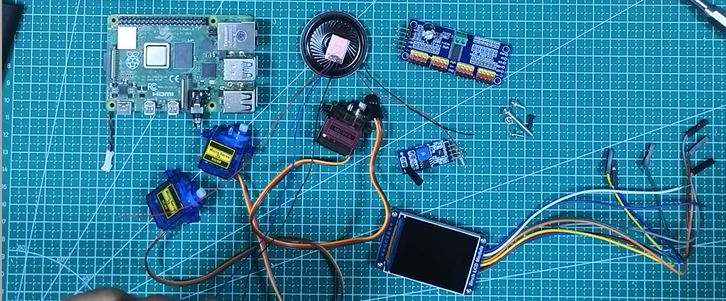
- Raspberry Pi 4B
- Waveshare 2-inch IPS LCD Display (240×320 resolution)
- SG90 Servo ×2
- MG90 Servo
- 16-channel 12-bit PWM Servo Driver Board
- 801S Vibration Sensor Module
- Single-channel TTP223 Touch Sensor Module
- 8 Ω 0.5 W Speaker Module
- PAM8403 Dual-channel Stereo Audio Amplifier Module
- 5 x 7 cm Double-sided Universal PCB Prototype Board
- 40-pin 2.54 mm Male-Female Header Connector (Separated Pin Header)
- 304 Stainless Steel CSK Flat Head Phillips Screw M2×10
- M3 x 10 mm CHHD Bolt Nut Kit
- M3 x 20 mm CHHD Bolt Nut Kit
- B-30-1000 Circuit Board Flying Leads (with PVC Insulation Layer)
- 2mm Thick Acrylic Plate
Software ComponentsThe software part requires knowledge of Python programming. After cloning the project from GitHub, it is deployed on the Raspberry Pi. The code is relatively simple and easy to understand, mainly focusing on controlling the servos, touch sensor, and vibration sensor to implement expression animations and corresponding sound file playback. The sound files in the GitHub code were missing, and I supplemented the missing files during the replication process. I used Python’s multiprocessing package, which allows the robot to perform multiple tasks simultaneously, thereby improving operational efficiency..Project Address
git clone https://github.com/CodersCafeTech/Emo.gitReplication Process