This article is reprinted from the Jishu Community
Jishu Column: Open Source Software on Arm Infrastructure
Author:yang
1 Introduction
This article aims to introduce Arm NEON technology, hoping that NEON beginners can quickly get started with NEON programming after reading this article. This article will also provide readers with a document index containing more detailed information.
2 Overview of NEON
This section introduces NEON technology and some background knowledge.
2.1 What is NEON?
NEON refers to a high-performance SIMD (Single Instruction Multiple Data) extension instruction set suitable for Arm Cortex-A series processors. NEON technology can accelerate multimedia and signal processing algorithms (such as video encoding/decoding, 2D/3D graphics, gaming, audio and speech processing, image processing technology, telephone, and sound synthesis).
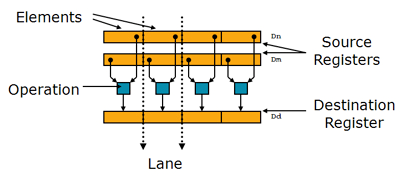
NEON instructions can execute parallel data processing:
- Registers are viewed as vectors of elements of the same data type
- Data types can be: 8/16/32/64 bit integers, single precision (Arm 32-bit platform), single precision floating point/double precision floating point (Arm 64-bit platform)
- Instructions perform the same operation across all channels
 2.2 Development History of Arm Advanced SIMD
 2.3 Why Use NEONNEON provides:
- Support for both integer and floating-point operations to ensure suitability for a wide range of applications from codecs, high-performance computing to 3D graphics.
- Tightly integrated with Arm processors, providing a unified view of instruction flow and memory, making programming simpler than external hardware accelerators.
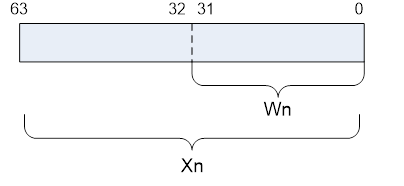
3 Introduction to Arm v8 ArchitectureArm v8-A is a very important architectural change that supports a 64-bit execution mode “AArch64” and introduces a brand new 64-bit instruction set “A64”. At the same time, to maintain compatibility with the Arm v7-A (32-bit architecture) instruction set, the concept of “AArch32” is also introduced. Most Arm v7-A code can run in Arm v8-A AArch32 execution mode.This section will introduce some characteristics related to NEON in the Arm v8-A architecture. Additionally, this section will briefly introduce the general-purpose CPU registers and CPU instructions commonly used in NEON programming, but the focus remains on NEON technology.3.1 RegistersArm v8-A AArch64 has 31 general-purpose registers of 64 bits each, with each general register having 64 bits (X0-X30) or 32 bits mode (W0-W30). The register view is as follows: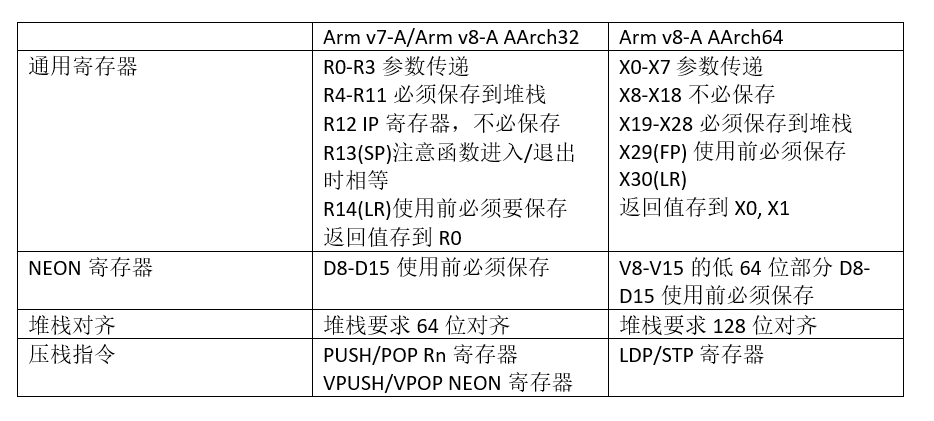 Arm v8-A AArch64 has 32 128-bit registers, which can also be used as 32-bit Sn registers or 64-bit Dn registers. The register view is as follows:
 3.2 Instruction SetThe Arm v8-A AArch32 instruction set consists of the A32 (Arm instruction, 32-bit fixed-length instruction set) and T32 (Thumb instruction set, 16-bit fixed-length instruction set; Thumb2 instruction set, 16/32-bit length instruction set). It is a superset of the Arm v7 Cortex-A instruction set, so Arm v8-A AArch32 is backward compatible with Arm v7-A to run earlier software. Meanwhile, to maintain consistency with the A64 instruction set, the AArch32 instruction set has added NEON division and encryption instruction extensions.Compared to the AArch32 instruction set, the AArch64 instruction set A64 (32-bit fixed length) has undergone significant changes, such as having completely different instruction formats. However, functionally, the AArch64 instruction set basically implements all the functions of the AArch32 instruction set, with additional support for NEON double-precision floating point.3.3 NEON Instruction FormatNow that most are on the Arm v8 platform, this section will only introduce the AArch64 NEON instruction format. The general description is as follows:{<prefix>}<op>{<suffix>} Vd.<T>, Vn.<T>, Vm.<T>Here:<prefix>——Prefix, such as S/U/F/P representing signed integer/unsigned integer/floating-point/boolean data types<op>——Operator. For example, ADD, AND, etc.<suffix>——Suffix, usually has the following types
- P: Pairwise operation on vectors, e.g., ADDP
- V: Operation across all data channels, e.g., FMAXV
- 2: Operate on the high part of the data in wide/narrow instructions. For example, ADDHN2, SADDL2.
ADDHN2: Adds two 128-bit vectors, obtaining a 64-bit vector result, and stores the result in the high 64-bit part of the NEON register.SADDL2: Adds the high 64-bit parts of two NEON registers, obtaining a 128-bit result.<T> ——Data types, usually 8B/16B/4H/8H/2S/4S/2D, etc. B represents 8-bit data type; H represents 16-bit data width; S represents 32-bit data width, which can be 32-bit integer or single precision floating point; D represents 64-bit data width, which can be 64-bit integer or double precision floating point.Below are specific examples of NEON instructions:UADDLP V0.8H, V0.16BFADD V0.4S, V0.4S, V0.4SFor more content, please refer toArmasm_user_guide.pdf(http://infocenter.arm.com/help/topic/com.Arm.doc.dui0801g/DUI0801G_Armasm_user_guide.pdf)
-
Chapters 13-15 introduce A32 and T32 instructions.
-
Chapters 16-20 introduce A64 instructions, with Chapter 20 specifically covering NEON instructions.
4 Basics of NEON Programming
- The previous chapters have introduced the concept of NEON, hardware resources, and instruction sets. Now we can start using NEON to accelerate our applications. Using NEON technology typically has the following four methods:
- Calling NEON optimized library functions
- Using compiler auto-vectorization options
- Using NEON intrinsics instructions
- Writing NEON assembly manually
4.1 Calling Library FunctionsUsers only need to directly call NEON optimized library functions in the program, which is simple and easy to use.Currently, you have the following libraries to choose from:
- Arm Compute Library
A series of low-level function libraries optimized for Arm CPU and GPU, used for image processing, machine learning, and computer vision. More information: https://developer.Arm.com/technologies/compute-library
- Ne10 Open Source Library
Developed under the leadership of Arm, currently provides relatively general mathematical functions, some image processing functions, and FFT functions.http://projectne10.github.io/Ne10/4.2 Auto-VectorizationIn the GCC compiler options, there is an auto-vectorization compilation option that can help existing code compile to generate NEON code.GNU GCC provides a series of options, some of which can improve performance, while others can reduce the size of the generated executable file.For each line of code, there are many assembly instructions to choose from.The compiler must make trade-offs among many options such as registers, stack space, code size, compilation time, ease of debugging, instruction execution time, etc., to generate the optimal image file.4.3 NEON IntrinsicsNEON intrinsics can be viewed as a layer of interface encapsulated above the NEON instructions.When users call the NEON intrinsics interface in C programs, the compiler automatically generates the corresponding NEON instructions.NEON intrinsics can run across Arm v7-A/v8-A.As long as you program once, you can use the compiler to generate the corresponding NEON code.If users use Arm v8-A AArch64 specific NEON instructions in the code, just separate this part of the code using the macro definition (__aarch64__) as shown in the example.Below is an example of NEON intrinsics.
// Below is the addition of floating-point arrays, assuming count is a multiple of 4

#include<arm_neon.h>

void add_float_c(float* dst, float* src1, float* src2, int count)
 {
    int i;
    for (i = 0; i < count; i++)
        dst[i] = src1[i] + src2[i];
 }

 void add_float_neon1(float* dst, float* src1, float* src2, int count)
 {
    int i;
    for (i = 0; i < count; i += 4)
    {
        float32x4_t in1, in2, out;
        in1 = vld1q_f32(src1);
        src1 += 4;
        in2 = vld1q_f32(src2);
        src2 += 4;
        out = vaddq_f32(in1, in2);
        vst1q_f32(dst, out);
        dst += 4;
// The following code is just an example of how to use AArch64 specific code and does not have practical significance.
#if defined (__aarch64__)
        float32_t tmp = vaddvq_f32(in1);
#endif

    }
}
By examining the disassembly, under Arm v7-A, you can see the vld1/vadd/vst1 NEON instructions. Under Arm v8-A, you can see the ldr/fadd/str NEON instructions.4.4 NEON AssemblyNEON handwritten assembly mainly has two ways:
- Independent assembly files
- Inline assembly
4.4.1 Independent Assembly FilesIndependent assembly files can use “.S” as the file suffix or “.s” as the file suffix. The difference is that .S files will be processed by the C/C++ preprocessor, allowing us to utilize features like macro definitions in C language. When writing NEON assembly files, we need to pay attention to register preservation. For Arm v7/v8, we need to save the following registers:Below is an example of Arm v7-A/v8-A NEON assembly.
// Define in the header file
void add_float_neon2(float* dst, float* src1, float* src2, int count);
Below is the handwritten assembly code, saved in a .S file
// Arm v7-A/Arm v8-A AArch32 version
    .text
    .syntax unified

    .align 4
    .global add_float_neon2
    .type add_float_neon2, %function
    .thumb
    .thumb_func

add_float_neon2:
.L_loop:
    vld1.32  {q0}, [r1]!
    vld1.32  {q1}, [r2]!
    vadd.f32 q0, q0, q1
    subs r3, r3, #4
    vst1.32  {q0}, [r0]!
    bgt .L_loop

    bx lr
// Arm v8-A AArch64 version
    .text

    .align 4
    .global add_float_neon2
    .type add_float_neon2, %function

add_float_neon2:

.L_loop:
    ld1     {v0.4s}, [x1], #16
    ld1     {v1.4s}, [x2], #16
    fadd    v0.4s, v0.4s, v1.4s
    subs x3, x3, #4
    st1  {v0.4s}, [x0], #16
    bgt .L_loop

    ret
For more code, please refer to:https://github.com/projectNe10/Ne10/tree/master/modules/dsp4.4.2 Inline AssemblyAs the name suggests, inline assembly is a method that tightly integrates with C code. We can directly embed assembly code in C/C++ code, allowing us to add it wherever NEON is needed.Advantages:
- Simple procedure call rules, no need to manually save registers.
- Can use C/C++ variables and functions, making it very easy to integrate into C/C++ code.
Disadvantages:
- Inline assembly has a set of complex syntax rules.
- NEON code embedded in C/C++ code is not easy to port to other platforms.
Example:
// Arm v7-A/Arm v8-A AArch32
void add_float_neon3(float* dst, float* src1, float* src2, int count)
{
    asm volatile (
               "1:                                   \n"
               "vld1.32  {q0}, [%[src1]]!            \n"
               "vld1.32  {q1}, [%[src2]]!            \n"
               "vadd.f32 q0, q0, q1                  \n"
               "subs     %[count],  %[count], #4     \n"
               "vst1.32  {q0}, [%[dst]]!             \n"
               "bgt      1b                          \n"
               : [dst] "+r" (dst)
               : [src1] "r" (src1), [src2] "r" (src2), [count] "r" (count)
               : "memory", "q0", "q1"
          );
}
// Arm v8-A AArch64
void add_float_neon3(float* dst, float* src1, float* src2, int count)
{
    asm volatile (
               "1:                                    \n"
               "ld1    {v0.4s}, [%[src1]], #16        \n"
               "ld1    {v1.4s}, [%[src2]], #16        \n"
               "fadd   v0.4s, v0.4s, v1.4s            \n"
               "subs   %[count],  %[count], #4        \n"
               "st1    {v0.4s}, [%[dst]], #16         \n"
               "bgt    1b                             \n"
               : [dst] "+r" (dst)
               : [src1] "r" (src1), [src2] "r" (src2), [count] "r" (count)
               : "memory", "v0", "v1"
          );
}
For more examples, please refer to libyuv4.5 NEON Intrinsics and NEON AssemblyNEON intrinsics and NEON handwritten assembly are the most commonly used NEON optimization methods.Below is a simple comparison of the advantages and disadvantages of these two methods.
| NEON Assembly | NEON Intrinsic | |
|---|---|---|
| Performance | For specific platforms, assembly always delivers the best performance. | Today’s compilers can achieve performance comparable to manual assembly. |
| Portability | Arm v7-A/v8-A platforms have different assembly formats. Even on the Arm v8-A platform, assembly programs may need to be adjusted differently for the Cortex A53/A57 microarchitecture to achieve the best performance. | By selecting the appropriate compiler options, programming once can easily achieve cross-platform compatibility and performance tuning for the platform microarchitecture, such as Arm v7-A Cortex A9/A7/A15 and Arm v8-A Cortex A53/A57. |
| Maintainability | More difficult to program compared to C language, with poorer readability | Similar to C language, relatively easy to program and maintain |
This is just a simple comparison of advantages and disadvantages; when the application of NEON is more complex, there will be more special cases. In another article, “Arm NEON Optimization”, I will analyze this issue further.With the above foundation, choose a NEON implementation method, and now you can begin your NEON programming journey! This article has an English version that contains more comparisons between Arm v7/v8.https://community.arm.com/developer/tools-software/oss-platforms/b/android-blog/posts/arm-neon-programming-quick-reference
Copyright belongs to the original author. If there is any infringement, please contact for removal.
END


关于安芯教育


安芯教育是聚焦AIoT(人工智能+物联网)的创新教育平台,提供从中小学到高等院校的贯通式AIoT教育解决方案。
安芯教育依托Arm技术,开发了ASC(Arm智能互联)课程及人才培养体系。已广泛应用于高等院校产学研合作及中小学STEM教育,致力于为学校和企业培养适应时代需求的智能互联领域人才。