Function Annotations are a syntax feature introduced in Python 3. They allow for the addition of type hints or descriptive information in function parameters and return values, enhancing the readability, maintainability, and development efficiency of the code.
Python is a dynamically typed language, and function annotations do not change runtime behavior; they only provide metadata for use by IDEs, static checkers, documentation tools, or runtime reflection.
1. Basic Syntax
The syntax for annotating function parameters and return values is as follows:
def function_name(parameter_name: annotation) -> return_value_annotation: function_bodyExample:
def greet(name: str, age: int = 18) -> str: return f"{name} is {age} years old."Explanation:
name: str indicates that the parameter name should be a string.
age: int = 18 indicates that the parameter age should be an integer, with a default value of 18.
-> str indicates that the function’s return value should be a string.
Annotations are not limited to types; they can also be any expression or object:
def add(a: 'numeric type', b: int = 0) -> 'returns an integer': return a + bNote:
Strings and objects in annotations are merely metadata tags and are not subject to type checking by the interpreter.
Annotation information is stored in the function’s __annotations__ attribute:
print(greet.__annotations__)# {'name': <class 'str'>, 'return': <class 'str'>}2. Common Type Hints (typing module)
To provide more precise hints for complex types, it is recommended to use the typing module.
1. Basic Types
Used to annotate parameters or return values as common built-in data types. For example, str indicates a string, and int indicates an integer.
def repeat(s: str, times: int = 2) -> str: return s * times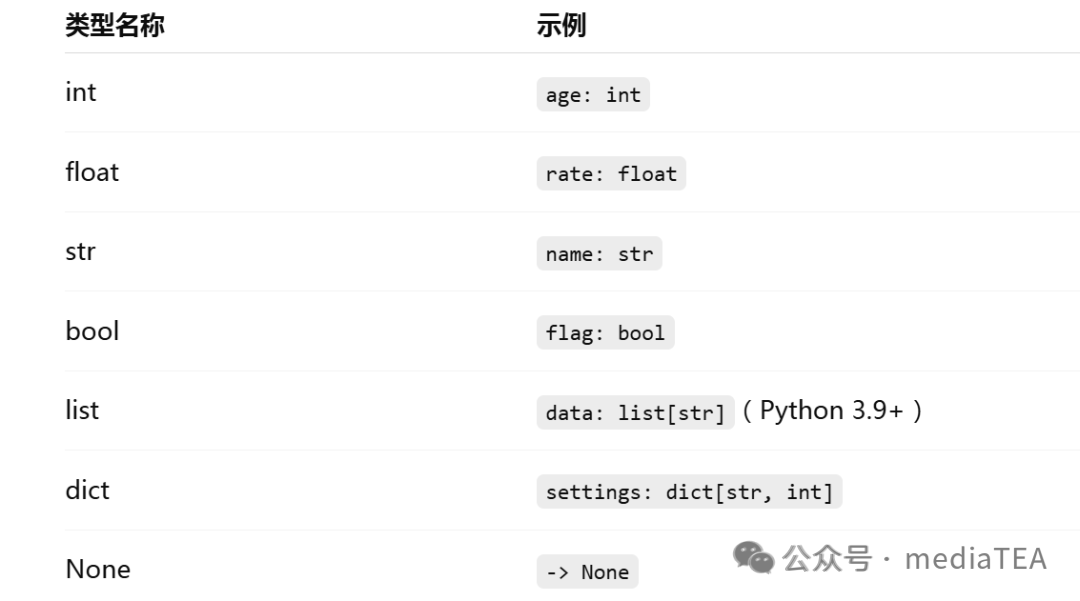
2. Container Types
Used to annotate the types of containers and their internal elements:
from typing import List, Dict, Tuple, Set
def total(scores: List[int]) -> int:     # List, elements are int    return sum(scores)
def phone_book() -> Dict[str, str]:      # Dictionary, keys and values are both str    return {"Alice": "1234", "Bob": "5678"}
def split_pair() -> Tuple[int, int]:     # Fixed-length tuple    return (1, 2)
Note:
Python 3.9+ supports native type hints (no need to import from typing):
def func(data: list[int]) -> dict[str, int]: return {str(i): i for i in data}3. Optional Types
Used to indicate that a value may be of a certain type or None.
from typing import Optional
def find(key: str) -> Optional[int]:    return None
Python 3.10 allows using | to indicate either/or.
def find(key: str) -> int | None: return None4. Union Types
Used to indicate that a value may belong to one of several types.
from typing import Union
def stringify(data: Union[str, int, float]) -> str:    return str(data)
Python 3.10 allows using | to indicate multiple options:
def stringify(data: str | int | float) -> str: return str(data)Note:
Optional[T] is shorthand for Union[T, None].
5. Any Type
Indicates that it can be of any type, suitable for scenarios requiring maximum flexibility.
from typing import Any
def log_all(*args: Any, **kwargs: Any) -> None:    print(args, kwargs)
6. Callable Types
Used to indicate that parameters or return values are functions, methods, lambdas, or other callable objects.
from typing import Callable
def apply(f: Callable[[int, int], int], x: int, y: int) -> int:    return f(x, y)
print(apply(lambda a, b: a + b, 3, 4))
The format for Callable is: Callable[[parameter_type…], return_type]
7. Literal Types
Used to restrict values to be one of a fixed literal, commonly used in configuration values and enumeration scenarios.
from typing import Literal
def get_status(code: int) -> Literal["ok", "error"]:    return "ok" if code == 0 else "error"
8. TypeVar (Generic Types)
Used to write generic functions or classes, keeping parameter and return value types consistent.
from typing import TypeVar
T = TypeVar("T")
def identity(x: T) -> T:    return x
Generics make functions/classes more versatile, applicable to multiple types.
9. Other Common Hints
Self
(Python 3.11+) Used in class methods to indicate returning the current class instance, making it clearer:
from typing import Self
class Person:    def set_name(self, name: str) -> Self:        self.name = name        return self
Annotated
(Python 3.9+) Adds extra metadata to type hints (e.g., validation rules, documentation notes):
from typing import Annotated
def scale(x: Annotated[float, "must be positive"]) -> float:    return x * 2
Self makes return values of class methods clearer, while Annotated adds semantic meaning to type hints.
3. Application Scenarios
1. Static Type Checking
Use tools like mypy for static analysis of code to catch type errors early.
Installation and usage:
pip install mypy
mypy your_script.py
Example:
def add(a: int, b: int) -> int:    return a + b
add("1", "2")  # ⚠ mypy reports an error, but Python still runs
2. IDE Autocompletion and Hints
Editors like PyCharm and VSCode provide smart suggestions based on annotations.
3. Code Documentation Generation
Tools like Sphinx and pdoc utilize annotations to generate clearer API documentation.
4. Runtime Validation (with third-party libraries)
Libraries like pydantic and typeguard implement runtime type checking.
from pydantic import BaseModel
class User(BaseModel):    name: str    age: int
u = User(name="Alice", age="18")  # Automatically converts to int
print(u)
📘 Summary
Function annotations in Python are not a tool for “enforced typing” but a mechanism to enhance code semantics. In large projects, using function annotations appropriately along with toolchains can effectively improve code quality, readability, and development efficiency.
 “Likes are a form of appreciation, and recognition is encouragement.”