
⬆ Follow “Python-Wu Liu Qi” to learn easily together~

After reading this article, your code debugging skills will improve
🌈Hey, friends!
Today, let’s talk about those annoying error messages in Python programming. Writing code and encountering errors is a common occurrence. When faced with a pile of English error messages, how can you quickly identify the errors and correct the code? This can be quite a headache for some friends.
🎯 Don’t worry, errors are not your enemy, but rather the best teacher!
Today, I will share some tips on how to read error messages and the common types of errors, making it easy for beginners to understand. This will help you categorize and identify errors effectively.
☘️ What to do when encountering programming errors?
1. Stay calm and interpret the error message
✅ When your code throws an error, don’t panic. Staying calm and carefully reading the error message is the first step to solving the problem. Let’s look at an example:
# Error example program
def get_name(input_name):
    print("Hello, " + input_nama)

get_name("Python-Wu Liu Qi")
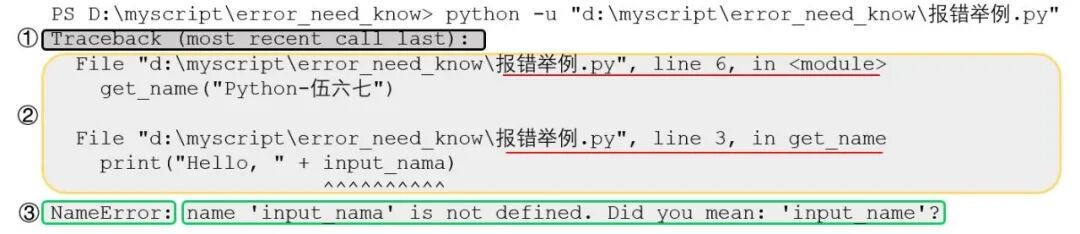
Running this code will result in an error, and the error message consists of three parts:
-
① The black box indicates the start of the error: This message appears every time an error occurs and can be ignored (Official documentation explanation: This information indicates that the following will show the code execution sequence that caused the error, starting from the most recent or last executed part).
-
② The yellow box indicates the error location: The error occurred in the file named error_example.py, with errors at line 3 and line 6. To check the error, look from the bottom up; the bottommost is the true cause of the error.
-
③ The green box indicates the error type: NameError, indicating that the identifier input_nama is not defined in the context and cannot be found, with a correction suggestion: did you mean input_name?
✅ Upon careful inspection, you will find that the variable input_name in line 3 has ‘a’ written as ‘e’, making the problem very easy to fix. Isn’t that quite simple?
2. Check error types from bottom to top
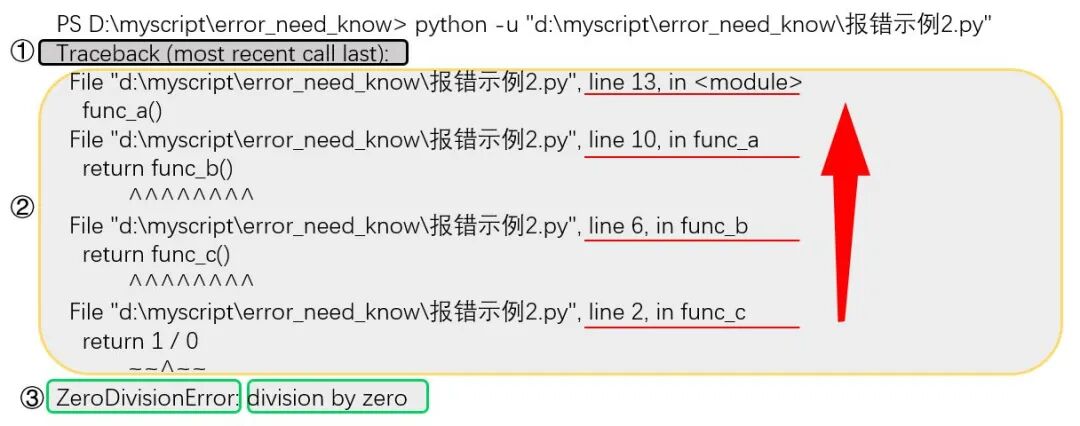
💡 Checking errors from bottom to top is important because: Python’s error traceback is displayed in the order of the call stack, starting from the bottommost function call and gradually moving up.
This design helps developers understand the program’s execution flow and the source of errors more intuitively. Below is an example code:
# Error example program
def func_c():
    return 1 / 0

def func_b():
    return func_c()


def func_a():
    return func_b()

func_a()
The order of the call stack is as follows👇:
func_a() is called
func_a() calls func_b()
func_b() calls func_c()
func_c() throws an error
👇 Here are some common error types:
1. Syntax Error
Error code example (SyntaxError)
print("Hello world! # Missing right parenthesis
Debugging tip: This is like writing an essay and stopping abruptly; Python cannot understand what you are writing. The error message will point directly to the error location, such as “SyntaxError: EOL while scanning string literal”. You need to carefully check if parentheses and quotes are paired correctly and if the code indentation is proper; don’t mix them up.
2. Indentation Error (IndentationError)
Error code example
if True:
print("Hello") # Inconsistent indentation
Debugging tip: Python is very particular about indentation; it uses indentation to distinguish code blocks. If the indentation is messy, such as mixing spaces and tabs, Python will get confused, and the error message “IndentationError: expected an indented block” will appear. You need to use either spaces or tabs consistently for indentation; don’t mix them.
3. Name Error (NameError)
Error code example
print(undefined_var) # Referencing an undefined variable
Debugging tip: This is like calling out the name of a non-existent person; Python cannot find the corresponding variable or function, resulting in “NameError: name ‘undefined_var’ is not defined”. You need to carefully check if the variable name or function name is misspelled or if it has not been defined yet.
4. Type Error (TypeError)
Error code example
"5" + 10 # Adding a string and a number
Debugging tip: Different data types are like different flavors of ice cream; they cannot be forced together. The error “TypeError: can only concatenate str (not “int”) to str” reminds you that the types of the operator or function parameters must match. You can use the type() function to check the types and see if there is any confusion.
5. Value Error (ValueError)
Error code example
int("abc") # Cannot convert a non-numeric string to an integer
Debugging tip: This is like asking a machine to turn an apple into an orange; it cannot do it. The error “ValueError: invalid literal for int() with base 10: ‘abc'” means that the value you passed to the function does not meet the requirements. You need to check if the parameters you passed are in the expected format and range.
6. Index Error (IndexError)
Error code example
list_a = [1, 2, 3]
print(list_a[3]) # Accessing an out-of-range index
Debugging tip: Imagine you have a row of seats, but someone insists on sitting in a non-existent seat; Python will throw “IndexError: list index out of range”. You need to confirm that the indices of lists and strings are within the valid range; you can use the len() function to check the length and avoid going out of bounds.
7. Key Error (KeyError)
Error code example
dict_b = {"a": 1, "b": 2}
print(dict_b["c"]) # Accessing a non-existent dictionary key
Debugging tip: A dictionary is like a treasure chest filled with treasures, each with its own name (key). If you look for a non-existent treasure, Python will throw “KeyError: ‘c'”. You can first use the in keyword to check if the key exists before retrieving its value.
8. Attribute Error (AttributeError)
Error code example
num = 5
num.append(10) # The integer type does not have an append method
Debugging tip: This is like asking a cat to fly; it has no wings. The error “AttributeError: ‘int’ object has no attribute ‘append'” means that the object does not have the attribute you want. You can use the dir() function to see what methods are available for the object; don’t use them randomly.
9. File Not Found Error (FileNotFoundError)
Error code example
with open("missing_file.txt", "r") as f: # Opening a non-existent file
pass
Debugging tip: If you look for a non-existent file, Python will throw “FileNotFoundError: [Errno 2] No such file or directory: ‘missing_file.txt'”. You need to check if the file path is correct and if the file actually exists; don’t look for it blindly.
10. Module Not Found Error (ModuleNotFoundError)
Error code example
# Attempting to import a non-existent module
import missing_module
Debugging tip: This is like going to the supermarket looking for a non-existent product; Python cannot find the module you want, resulting in “ModuleNotFoundError: No module named ‘missing_module'”. You need to check if the module name is spelled correctly, if it is not installed, or if the import path is correct. If the module does exist but is not installed, you can use pip to install it.
Using debugging techniques to reduce errors
-
Use try-except to catch exceptions: This is like putting a protective suit on your code, allowing you to quickly discover and print errors when they occur, e.g., except Exception as e: print(e)
-
Use print() to output variable values: Print variable values at critical points, like leaving markers in a maze, helping you quickly locate where the error occurred.
-
Use Python debugger (like pdb): Execute code line by line, like using a magnifying glass to inspect closely, allowing you to clearly see variable states and uncover hidden errors.
Conclusion:
🚀 I hope that through my sharing, error messages can become stepping stones on your path to improvement.📣 Finally, if you find this article useful, don’t forget to like, share, and let more friends improve together. Follow me for more practical Python and AI knowledge, and let’s speed through this technical world together. See you next time!
👇Click to read previous articles
1.Python captures camera images for AI recognition (Part 4): Implementation of automatic fire warning2.Python captures camera images for AI recognition (Part 1)3.Guide to automatically sending text, files, audio, and video via WeChat Work using Python4.Detailed explanation of APScheduler: Efficient implementation of scheduled tasks in Python5.Pandas learning journey (Part 1): Comprehensive guide to adding, deleting, modifying, and querying Excel6.“pip secrets: 10 efficient tips for Python package management”7.Scheduled tasks to capture Excel data and automatically push to WeChat Work: A new experience in automated office work8.“Essential for beginners! One-click installation of VS Code, efficiently running Python”9.What exactly is if __name__ == “__main__”?10.Python word cloud: The magical forest of words11.Super fun Python comic book12. “PyInstaller: Easily package your Python program into an executable file”13.“Must-read for Python beginners! Two steps to complete Python installation and easily start your programming journey”