
Table of Contents
-
1. dump_stack Function
-
2. WARN_ON(condition) Function
-
3. BUG_ON(condition) Function
-
4. panic(fmt…) Function
Also consider joining the Rockchip course:
The RK3568 course is here.
Accumulation, sharing, and growth, allowing both yourself and others to gain something! 😄
📢 This article will summarize debugging methods for drivers.
1. dump_stack Function
<span>dump_stack</span> Purpose: Prints the kernel call stack and the relationship of function calls. Here, we will demonstrate the <span>dump_stack</span> function using the simplest <span>helloworld</span> driver as an example, with the experimental code shown below:
#include<linux/module.h>
#include<linux/kernel.h>
static int __init helloworld_init(void)
{
    printk(KERN_EMERG "helloworld_init\r\n");
    dump_stack();
    return 0;
}
static void __exit helloworld_exit(void)
{
    printk(KERN_EMERG "helloworld_exit\r\n");
}
module_init(helloworld_init);
module_exit(helloworld_exit);
MODULE_LICENSE("GPL v2");
Compared to the original <span>helloworld</span> driver, we added <span>dump_stack()</span> on line <span>6</span>. After loading the driver, the printed information is as follows:
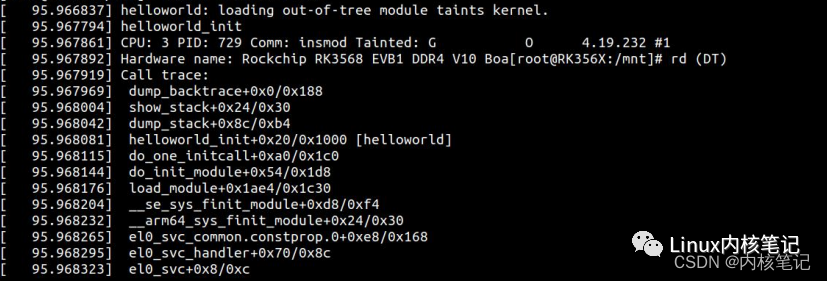
We can see that the call relationship of the <span>helloworld_init</span> function has been printed out.
2. WARN_ON(condition) Function
<span>WARN_ON(condition)</span> Function Purpose: When the condition in parentheses is true, the kernel will throw a stack trace and print the function call relationship. It is usually used to issue a warning in the kernel, indicating that something unreasonable has occurred.
<span>WARN_ON</span> actually also calls <span>dump_stack</span>, but with an additional parameter <span>condition</span> to check if the condition is true. For example, <span>WARN_ON(1)</span> will succeed in the condition check, and the function will execute successfully.
Again, we will demonstrate the <span>WARN_ON</span> function using the simplest <span>helloworld</span> driver as an example, with the experimental code shown below:
#include<linux/module.h>
#include<linux/kernel.h>
static int __init helloworld_init(void)
{
    printk(KERN_EMERG "helloworld_init\r\n");
    WARN_ON(1);
    return 0;
}
static void __exit helloworld_exit(void)
{
    printk(KERN_EMERG "helloworld_exit\r\n");
}
module_init(helloworld_init);
module_exit(helloworld_exit);
MODULE_LICENSE("GPL v2");
Compared to the original <span>helloworld</span> driver, we added <span>WARN_ON(1)</span> on line <span>6</span>. After loading the driver, the printed information is as follows:
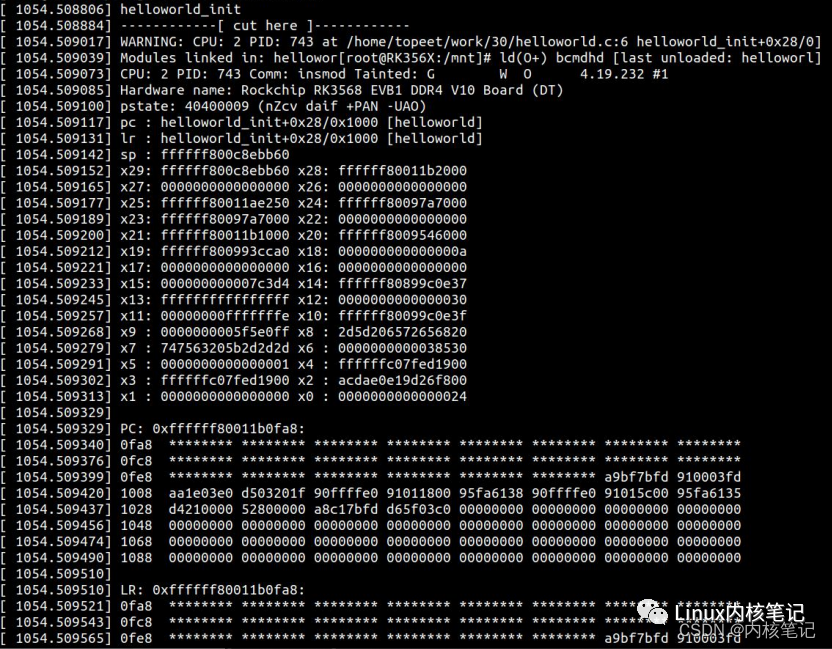 We can see that the call relationship of the
 <span>helloworld_init</span> function and the register values have all been printed out. Thus, the test for the <span>WARN_ON</span> function is complete.
3. BUG_ON(condition) Function
There are many places in the kernel that call statements similar to <span>BUG_ON()</span>, which is very much like an assertion at runtime in the kernel, meaning that the <span>BUG_ON()</span> statement should not have been executed. Once <span>BUG_ON()</span> is executed, the kernel will immediately throw an <span>oops</span>, causing a stack trace and printing error information. Most architectures define <span>BUG()</span> and <span>BUG_ON()</span> as some kind of illegal operation, which naturally leads to the required <span>oops</span>. The parameter <span>condition</span> checks if the condition is true. For example, <span>BUG_ON(1)</span> will succeed in the condition check, and the function will execute successfully.
Again, we will demonstrate the <span>BUG_ON</span> function using the simplest <span>helloworld</span> driver as an example:
#include<linux/module.h>
#include<linux/kernel.h>
static int __init helloworld_init(void)
{
    printk(KERN_EMERG "helloworld_init\r\n");
    BUG_ON(1);
    return 0;
}
static void __exit helloworld_exit(void)
{
    printk(KERN_EMERG "helloworld_exit\r\n");
}
module_init(helloworld_init);
module_exit(helloworld_exit);
MODULE_LICENSE("GPL v2");
Compared to the original <span>helloworld</span> driver, we added <span>BUG_ON(1)</span> on line <span>6</span>. After loading the driver, the printed information is as follows:
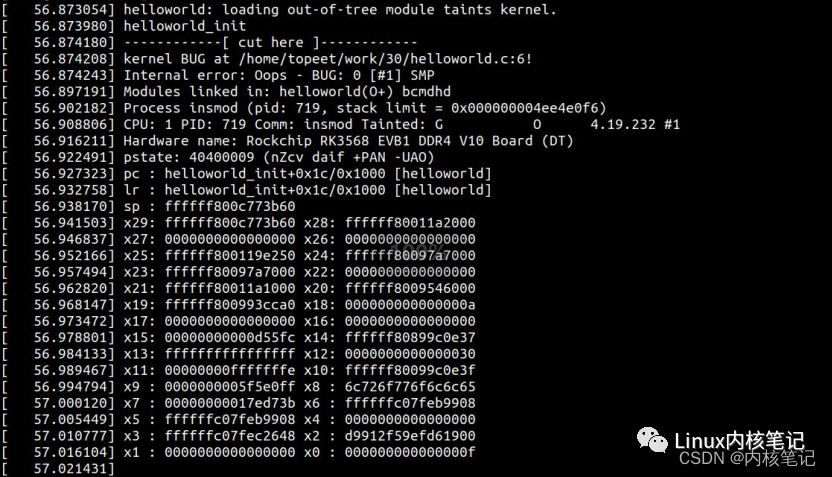
We can see that the call relationship of the <span>helloworld_init</span> function and the register values have all been printed out.
4. panic(fmt…) Function
<span>panic(fmt...)</span> Function: The output will cause the system to crash and print the function call relationship and register values.
Again, we will demonstrate the <span>panic</span> function using the simplest <span>helloworld</span> driver as an example:
#include<linux/module.h>
#include<linux/kernel.h>
static int __init helloworld_init(void)
{
    printk(KERN_EMERG "helloworld_init\r\n");
    panic("!!!!!!!!!!!!!!!!!!!!!!!!!!!!");
    return 0;
}
static void __exit helloworld_exit(void)
{
    printk(KERN_EMERG "helloworld_exit\r\n");
}
module_init(helloworld_init);
module_exit(helloworld_exit);
MODULE_LICENSE("GPL v2");
Compared to the original <span>helloworld</span> driver, we added <span>panic("!!!!!!!!!!!!!!!!!!!!!!!!!!!!")</span> on line <span>6</span>. After loading the driver, the printed information is as follows:
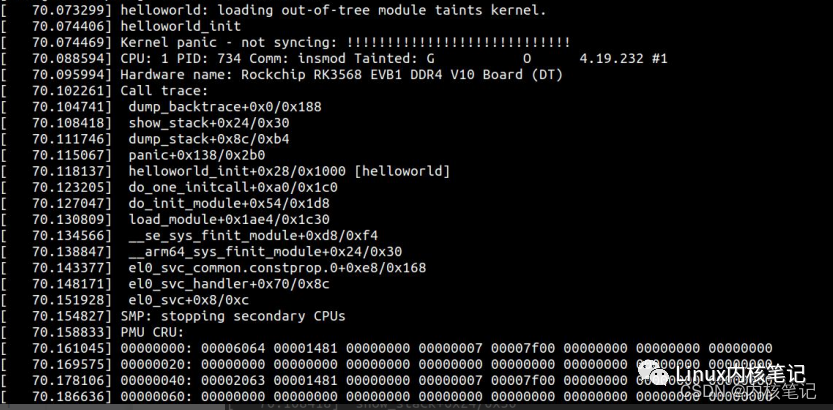
We can see that the call relationship of the <span>helloworld_init</span> function and the register values have all been printed out. After the information is printed, we will find that the system has crashed, and the terminal can no longer accept input.