1 Project Overview
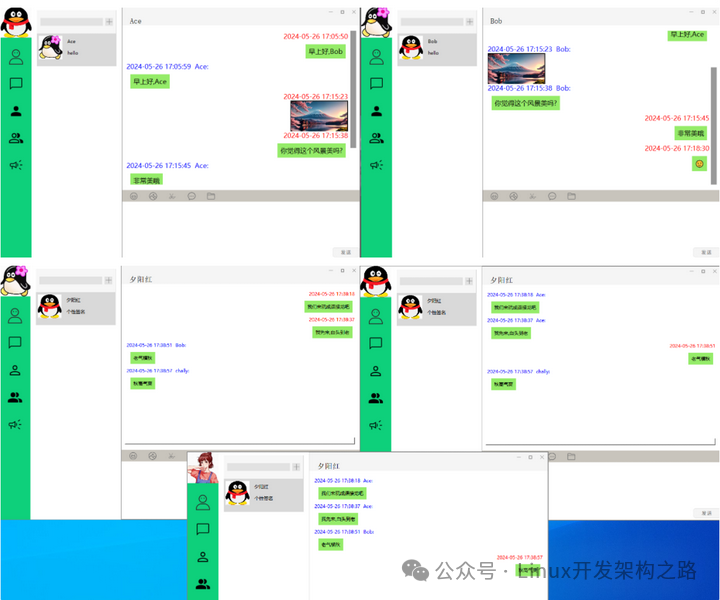
The client is developed using QT6, and the backend is implemented in Linux C++. It provides users with an instant messaging platform.
Project Address: https://gitee.com/voice-of-sentiment/chat-forge.git
Video explanation and source code access:
https://www.bilibili.com/video/BV16UYMztEoz/
2 Compiling and Running the Linux C++ Backend
Open-source project address
git clone https://gitee.com/voice-of-sentiment/chat-forge.gitcd chat-forge/server/thirdpartygit clone https://gitee.com/NEU-lab/SQLiteCpp.git# If using the source code provided by Lao Liao, just unzip the source package# Return to chat-forge/server directorycd ..cd buildrm -rf *# Re-run cmake to compile in debug modecmake -DCMAKE_BUILD_TYPE=Debug ..make -j4
After successful compilation, the server executable file will be generated.
Run:
./server
The default listening port is: 8888
3 Compiling and Running the QT Client
Compilation environment: QT6.5 MinGW 64-bit
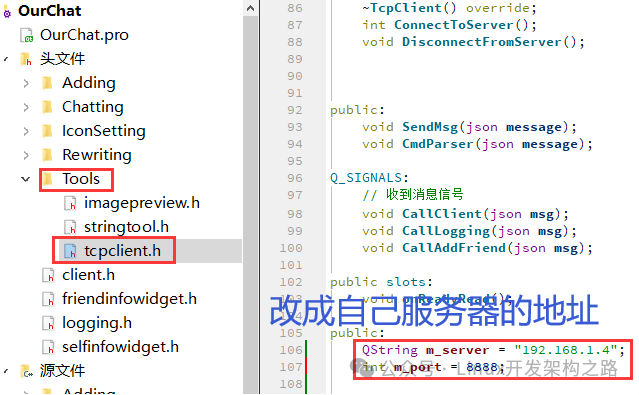
Before running the code, modify the server’s IP address and port.
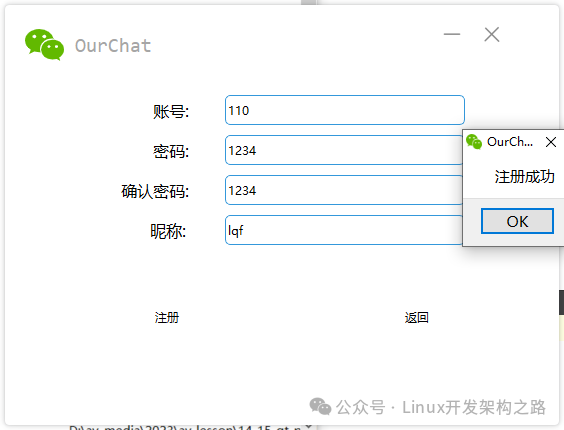
Account registration must use numbers:
Then open another client
The usage is very simple: in the command line provided by Qt, run windeployqt to copy the required Qt plugins/DLLs to the same directory.
Steps
-
Open the “Qt 6.5.0 for Desktop (MinGW 64-bit)” command prompt (ensure windeployqt is in PATH).
-
Navigate to your exe directory:
# First switch the driveF:# Navigate to the specific pathcd F:\0voice\vip\tc\202412\build-OurChat-Desktop_Qt_6_5_0_MinGW_64_bit-Debug\debug
-
Execute deployment (Debug build):
windeployqt --verbose 2 --no-translations OurChat.exe
-
If it is a Release build, enter the release directory and execute:
windeployqt --release --verbose 2 --no-translations OurChat.exe
-
After execution, the exe directory should contain platforms\qwindows.dll、styles\…、imageformats\… and multiple Qt6*.dll files.
-
Double-click OurChat.exe to start; if prompted for missing DLLs, it is likely that the MinGW runtime library has not been copied or Debug/Release libraries have been mixed.
4 Detailed Architecture of the Linux Backend
4.1 Overall Architecture of the Server
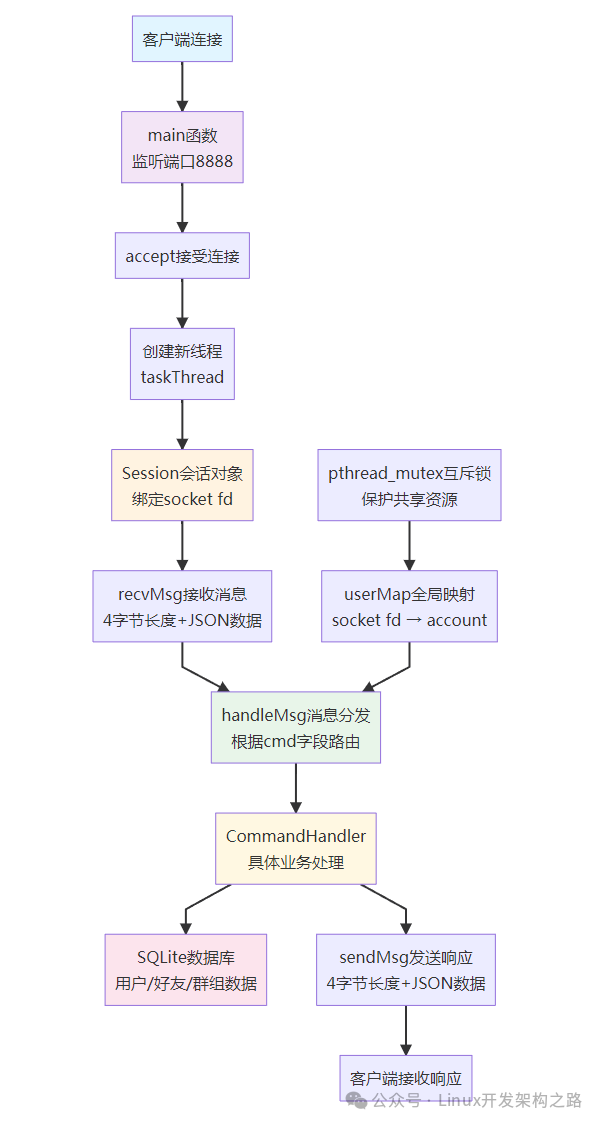
The server adopts amultithreading + session management + command dispatch architecture model, allocating an independent processing thread for each client connection.
Core Component Description
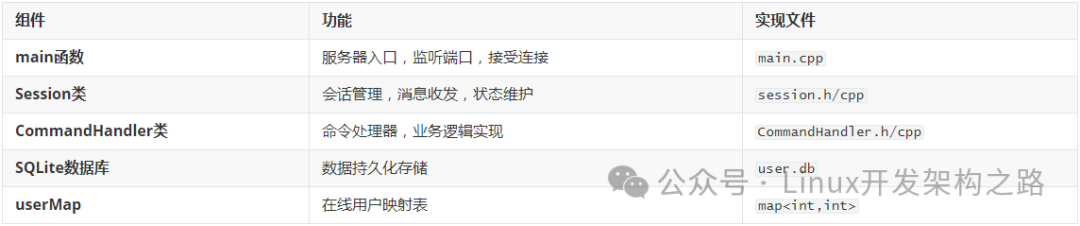
Thread Model
The server uses aone connection one thread model:
-
The main thread is responsible for listening and accepting connections
-
An independent worker thread is allocated for each client connection
-
Threads protect shared resources through mutexes
Architecture Flowchart
4.2 Network Communication Protocol
Message Format Design
Useslength prefix + JSON message body binary protocol:
[0-3 bytes] [4 bytes start] message length JSON message body (4 bytes) (variable length)
Protocol Implementation Details
Message Sending Process:
-
Serialize the JSON object to a string
-
Calculate the message length (in bytes)
-
Construct 4-byte length header + JSON message body
-
Send the complete data packet through the socket
Message Receiving Process:
-
First read 4 bytes to get the message length
-
Read the complete JSON data according to the length
-
Parse the JSON and dispatch to the corresponding handler function
// Example send codevoid Session::sendMsg(json &j) {    std::string msg = j.dump();    int len = msg.length();    char buffer[4];    memcpy(buffer, &len, sizeof(len));
    char *message = new char[4 + len];    memcpy(message, buffer, 4);           // Length header    memcpy(message + 4, msg.c_str(), len); // JSON body
    send(m_socket, message, len + 4, 0);}
4.3 Database Design
Detailed Description of Data Tables

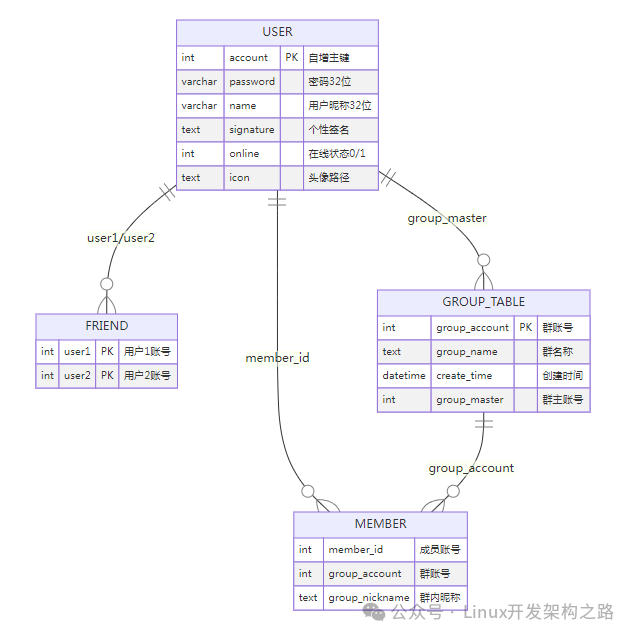
Database ER Relationship Diagram
Key Design Features
-
User account auto-increment: The account field auto-increments to ensure uniqueness
-
Bidirectional friend relationship: The friend table stores friend relationships through a composite primary key (user1, user2)
-
Group hierarchy management: The group owner is associated with the user table through the group_master field
-
Group nickname support: Members can have different nicknames in different groups
4.4 Command System Details
Command Enumeration Definition
enum commands { cmd_regist = 0, // User registration cmd_login, // User login cmd_logout, // User logout cmd_friend_search, // Search for friends cmd_add_friend_request, // Add friend request cmd_add_friend_response, // Add friend response cmd_friend_list, // Get friend list cmd_friend_chat, // Friend chat cmd_group_create, // Create group cmd_group_search, // Search group cmd_group_join_request, // Join group request cmd_group_join_response, // Join group response cmd_group_list, // Get group list cmd_group_chat, // Group chat cmd_group_member_list, // Get group member list cmd_group_member_add, // Add group member cmd_group_member_del, // Delete group member cmd_set_icon // Set avatar};
Command Processing Flowchart

4.5 Core Command Details
User Authentication Commands
1. User Registration (cmd_regist = 0)
Client Request:
{ "cmd": 0, "account": 12345, "password": "123456", "name": "Zhang San"}
Server Response:
{ "cmd": 0, "res": "yes", // or "no" "err": "Account already exists" // Error message on failure}
Processing Logic:
-
Check if the account already exists
-
Insert user record into the user table
-
Automatically add system friend (10000)
-
Return registration result
2. User Login (cmd_login = 1)
Client Request:
{ "cmd": 1, "account": 12345, "password": "123456"}
Server Response:
{ "cmd": 1, "res": "yes", "info": ["Zhang San", "hello", ":/Icons/src/QQIcon/icon.jpg"]}
Processing Logic:
-
Validate account password
-
Update online status to 1
-
Add connection to userMap
-
Return user basic information
Friend Management Commands
3. Search for Friends (cmd_friend_search = 3)
Client Request:
{ "cmd": 3, "info": "12345" // Account or nickname to search}
Server Response:
{ "cmd": 3, "count": 1, "msglist": [ { "account": 12345, "name": "Zhang San", "signature": "hello", "online": 1, "icon": ":/Icons/src/QQIcon/icon.jpg" } ]}
4. Get Friend List (cmd_friend_list = 6)
Client Request:
{ "cmd": 6, "account": 12345}
Server Response:
{ "cmd": 6, "count": 2, "msglist": [ { "account": 10000, "name": "System Message", "signature": "Official system account", "online": 1, "icon": ":/Icons/src/QQIcon/icon.jpg" }, { "account": 54321, "name": "Li Si", "signature": "Online status", "online": 0, "icon": ":/Icons/src/QQIcon/icon.jpg" } ]}
5. Friend Chat (cmd_friend_chat = 7)
Client Request:
{ "cmd": 7, "account": 12345, // Sender account "friendAccount": 54321, // Receiver account "sendmsg": "Hello!" // Message content}
Server Processing:
-
Forward the message to the online target friend
-
If the friend is offline, the message is not stored temporarily
Group Management Commands
6. Search for Groups (cmd_group_search = 9)
Client Request:
{ "cmd": 9, "info": "Group name or group number"}
Server Response:
{ "cmd": 9, "count": 1, "msglist": [ { "group_account": 100001, "group_name": "Technical Exchange Group", "group_master": 12345 } ]}
7. Get Group List (cmd_group_list = 12)
Client Request:
{ "cmd": 12, "account": 12345}
Server Response:
{ "cmd": 12, "count": 1, "msglist": [ { "group_account": 100001, "group_name": "Technical Exchange Group" } ]}
8. Group Chat (cmd_group_chat = 13)
Client Request:
{ "cmd": 13, "account": 12345, "groupAccount": 100001, "sendmsg": "Hello everyone!"}
Server Processing:
-
Get all online group members
-
Broadcast the message to all online group members
-
Exclude the sender
4.6 GDB Network Debugging Details
Network Framework Debugging Flowchart

Key Breakpoint Setting Strategy
Why set breakpoints at these locations?

Detailed Debugging Steps
1. Main Function Debugging – Server Startup
Set Breakpoint:
(gdb) b mainNote: breakpoint 1 also set at pc 0x5555555782a2.Breakpoint 4 at 0x5555555782a2: file /home/lqf/linux/reactor/chat-forge/server/main.cpp, line 13.
Debugging Key Points:
-
Check database initialization:SQLite::Database db(“user.db”)
-
Validate table creation:CREATE TABLE IF NOT EXISTS user…
-
Confirm port settings:default_port = 8888
-
Observe socket creation:listen_fd = socket(AF_INET, SOCK_STREAM, 0)
Key Variable Monitoring:
(gdb) p default_port # Monitor port number(gdb) p listen_fd # Monitor socket file descriptor(gdb) info locals # View all local variables
2. Accept Debugging – Connection Listening
Set Breakpoint:
(gdb) b accept# Or more precisely at the accept call in main.cpp(gdb) b main.cpp:88
Call Stack Analysis:
#0 __libc_accept (fd=4, addr=..., len=0x7fffffffde78) at ../sysdeps/unix/sysv/linux/accept.c:24#1 0x00005555555784f1 in main (argc=1, argv=0x7fffffffdfe8) at /home/lqf/linux/reactor/chat-forge/server/main.cpp:88
Debugging Key Points:
-
The server enters listening state, waiting for client connections
-
Observe client connection information: IP address and port
-
Monitor the socket file descriptor of the new connection
-
Validate thread creation and userMap updates
Key Variable Monitoring:
(gdb) p client_addr.sin_addr # Client IP(gdb) p ntohs(client_addr.sin_port) # Client port(gdb) p connect_fd # New connection's socket fd(gdb) p userMap # Online user mapping table
3. Recv Debugging – Data Reception
Set Breakpoint:
(gdb) b Session::recvMsg# Or at the specific recv system call(gdb) b session.cpp:301
Call Stack Analysis:
#0 __libc_recv (fd=6, buf=0x7ffff71a0be4, len=4, flags=0) at ../sysdeps/unix/sysv/linux/recv.c:24#1 in Session::recvMsg[abi:cxx11]() (this=) at /home/lqf/linux/reactor/chat-forge/server/session.cpp:301#2 in taskThread (clientFd=6) at /home/lqf/linux/reactor/chat-forge/server/chatTask.cpp:13#3 in std::__invoke_impl<void, void (*)(int), int> (__f=@0x55555570cd80: <taskThread(int)>) at /usr/include/c++/10/bits/invoke.h:60#4 in std::__invoke<void (*)(int), int> (__fn=@0x55555570cd80: 0x55555557455f <taskThread(int)>) at /usr/include/c++/10/bits/invoke.h:95#5 in std::thread::_Invoker<std::tuple<void (*)(int), int> >::_M_invoke<0ul, 1ul> (this=) at /usr/include/c++/10/thread:264#6 in std::thread::_Invoker<std::tuple<void (*)(int), int> >::operator() (this=) at /usr/include/c++/10/thread:271#7 in std::thread::_State_impl<std::thread::_Invoker<std::tuple<void (*)(int), int> > >::_M_run (this=) at /usr/include/c++/10/thread:215#8 in ?? () from /lib/x86_64-linux-gnu/libstdc++.so.6#9 in start_thread (arg=<optimized out>) at pthread_create.c:477#10 in clone () at ../sysdeps/unix/sysv/linux/x86_64/clone.S:95
Debugging Key Points:
-
First receive the 4-byte length header:recv(m_socket, buffer, 4, 0)
-
Then receive the complete JSON data:recv(m_socket, msg, len, MSG_WAITALL)
-
Validate protocol format: length prefix + JSON message body
-
Observe the JSON parsing process:json::parse(msg)
Key Variable Monitoring:
(gdb) p len # Message length(gdb) x/4xb buffer # View the 4-byte length header in hexadecimal(gdb) p msg # JSON string content(gdb) p j # Parsed JSON object(gdb) p j["cmd"] # Command type
Protocol Validation:
# View raw byte data(gdb) x/16xb buffer # Hexadecimal view(gdb) printf "%s\n", msg # Print JSON string
4. Send Debugging – Response Sending
Set Breakpoint:
(gdb) b Session::sendMsg# Or at the specific send system call(gdb) b session.cpp:244
Call Stack Analysis:
#0 __libc_send (fd=6, buf=0x7fffe8001180, len=78, flags=0) at ../sysdeps/unix/sysv/linux/send.c:24#1 0x000055555557c66a in Session::sendMsg (this=, j=...) at /home/lqf/linux/reactor/chat-forge/server/session.cpp:244#2 0x0000555555562e49 in CommandHandler::Login (account=110, password="1234", session=) at /home/lqf/linux/reactor/chat-forge/server/CommandHandler.cpp:65#3 0x000055555557b088 in Session::handleMsg (this=, msg=...) at /home/lqf/linux/reactor/chat-forge/server/session.cpp:58#4 0x000055555557ccb9 in Session::recvMsg[abi:cxx11]() (this=) at /home/lqf/linux/reactor/chat-forge/server/session.cpp:334#5 0x00005555555745d6 in taskThread (clientFd=6) at /home/lqf/linux/reactor/chat-forge/server/chatTask.cpp:13
Debugging Key Points:
-
Construct response JSON:j.dump()
-
Send length header:send(m_socket, message, 4, 0)
-
Send JSON data:send(m_socket, message+4, len, 0)
-
Validate sending status and data integrity
Key Variable Monitoring:
(gdb) p j # Response JSON object(gdb) p msg # JSON string(gdb) p len # Message length(gdb) x/4xb buffer # Length header in hexadecimal(gdb) printf "%s\n", msg.c_str() # Response content
Complete Debugging Session Example
# Start GDB debugging$ gdb ./server(gdb) b main(gdb) b accept  (gdb) b Session::recvMsg(gdb) b Session::sendMsg(gdb) run
# When the client connectsBreakpoint 2, accept (...)(gdb) p client_addr.sin_addr(gdb) c
# When the client sends a messageBreakpoint 3, Session::recvMsg (...)(gdb) p len(gdb) p msg(gdb) p j["cmd"](gdb) c
# When the server sends a responseBreakpoint 4, Session::sendMsg (...)(gdb) p j(gdb) printf "%s\n", msg.c_str()(gdb) c
Debugging Best Practices
Common Issue Troubleshooting
1. Connection Failure
-
Check if the port is occupied:netstat -tlnp | grep 8888
-
Validate firewall settings:iptables -L
-
Confirm server listening status:ss -tlnp | grep 8888
2. Message Parsing Error
-
Validate JSON format: use online JSON validation tools
-
Check character encoding: ensure UTF-8 encoding
-
Monitor message length: does the length header match the actual data?
3. Database Operation Failure
-
Check database file permissions:ls -la user.db
-
Validate SQL statements: test using sqlite3 command line tool
-
Monitor database locks: check for concurrent access conflicts
Performance Tuning Breakpoints
# Monitor thread creation(gdb) b pthread_create# Monitor database operations(gdb) b SQLite::Statement::executeStep# Monitor memory allocation(gdb) b malloc(gdb) b free
4.7 Performance Features and Limitations
Advantages
-
Simple and Intuitive: Clear architecture, easy to understand and maintain
-
Rapid Development: Based on mature SQLite and nlohmann/json libraries
-
Cross-Platform: Linux server + Windows/Linux client
Current Limitations
-
Concurrency Performance: One connection one thread model, high overhead in threads during high concurrency
-
Message Persistence: Offline messages are not stored, messages are lost when users are offline
-
Load Balancing: Single machine deployment, no cluster support
-
Security: Plaintext transmission, lacking encryption and authentication mechanisms
Optimization Suggestions
-
Introduce Thread Pool: Reduce thread creation and destruction overhead
-
Message Queue: Support offline message storage and push
-
Connection Pool: Optimize database connection management
-
SSL/TLS: Encrypt network transmission
-
Redis Cache: Improve online status query performance
5 Project Summary
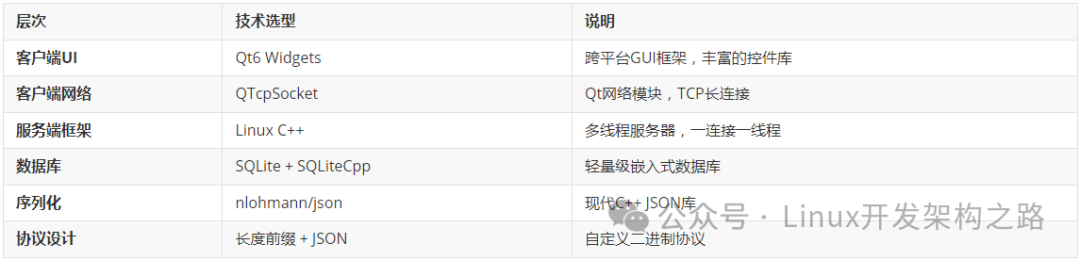
5.1 Technology Stack Overview
5.2 Architectural Advantages
-
High Development Efficiency: Based on mature open-source libraries, rapid prototype development
-
Simple Deployment: Single machine deployment, no complex dependencies
-
Easy to Debug: Clear architecture, clear debugging breakpoints
-
Cross-Platform: Client supports Windows/Linux
5.3 Applicable Scenarios
-
Learning Project: Understand network programming and database operations
-
Small Teams: Internal communication tool (<100 people)
-
Prototype Validation: Rapidly validate chat functionality requirements
-
Technical Demonstration: Showcase Qt + C++ technology stack
5.4 Expansion Directions
Function Expansion:
-
File transfer, image sharing
-
Voice/video calls
-
Message encryption, digital signatures
-
Offline messages, message history
Architecture Upgrade
-
Microservices, load balancing
-
Message queue, caching layer
-
Containerized deployment
-
Monitoring and alerting system
This project provides a complete foundational framework for an instant messaging system, suitable as a starting point for learning and further development.