【Previous Highlights】
- Running a Web Server on ESP32 (Web-Server) – Beginner’s Guide
- Running a Web Server on ESP32 (Web Server) – Practical Guide
- A Method to Wirelessly View and Log Your MCU’s Logs in Real-Time
1. Background
Recently, I came across an interesting <span>Wi-Fi</span> communication protocol launched by Espressif, which allows devices to communicate directly when they are not connected.
Espressif’s overview is as follows:
“
<span>ESP-NOW</span>is a connectionless<span>Wi-Fi</span>communication protocol defined by Espressif. In<span>ESP-NOW</span>, application data is encapsulated in action frames from various vendors and transmitted from one<span>Wi-Fi</span>device to another without a connection.
This seemed very interesting, so I used the <span>IDF</span> demo provided by Espressif for verification. The demo used is located in the IDF path:<span>esp-idf/examples/wifi/espnow</span>.
I gathered a few ESP32-C3 modules, flashed them, and indeed, they could communicate directly without connecting to a router.
2. Modifying the Example
By running the demo:<span>esp-idf/examples/wifi/espnow</span>, I found that the demo had a limitation of not connecting to a router. I wondered if it was possible to communicate directly with other devices that are not connected to a router while still being connected to one.
My idea is illustrated in the following image 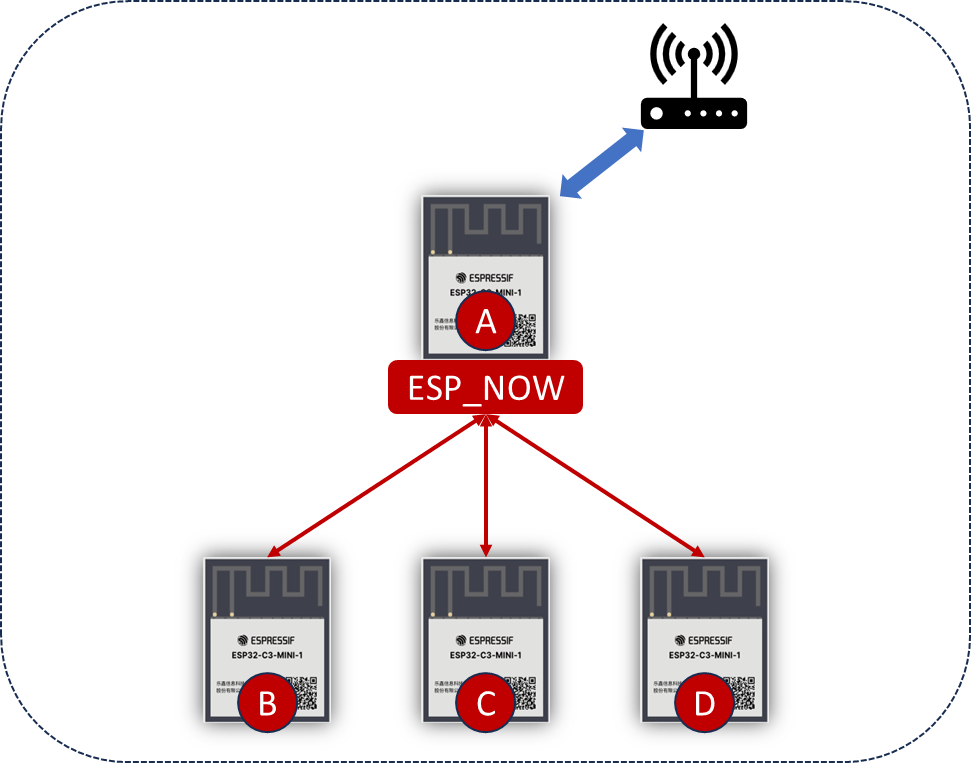 . Here, the A device is connected to the router and also communicates directly with devices B/C/D based on
 <span>ESP_NOW</span>.
I configured the A device to operate in <span>STA+AP</span> mode, where <span>STA</span> is used to connect to the router, and <span>AP</span> is used for communication via <span>ESP_NOW</span>. Based on this idea, I also consulted <span>deepSeek</span>, which confirmed that the solution was feasible; 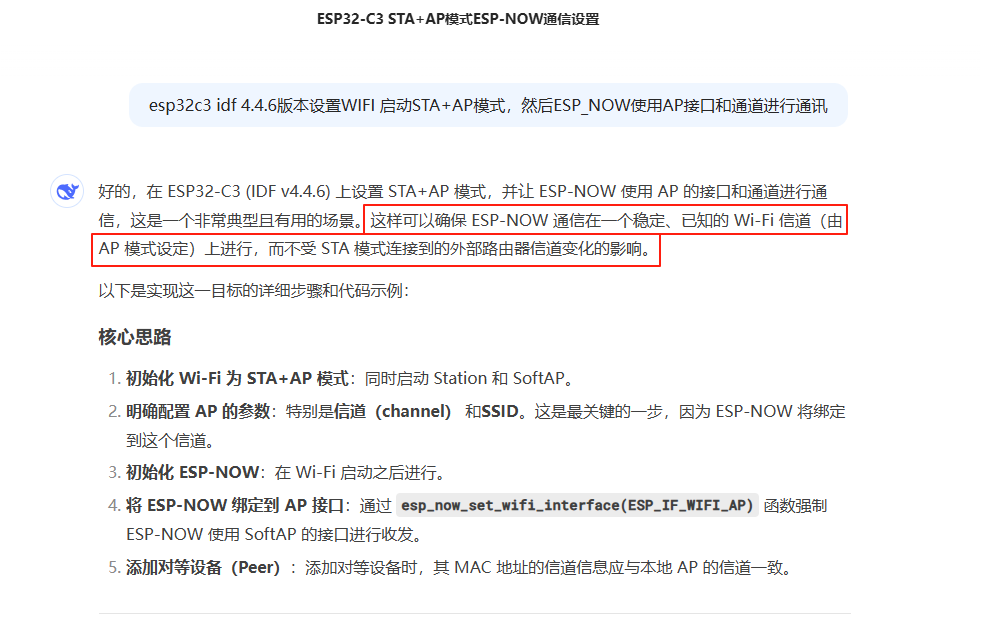
So I happily wrote the code, where the initialization for <span>Wi-Fi</span> and <span>ESP_NOW</span> is as follows, and then replaced the initialization in <span>esp-idf/examples/wifi/espnow</span> accordingly;
- The initialization for Wi-Fi is as follows
#define ESP_AP_CHANNEL 6 // Fixed to use channel 6
static void example_wifi_init(void)
{
    wifi_config_t wifi_config = {
        .sta = {
            .ssid = "xLogMonitor",
            .password = "1234567890",
        },
    };
    // Configure AP mode parameters - key part!
    wifi_config_t ap_config = {
        .ap = {
            .ssid = "",             // Empty SSID, do not broadcast
            .ssid_len = 0,
            .channel = ESP_AP_CHANNEL, // This is the parameter we care about
            .authmode = WIFI_AUTH_OPEN,
            .max_connection = 0,    // No stations allowed to connect
        },
    };

    ESP_ERROR_CHECK(esp_netif_init());
    ESP_ERROR_CHECK(esp_event_loop_create_default());
    esp_netif_create_default_wifi_sta();
    esp_netif_t *ap_netif = esp_netif_create_default_wifi_ap();
    wifi_init_config_t cfg = WIFI_INIT_CONFIG_DEFAULT();
    ESP_ERROR_CHECK( esp_wifi_init(&cfg) );
    ESP_ERROR_CHECK( esp_wifi_set_storage(WIFI_STORAGE_RAM) );
    ESP_ERROR_CHECK(esp_event_handler_instance_register(WIFI_EVENT,
                                                        ESP_EVENT_ANY_ID,
                                                        &event_handler,
                                                        NULL,
                                                        &instance_any_id));
    ESP_ERROR_CHECK(esp_event_handler_instance_register(IP_EVENT,
                                                        IP_EVENT_STA_GOT_IP,
                                                        &event_handler,
                                                        NULL,
                                                        &instance_got_ip));
    ESP_ERROR_CHECK( esp_wifi_set_mode(WIFI_MODE_APSTA) );
    ESP_ERROR_CHECK(esp_wifi_set_config(WIFI_IF_STA, &wifi_config) );
    ESP_ERROR_CHECK(esp_wifi_set_config(WIFI_IF_AP, &ap_config));
    ESP_ERROR_CHECK( esp_wifi_start());
    // ESP_ERROR_CHECK( esp_wifi_set_channel(CONFIG_ESPNOW_CHANNEL, WIFI_SECOND_CHAN_NONE));

#if CONFIG_ESPNOW_ENABLE_LONG_RANGE
    ESP_ERROR_CHECK( esp_wifi_set_protocol(ESPNOW_WIFI_IF, WIFI_PROTOCOL_11B|WIFI_PROTOCOL_11G|WIFI_PROTOCOL_11N|WIFI_PROTOCOL_LR) );
#endif
}
- The initialization for ESP_NOW is as follows
static esp_err_t example_espnow_init(void)
{
    example_espnow_send_param_t *send_param;

    s_example_espnow_queue = xQueueCreate(ESPNOW_QUEUE_SIZE, sizeof(example_espnow_event_t));
    if (s_example_espnow_queue == NULL) {
        ESP_LOGE(TAG, "Create mutex fail");
        return ESP_FAIL;
    }

    /* Initialize ESPNOW and register sending and receiving callback function. */
    ESP_ERROR_CHECK( esp_now_init() );
    ESP_ERROR_CHECK( esp_now_register_send_cb(example_espnow_send_cb) );
    ESP_ERROR_CHECK( esp_now_register_recv_cb(example_espnow_recv_cb) );

    /* Set primary master key. */
    ESP_ERROR_CHECK( esp_now_set_pmk((uint8_t *)CONFIG_ESPNOW_PMK) );

    /* Add broadcast peer information to peer list. */
    esp_now_peer_info_t *peer = malloc(sizeof(esp_now_peer_info_t));
    if (peer == NULL) {
        ESP_LOGE(TAG, "Malloc peer information fail");
        vSemaphoreDelete(s_example_espnow_queue);
        esp_now_deinit();
        return ESP_FAIL;
    }
    memset(peer, 0, sizeof(esp_now_peer_info_t));
    peer->channel = ESP_AP_CHANNEL;
    peer->ifidx = ESP_IF_WIFI_AP;
    peer->encrypt = false;
    memcpy(peer->peer_addr, s_example_broadcast_mac, ESP_NOW_ETH_ALEN);
    ESP_ERROR_CHECK( esp_now_add_peer(peer) );
    free(peer);

    /* Initialize sending parameters. */
    send_param = malloc(sizeof(example_espnow_send_param_t));
    if (send_param == NULL) {
        ESP_LOGE(TAG, "Malloc send parameter fail");
        vSemaphoreDelete(s_example_espnow_queue);
        esp_now_deinit();
        return ESP_FAIL;
    }
    memset(send_param, 0, sizeof(example_espnow_send_param_t));
    send_param->unicast = false;
    send_param->broadcast = true;
    send_param->state = 0;
    send_param->magic = esp_random();
    send_param->count = CONFIG_ESPNOW_SEND_COUNT;
    send_param->delay = CONFIG_ESPNOW_SEND_DELAY;
    send_param->len = CONFIG_ESPNOW_SEND_LEN;
    send_param->buffer = malloc(CONFIG_ESPNOW_SEND_LEN);
    if (send_param->buffer == NULL) {
        ESP_LOGE(TAG, "Malloc send buffer fail");
        free(send_param);
        vSemaphoreDelete(s_example_espnow_queue);
        esp_now_deinit();
        return ESP_FAIL;
    }
    memcpy(send_param->dest_mac, s_example_broadcast_mac, ESP_NOW_ETH_ALEN);
    example_espnow_data_prepare(send_param);

    xTaskCreate(example_espnow_task, "example_espnow_task", 2048, send_param, 4, NULL);

    return ESP_OK;
}
The program ran successfully, and it met my expectations. Device A connected to the router and simultaneously communicated with B, C, and D, which felt perfect, unless something unexpected happens.
3. Problems Arise
Just when I was happy about the success of modifying the example, a problem occurred. I changed to a different router and found that communication failed.
<span>esp_send</span> produced the following error:
E (12554) ESPNOW: Peer channel is not equal to the home channel, send fail!I was confused as to why changing the router caused this issue. Does this protocol depend on the router? The official documentation from Espressif did not mention this~
Espressif documentation: <span>https://docs.espressif.com/projects/esp-idf/zh_CN/v4.4.6/esp32c3/api-reference/network/esp_now.html?highlight=esp_now_init#</span>
4. Problem Analysis
From the error log, this error indicates that the <span>Peer channel</span> and <span>home channel</span> are inconsistent.
Here, <span>Peer</span> should refer to the channel of the target device to which data is being sent, while <span>home</span> should refer to the device itself;
However, I had specified both places with <span>#define ESP_AP_CHANNEL 6 // Fixed to use channel 6</span>. Why did this error still occur?
After running a few more tests, I found that the error only occurred after device A connected to the network.
Could it be that the channel of device A changed after connecting to the router? After researching, I found that this is indeed the case. The Wi-Fi channel of a STA device is determined by the router once it connects, so when the channel assigned by the router is inconsistent with <span>#define ESP_AP_CHANNEL 6</span>, problems arise.
So, I printed the current channel information of the device before calling <span>esp_now_send</span>, and obtained the following information:
I (12554) sta_ap_espnow: STA connection info: SSID=xLogMonitor, Channel=8, RSSI=-61
I (12554) sta_ap_espnow: Current working channel: 8
E (12554) ESPNOW: Peer channel is not equal to the home channel, send fail!
E (12564) sta_ap_espnow: ESP-NOW data send failed: 0x3066
The theoretical and experimental results are consistent; after the device connects, the channel changed to 8.
Thus, solving the current problem is straightforward; I just need to change all ESP_NOW devices to the same channel as the router, which is 8.
The result confirmed that when the channel was changed to 8, all devices communicated normally.
5. Conclusion
-
Although we identified and resolved the issue, the Espressif documentation did not emphasize this point, leading to a lack of attention when reviewing the documentation.
-
In STA+AP mode of ESP32-C3, after the STA connects to the router, the channel specified in AP mode cannot be used for ESP_NOW communication.
-
If a device needs to connect to a router, it must know the router’s channel in advance and specify a uniform channel for other devices to communicate via ESP_NOW. This is indeed a problem for future product implementation, and we need to consider how to optimize it.
Finally, if any experts have good solutions or have encountered similar pitfalls, feel free to leave comments for discussion and learning!
Your likes, follows, and shares will be my greatest motivation for creating content!