One of the reasons for Python’s popularity is its rich computational ecosystem. According to incomplete statistics, there are currently over 130,000 third-party libraries available for Python.
This series will gradually organize and share some interesting and useful third-party libraries.
There are two ways to obtain the accompanying code for this article:
- Access via Baidu Cloud:
Link: https://pan.baidu.com/s/1FSGLd7aI_UQlCQuovVHc_Q?pwd=mnsj Extraction code: mnsj- Visit GitHub to obtain:
https://github.com/returu/Python_Ecosystem01Introduction:OpenCC (Open Chinese Convert) is an open-source library for converting between Simplified Chinese, Traditional Chinese, and Japanese kanji (new font). It supports character-level conversion, vocabulary-level conversion, variant character conversion, and the conversion of commonly used terms in mainland China, Taiwan, and Hong Kong.
- Strictly distinguishes between “one-to-many” and “one-to-many variants”;
- Fully compatible with variant characters, supporting dynamic replacement;
- Strictly reviews entries for “one-to-many” conversions, with the principle of “if it can be separated, do not separate”;
- Supports variant characters and commonly used terms conversion in mainland China, Taiwan, and Hong Kong;
- The vocabulary and function libraries are completely separated, allowing users to modify, import, and extend freely.
Directly install using pip:
pip install openccGitHub page:
https://github.com/BYVoid/OpenCCAlso provides an online conversion website:
https://opencc.byvoid.com/02Usage:
OpenCC provides various preset conversion modes to meet the needs of Simplified to Traditional conversion in different scenarios:
-
s2t: Simplified Chinese to Traditional Chinese;
- t2s: Traditional Chinese to Simplified Chinese;
- s2tw: Simplified Chinese to Taiwanese Traditional;
- tw2s: Taiwanese Traditional to Simplified Chinese;
- s2hk: Simplified Chinese to Hong Kong Traditional;
- hk2s: Hong Kong Traditional to Simplified Chinese;
- s2twp: Simplified Chinese to Traditional Chinese (Taiwan standard) and convert to commonly used Taiwanese vocabulary;
- tw2sp: Traditional Chinese (Taiwan standard) to Simplified Chinese and convert to commonly used vocabulary in mainland China;
- t2tw: Traditional Chinese (OpenCC standard) to Taiwanese Traditional;
- hk2t: Hong Kong Traditional to Traditional Chinese;
- t2hk: Traditional Chinese (OpenCC standard) to Hong Kong Traditional;
- t2jp: Traditional Chinese (old font) to Japanese new font;
- jp2t: Japanese new font to Traditional Chinese (old font);
- tw2t: Taiwanese Traditional to Traditional Chinese.
-
Example 1, Simplified to Traditional:
import opencc

# Create an OpenCC object, specifying the conversion mode
converter = opencc.OpenCC('s2t')  # Simplified to Traditional

# Perform conversion
result = converter.convert('汉字')
print(result)  # Output: 漢字
-
Example 2, Traditional to Simplified:
# Create an OpenCC object, specifying the conversion mode
converter = opencc.OpenCC('t2s')  # Traditional to Simplified

# Perform conversion
result = converter.convert('漢字')
print(result)  # Output: 汉字
-
Example 3, Handling Regional Differences:
Adapt regional vocabulary through different conversion modes.
# Simplified to Taiwanese Traditional (with regional vocabulary)
converter_tw = opencc.OpenCC('s2twp')
# Simplified to Hong Kong Traditional
converter_hk = opencc.OpenCC('s2hk')

# Perform conversion
result_tw = converter_tw.convert('鼠标')
result_hk = converter_hk.convert('鼠标')


print(f"Taiwanese Traditional: {result_tw}")
# Output: Taiwanese Traditional: 滑鼠
print(f"Hong Kong Traditional: {result_hk}")
# Output: Hong Kong Traditional: 鼠標
-
Example 4, Strictly Distinguishing “One-to-Many” and “One-to-Many Variants”:
In Chinese Simplified-Traditional conversion, “one-to-many” and “one-to-many variants” are two different situations:
-
One-to-Many: Refers to a simplified character corresponding to multiple traditional characters, where the correct traditional character must be selected based on context during conversion. For example, “发” can correspond to “發” (as in “发展”) and “髮” (as in “头发”) in different contexts.
-
One-to-Many Variants: A simplified character corresponds to multiple variant traditional characters with subtle differences in meaning.
The OpenCC library strictly distinguishes these situations during conversion, as explained in detail through the following code.
# Create a converter instance to convert Simplified Chinese to Traditional Chinese
converter = opencc.OpenCC('s2t.json')

# Example text
simplified_text = "皇后在后宫中"
traditional_text = converter.convert(simplified_text)

print("Simplified Chinese:", simplified_text)
# Output: Simplified Chinese: 皇后在后宫中
print("Traditional Chinese:", traditional_text)
# Output: Traditional Chinese: 皇后在後宮中
-
Example 5, Converting Text Files:
OpenCC can be used for converting text files, such as converting a Simplified text file to Traditional:
import opencc

# Simplified to Traditional
mode = "s2t"

# Define a function convert_txt to convert the text in the input file and save the result to the output file
# input_file: path to the input file containing the text to be converted
# output_file: path to the output file to save the converted text
# mode: conversion mode, default is the specified "s2t"
def convert_txt(input_file, output_file, mode=mode):
    # Open the input file
    with open(input_file, "r", encoding="utf-8") as file:
        # Read all text content from the file
        text = file.read()

    # Create an OpenCC converter object using the specified conversion mode
    converter = opencc.OpenCC(mode)

    # Call the convert method of the converter to convert the read text
    converted_text = converter.convert(text)

    # Open the output file in write mode and write the converted text using UTF-8 encoding
    with open(output_file, "w", encoding="utf-8") as file:
        # Write the converted text to the output file
        file.write(converted_text)

# Call the convert_txt function
convert_txt("test.txt", "converted_test.txt")
-
Example 6, Creating a Custom Vocabulary:
OpenCC supports the separation of vocabulary and function libraries, allowing users to create custom vocabularies by modifying or creating new configuration files.
Suppose we want to create a custom Simplified-Traditional conversion vocabulary, converting “鼠标” to “滑鼠” (default conversion is “鼠標”) and “软件” to “軟碟” (default conversion is “軟件”).
The core idea of creating a custom conversion vocabulary is to create or modify a vocabulary configuration file and then use the new configuration file to create an <span>OpenCC</span> converter. The specific steps are as follows:
- ① Create a custom configuration file (JSON format):
Based on OpenCC’s default configuration file (such as s2t.json), create a new JSON format configuration file and include the custom dictionary file. This time, we create a file named custom_config.json that references the default configuration and custom rules. A complete OpenCC configuration file typically includes the following two parts:segmentation part: defines the word segmentation strategy. OpenCC can use the specified dictionary file (STPhrases.txt) and segmentation algorithm (mmseg) to segment the input text. The segmentation results will be used for subsequent conversion steps to ensure accuracy. Among them, STPhrases.txt is the mapping of phrases from Simplified Chinese to Traditional Chinese, with one phrase pair per line, formatted as: Simplified phrase Traditional phrase;conversion_chain part: defines the specific conversion rule chain, including character-level and vocabulary-level conversions. Among them, custom_phrases.txt is the custom dictionary file; STCharacters.txt is OpenCC’s default character mapping file. The content is as follows:
{
  "name": "Simplified Chinese to Traditional Chinese",
"segmentation": {
    "type": "mmseg",
    "dict": {
      "type": "text",
      "file": "STPhrases.txt"
    }
  },
"conversion_chain": [{
    "dict": {
      "type": "group",
      "dicts": [{
        "type": "text",
        "file": "custom_phrases.txt"
      },{
        "type": "text",
      "file": "STPhrases.txt"
      }, {
        "type": "text",
        "file": "STCharacters.txt"
      }]
    }
  }]
}- ② Create a character mapping file:
This time we use OpenCC’s default character mapping file STCharacters.txt.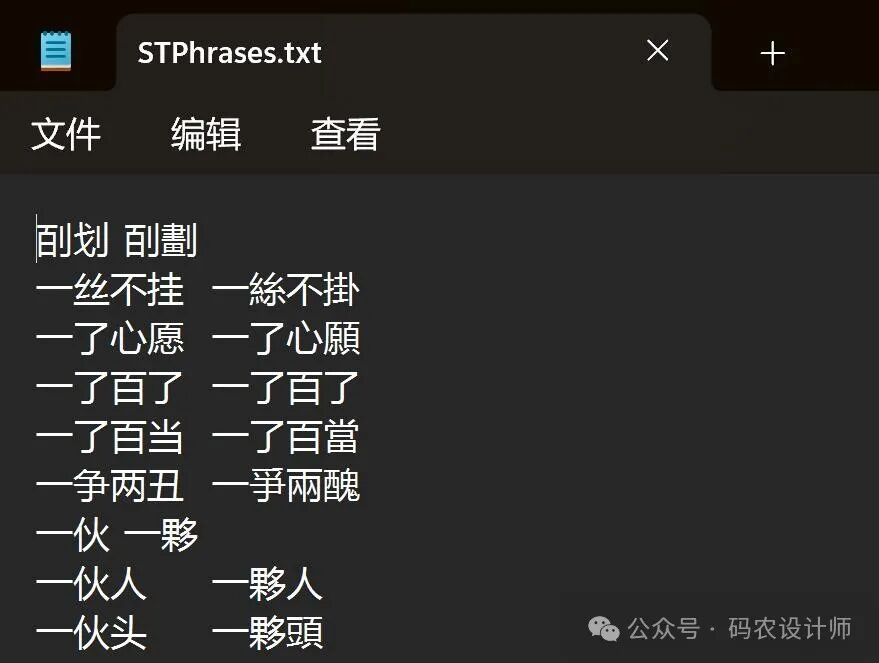
- ③ Create a custom dictionary file:
If custom conversion rules are needed (using a custom dictionary), you can directly edit the default vocabulary file of OpenCC STCharacters.txt, or you can override the default rules with a custom dictionary. The custom dictionary can be a .txt file, with each line containing a simplified word and its corresponding traditional word, separated by a tab (Tab). This time we create a custom dictionary text file custom_phrases.txt with the following content:
鼠标 滑鼠
软件 軟碟
- ④ Use the custom configuration file for conversion:
Load the custom JSON configuration file in the code and use OpenCC for conversion.
import opencc

# Text to be converted
text = '鼠标和软件'

# Default vocabulary
cc_o = opencc.OpenCC('s2t')
# Load custom vocabulary
cc_c = opencc.OpenCC('./custom_config/custom_config.json')


converted_o = cc_o.convert(text)
converted_c = cc_c.convert(text)

print(f"Default conversion result: {converted_o}")
# Output: Default conversion result: 鼠標和軟件
print(f"Custom conversion result: {converted_c}")
# Output: Custom conversion result: 滑鼠和軟碟
For more content, please visit the GitHub page:
https://github.com/BYVoid/OpenCC