Open Source Repository Link:https://github.com/Rbb666/MCoreDump
Platforms verified for this component: Renesas RA6M3 (Cortex-M4), Renesas RA6M4 (Cortex-M33) are both operational, for more platforms please follow the open-source repository.
Table of Contents

Component Introduction
Main Features
Application Scenarios
Supported Architectures
System Architecture
Directory Structure
Configuration Options
Quick Start
API Reference
-
Main Functions
-
Detailed Explanation of Output Modes
Advanced Configuration
Debug Tool Usage
How to Adapt to New Architectures
Performance Characteristics
Troubleshooting
Contribution Guidelines
License
Component Introduction
MCoreDump (mini-coredump) is a core dump component designed specifically for embedded systems, capable of automatically generating standard ELF format core dump files during hard faults, assertion failures, or other exceptional conditions for offline debugging and fault analysis.

Main Features
-
🔧 ELF Format Compatibility: Generates standard ELF format core dump files, compatible with debugging tools such as GDB and objdump
-
💾 Multiple Output Modes: Supports serial output, memory buffer storage, and filesystem saving
-
🏗️ Multi-thread Support: Capable of capturing state information of all threads in a multi-threaded environment
-
⚡ Power Loss Retention: Data in memory mode can be retained after power loss and reboot (requires hardware support)
-
🛡️ Fault Safety: Uses static memory allocation to avoid dynamic memory usage during faults
-
📊 Complete State Capture: Includes complete system state such as registers, stack information, and memory data
Application Scenarios
-
Embedded System Debugging: Locating hard faults, stack overflows, memory access errors, etc.
-
Product Quality Assurance: Fault recording and analysis in production environments
-
Firmware Development: Debugging and optimizing multi-threaded programs
-
On-site Fault Analysis: Remote fault diagnosis after device deployment
Supported Architectures
-
Armv7-M
-
Armv8-M
System Architecture
MCoreDump Component Architecture┌─────────────────────────────────────────────────────────┐│ User Layer API │├─────────────────────────────────────────────────────────┤│ mcd_faultdump() │ mcd_test │ mcd_dump_filesystem |├─────────────────────────────────────────────────────────┤│ Core Engine Layer │├─────────────────────────────────────────────────────────┤│ mcd_mini_dump() │ mcd_multi_dump() │ mcd_gen_coredump() │├─────────────────────────────────────────────────────────┤│ Output Adaptation Layer │├─────────────────────────────────────────────────────────┤│ Serial Output │ Memory Buffer │ Filesystem │├─────────────────────────────────────────────────────────┤│ Platform Abstraction Layer │├─────────────────────────────────────────────────────────┤│ RT-Thread Adaptation │ Architecture Specific Code │├─────────────────────────────────────────────────────────┤│ Hardware │└─────────────────────────────────────────────────────────┘Directory Structure
The MCoreDump component adopts a modular design:
MCoreDump/├── README.md # Component documentation├── Kconfig # Configuration option definitions├── SConscript # Build script│├── inc/ # Header files directory│ ├── mcd_cfg.h # Configuration file and OS abstraction layer│ ├── coredump.h # Main API declarations│ └── mcd_elf_define.h # ELF format definitions│├── src/ # Source code directory│ ├── coredump.c # Core dump generation engine│ ├── faultdump.c # Fault handling and output management│ └── arm/ # ARM architecture specific code│ ├── mcd_arm.c # ARM architecture implementation (unified ARM32/64)│ └── mcd_arm_define.h # ARM architecture definitions│├── arch/ # Architecture abstraction layer│ ├── mcd_arch_interface.h # Architecture interface definitions│ └── armv7m/ # ARM Cortex-M specific implementation│ ├── armv7m.c # ARMv7-M register collection│ └── registers.h # Register structure definitions│├── osal/ # Operating system adaptation layer│ └── rtthread.c # RT-Thread specific adaptation code│└── example/ # Example code └── mcd_example.c # Usage examples and test commandsDirectory Description
Core Module
-
inc/ – Common header files
-
mcd_cfg.h: Configuration management and OS abstraction, supports multi-OS compatibility
-
coredump.h: Main API and data structure definitions
-
mcd_elf_define.h: ELF file format related definitions
-
src/ – Core implementation
-
mcoredump.c: Core dump generation engine, handles ELF format output
-
faultdump.c: Fault handling entry, manages multiple output modes
-
arm/: ARM architecture specific implementation (unified management of ARM32/ARM64)
Architecture Support
-
arch/ – Architecture abstraction layer
-
mcd_arch_interface.h: Defines architecture-independent interfaces
-
armv7m/: ARM Cortex-M (ARMv7-M) specific implementation
-
Register definitions, exception handling, stack frame parsing
System Adaptation
-
osal/ – Operating system adaptation layer
-
rtthread.c: RT-Thread system thread management and memory operation adaptation
Example Code
-
example/ – Usage examples
-
Basic API usage demonstration
-
MSH debug commands
-
Fault trigger tests
Key File Descriptions
|
File |
Function |
Features |
|
mcd_cfg.h |
OS abstraction and configuration management |
Supports multiple OS, unified API interface |
|
mcoredump.c |
Core ELF file generation |
ELF format handling, memory layout |
|
faultdump.c |
Fault handling entry |
Multiple output modes, user API |
|
mcd_arm.c |
ARM architecture implementation |
Unified ARM32/64 support |
|
armv7m.c |
Cortex-M specific code |
Register collection, exception handling |
|
rtthread.c |
RT-Thread adaptation |
Thread information, system calls |
|
mcd_example.c |
Usage example |
MSH commands, test cases |
Configuration Options
Kconfig Configuration
Use the RTT ENV tool menuconfig to enter RT-Thread Components → tools packages → MCoreDump for configuration:
|
Configuration Item |
Description |
Default Value |
|
PKG_USING_MCOREDUMP |
Enable MCoreDump component |
n |
|
PKG_USING_MCOREDUMP_ARCH_ARMV7M |
Support ARM Cortex-M architecture |
y |
|
PKG_MCOREDUMP_MEMORY_SIZE |
Memory buffer size |
8192 bytes |
|
PKG_USING_MCOREDUMP_FILESYSTEM |
Enable filesystem support |
n |
|
PKG_MCOREDUMP_FILESYSTEM_DIR |
Filesystem save directory |
“/sdcard” |
|
PKG_MCOREDUMP_FILESYSTEM_PREFIX |
File name prefix |
” core_” |
|
PKG_USING_MCOREDUMP_EXAMPLE |
Enable example code |
y |
Memory Requirements
-
Minimum RAM: Approximately 10KB (including buffer and code)
-
Flash Usage: Approximately 15-20KB (depending on configuration)
Quick Start
Adaptation Work
GCC Toolchain
It is necessary to add the following code to the project’s linker script (the noinit section needs to be added before the bss section):
/* Section for persistent data that survives reset (no load, no init) */.noinit (NOLOAD) : ALIGN(4){ . = ALIGN(4); __noinit_start__ = .; *(.noinit) *(.noinit.*) . = ALIGN(4); __noinit_end__ = .;} > RAM1__bss_start = .;.bss :{ ...} > RAM1__bss_end = .;Keil Toolchain (ac5/ac6)
/* 0x2400 is the reserved memory space for coredump */RW_IRAM2 (0x20000000 + (0x00020000 - 0x2400)) UNINIT 0x2400 { *(.bss.NoInit)}CPU Exception Section
-
For cortex-m3, please refer to the content of this PR for modifications:https://github.com/RT-Thread/rt-thread/pull/10619
-
For cortex-m4, please refer to the content of this PR for modifications:https://github.com/RT-Thread/rt-thread/pull/10618
-
For cortex-m33, please refer to the content of this PR for modifications:https://github.com/RT-Thread/rt-thread/pull/10624
1. Enable Component
Enable MCoreDump in the RT-Thread project through menuconfig:
# Update package indexpkgs --upgrade-force# Enter configuration menu menuconfig# Navigate to: RT-Thread online packages → tools packages → MCoreDump2. Compile and Run
# Compile project scons# Flash to target board# Start system, MCoreDump will automatically initialize3. Basic Usage
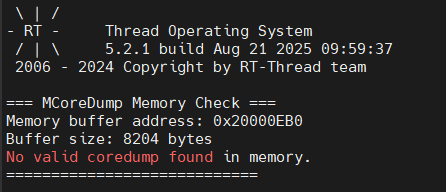
The system starts normally and will automatically print MCoreDump related information, including: core dump cache starting address, buffer size
Demonstration of the first startup without triggering an exception will display: “No valid coredump found in memory.”
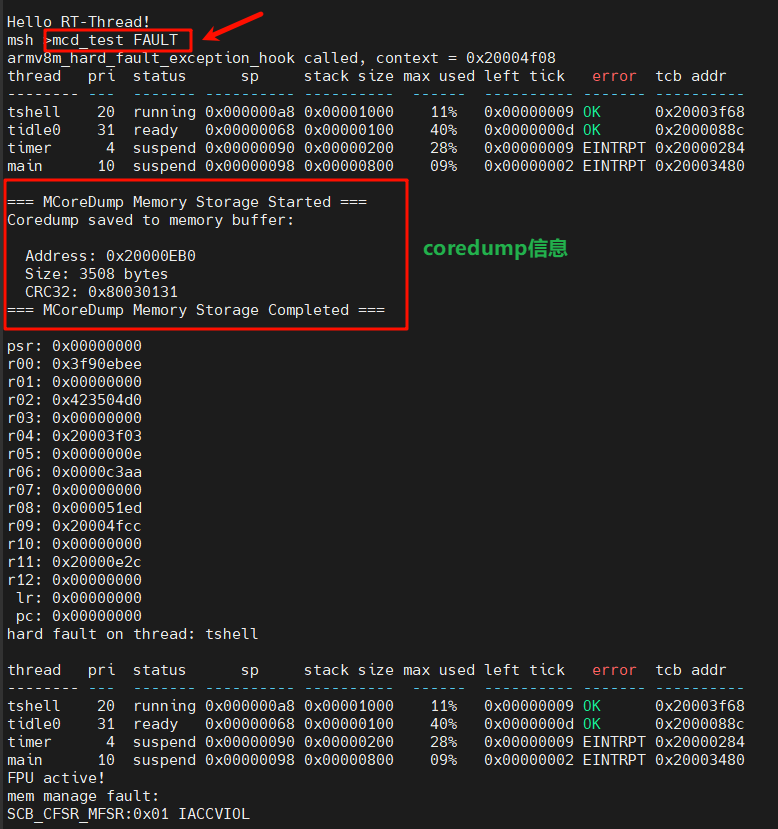
Manually input mcd_test FAULT to trigger an illegal address access exception and trigger a hardware fault, at this point, core dump information will be printed.
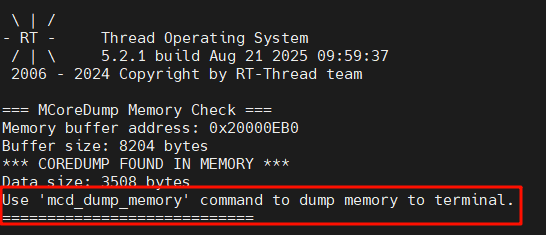
After the chip is reset, it will print “Use ‘mcd_dump_memory’ command to dump memory to terminal.”
Since the core dump cache area is defined in the noinit section, unless there is no hardware fault, it will normally be as shown in the figure below
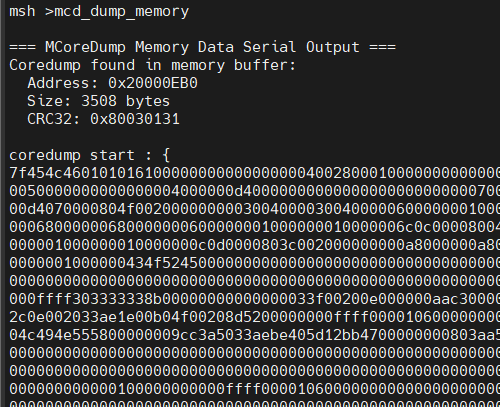
At this point, you can enter mcd_dump_memory in the shell to print the core dump information.
Tool Usage: Open the coredump.exe software under MCoreDump/tools, the following figure introduces the specific function field information:
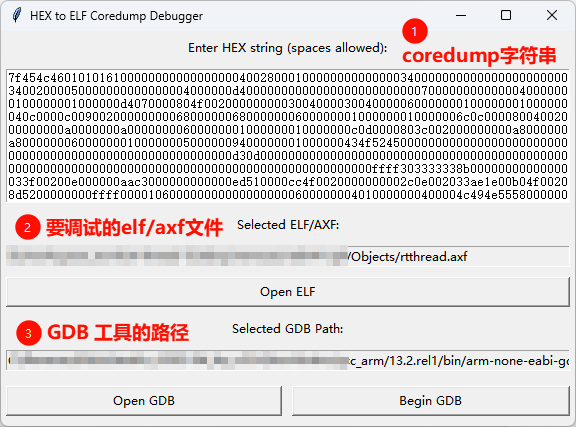
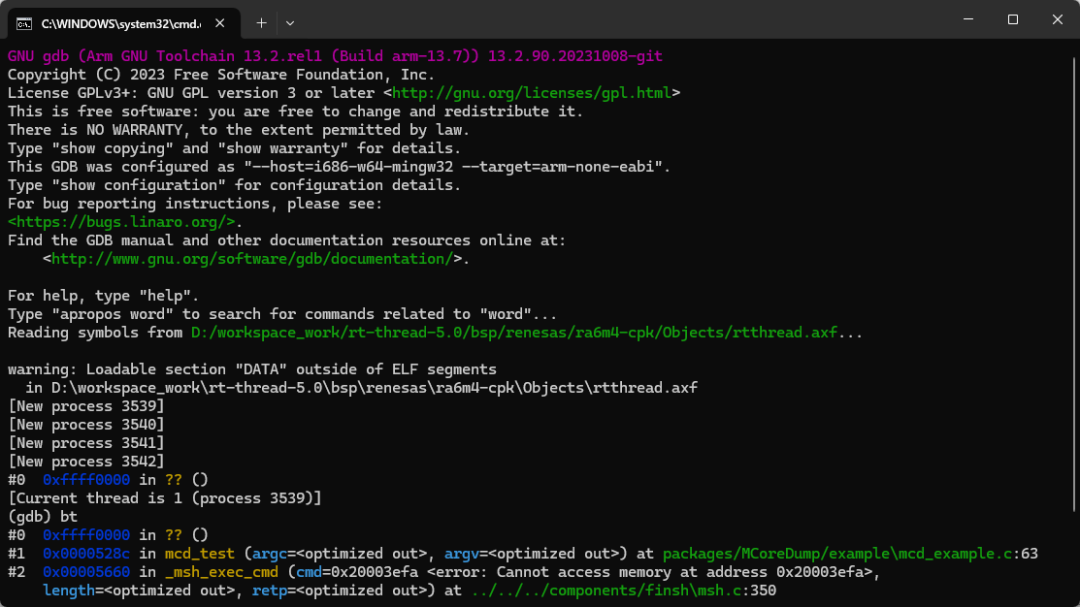
Click the Begin GDB button to start GDB debugging:
API Reference
Main Functions
mcd_init() – Initialization function
void mcd_init(mcd_writeout_func_t func);Function: Initializes the MCoreDump system, automatically detects FPU support
Parameters:
-
func: Output callback function pointer for processing core dump data
FPU Detection:
-
Automatic detection: Based on compiler macros __VFP_FP__ and __SOFTFP__
-
Hardware FPU: Includes floating-point register information
-
Software FPU: Only includes core register information
Example:
void my_output(uint8_t *data, int len){ // Process core dump data}mcd_init(my_output); // Automatically detect FPUmcd_faultdump()
int mcd_faultdump(mcd_output_mode_t output_mode);Function: Generates core dump and outputs to the specified target
Parameters:
-
output_mode: Output mode
-
MCD_OUTPUT_SERIAL: Serial output
-
MCD_OUTPUT_MEMORY: Memory buffer
-
MCD_OUTPUT_FILESYSTEM: Filesystem
Return Value:
-
MCD_OK: Success
-
MCD_ERROR: Failure
mcd_check_memory_coredump()
rt_bool_t mcd_check_memory_coredump(void);Function: Checks if there is a valid core dump in memory
Return Value:
-
RT_TRUE: Valid core dump exists
-
RT_FALSE: No valid core dump
mcd_print_memoryinfo()
void mcd_print_memoryinfo(void);Function: Prints core dump memory information, usually called at startup
mcd_mini_dump() – Simplified core dump
void mcd_mini_dump(void);Function: Generates a simplified core dump of the current thread
Features:
-
Only includes current thread information
-
Smaller file size, faster generation
-
Suitable for quick fault analysis
mcd_multi_dump() – Complete core dump (including thread information)
void mcd_multi_dump(void);Function: Generates a complete core dump including all threads
Features:
-
Includes information of all system threads
-
Provides a complete system snapshot
-
Suitable for in-depth analysis
Size Calculation Functions
int32_t mcd_mini_dump_size(void); // Get size of simplified core dumpint32_t mcd_multi_dump_size(void); // Get size of complete core dumpDetailed Explanation of Output Modes
1. Serial Output Mode (MCD_OUTPUT_SERIAL)
// Directly output core dump to serialmcd_faultdump(MCD_OUTPUT_SERIAL);Features:
-
Real-time output, no additional storage space required
-
Output in hexadecimal format, with CRC32 checksum
-
Suitable for real-time debugging and analysis
Output Format:
coredump start : {7f454c46010101000000000000000000...} coredump endcrc32 : 12345678Memory Buffer Mode (MCD_OUTPUT_MEMORY)
// Save to memory buffermcd_faultdump(MCD_OUTPUT_MEMORY);// Check and readif (mcd_check_memory_coredump()) { mcd_dump_memory_to_serial();}Features:
-
Data persistently saved (power loss retention)
-
Buffer size configurable
-
Includes integrity check (CRC32)
-
Suitable for on-site fault recording
3. Filesystem Mode (MCD_OUTPUT_FILESYSTEM)
// Save to filesystemmcd_faultdump(MCD_OUTPUT_FILESYSTEM);// Save from memory to filemcd_dump_filesystem();Features:
-
Generates standard ELF files
-
Supports timestamp naming
-
Can be analyzed with standard debugging tools
-
Requires filesystem support
Advanced Configuration
Custom Output Function
void my_custom_output(uint8_t *data, int len){ // Custom data processing logic // For example: network transmission, dedicated storage, etc.}Memory Buffer Configuration
Set in rtconfig.h or through Kconfig:
#define PKG_MCOREDUMP_MEMORY_SIZE (16 * 1024) // 16KB bufferFilesystem Path Configuration
#define PKG_MCOREDUMP_FILESYSTEM_DIR "/data/coredump"#define PKG_MCOREDUMP_FILESYSTEM_PREFIX "crash_"Debug Tool Usage
Using GDB for Analysis
Get core dump content:
# Simulate exception situation:msh />mcd_test FAULTthread pri status sp stack size max used left tick error tcb addr---------------- --- ------- ---------- ---------- ------ ---------- ------- ----------tshell 20 running 0x000000d40x00001000 13% 0x00000008 OK 0x20006e28mmcsd_detect 22 suspend 0x000000c40x00000800 51% 0x00000001 EINTRPT 0x20004d68tidle0 31 ready 0x0000008c0x00000400 16% 0x00000005 OK 0x20005878main 10 suspend 0x000000d40x00000800 56% 0x0000000c EINTRPT 0x20005fc0=== MCoreDump Memory Storage Started ===Coredump saved to memory buffer: Address: 0x20000EF4 Size: 3644 bytes CRC32: 0x86517DA7=== MCoreDump Memory Storage Completed ===# -------------------------------------Soft reset chip------------------------------------- \ | /- RT - Thread Operating System / | \ 5.2.1 build Aug 19202513:50:552006 - 2024 Copyright by RT-Thread team=== MCoreDump Memory Check ===Memory buffer address: 0x20000EF4Buffer size: 8208 bytes*** COREDUMP FOUND IN MEMORY ***Data size: 3644 bytesUse 'mcd_dump_filesystem' command to save to file.Use 'mcd_dump_memory' command to dump memory to terminal.File counter: 0 (next file will be 0001)============================[I/SDIO] SD card capacity 31166976 KB.[I/SDIO] sd: switch to High Speed / SDR25 modefound part[0], begin: 1048576, size: 29.739GB[I/app.filesystem] SD card mount to '/sdcard'msh />msh />mcd_dump_filesystemCreating coredump file: /sdcard/core_0001.elfCoredump file opened successfully (fd: 3)Saving coredump from memory to file: /sdcard/core_0001.elfCoredump saved successfully to: /sdcard/core_0001.elfmsh />msh /sdcard>lsDirectory /sdcard:core_0001.elf 3736GDB Analysis (requires a higher version of gcc toolchain, tested >= 13.2):
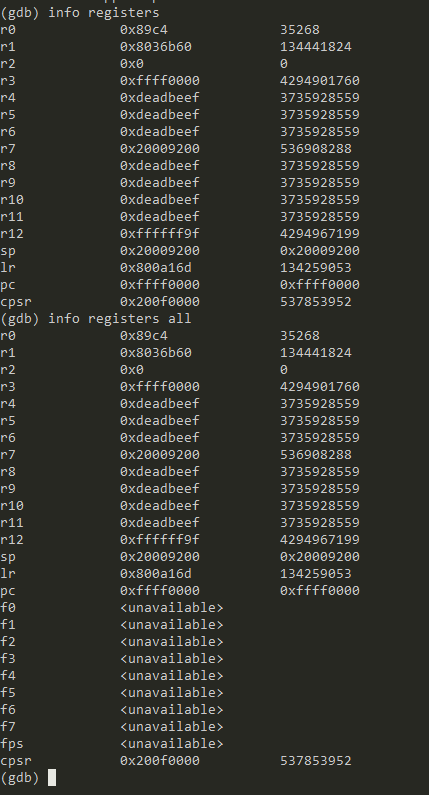
# Start GDB + load coredumpD:\...\gcc_arm\13.2.rel1\bin\arm-none-eabi-gdb.exe rt-thread.elf core_0001.elf# View crash location(gdb) bt# View registers(gdb) info registers# View all registers(gdb) info registers all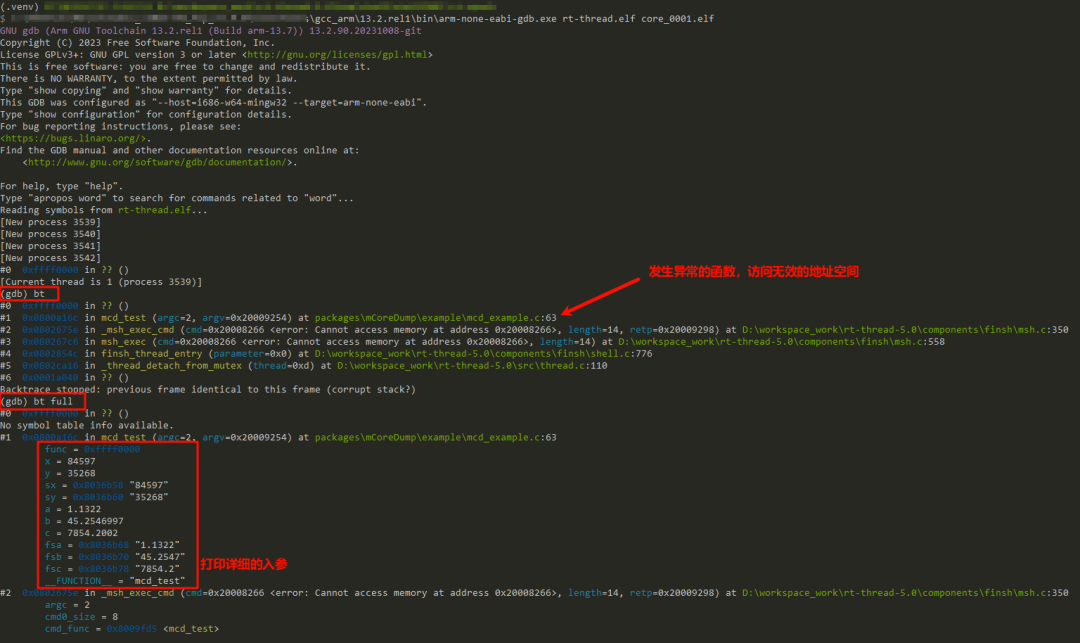
View register contents:
View system thread information:

How to Adapt to New Architectures
Taking ARMV7-M as an example:
-
Implement rt_hw_exception_install passing the stack frame at the time of exception occurrence
-
Add architecture folder under packages\MCoreDump\arch, need to implement armv7m_hard_fault_exception_hook in armv7m.c,
-
Implement collect_registers_armv7m function in armv7m.c to assign values to the core dump structure members
-
Add arch_hard_fault_exception_hook declaration in packages\MCoreDump\osal\rtthread.c, call relationship: rtt_hard_fault_exception_hook—>arch_hard_fault_exception_hook
-
Implement mcd_get_regset: Write a snapshot of the current CPU’s core registers into the memory area pointed to by regset, saved in the agreed order
-
Implement mcd_multi_dump: Used to collect the current CPU register snapshot (core + optional FPU), then call RTOS related callbacks to collect multi-thread information, and finally generate core dump. The main difference from mcd_mini_dump is that mini only prepares single thread/minimal information, multi will collect multi-thread/RTOS information and then generate complete core dump
-
Implement the corresponding architecture stack frame (r0-r15, xpsr) in packages\MCoreDump\arch\armv7m\registers.h
Performance Characteristics
|
Metric |
Value |
Description |
|
Single-thread core dump time |
< 100ms |
Excluding I/O time |
|
Multi-thread core dump time |
< 500ms |
Depends on the number of threads |
|
Memory usage |
8-64KB |
Configurable buffer size |
|
Flash usage |
15-20KB |
Includes full functionality |
|
Supported thread count |
Unlimited |
Limited by memory size |
Troubleshooting
Q1: GDB reports “Core file format not supported”
Please use gdb-multiarch or a higher version of arm-none-eabi-gdb.
Q2: Console prints “Failed to create coredump file”
Please ensure the SD card is successfully mounted;
You can use the ls / command to confirm if the filesystem directory is visible.
Q3: System startup prompts “elm mount filesystem failed!”
The storage medium needs to be formatted to FAT32 format, you can enter mkfs -t elm sd0 command to format after system startup. After successful formatting, restart the system, the console will print elm file system initialized!
Note: Formatting will delete all files on the SD card, please use with caution!!!
Contribution Guidelines
Welcome ⭐ to support this project, and welcome to participate in the development and improvement of the MCoreDump component!
Development Environment
-
RT-Thread Development Environment
-
Cross-compilation Toolchain
License
This project is licensed under the Apache 2.0 License. See LICENSE file for details.
https://github.com/RT-Thread/rt-thread/blob/master/LICENSE




Want to publish content on the RT-Thread platform or community?
Or want to participate in related live events and competitions?
RT-Thread has opened a docking window,
Please contact us via email, looking forward to cooperation!
Cooperation Email: [email protected]

Based on MCUXpresso and FRDM-MCXA346 RT-Thread Nano Porting | Technical Collection
Revealed! Exploring the task scheduling under “Priority Inversion” based on RT-Thread | Technical Collection
HMI-Board Ethernet connects to the cloud learning notes | Technical Collection
RT-Thread adapts to GigaDevice GD32F5 series MCU, open free trial application! | Technical Collection
[RT-Trace] Function Upgrade! GDB Server Function + One-click Flash Burning, Embedded Development More Convenient! | Technical Collection
——————End——————


Click “Read the original text”