
Welcome to the 【Ultimate Programming】 WeChat public account 【Knowledge Repository】, specially customized for everyone《Qt C++ Architect》 Series – Project Practice Episode 133:This episode focuses on a practical and challenging technical topic –【Mastering C++17 and SQLite3 for Efficient Data Processing of Millions of Records】.Whether you are a beginner who has just mastered the Qt cross-platform framework and Linux C/C++ backend server development, or a developer looking to delve deeper into C/C++ system architecture research, this technology will open a door to deep learning for you.
【Development Environment】: Win10 x64, Qt version 6.8;
【Daily sharing of high-quality projects and cutting-edge technical programming content!】
【Follow the UP master and join the QQ group】: 【895876809 Download project source code (for research and learning)】.
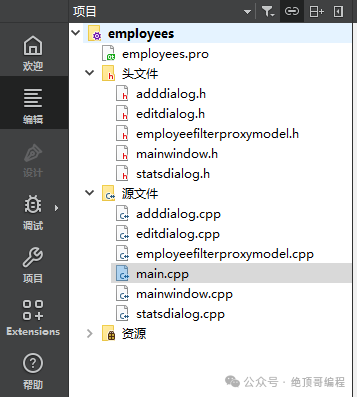
1: 【Project】📁 Source Structure
2: 【Project】🚀 Running Results
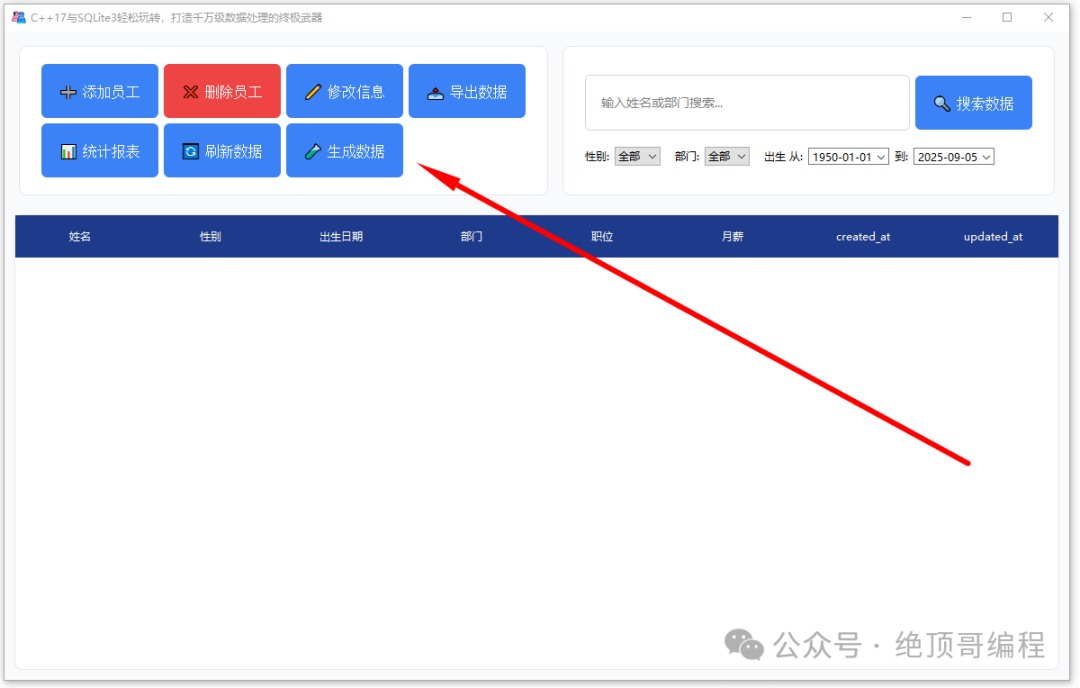
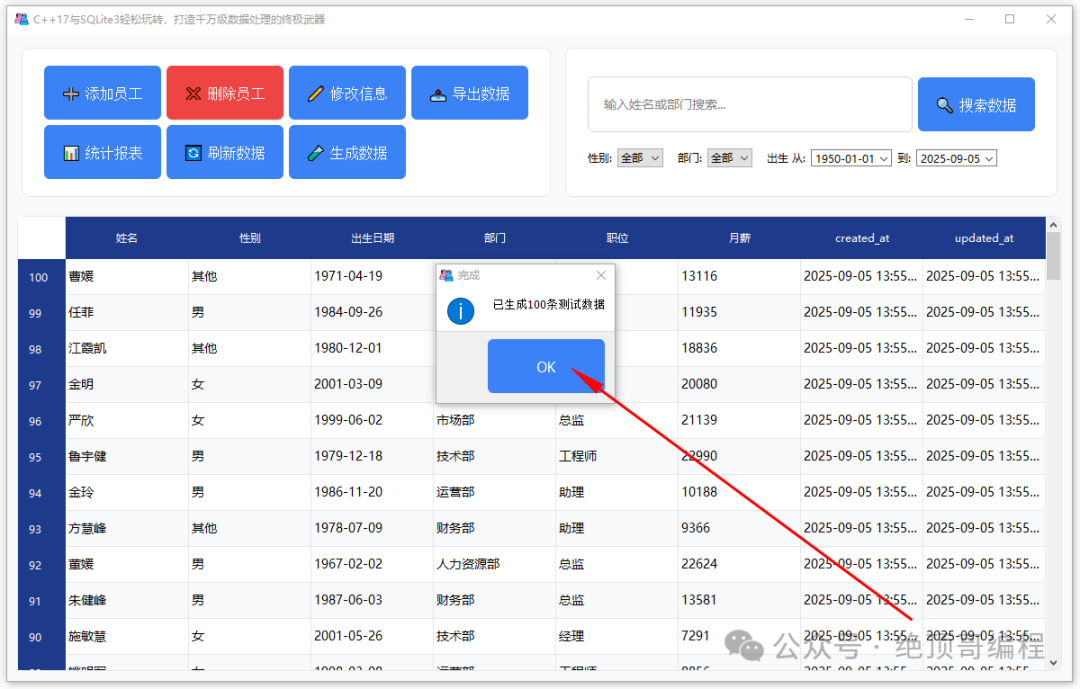
1: Initialize Test Data
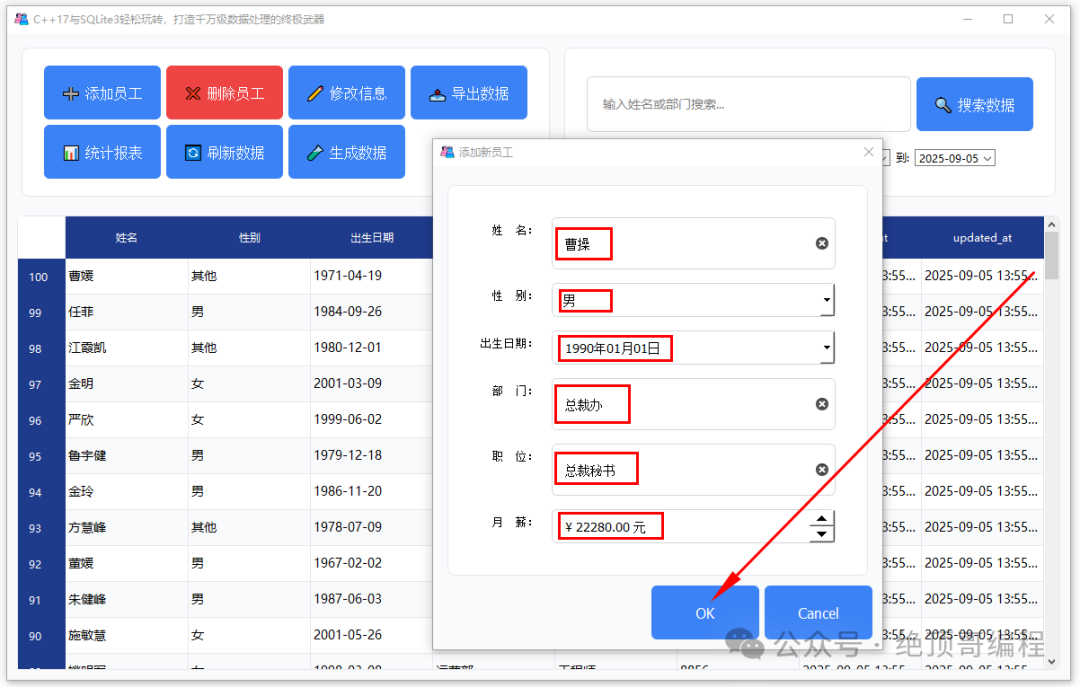
2: Add Employee
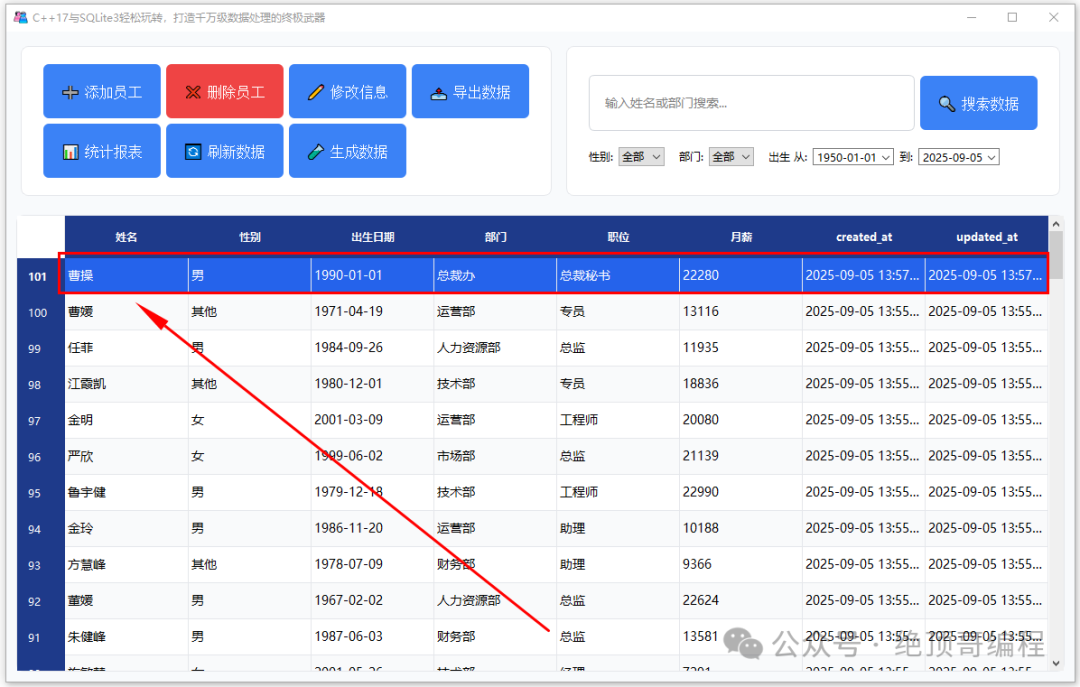
3: Statistical Report
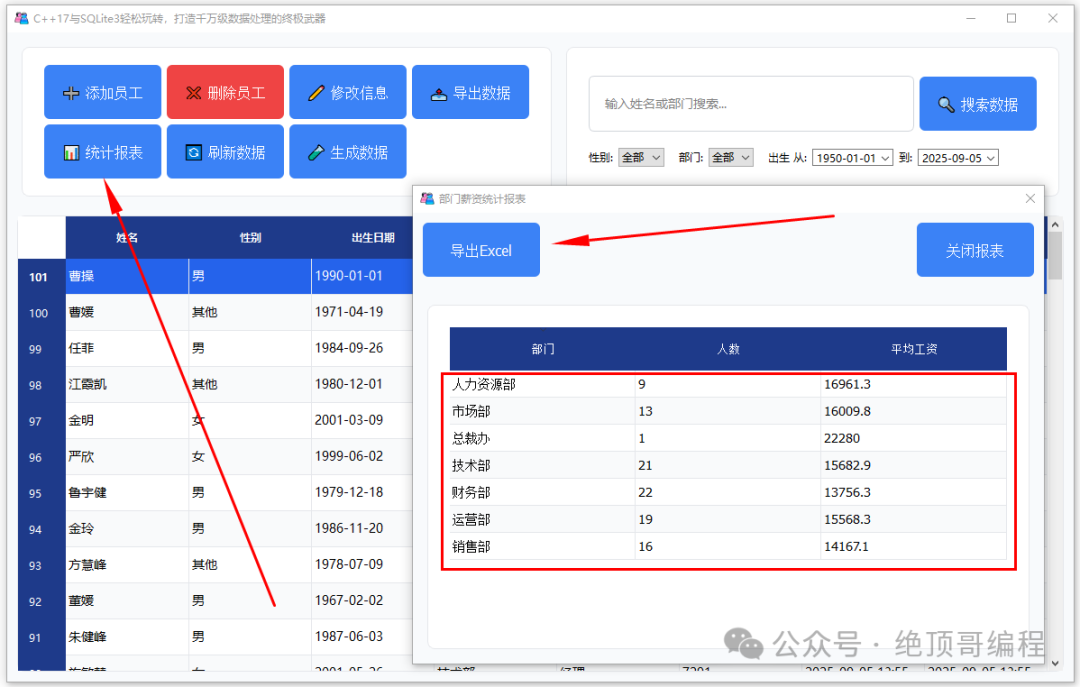
4: Delete Employee
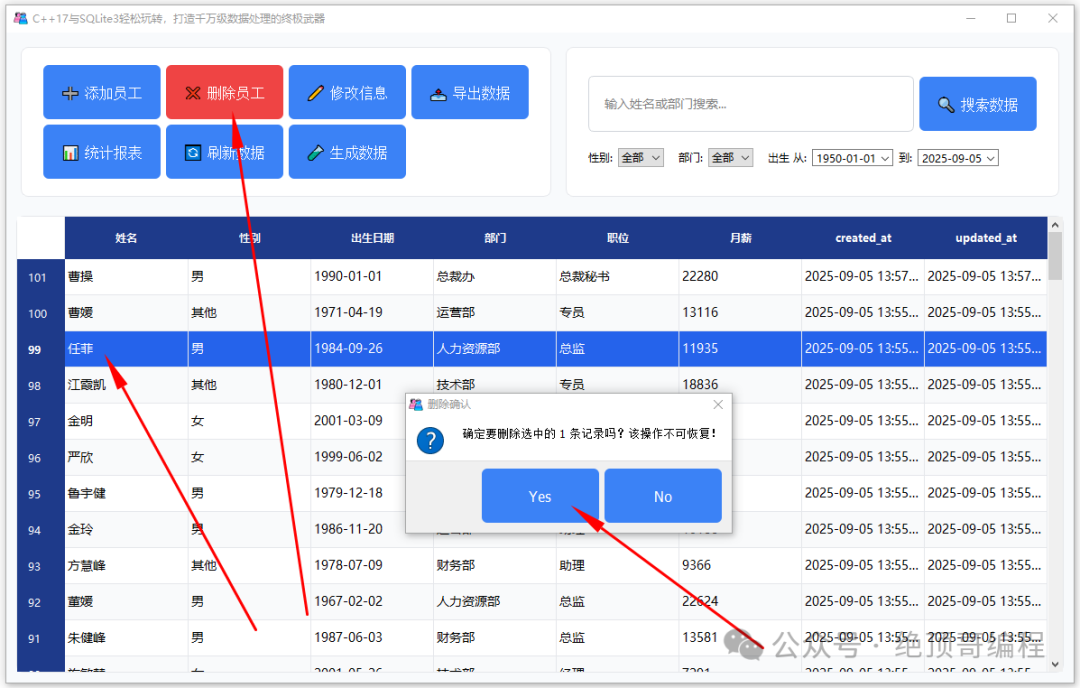
5: Query Function (Gender and Department Filtering)
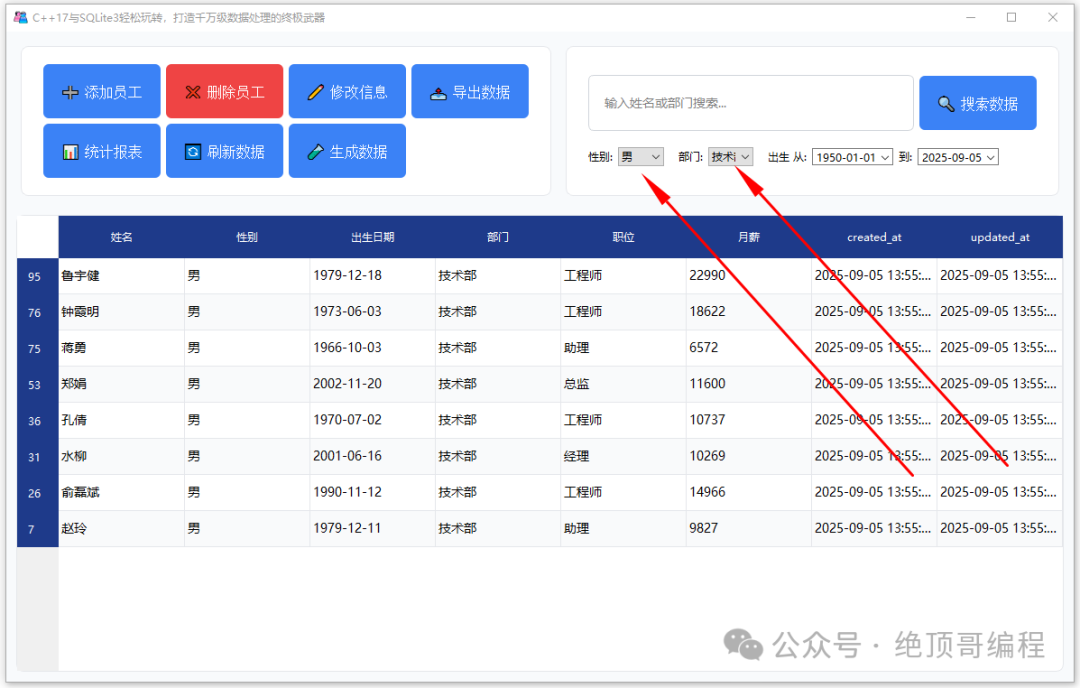 Other functions can be operated by everyone.
3: 【Project】🏗️ Project Overview and Features
1: Project Overview
This project is a lightweight human resources data management system suitable for personnel information maintenance and statistics in small and medium-sized enterprises. The system is implemented using Qt Widgets + SQLite3, providing convenient CRUD, export, statistics, and filtering capabilities, and has undergone multiple performance optimizations designed for handling millions of records, ensuring smooth operation and interaction.
2: Feature Characteristics
【Data Management】
Add, edit, and delete employee information (name, gender, birth date, department, position, monthly salary)
List sorting, full row selection, alternating row display
【Advanced Search and Filtering】
Multi-field fuzzy matching based on QSortFilterProxyModel (name/department/position)
Case-insensitive matching; reserved full spelling/initial matching interface (can be integrated with a pinyin library later)
Birth date range filtering (from/to)
Department and gender dropdown filtering
Search input supports debounce (reducing frequent recalculations)
【Batch Operations】
QTableView supports multi-selection (ExtendedSelection)
Batch delete: one SQL + transaction (IN clause), faster speed
Batch export: can export only selected rows or all data after current filtering
【Data Export】
Export to CSV (comma-separated) or TSV (tab-separated)
Standard CSV escaping (commas, newlines, double quotes are correctly escaped), and write BOM for Excel to correctly recognize UTF-8
【Input Validation】
Required: Name, Department, Position
Valid range: Salary >= 0; Birth date cannot be later than today
Unified interception and friendly prompt before submission in the dialog (Ok)
【Statistical Reports (Basic Version)】
Department dimension: number of people, average salary list
Supports exporting to CSV
Planned enhancements: bar chart of department number/salary, gender ratio, age distribution, export to PNG/PDF
4: 【Project】📋 Source Code Analysis
1: main.cpp File
/* * Main entry file for the Qt application * Compilation notes: Qt Core and Qt Widgets module dependencies must be configured */
// Include custom main window class header file (interface logic implemented in this class)
#include "mainwindow.h"
// Include Qt application base class header file (core module that must be included)
#include <QApplication>
/* * Main program function * @param argc - number of command line arguments * @param argv - command line argument array * @return int - application exit code */
int main(int argc, char *argv[]){    // Create Qt application object (must be the first created Qt object)    // Parameter handling description: automatically recognizes built-in command line parameters like "-style"    QApplication a(argc, argv);
    // Instantiate main window (custom class inherited from QMainWindow)    MainWindow window;
    /* Basic window configuration */    // Set window title bar text (including version number)    window.setWindowTitle("C++17 and SQLite3 Made Easy, The Ultimate Weapon for Processing Millions of Records");
    // Set initial window size (unit: pixels)    // Design basis: adapt to the information display needs of 1080p screens    window.resize(1200,750);
    // Set minimum window size limit (to ensure normal display of interface elements)    // Note: this setting does not affect window maximization operations    window.setMinimumWidth(1100);    window.setMinimumHeight(700);
    // Set window icon (using Qt resource system path)    // Path format description: ":/" prefix indicates embedded resources, must be defined in .qrc file    // Icon specifications suggested: at least include multiple sizes of 256x256/64x64/32x32/16x16    window.setWindowIcon(QIcon(":/new/prefix1/images/logo.ico"));
    // Show main window (default hidden, must be actively displayed)    window.show();
    // Enter main event loop (blocking until the window is closed)    // Function description: handles user input, system events, timers, etc.    return a.exec();}
2: adddialog.h File
// adddialog.h
#ifndef ADDDIALOG_H    // Header file protection macro to prevent multiple inclusions
#define ADDDIALOG_H
#include <QDialog>         // Base dialog class
#include <QLineEdit>       // Single line text input box
#include <QComboBox>       // Dropdown selection box
#include <QDateEdit>       // Date editing control
#include <QDoubleSpinBox>  // Double precision number input box
#include <QFormLayout>     // Form layout manager
#include <QDialogButtonBox>// Dialog button group
// Employee information adding dialog class, inherited from QDialog
class AddDialog : public QDialog{    Q_OBJECT  // Enable Qt's meta-object system (required for signal-slot mechanism)
public:    // Constructor    // Parameter parent: parent window pointer, default is null    explicit AddDialog(QWidget *parent = nullptr);
    // The following methods are used to get input data from the dialog    QString name() const;       // Get name    QString gender() const;     // Get gender    QDate birthdate() const;    // Get birth date    QString department() const; // Get department information    QString position() const;   // Get position information    double salary() const;      // Get salary value
private:    // Interface control pointers    QLineEdit *nameEdit;       // Name input box    QComboBox *genderCombo;    // Gender selection dropdown (usually includes "Male", "Female", etc.)    QDateEdit *birthEdit;      // Birth date selection control    QLineEdit *deptEdit;       // Department input box    QLineEdit *posEdit;        // Position input box    QDoubleSpinBox *salarySpin;// Salary value input box (supports decimals)
protected:    void accept() override;    // Validation before submission};
#endif // ADDDIALOG_H
3: adddialog.cpp File
#include "adddialog.h"
#include <QVBoxLayout>
#include <QLabel>
#include <QGroupBox>
#include <QMessageBox>
AddDialog::AddDialog(QWidget *parent) : QDialog(parent){ // Set dialog properties setWindowTitle("Add New Employee"); setMinimumSize(500, 400);
// Main layout QVBoxLayout *mainLayout = new QVBoxLayout(this);
// Create group box QGroupBox *formGroup = new QGroupBox(); QFormLayout *form = new QFormLayout;
// Name input box nameEdit = new QLineEdit; nameEdit->setPlaceholderText("Please enter the full name of the employee"); nameEdit->setMinimumHeight(38); nameEdit->setClearButtonEnabled(true);
// Gender selection dropdown genderCombo = new QComboBox; genderCombo->addItems({"Male", "Female", "Other"}); genderCombo->setMinimumHeight(38);
// Birth date selection control birthEdit = new QDateEdit; birthEdit->setCalendarPopup(true); birthEdit->setDisplayFormat("yyyy-MM-dd"); birthEdit->setMinimumHeight(38); birthEdit->setDateRange(QDate(1950, 1, 1), QDate::currentDate()); birthEdit->setDate(QDate(1990, 1, 1));
// Department input box deptEdit = new QLineEdit; deptEdit->setPlaceholderText("For example: Human Resources"); deptEdit->setMinimumHeight(38); deptEdit->setClearButtonEnabled(true);
// Position input box posEdit = new QLineEdit; posEdit->setPlaceholderText("For example: HR Manager"); posEdit->setMinimumHeight(38); posEdit->setClearButtonEnabled(true);
// Salary input control salarySpin = new QDoubleSpinBox; salarySpin->setRange(0, 999999999); salarySpin->setPrefix("¥ "); salarySpin->setSuffix(" Yuan"); salarySpin->setDecimals(2); salarySpin->setMinimumHeight(38);
// Add labeled form rows form->addRow("Name:", nameEdit); form->addRow("Gender:", genderCombo); form->addRow("Birth Date:", birthEdit); form->addRow("Department:", deptEdit); form->addRow("Position:", posEdit); form->addRow("Monthly Salary:", salarySpin);
// Set form alignment and spacing form->setLabelAlignment(Qt::AlignRight); form->setContentsMargins(20, 20, 20, 20); form->setSpacing(15); formGroup->setLayout(form);
// Create dialog button group QDialogButtonBox *buttons = new QDialogButtonBox( QDialogButtonBox::Ok | QDialogButtonBox::Cancel);
// Button beautification buttons->setStyleSheet(R"(
QPushButton {
background-color: #3B82F6;
color: white;
border: none;
padding: 10px 20px;
border-radius: 6px;
min-width: 80px;
font-weight: 500;
}
QPushButton:hover {
background-color: #2563EB;
}
QPushButton:pressed {
background-color: #1D4ED8;
}
QPushButton:disabled {
background-color: #9CA3AF;
}
)");
// Connect button signals connect(buttons, &QDialogButtonBox::accepted, this, &QDialog::accept); connect(buttons, &QDialogButtonBox::rejected, this, &QDialog::reject);
// Add to main layout mainLayout->addWidget(formGroup); mainLayout->addWidget(buttons); mainLayout->setAlignment(buttons, Qt::AlignRight);
// Set the entire dialog style setStyleSheet(R"(
QDialog {
background-color: #F8FAFC;
font-family: "Noto Sans CJK SC";
}
QGroupBox {
font-weight: 500;
font-size: 14px;
border: 1px solid #E5E7EB;
border-radius: 8px;
margin-top: 10px;
padding: 15px;
background-color: white;
}
QGroupBox::title {
subcontrol-origin: margin;
padding: 0 8px;
background-color: white;
color: #1E3A8A;
left: 10px;
top: -10px;
}
QLineEdit, QDateEdit, QComboBox, QDoubleSpinBox {
background: white;
border: 1px solid #D1D5DB;
border-radius: 6px;
padding: 8px 12px;
font-size: 14px;
}
QLineEdit:focus, QDateEdit:focus, QComboBox:focus, QDoubleSpinBox:focus {
border: 1px solid #3B82F6;
background-color: #EFF6FF;
}
)");}
QString AddDialog::name() const { return nameEdit->text().trimmed();}
QString AddDialog::gender() const { return genderCombo->currentText();}
QDate AddDialog::birthdate() const { return birthEdit->date();}
QString AddDialog::department() const { return deptEdit->text().trimmed();}
QString AddDialog::position() const { return posEdit->text().trimmed();}
double AddDialog::salary() const { return salarySpin->value();}
void AddDialog::accept(){ // Validation before submission: required and range if (nameEdit->text().trimmed().isEmpty()) { QMessageBox::warning(this, "Warning", "Name is a required field"); return; } if (deptEdit->text().trimmed().isEmpty()) { QMessageBox::warning(this, "Warning", "Department is a required field"); return; } if (posEdit->text().trimmed().isEmpty()) { QMessageBox::warning(this, "Warning", "Position is a required field"); return; } if (birthEdit->date() > QDate::currentDate()) { QMessageBox::warning(this, "Warning", "Birth date cannot exceed today"); return; } if (salarySpin->value() < 0) { QMessageBox::warning(this, "Warning", "Salary must be greater than or equal to 0"); return; } QDialog::accept();}
4: editdialog.h File
// editdialog.h
#ifndef EDITDIALOG_H
#define EDITDIALOG_H
#include <QDialog>
#include <QSqlRecord>
#include <QLineEdit>
#include <QComboBox>
#include <QDoubleSpinBox>
#include <QDateEdit>
#include <QSqlError>
#include <QSqlQuery>
#include <QFormLayout>
#include <QDialogButtonBox>
class EditDialog : public QDialog{ Q_OBJECT
public: explicit EditDialog(QWidget *parent = nullptr); void setData(const QSqlRecord &record);
QString name() const; QString gender() const; QDate birthdate() const; QString department() const; QString position() const; double salary() const;
private: QLineEdit *nameEdit; QComboBox *genderCombo; QDateEdit *birthEdit; QLineEdit *deptEdit; QLineEdit *posEdit; QDoubleSpinBox *salarySpin;
protected: void accept() override; // Validation before submission};
#endif // EDITDIALOG_H
5: editdialog.cpp File
#include "editdialog.h"
#include <QVBoxLayout>
#include <QGroupBox>
#include <QMessageBox>
EditDialog::EditDialog(QWidget *parent) : QDialog(parent){ setWindowTitle("Edit Employee Information"); setMinimumSize(500, 400);
// Main layout QVBoxLayout *mainLayout = new QVBoxLayout(this);
// Create group box QGroupBox *formGroup = new QGroupBox(); QFormLayout *formLayout = new QFormLayout;
// Initialize controls nameEdit = new QLineEdit; nameEdit->setPlaceholderText("Please enter the full name of the employee"); nameEdit->setMinimumHeight(38); nameEdit->setClearButtonEnabled(true);
genderCombo = new QComboBox; genderCombo->addItems({"Male", "Female", "Other"}); genderCombo->setMinimumHeight(38);
birthEdit = new QDateEdit; birthEdit->setCalendarPopup(true); birthEdit->setDisplayFormat("yyyy-MM-dd"); birthEdit->setMinimumHeight(38);
departmentEdit = new QLineEdit; deptEdit->setPlaceholderText("For example: Human Resources"); deptEdit->setMinimumHeight(38); deptEdit->setClearButtonEnabled(true);
posEdit = new QLineEdit; posEdit->setPlaceholderText("For example: HR Manager"); posEdit->setMinimumHeight(38); posEdit->setClearButtonEnabled(true);
salarySpin = new QDoubleSpinBox; salarySpin->setRange(0, 999999999); salarySpin->setPrefix("¥ "); salarySpin->setSuffix(" Yuan"); salarySpin->setDecimals(2); salarySpin->setMinimumHeight(38);
// Add form rows formLayout->addRow("Name:", nameEdit); formLayout->addRow("Gender:", genderCombo); formLayout->addRow("Birth Date:", birthEdit); formLayout->addRow("Department:", deptEdit); formLayout->addRow("Position:", posEdit); formLayout->addRow("Monthly Salary:", salarySpin);
// Set form alignment and spacing formLayout->setLabelAlignment(Qt::AlignRight); formLayout->setContentsMargins(20, 20, 20, 20); formLayout->setSpacing(15); formGroup->setLayout(formLayout);
// Create button box QDialogButtonBox *buttonBox = new QDialogButtonBox( QDialogButtonBox::Ok | QDialogButtonBox::Cancel);
// Button beautification buttonBox->setStyleSheet(R"(
QPushButton {
background-color: #3B82F6;
color: white;
border: none;
padding: 10px 20px;
border-radius: 6px;
min-width: 80px;
font-weight: 500;
}
QPushButton:hover {
background-color: #2563EB;
}
QPushButton:pressed {
background-color: #1D4ED8;
}
)");
// Connect signals and slots connect(buttonBox, &QDialogButtonBox::accepted, this, &QDialog::accept); connect(buttonBox, &QDialogButtonBox::rejected, this, &QDialog::reject);
// Main layout mainLayout->addWidget(formGroup); mainLayout->addWidget(buttonBox); mainLayout->setAlignment(buttonBox, Qt::AlignRight);
// Set dialog style setStyleSheet(R"(
QDialog {
background-color: #F8FAFC;
font-family: "Noto Sans CJK SC";
}
QGroupBox {
font-weight: 500;
font-size: 14px;
border: 1px solid #E5E7EB;
border-radius: 8px;
margin-top: 10px;
padding: 15px;
background-color: white;
}
QGroupBox::title {
subcontrol-origin: margin;
padding: 0 8px;
background-color: white;
color: #1E3A8A;
left: 10px;
top: -10px;
}
QLineEdit, QDateEdit, QComboBox, QDoubleSpinBox {
background: white;
border: 1px solid #D1D5DB;
border-radius: 6px;
padding: 8px 12px;
font-size: 14px;
}
QLineEdit:focus, QDateEdit:focus, QComboBox:focus, QDoubleSpinBox:focus {
border: 1px solid #3B82F6;
background-color: #EFF6FF;
}
)");}
void EditDialog::setData(const QSqlRecord &record){ nameEdit->setText(record.value("name").toString()); genderCombo->setCurrentText(record.value("gender").toString()); birthEdit->setDate(record.value("birthdate").toDate()); deptEdit->setText(record.value("department").toString()); posEdit->setText(record.value("position").toString()); salarySpin->setValue(record.value("salary").toDouble());}
QString EditDialog::name() const{ return nameEdit->text().trimmed();}
QString EditDialog::gender() const{ return genderCombo->currentText();}
QDate EditDialog::birthdate() const{ return birthEdit->date();}
QString EditDialog::department() const{ return deptEdit->text().trimmed();}
QString EditDialog::position() const{ return posEdit->text().trimmed();}
double EditDialog::salary() const{ return salarySpin->value();}
void EditDialog::accept(){ if (nameEdit->text().trimmed().isEmpty()) { QMessageBox::warning(this, "Warning", "Name is a required field"); return; } if (deptEdit->text().trimmed().isEmpty()) { QMessageBox::warning(this, "Warning", "Department is a required field"); return; } if (posEdit->text().trimmed().isEmpty()) { QMessageBox::warning(this, "Warning", "Position is a required field"); return; } if (birthEdit->date() > QDate::currentDate()) { QMessageBox::warning(this, "Warning", "Birth date cannot exceed today"); return; } if (salarySpin->value() < 0) { QMessageBox::warning(this, "Warning", "Salary must be greater than or equal to 0"); return; } QDialog::accept();}
Due to space limitations, please follow the UP master and join the group to download the project source code for research and learning.