Have you ever encountered the situation where you want to run a CPU on an FPGA, connect Ethernet, or link DDR, only to find yourself overwhelmed with toolchains, mismatched interfaces, and having to manually wire everything? It feels like battling monsters every day, with a pile of redundant scripts, hand-written buses, and endless manual checks… Let me tell you, this should not be the norm. LiteX acts like a ‘magic plugin’, eliminating these repetitive tasks so you can focus on writing algorithms and developing applications, significantly boosting your efficiency.
What is LiteX? LiteX is a SoC construction framework tailored by the Enjoy-Digital team for customer projects, which was later open-sourced to allow everyone to enjoy its benefits. Essentially, it is a SoC building framework written in Python, based on Migen (also a Python hardware description library), integrating various common buses, CPUs, memory, and peripherals, while seamlessly mixing Verilog/VHDL/SpinalHDL/nMigen code. In simple terms, it allows you to piece together modules and automate bitstream generation with scripts, just like installing a ‘cheat plugin’ for your FPGA!
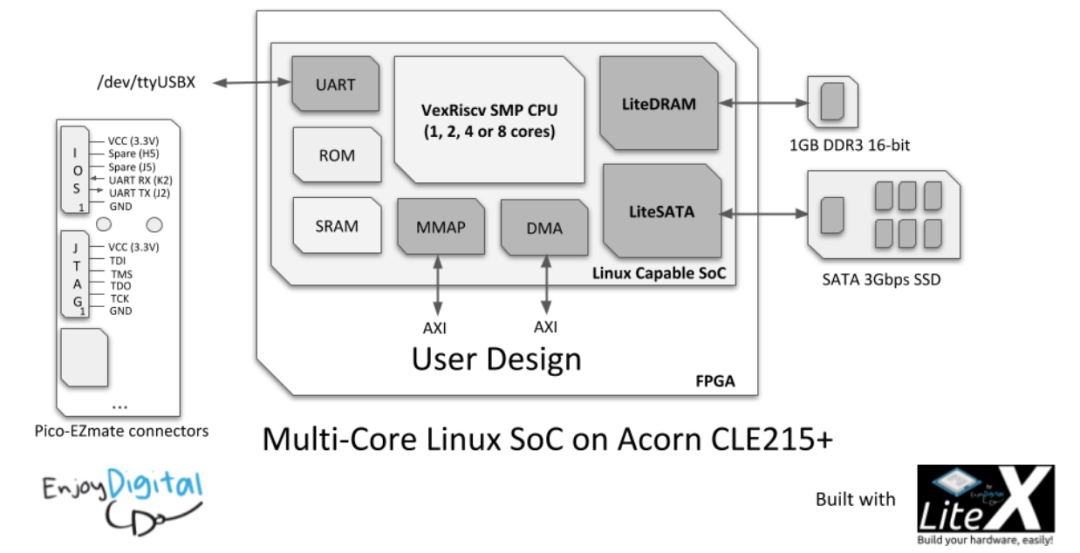
What Pain Points Does It Address?
- • Complicated Connections: Common buses like Wishbone, AXI, and Avalon-ST can be used directly without needing to draw wiring diagrams or worry about losing registers.
- • Heterogeneous Language Issues: Your Verilog, someone else’s VHDL, or even the new nMigen can all be integrated without the need for transcoding.
- • Debugging Hassles: Comes with Litescope and JTAG debugging bridge, allowing you to capture waveforms without needing to modify logic or rerun tools.
- • Multiple Toolchains: Choose from open-source chains, Vivado, or Quartus, catering to both beginners and experts.
- • Instant Example Instantiation: The ready-to-use LiteX-Boards support list allows you to find boards and run demos in no time.
- • Flexible Expansion: The entire process is in Python, allowing for parallel traditional and script-based workflows, whether you want to rely entirely on scripting or export Verilog.
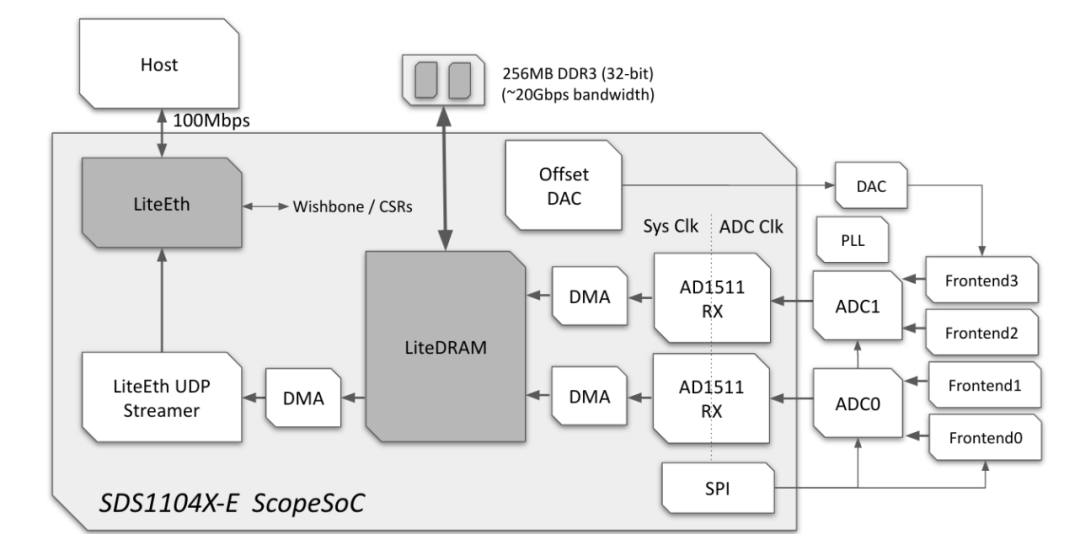
Main Features Overview
| Module | Function Description |
| Buses and Connections | Plug-and-play integration of various protocols like Wishbone, AXI, Avalon-ST |
| Basic Peripherals | RAM, ROM, Timer, UART, JTAG, GPIO, etc., readily available |
| Complex Peripherals | LiteDRAM (DDR), LitePCIe, LiteEth, LiteSATA, etc. |
| Soft CPU Cores | VexRiscv, Rocket, OpenRISC, LM32, PicoRV32, etc. |
| Debugging and Simulation | Litescope waveform capture, Verilator fast simulation |
| Toolchain Interfaces | Integration of open-source and vendor toolchains, eliminating the need to write scripts |
Installation and Getting Started
- 1. Environment Preparation
- • Python 3.6+, vendor FPGA development tools (Vivado/Quartus) and/or Verilator.
wget https://raw.githubusercontent.com/enjoy-digital/litex/master/litex_setup.py
chmod +x litex_setup.py
./litex_setup.py --init --install --user --config=standardpip3 install meson ninja
./litex_setup.py --gcc=riscv- • Simulate directly on your computer:
litex_sim --cpu-type=vexriscv - • Or navigate to LiteX-Boards and execute the target script for your board:
cd litex-boards/litex_boards/targets
python3 my_board.py --build
Pros and Cons Comparison
| Advantages | Disadvantages |
| Quickly build SoCs, reducing redundant RTL code | Those unfamiliar with Python and Migen may need some time to get started |
| Rich support for buses/peripherals/CPUs, one-stop assembly | The IP ecosystem is not as extensive as that of vendors, and special requirements may need custom extensions |
| High compatibility with mixed languages, full flexibility | Documentation updates are inconsistent, and edge cases may require digging into the source code |
| Can be exported to Verilog, compatible with traditional FPGA processes | Error messages can sometimes be unclear, requiring the use of debugging tools |
Final Thoughts Ultimately, LiteX is like installing a ‘cheat plugin’ for your FPGA: it allows you to delegate repetitive tasks related to connections, peripherals, debugging, and toolchains to the framework, so you can focus on assembling modules and writing scripts. If you want to experiment with Linux SoCs, DIY network cards, high-speed storage, or simply want to try using Python for hardware, LiteX can significantly accelerate your work. The community is also quite active, with examples on the Wiki, Q&A on Discord/IRC, and new boards or peripherals frequently being contributed. If you’re interested, dive in and learn while you play; the experience will definitely surpass writing Verilog from scratch.
Project Address: https://github.com/enjoy-digital/litexLiteX!