This article is the second in this series. In the previous part, we learned about some components of the Linux system kernel and application layer. In this part, we will continue this topic, clarifying what the kernel and application layers are, how they complement each other, and how the ARM64 privilege levels assist Linux in managing system resources through system calls.
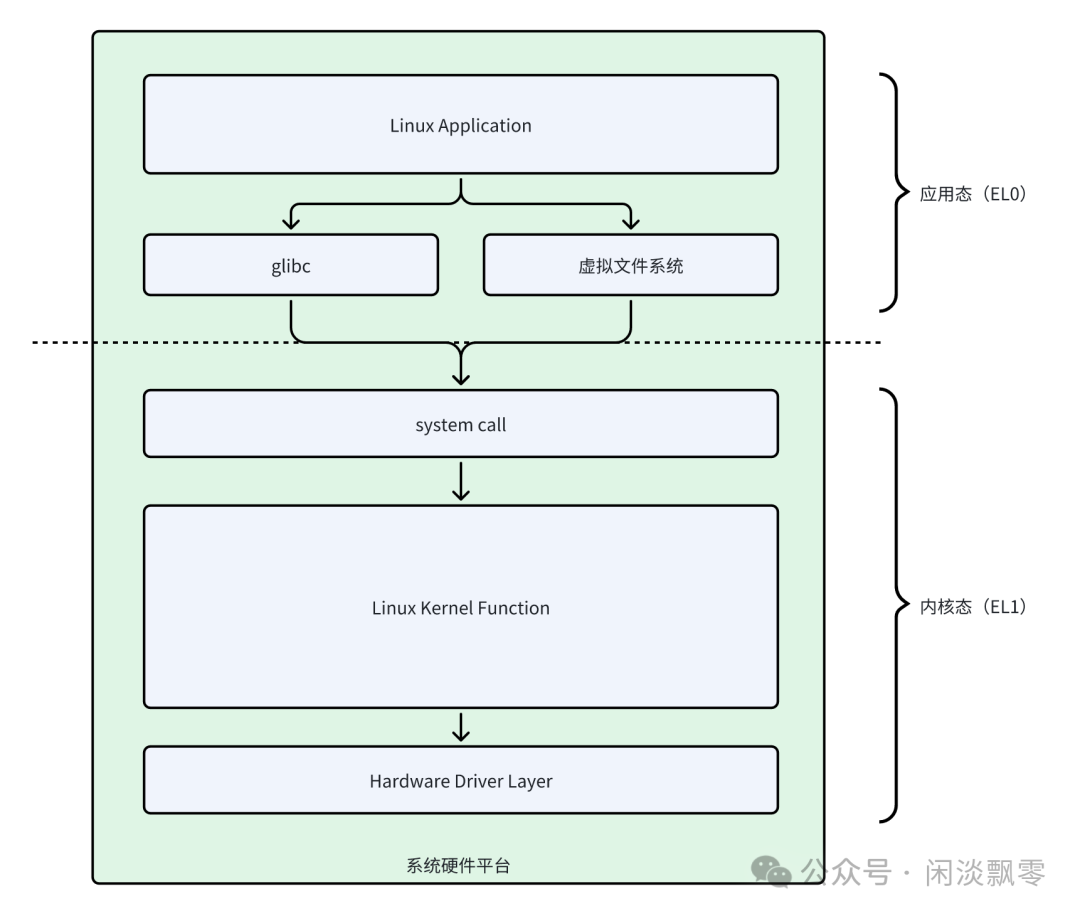
1. ARM64 Privilege Levels: The Foundation of Exception Levels
In the ARM64 architecture, there are no direct terms called “kernel mode” and “user mode”; instead, it uses exception levels. This is similar to the Ring 0 to Ring 3 in the x86 architecture but is designed to be more concise and modern.
ARM64 defines four exception levels, from EL0 to EL3, with higher numbers indicating higher privileges:
- • EL0 (Exception Level 0): User mode. This is where all normal applications run. Code at this level has the lowest permissions and cannot directly access most system registers or execute privileged instructions. If an application attempts to perform unauthorized operations, the CPU will trigger an exception and switch to a higher privilege level for handling (usually resulting in the kernel terminating the application).
- • EL1 (Exception Level 1): Kernel mode. The operating system kernel (such as Linux) runs at this level. It has full system permissions and can access all memory, hardware devices, and system registers.
- • EL2 (Exception Level 2): Hypervisor mode. Used for hardware-assisted virtualization. Hypervisors (such as KVM) run at this level, managing multiple operating system kernels (Guest OS running at EL1) and isolating and virtualizing hardware resources for them.
- • EL3 (Exception Level 3): Secure monitor mode. Responsible for switching between the secure world and the non-secure world. This is the core of ARM TrustZone technology, used to run extremely sensitive security code (such as Trusted Execution Environment, TEE).
The core relationship: For the Linux system, the most critical levels are EL0 and EL1. Applications live in the “sandbox” of EL0, while the Linux kernel operates in EL1, acting as the “supervisor” with supreme authority.
2. Distinction Between Linux Kernel Mode and User Mode
Linux utilizes ARM64’s EL0 and EL1 to clearly delineate two worlds:
| Feature | User Space (EL0) | Kernel Space (EL1) |
| Privilege Level | No Privilege | Highest Privilege (Operating System Level) |
| Memory Access | Can only access its own virtual memory space | Can access all physical memory and the memory space of all processes |
| Instruction Execution | Can only execute non-privileged instructions | Can execute all privileged instructions (such as configuring MMU, operating devices) |
| Stability Impact | Process crashes only affect itself | Kernel crashes can lead to system-wide failures (kernel panic) |
| Representative Entities | Applications (such as bash, vim, nginx) | Linux kernel itself, device drivers, system call handlers |
This enforced isolation is the cornerstone of system stability and security. Even a poorly written user program cannot directly crash the entire system.
3. How Chip Privilege Levels Assist Linux in Layered Resource Management
The ARM64 exception levels are not just labels; they enforce this layered management through hardware mechanisms:
- 1. Memory Management Unit: When the CPU is in EL0, the MMU’s page table translation mechanism checks the access. User processes can only see the portion of virtual memory mapped to them. Attempting to access unmapped or insufficiently privileged memory (such as trying to write to a read-only page) will immediately trigger a page fault exception, causing the CPU to switch from EL0 to EL1, where the kernel’s page fault handler will take over.
- 2. Instruction Execution Permissions: Instructions such as configuring timers, enabling/disabling interrupts, and accessing specific system registers will trigger an illegal instruction exception when executed in EL0, similarly leading to a switch to EL1.
- 3. Interrupt and Exception Handling: Any hardware interrupt (such as disk I/O completion, network packet arrival) or synchronous exception (such as division by zero, page fault) will cause the CPU to automatically switch from the current level (even if it is EL0) to EL1 and jump to the address specified in the kernel’s predefined exception vector table. This means that all hardware events and errors are ultimately handled by the kernel running at EL1.
In summary: The chip hardware acts as a “cold enforcer.” It delineates a safe sandbox for user programs (EL0), and any boundary violations are immediately captured by the hardware and “reported” to the kernel (EL1) for handling. This allows the Linux kernel to act as an omniscient manager, arbitrating all access to hardware resources (CPU, memory, devices).
4. System Call: The Secure Channel Between Applications and the Kernel
Since user programs are confined to a sandbox, how do they request services from the kernel (such as reading/writing files, allocating memory, sending network data)? The answer is: system calls. System calls are the only legitimate interface for user-mode programs to actively request services from the kernel. Essentially, it is a controlled, carefully designed “trap.”
1. The Key to Kernel Calls — ARM64 SVC #0 Instruction
<span>SVC #0</span> is the core privilege level switch instruction in the ARM architecture (Supervisor Call), which serves to:
- • Allow low privilege levels (such as ARM64 EL0/ARM32 User Mode) to actively trigger a privilege level switch, requesting high privilege levels (ARM64 EL1/ARM32 SVC Mode) to perform privileged operations;
- • Serve as theonly legitimate active path for user space to request kernel services (no other instruction can replace it).
2. Hardware Behavior of Executing <span>SVC #0</span> Under ARM64
When user mode (EL0) executes <span>SVC #0</span>, the CPU hardware willautomatically perform the following operations (without software intervention), which is the core of privilege level switching:
Step 1: Trigger Synchronous Exception, Mark Exception Type
After the CPU recognizes the <span>SVC</span> instruction, it triggers a “Supervisor Call Exception” and marks the exception type in the exception state register (distinguishing SVC, IRQ, FIQ, etc.).
Step 2: Save User Mode (EL0) Context
To restore execution when switching back to EL0, the hardware automatically saves the critical registers of EL0 toEL1’s exception stack (SP_EL1):
Step 3: Switch Privilege Level and Execution Mode
- • The CPU switches from EL0 (user mode, no privilege) to EL1 (kernel mode, privileged level);
- • Switch stack pointer: from
<span>SP_EL0</span>(user mode stack) to<span>SP_EL1</span>(kernel exception stack, initialized at kernel startup); - • Disable EL0 interrupts/exceptions (to avoid interruption during the switch process).
Step 4: Jump to Kernel Exception Vector Table
The ARM64 kernel initializes the exception vector table at startup, which is a fixed address memory area containing entry points for different exception types/privilege levels. The exception triggered by <span>SVC #0</span><span> will jump to the entry </span><code><span>EL0_SVC</span> in the vector table (corresponding to “SVC exception triggered in EL0”), and the kernel will start executing software processing logic from this entry.
3. Software Processing Flow of the Linux Kernel for <span>SVC #0</span>
After the hardware completes the privilege level switch and context saving, the kernel begins processing from the <span>EL0_SVC</span> entry, with the core steps as follows:
Step 1: Exception Entry Initialization (<span>el0_svc</span>)
The kernel first executes the general logic of the exception entry:
- • Check CPU status (such as whether it is in a virtualization scenario, whether there are security extensions);
- • Save remaining context (the hardware only saves core registers, and the kernel supplements saving
<span>x4-x30</span>, etc.); - • Enter the kernel’s system call processing flow.
Step 2: Parse System Call Parameters and Number
- • Read the
<span>system call number</span>(e.g.,<span>write</span>corresponds to 64,<span>open</span>corresponds to 56) from the<span>x8</span>register; - • Read system call parameters from
<span>x0-x3</span>registers (e.g.,<span>write</span>parameters:<span>fd</span>,<span>buf</span>,<span>count</span>); - • Validate parameter legality (e.g., check if
<span>buf</span>is a valid virtual address for EL0 to avoid application access to kernel memory).
Step 3: Execute System Call Kernel Function
In Linux, there is a system call table, which is defined in the kernel source code as the variable name <span>sys_call_table</span>. The <code><span>sys_call_table</span> is an array of pointers, where each member is a function pointer, and the array element number corresponds to the system call number. Different versions of Linux and different chip architectures have different definitions of <span>sys_call_table</span><span>, so you need to check it yourself. The following link and image show the </span><code><span>sys_call_table</span> for ARM64, Linux v6.2 as an example. For instance, <span>sys_call_table[0]</span><span> corresponds to the function executed for the io_setup system call (the system call number for io_setup is 0). Similarly, </span><code><span>sys_call_table[1]</span><span> corresponds to the execution function for the io_destroy system call (the system call number for io_destroy is 1).</span>
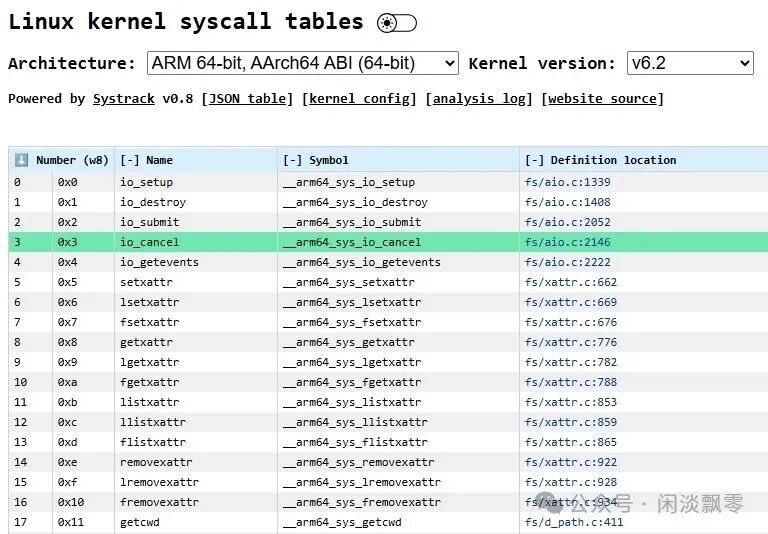
After execution, the return value will be written to the <span>x0</span> register (the return value of ARM64 system calls is passed through <span>x0</span>).
Step 4: Exception Return (ERET Instruction)
After the kernel completes the system call processing, it executes the <span>ERET</span> (Exception Return) instruction:
- • The hardware restores
<span>PC_EL0</span>from<span>ELR_EL1</span>(returning to the next instruction after the SVC instruction); - • Restores
<span>PSTATE_EL0</span>from<span>SPSR_EL1</span>(restoring user mode execution state); - • Switches back to EL0 privilege level, restoring
<span>SP_EL0</span>stack pointer; - • User mode continues execution, reading the return value from
<span>x0</span><span> (e.g., the number of bytes written by </span><code><span>write</span><span>).</span>
4. The System Call Chain for Printf
We will take <span>printf("Hello, world\n")</span> as an example to describe the complete call sequence from the application to the kernel.
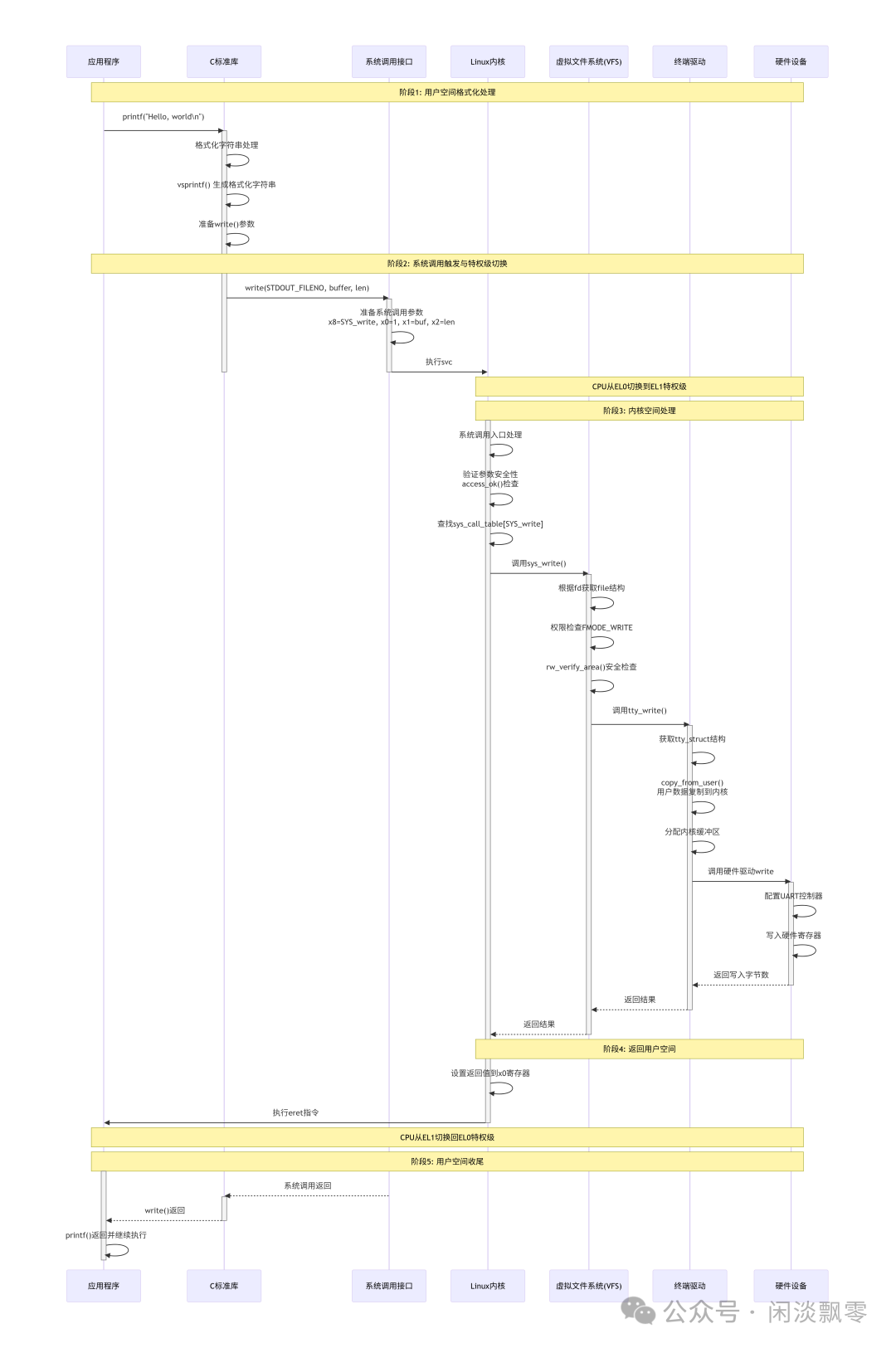
Stage 1: User Space Formatting Processing
- The application calls
<span>printf()</span><span>, passing the format string and parameters.</span> - The C standard library’s
<span>printf()</span><span> implementation calls </span><code><span>vsprintf()</span><span> for string formatting.</span> - Prepares parameters needed for the
<span>write()</span><span> system call.</span>
Stage 2: System Call Trigger and Privilege Level Switch
- The C library calls the
<span>write()</span><span> wrapper function.</span> - Prepares ARM64 system call parameters (system call number in x8, parameters in x0-x6).
- Executes
<span>svc #0</span><span> instruction, triggering a synchronous exception.</span> - The CPU hardware automatically switches from EL0 to EL1 privilege level.
Stage 3: Kernel Space Processing
- System call dispatch: The kernel looks up the
<span>sys_call_table</span><span> based on the system call number.</span> - Parameter validation:
<span>access_ok()</span><span> checks the validity of user pointers.</span> - VFS layer processing: Finds the corresponding file operation structure through the file descriptor.
- Permission check: Validates whether the file is writable and whether the memory area is accessible.
- Terminal driver: Copies user space data to the kernel space buffer.
- Hardware driver: Ultimately operates the hardware registers to send data to the terminal device.
Stage 4: Return to User Space
- The kernel sets the system call return value in the x0 register.
- Executes
<span>eret</span><span> instruction.</span> - The CPU hardware automatically switches back from EL1 to EL0 privilege level.
Stage 5: User Space Finalization
- The system call returns to the C library wrapper function.
- Returns from
<span>write()</span><span> to </span><code><span>printf()</span><span>.</span> - Returns from
<span>printf()</span><span> to the application, and the program continues execution.</span>
5. Mutual Achievement: The Symbiotic Relationship Between Kernel and Application Layer
Through the mechanisms described above, the kernel and application layer truly achieve “mutual accomplishment,” clearly depicting the complete picture from hardware to software:
The ARM64 exception levels (EL0/EL1) provide the hardware basis for isolation -> The Linux kernel utilizes this basis to delineate the user and kernel modes in software -> The chip hardware acts as an enforcer, enforcing isolation and assisting the kernel in layered resource management -> System calls serve as a carefully designed bridge, allowing isolated applications to safely and controllably request kernel services -> Ultimately, the constrained yet flexible application layer and the omnipotent yet stable kernel layer depend on and complement each other through this “request-response” model, jointly constructing our powerful and reliable modern operating system.