In the Linux server operation and maintenance system, log files serve as a “barometer” of the system’s operational status, recording key information such as service start and stop, error troubleshooting, and user operations. However, the continuous generation and unordered accumulation of logs can often consume a significant amount of disk space. Therefore, establishing a log management system that emphasizes “prevention first, remediation second” is one of the core tasks to ensure the stable operation of servers. Below, we will discuss methods to prevent logs from filling up the disk from the perspective of Linux operations.1. Preliminary Foundation: Accurately Identifying Log Usage IssuesBefore formulating defense strategies, it is essential to clarify the distribution and usage of log files to avoid blind operations. The Linux system provides several built-in commands that can quickly check the status of disks and logs.
# Disk space overview scan
df -h  # Display overall disk usage information
# Precise location of log files
du -sh /var/log/*
# Find log files in /var/log larger than 100MB
find /var/log -type f -size +100M -name "*.log"
System logs (e.g., /var/log/messages), application logs (e.g., Nginx’s access.log), and service logs (e.g., /var/log/rsyslog) are the most common sources of large logs.2. Core Defense Strategy One: Automated Cleanup to Cut Off the Source of Log AccumulationFor expired or oversized logs that have already been generated, manual cleanup is inefficient and prone to omissions. Implementing automated cleanup through scripts and scheduled tasks is the most direct defense measure. By using the find command to write targeted cleanup scripts, redundant logs can be filtered and deleted based on log age, file size, and other dimensions. For example, the following script can delete .log files in the /var/log directory that are older than 30 days and log the cleanup actions for traceability:
#!/bin/bash
# Log storage directory
LOG_DIR="/var/log"
# Maximum days to retain logs
MAX_DAYS=30
# Clean up log files
find $LOG_DIR -type f -name "*.log" -mtime +$MAX_DAYS -exec rm {} \;
# Record cleanup operation to log
echo "$(date '+%Y-%m-%d %H:%M:%S'): Deleted all old log files older than $MAX_DAYS days" >> $LOG_DIR/cleanup_history.log
exit 0
After saving it as autodellog.sh, first verify the script’s accuracy in a test environment to avoid accidentally deleting critical logs, which is a good habit to develop. Once verified, the cleanup script can be automatically run at preset intervals using cron jobs without manual intervention. Refer to previous articles: Linux Cron Jobs: Make Automation Your Strong Assistant, or simply: Stop Struggling with Cron! Linux Comes with These 2 Lightweight Tools, Temporary Tasks Done in 10 Seconds.3. Core Defense Strategy Two: Log Rotation for Lifecycle Management of LogsWhile automated cleanup can delete old logs, it does not solve the problem of “individual log files being too large”—oversized log files not only consume space but also affect log viewing and analysis efficiency. Log rotation (Log Rotation) achieves refined lifecycle management of logs through a mechanism of “splitting, compressing, and retaining”. It is the standard log governance solution for Linux systems, utilizing the built-in log rotation tool that automatically completes log rotation, compression, deletion, and other operations by reading configuration files. It supports various trigger conditions such as time and size, and can restart related services after rotation to ensure normal log generation. The core configuration files are divided into two categories:Main configuration file: /etc/logrotate.conf, which defines global default rules;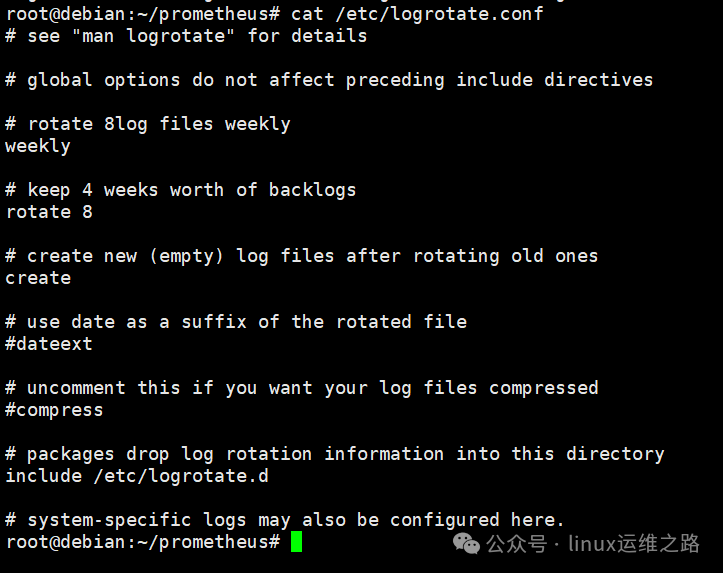 Application configuration files: files in the /etc/logrotate.d/ directory, which set personalized rules for specific services (e.g., rsyslog, ufw) and take precedence over the main configuration.
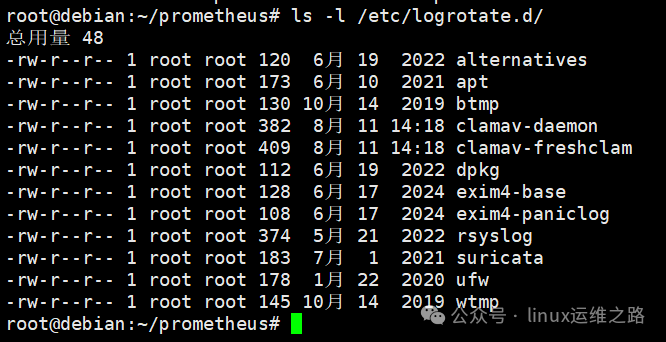 For example, the following configuration can implement a management strategy of “daily rotation, retaining 7 days, and compressing storage” for system logs in the /var/log directory:
/var/log/*.log {
daily                  # Rotation frequency: once a day
rotate 7               # Retain the last 7 rotated logs, delete the rest
compress               # Compress old logs using gzip to save disk space
missingok              # If the log file does not exist, continue without error
notifempty             # If the log file is empty, do not perform rotation
create 640 root adm    # New log file permissions are set to 640, owner root, group adm
postrotate             # Script to execute after rotation: reload rsyslog service
/etc/init.d/rsyslog reload > /dev/null
endscript
}
For application logs that are generated at a very fast rate (e.g., Nginx access logs in high concurrency scenarios), the size 100M parameter can be added to achieve “size-triggered rotation”—when the log file reaches 100MB, it will rotate immediately to avoid having a single file that is too large.4. Core Defense Strategy Three: Source Optimization to Reduce Invalid Log GenerationWhether it is cleanup or rotation, the essence is “post-processing” of already generated logs. Reducing the generation of invalid logs at the source can fundamentally alleviate disk usage pressure, which requires adjusting log levels and optimizing service configurations. For example, system services can reduce debug logs by modifying *.debug to *.info in /etc/rsyslog.conf; for specific applications in production environments, it is necessary to consult with development colleagues about which logs can be turned off. Operations should not make unilateral decisions to turn them off to avoid future bugs where developers need a specific log, and you respond that it has been turned off.5. Advanced Defense Strategy: Log Management Solutions in Scaled ScenariosWhen the operation and maintenance environment expands from a single server to a multi-node cluster, traditional local log management methods can no longer meet the needs, requiring the introduction of centralized management and monitoring systems to achieve global log control. Centralized logging systems can unify the collection, storage, and analysis of logs from all servers, completely eliminating reliance on local disks. Currently, mainstream solutions include the ELK Stack (Elasticsearch + Logstash + Kibana), which allows local servers to retain only short-term logs while synchronizing all other logs to remote storage, fundamentally avoiding local disks being filled with logs. Additionally, cloud hosts can utilize log services provided by cloud vendors (for those with a budget), but I have not used this feature, so I won’t elaborate on it here.Logs filling up the disk is not a sudden failure but a result of long-term management deficiencies. From the perspective of Linux operations, preventing such issues requires building a full-link system of “precise positioning – automated cleanup – lifecycle management – source optimization – centralized monitoring”. Through the strategies and tools described in this article, operations personnel can transform logs from “disk killers” into “operation assistants”, ensuring stable disk space on servers while fully leveraging the value of logs for fault troubleshooting and system monitoring. Otherwise, the situation will only lead to: when problems arise, the boss questions your usefulness; when there are no problems, the boss also questions your usefulness.