1. Introduction
In the process of writing projects, multithreading is often involved. Programming multithreaded applications usually involves issues of thread safety, which is why mutexes are often used to ensure thread safety.
However, the use of mutexes can often lead to another problem: deadlocks.
A deadlock, simply put, occurs when there are two shared resources, one in your possession and one in mine. I wait for you to finish using your resource to give me mine, and you wait for me to finish using mine to give you yours, creating a situation of mutual waiting that results in a deadlock.
Therefore, here, in a Linux environment, we will use C++11’s multithreading programming to simulate a deadlock and attempt to diagnose it from an “unaware” perspective using shell + GDB.
2. Simulating Deadlock
1 #include <iostream> 2 #include <thread> 3 #include <mutex> 4 5 using namespace std; 6 7 mutex mtxA; 8 mutex mtxB; 9 10 void taskA() { 11 lock_guard<mutex> lockA(mtxA); 12 cout << "Thread A gets Lock A!" << endl; 13 this_thread::sleep_for(chrono::seconds(1)); 14 lock_guard<mutex> lockB(mtxB); 15 cout << "Thread A gets Lock A and B!" << endl; 16 cout << "Thread A releases all resources!" << endl; 17 18 } 19 20 void taskB() { 21 lock_guard<mutex> lockB(mtxB); 22 cout << "Thread B gets Lock B!" << endl; 23 this_thread::sleep_for(chrono::seconds(1)); 24 lock_guard<mutex> lockA(mtxA); 25 cout << "Thread B gets Lock B and A!" << endl; 26 cout << "Thread B releases all resources!" << endl; 27 } 28 29 int main() { 30 31 thread t1(taskA); 32 thread t2(taskB); 33 34 t1.join(); 35 t2.join(); 36 37 return 0; 38 }Here, we used C++11’s multithreading programming to simulate a deadlock scenario.
First, for thread t1, it will execute the work function taskA. In taskA, thread t1 first acquires the mutex mtxA. Then it sleeps for 1 second, allowing thread t2 to execute the work function taskB, during which thread t2 acquires the mutex mtxB. At this point, when thread t1 wakes up wanting to acquire lock B, it finds that B is held by t2. When t2 acquires mtxB, it immediately tries to acquire mtxA, which is held by the sleeping t1.
Thus, thread t1 and t2 are in a cycle of waiting for each other’s resources while releasing their own resources, resulting in a deadlock.
We name this file: deadLock.cc and compile it using g++, generating an executable file (tip: make sure to add -pthread, as the C++11 multithreading library is based on the pthread library in Linux):
g++ deadLock.cc -pthread -o deadLock -gThus, the executable file is generated, and it can be run:
./deadLockRunning result:
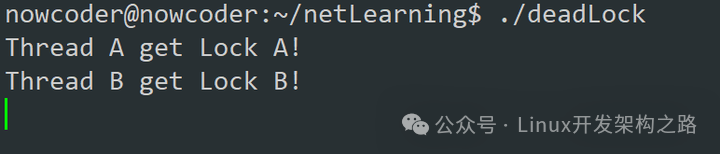
We can see that threads t1 and t2 each acquired a lock, and they are both waiting for the other to release their lock, thus causing a deadlock.
3. Diagnosing Deadlock
First, when we suspect a program has a deadlock, we can check the CPU and memory utilization of the process. If a deadlock occurs (assuming it is a mutex), the threads that are deadlocked will be in a blocked state, and thus will not occupy much CPU, leading to low CPU and memory utilization. We can use the ps aux command to get the status of a process:
ps aux | grep deadLock
Here we can see two processes related to deadLock: 6586 and 6674. The latter is the process generated after executing the grep command, so the first process is the one we want to diagnose.
Next, we use the top command to check the CPU and memory utilization of the process:
top -Hp 6586
We can see that there are three threads in this process. Upon careful consideration, they should correspond to threads t1, t2, and the main thread. Their CPU and memory usage is 0, indicating a high likelihood of a deadlock.
At this point, the process is already running. In actual projects, we generally cannot stop a process to debug it with GDB. Therefore, we can only use GDB’s attach command to trace this process:
First, superuser privileges are required, so enter the password:
suThen:
gdb attach 6586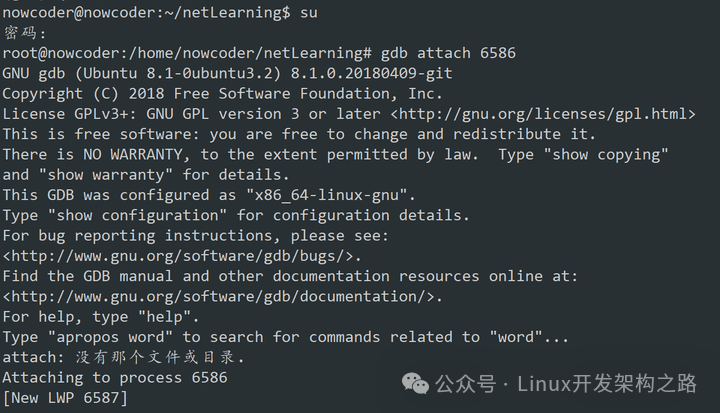
Next, check the stack call situation of the three threads:
thread apply all bt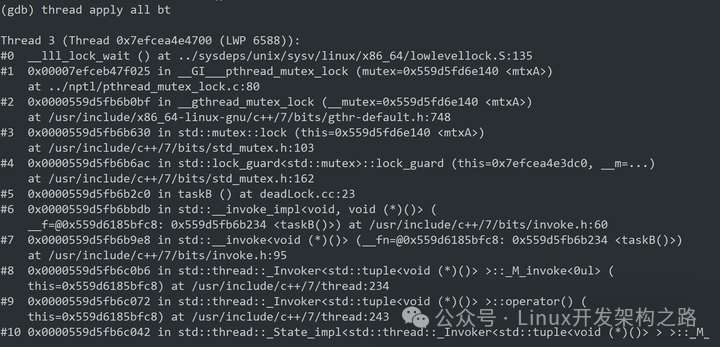
(Press enter)
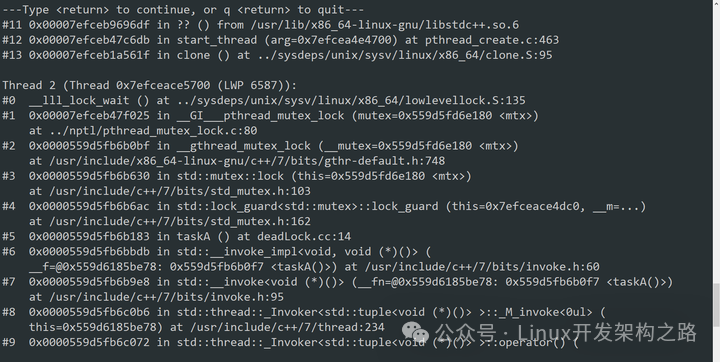
(Press enter)
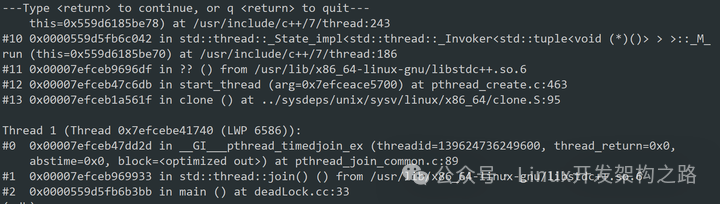
We can see that the three images above show the stack call situation of the three threads. Let’s carefully observe each thread:

Here, the red box indicates main, showing that thread 1 is the main thread.
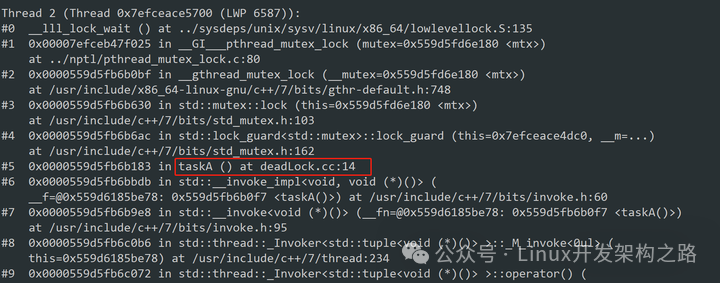
Here, the red box indicates taskA, showing that thread 2 is thread t1.
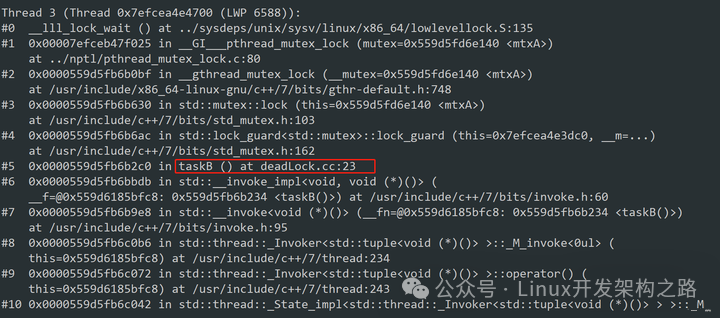
Here, the red box indicates taskB, showing that thread 3 is thread t2.
Thus, we know that thread 1 is the main thread, thread 2 is t1, and thread 3 is t2. Therefore, the next step is to check the stack call situation of each thread individually. Use:
info threadsTo get:

Each thread’s index.
Use thread + thread index to switch to a specific thread:
thread 1
Use bt to view the current thread’s stack call:

We can roughly browse that the current thread has no calls related to locks, so it is unlikely that a deadlock occurs in this thread.
Need C/C++ Linux server architect learning materials, add group 812855908 to obtain (materials includeC/C++, Linux, Golang technology, Nginx, ZeroMQ, MySQL, Redis, FastDFS, MongoDB, ZK, streaming media, CDN, P2P, K8S, Docker, TCP/IP, coroutines, DPDK, ffmpeg etc.), free sharing

Next, switch to thread 2 and use bt to view the stack:

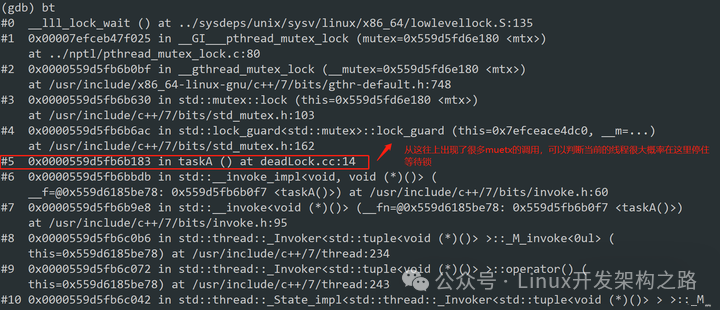
In the above image, looking from top to bottom, find the combination of process name + line number that appears last, which is found on line 14 of the program. Let’s check what line 14 is in the program using vim:
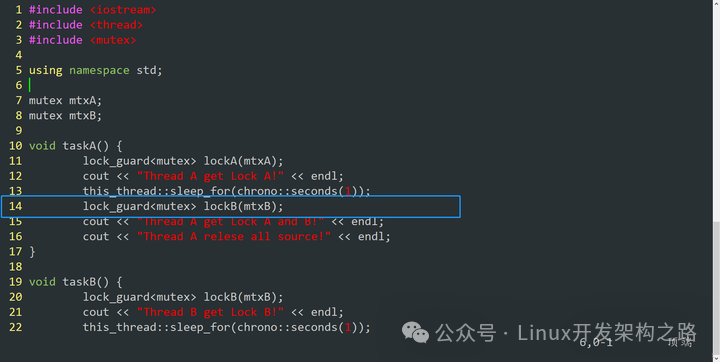
It happens to be the line where thread t1 wakes up and tries to acquire lock B. So it can be concluded that this thread is unable to acquire the lock and is continuously blocked waiting.
Let’s check the situation of thread 3:

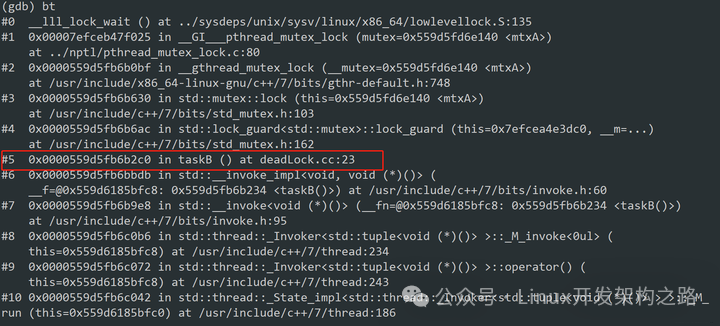
We can see that thread 3 is basically blocked after executing line 23 of the process. Let’s see what line 23 is:
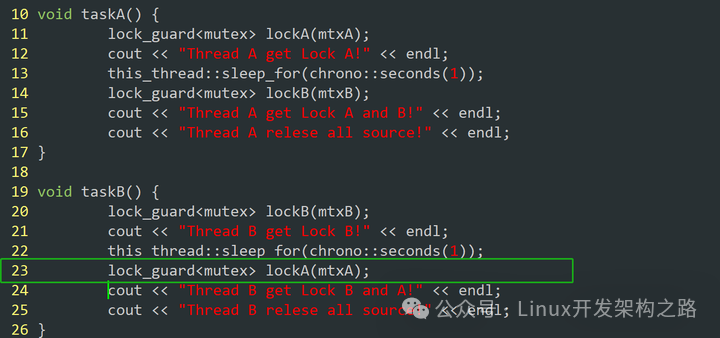
We can see that thread t2 wants to acquire lock A, but lock A is held by t1, so they are both waiting for each other to release the lock, resulting in a deadlock.
At this point, the diagnosis is essentially complete. There are many ways to resolve a deadlock, such as using a resource ordering method, where locks are allocated to threads t1 and t2 in the same order (in this case, thread t1 acquires A then B, while thread t2 acquires B then A, leading to a deadlock), or allocating locks to one thread first, allowing it to release all locks after use, which can also resolve the deadlock issue.