 Last year, in the second half, I designed a product (a small batch production). Some areas on the board needed an MCU for simple control.Since I am most familiar with the STM32 series, I chose the cheapest 20-pin STM32F030F4P6 for use.At that time, it was a bit over two yuan each, not the cheapest MCU solution, but it was the fastest for me to develop.A month later, during the second batch procurement, the same seller’s price had increased significantly, but I continued to use it.Another month later, the price had surprisingly increased again, so I switched to the pin-compatible STM32L010F4P6, which cost less than four yuan.Although it was still more expensive than the original, it was cheaper than the F030F4P6 at that time.Later, the price of STM32F030 skyrocketed (although the MCU cost is not a large proportion), so I started to look for domestic substitutes.Trial ①CKS32F030F4P6. It is said to be binary compatible with STM32F030 and is cheaper. I bought a sample to test and was surprised to find it could be downloaded using ST-Link, recognized by ST-Link Utility as STM32F030. I burned the original HEX without modification, and the running effect was the same as STM32. Since the functionality I needed was very simple, the functionality verification I used was fine, but it does not mean 100% compatibility with STM32. It was cheap and useful, but early this year, it also went out of stock and prices increased.Trial ②HK32F030MF4P6. When I found that domestic substitute MCUs were also starting to run out of stock, I considered other options, not ruling out using C51 as a substitute in the future. Since pin compatibility also had to be considered, I modified the PCB to be compatible with STM8S003, which was no longer compatible with STM32F030. Then, I discovered the peculiar model HK32F030MF4P6. The manufacturer also had a model called HK32F030F4P6, which was pin-compatible with STM32F030. However, the former was compatible with STM8S003. I tested the sample and found it could not be recognized by ST’s tools and could only use OpenOCD to write scripts for downloading. Although the pin distribution changed, I found in the manual that the registers were basically the same as STM32, so I used an STM8S small board to write a code segment, and it worked fine for lighting, so I went ahead with the PCB production.Trial ③3XM1008F6P6. Recently, I had another project that required STM32F031F6P6, but due to stock shortages, I had to find a substitute model. The CKS32F031 was already unavailable. I searched and found this model, which claimed to be compatible with ST’s F030/031, and the price was reasonable. It seemed the manufacturer was promoting it, offering free shipping for samples, so I verified it first. Surprisingly, it could again be recognized by ST tools as STM32F0, but my code could not function normally after being burned in.
Now let’s talk about the pitfalls I encountered
For XM1008, I encountered two incompatibility issues with the original STM32 code.(1) The GPIO.BSRR register can be read and written in 32-bit/16-bit/8-bit in STM32, but on XM1008, writing the high 16 bits of BSRR with a half-word operation is ineffective—this can be resolved by modifying the source code. However, this suggests that XM1008 may not completely align with STM32 in terms of register access methods.(2) This was actually a bug in my STM32 code, but STM32 worked according to my intent, while it failed strictly on XM1008. I altered the memory mapping by manipulating the SYSCFG’s CR register without enabling SYSCFG in RCC. This erroneous operation surprisingly worked on STM32. The pitfalls with HK32F030MF4P6 arose because the board had just been soldered and was still in debugging. This issue cost me a lot of effort to troubleshoot. This chip can be seen as a variant of STM32F030. Although comparing the register definitions in the header files, it seemed identical to STM32… (but the devil may be in the details) my modified pin usage program did not work after being burned in, and I could not re-burn the program; the SWD port could not connect… My program used STOP mode, relying on external interrupts for wake-up. Based on my experience with STM32, SWD debugging should work in STOP mode unless the low-power debug option in DBGMCU is enabled. Strangely, I could not connect to SWD even using the reset pin (Connect under reset), making this MCU appear bricked. To troubleshoot, I used an experimental board and another chip, adding a delay in the code for the debugger to intervene. I discovered that if the SCB.CR’s SLEEPDEEP bit was not set, the external interrupt could wake up, meaning it worked normally in ordinary Sleep mode. Why was it not normal in STOP mode? Moreover, after entering STOP mode, not only could the external interrupt not wake up, but the reset pin also had no effect.Later, I noticed that the product manual mentioned that all pins except the power pins could act as GPIO. Oh, right, the NRST pin can also act as GPIO. Upon careful verification, I found that the NRST pin is actually PA0. My code had set all default pins to analog mode. Therefore, I had to set PA0 to AF to use it as a reset pin.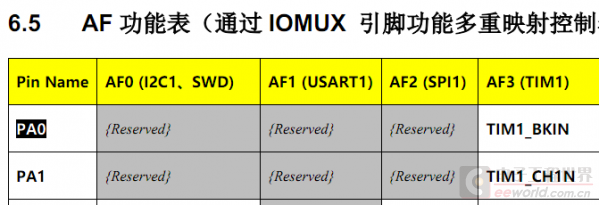 The reset pin issue was resolved. However, I still could not reset in STOP mode. This was strange; I measured the operating current, and it had not yet reached the low level of STOP mode. Upon reviewing the manual, HK32F030M has Sleep, Deep Sleep, and STOP modes, which is one more than STM32F030 has a Deep Sleep mode. The current I measured seemed to be similar to Deep Sleep. Could it be a mistake in the sleep mode?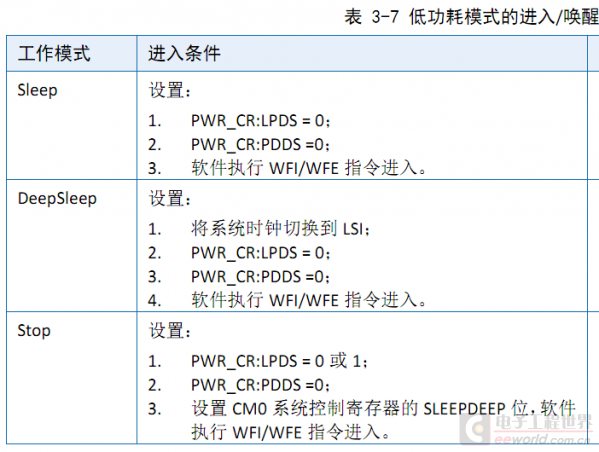
According to the manual’s instructions, I set the SLEEPDEEP bit to enter STOP mode without any issues. Where did this pitfall come from?
However, after writing 1 to the LPDS bit in PWR.CR, it miraculously worked. The current was lower, and I could also reset using the NRST pin.
What “pits” have you encountered when choosing domestic substitutes? Feel free to leave a comment and share your story!
Author: cruelfox, Source: Electronic Engineering World
This article is reprinted with permission from the “Electronic Engineering World” public account. The reprint is for learning and reference only and does not represent the views of this account. This account also does not bear any infringement responsibility for its content, text, and images.
END♥Click 👇 the business card to follow me♥Previous Recommendations1. I stepped on another landmine! Over 1000 sets of boards need to be reworked, tears are all I can say! 2. A Bluetooth chip with a working circuit so simple it’s shocking, let’s take a look together 3. How I converted 51 code to STM32 driver code