In this era of data flying everywhere, information is like the stars in the universe, densely packed and countless. So how are these stars connected? What do they rely on? They rely on —network protocols!
When it comes to the best partner of network protocols, we must mention the heavyweight of the open-source community —Linux. This system is not to be underestimated; its network protocol stack is known as the “Swiss Army Knife of communication,” with many functions, high efficiency, and great flexibility, allowing you to tinker with it however you like and still get clear results.
Whether you are a newcomer to the field or a seasoned coder with years of experience,understanding the network protocol mechanisms of Linux is an essential step on your path to advancement. Just like learning to cook, you have to know what a pot looks like first, right?
Therefore, this article is specifically designed to take you into the “mysterious cave” of Linux networking. We will start with the most basic network protocols, gradually unveil the Linux network protocol stack, see how TCP/IP works, and how Linux assembles these protocols like building blocks to make data run fast and stable.So, are you ready to hit the road together? Let’s unveil the mystery of Linux network protocols and experience what it means to have an “invisible force that supports the entire world”.
Part1Background of Computer Networks
Computer networks began with the ARPANET project of the U.S. Department of Defense in the 1960s, completed in 1969, and became the world’s first computer network. Over the decades, it transitioned from military to civilian use, expanding from local area networks to wide area networks. The TCP/IP protocol adopted by ARPANET in 1974 became the foundation of the internet, and in the 1980s, local area networks (LANs) and wide area networks (WANs) became widespread, with TCP/IP becoming the standard, marking the official establishment of the internet.
Part2Network Protocols
What is a protocol? Simply put, it is a “rule”!
Imagine you want to send a package from Beijing to Shanghai. Without any rules, the delivery person might throw your items into a vegetable market and have a vendor take them along… that would definitely cause chaos!
So everyone agrees: how to pack, how to write the address, and how to route must all follow the rules. This “rule” is called a —protocol.
However, in the network world, the “delivery person” is not a human but various light signals and electrical signals, which represent 0s and 1s through “frequency” and “strength”. To ensure everyone can understand these “secret codes” made up of 0s and 1s, a common format must be agreed upon in advance.
This is thesignificance of protocols: to enable communication and data exchange between different manufacturers and devices, even if they are not from the same family, without confusion.
Why do we need protocols? Without rules, it just won’t work!
Think about it, network communication is far more complex than you imagine:
- Data has to traverse mountains and rivers, and packets may get lost along the way;
- Where is the other computer? How do you find it?
- Once the data is sent, how does the other side interpret it? Will it be seen as garbled text?
- With countless devices (switches, routers, hubs) in between, how do we avoid errors?
All these issues are resolved by protocols. They act like an all-purpose housekeeper, arranging everything clearly from start to finish.

So in summary:Protocols are used to solve the problem of “how to accurately, efficiently, and securely transmit information”.
Why do we need layered protocols? To prevent your code from crashing!
Network communication is too complex; it is impossible to create an “all-purpose protocol” directly. So what to do? Clever humans invented a classic approach —layered design.
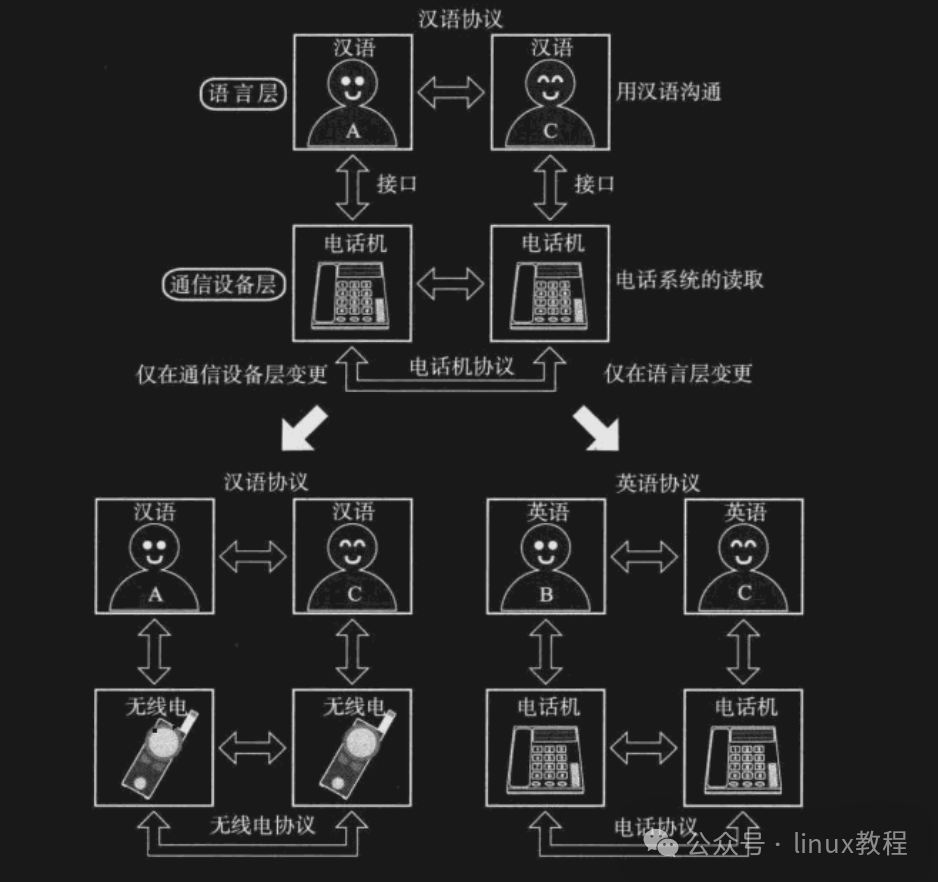
In simple terms, it breaks down complex tasks into smaller modules, with each layer only responsible for its own part, making design easier, maintenance more convenient, and problem identification simpler.
It’s a bit like building a house: the foundation is handled by the construction team, plumbing and electrical work by the renovation crew, and doors and windows by the installation team, each with their own responsibilities, leading to high efficiency and fewer conflicts!
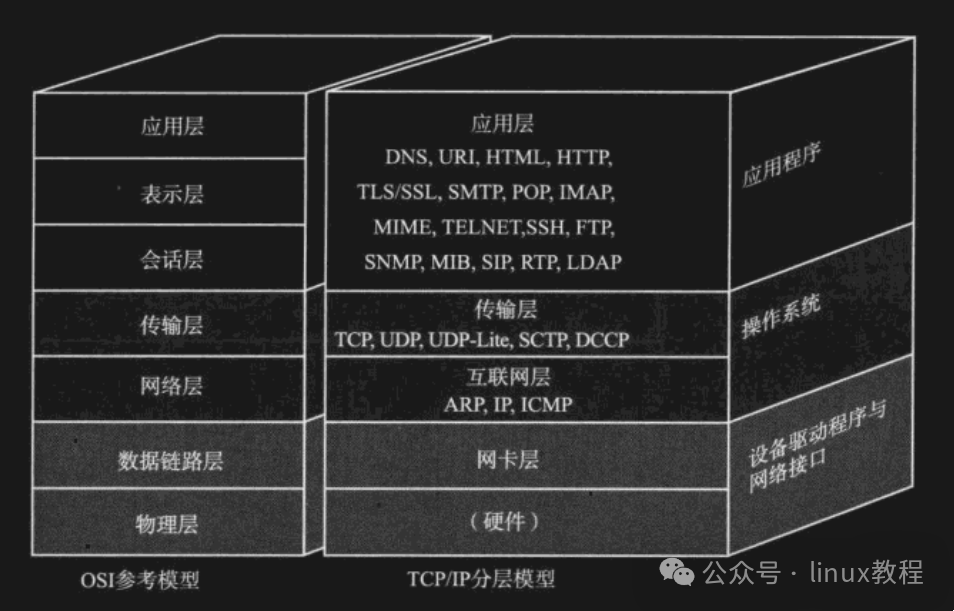
There are two common layered models:
1️⃣ OSI Seven-Layer Model — The Idealist in Textbooks
The OSI model is like the “perfectionist” in the theoretical world, consisting of seven layers:
- Application Layer
- Presentation Layer
- Session Layer
- Transport Layer
- Network Layer
- Data Link Layer
- Physical Layer
Each layer provides services to the layer above it while calling functions from the layer below, creating a clear logical structure.
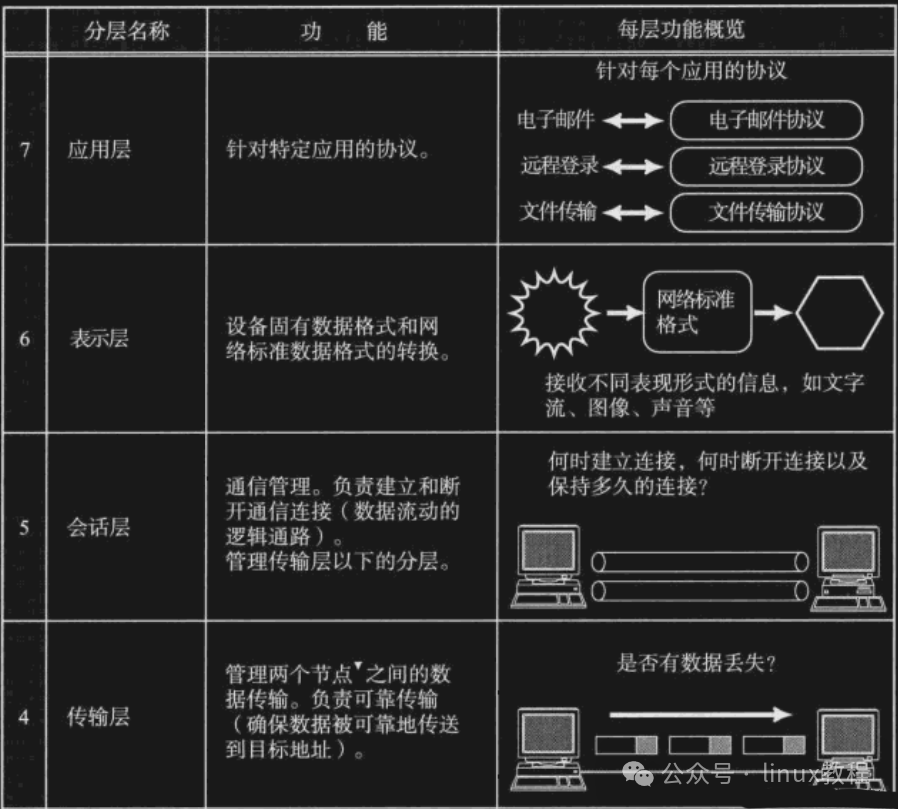
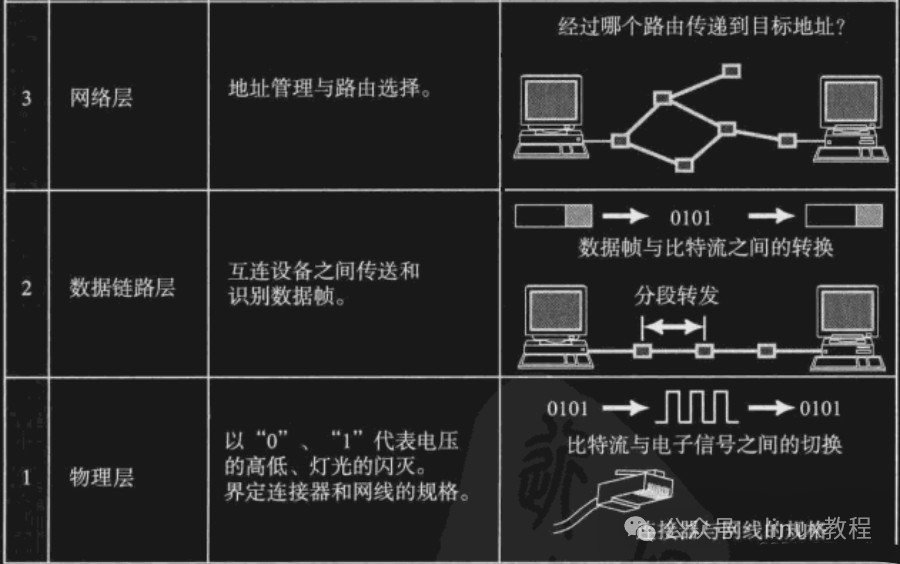
However, while this model is impressive, it is too complex in practice, and the engineering community feels that “the ideal is full, but the reality is thin,” leading to the emergence of the following…
2️⃣ TCP/IP Four-Layer/Five-Layer Model — The Practical Heavyweight
The TCP/IP model is more down-to-earth, with a simplified structure divided into four layers (sometimes referred to as five layers):
- Application Layer
- Transport Layer
- Network Layer (also called Internet Layer)
- Link Layer (also called Network Interface Layer)
- (Optional) Physical Layer (sometimes counted as a separate layer)
It merges the Presentation Layer and Session Layer from the OSI model into the Application Layer, simplifying things significantly. The internet we use every day is based on the TCP/IP protocol suite.
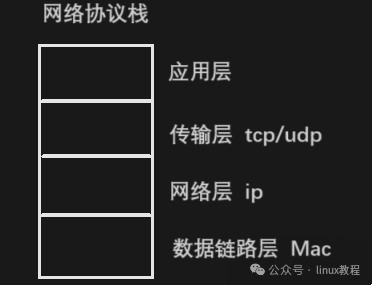
💡 Fun Fact: TCP/IP is actually a collection of protocols, not just TCP and IP; it includes HTTP, FTP, SMTP, ICMP, and many other siblings, forming a large family of protocols.
What does each layer do? Let’s break it down layer by layer
🔹 Physical Layer: The Bottom Layer “Mover”
Responsible for the transmission methods of light signals and electrical signals. For example:
- Twisted pair, coaxial cable, fiber optic
- WiFi uses electromagnetic waves
It determines how fast you can run, how far you can transmit, and how resistant to interference you are. Hubs operate at this layer.
🔹 Data Link Layer: Clarifying “Who Are You”
This layer is mainly responsible for the transmission and identification of data frames between devices. For example:
- Network card drivers
- Frame synchronization, collision detection, error checking
Standards like Ethernet and wireless LAN operate at this layer. Switches work here.
🔹 Network Layer: The Navigation Master, Guiding You
Responsible for addressing and routing between hosts. For example:
- IP protocol: identifies hosts through IP addresses
- Routing tables: plan data transmission paths
Routers act as commanders at this layer.
🔹 Transport Layer: Ensuring Data is Delivered Accurately and Reliably
Responsible for end-to-end data transmission between two hosts. For example:
- TCP protocol: reliable transmission, not afraid of packet loss
- UDP protocol: fast, but does not guarantee delivery
You can think of it as “the delivery company + bodyguard,” specifically responsible for safely delivering your package.
🔹 Application Layer: The Programmer’s Old Friend
Responsible for communication between application programs, for example:
- HTTP: web access
- FTP: file transfer
- SMTP: email sending
- Telnet: remote login
The network programs we usually write mainly operate at this layer.
Different Systems? Similar Interfaces!
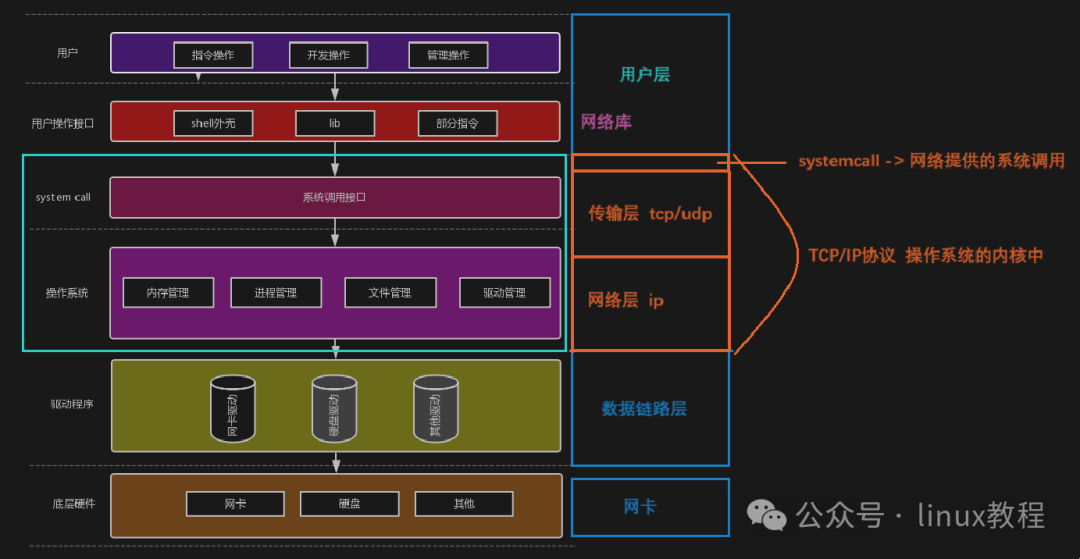
First, we need to understand one thing: whether it is Windows, Linux, or macOS, these operating systems actually perform similar tasks in network communication. Therefore, thesystem call interfaces (APIs) they provide are also quite similar.
For example, if you want to send a data packet:
- On Linux, you might use
<span><span>socket()</span></span>,<span><span>send()</span></span>, and<span><span>recv()</span></span>; - Windows also has corresponding
<span><span>Winsock</span></span>interfaces, which function similarly, just with different names;
In short,the interfaces look like relatives, and the work is quite similar, just with some different terminologies; you just need to pay attention to platform differences when coding. It’s like McDonald’s being available all over the country, with the burger recipe being the same, but some places might add spicy strips, while others might use a bit of Lao Gan Ma…
What is a Header? The “ID + Delivery Slip” of a Data Packet
Next, let’s take a look at one of today’s main characters — the Header.
Imagine you want to send a package; you must clearly write on the package:
- Who is the recipient?
- Who is the sender?
- How heavy is the package?
- Which courier company is being used?
- Where is it going?
In the network world, this “delivery slip” is called aHeader, which is usually located at the front of the data packet, containing various metadata and control information to help the data accurately find its target in the network.
Common headers include:
- Ethernet Frame Header (Data Link Layer)
- IP Header (Network Layer)
- TCP/UDP Header (Transport Layer)
- HTTP Header (Application Layer)
Each layer adds its own header, encapsulating the data like a “Russian doll”; at each layer, one shell is removed.
The Importance of Headers: Without Them, Data Gets Lost!
How important are headers? Let’s put it this way,a data packet without a header is like a self-driving trip without navigation, going wherever it pleases, and can get lost at any moment.
Its main functions include:
- Identifying Identity: Tells you who sent this data packet and who it is for;
- Routing Navigation: Instructs routers on how to forward it;
- Error Checking: Checks for packet loss or errors;
- Protocol Identification: Lets the receiver know which program to use for processing;
- Debugging Tool: By using packet capture tools to view header information, network issues can be diagnosed quickly.
So,the header is not only the ID of the data packet but also its itinerary, insurance policy, and instruction manual!
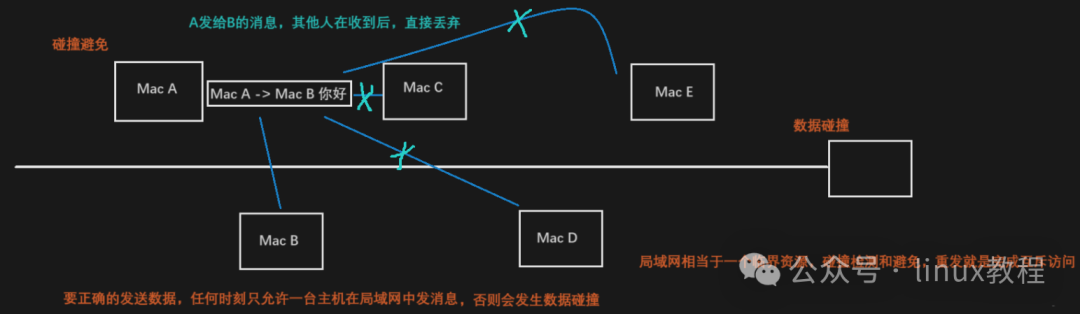
Local Area Network: The “Neighborhood Group Chat” of Your Community
Finally, let’s briefly mention the Local Area Network (LAN), one of the most common forms of networks in our daily lives.
You can think of it as a “WeChat group”; for example, several computers, phones, and tablets in your home are connected under one router, allowing them to share files, printers, and stream shows…
Characteristics of a Local Area Network:
- Short distance (generally tens to hundreds of meters)
- Fast speed (hundreds of megabits, gigabits, or even tens of gigabits)
- Low cost (a single network cable + a switch can suffice)
Common technologies include:
- Ethernet
- WiFi (Wireless LAN)
- Token Ring (an old relic)
A local area network is like a “community group”; everyone is a neighbor, and you don’t need to shout; just call out directly.
Part3Network Transmission Process
How do data packets traverse mountains and rivers?
You might think it’s as simple as “whoosh” and it’s done? Wrong! It undergoes a journey comparable to “couriers traversing China,” with layers of packaging, unpacking, security checks, vehicle changes, and highway travel…
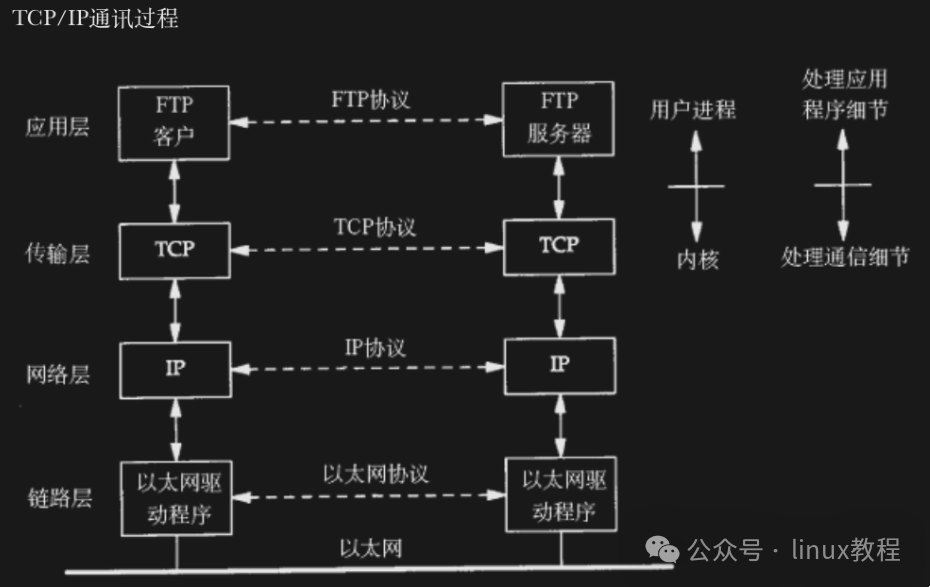
Why is it so complicated to send a file?
Imagine you want to send a file from Beijing to Guangzhou. If you send it out directly without any information, it might end up in the trash without anyone knowing.
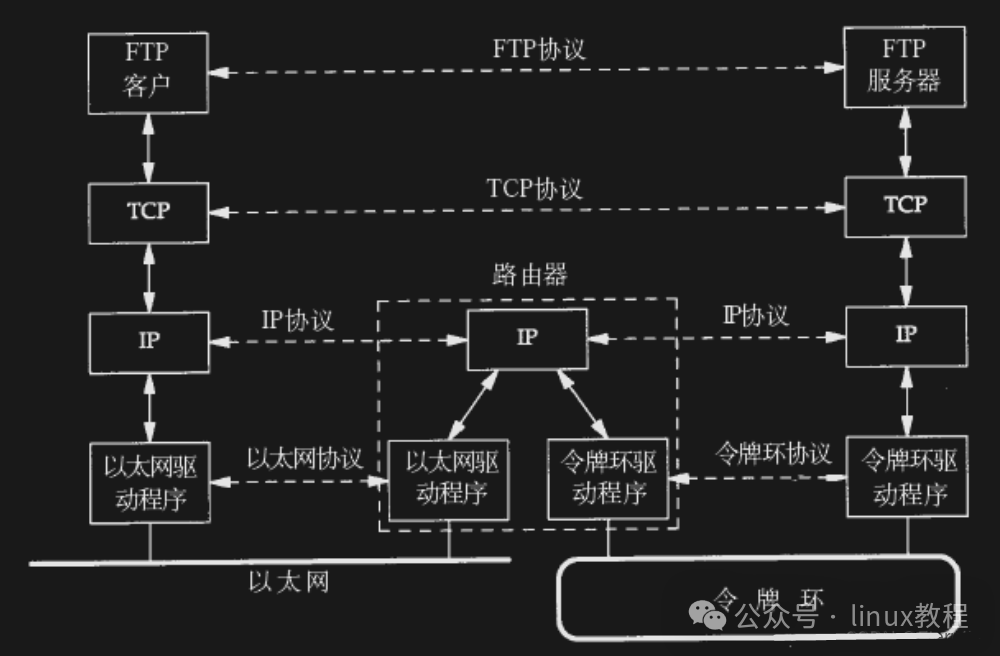
So you need to do several things:
- Put the file in an envelope (add the address)
- Then put it in a courier bag (add another layer of identification)
- Write down the recipient’s phone number and the sender’s phone number
- Find a courier company (choose a transmission method)
Once it reaches the destination, they also need to unpack it layer by layer to confirm who it belongs to and who it should be delivered to.
In the network world, this process is called —Encapsulation and Decapsulation.
Data packets have different names at different layers
Just like a person has different names in different situations, data has different “nicknames” at different protocol layers:
| Layer | Alias of Data Packet |
|---|---|
| Application Layer | Data |
| Transport Layer | Segment |
| Network Layer | Datagram |
| Data Link Layer | Frame |
These names are not arbitrary; they are designed to facilitate the identification of each layer’s data structure and processing methods.
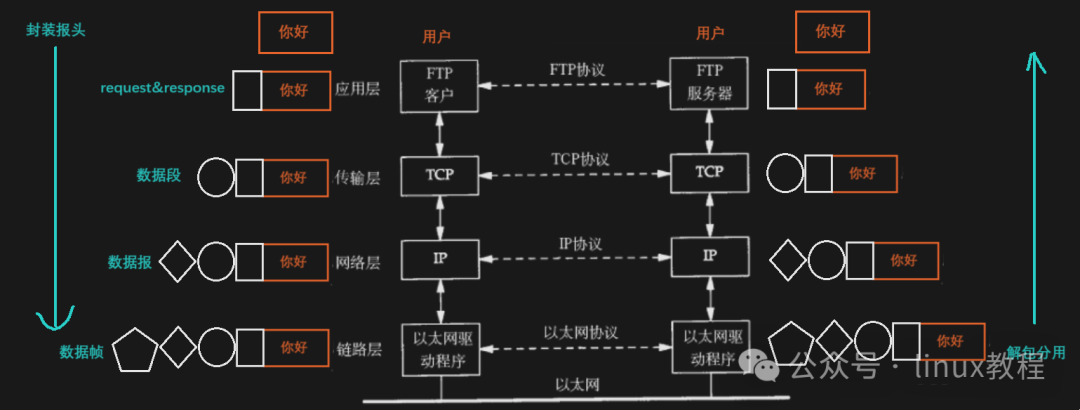
Encapsulation: Dressing Data in “Russian Dolls”
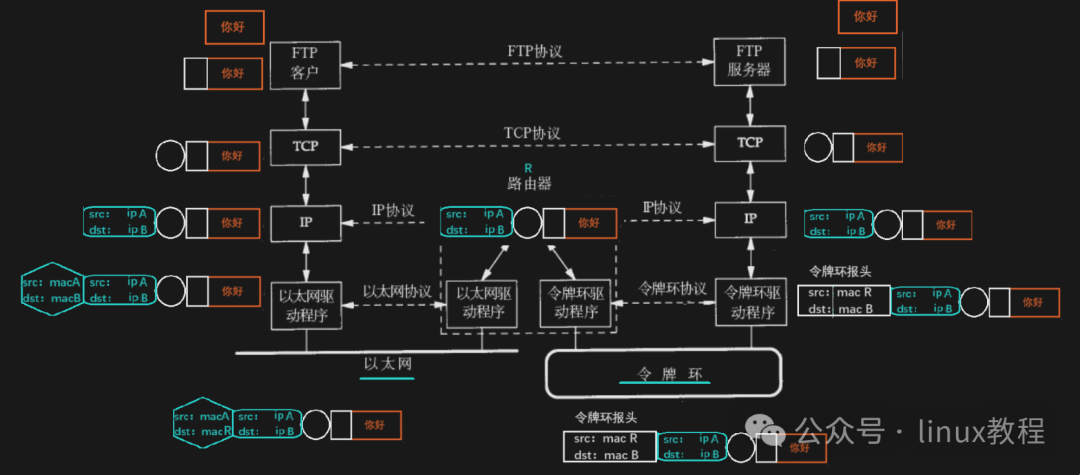
As your data moves down from the application layer, each layer adds aHeader, and this process is calledEncapsulation.
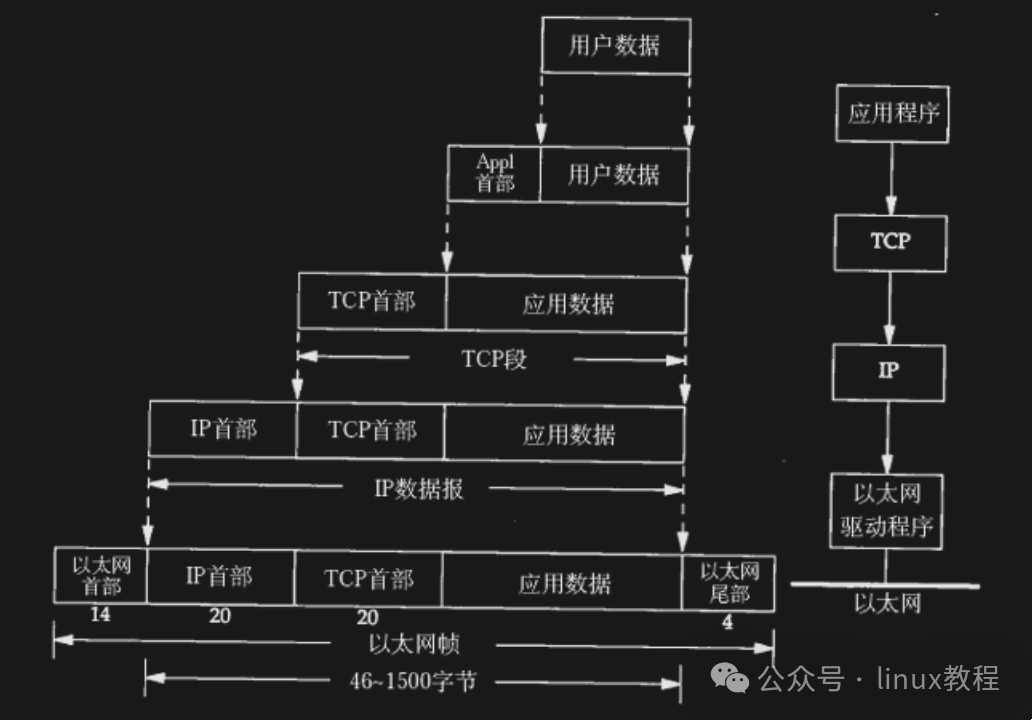
What does this header contain?
- Header length
- Payload length
- Upper layer protocol type
- Source and destination addresses
- Checksum, timestamp, etc…
In short, this header is like the various information on a delivery slip: sender, recipient, courier company, weight, volume, whether it is insured…
For example 🌰:
You send a message on WeChat: “Are we having hot pot tonight?” This text data first reaches the transport layer, where it is packed by TCP and has a port number added; then it goes to the network layer, where an IP address is added; and finally to the data link layer, where a MAC address and frame header are added; and it ultimately becomes a series of optical and electrical signals sent out via a network cable or WiFi.
Decapsulation: Once it arrives, start peeling the onion layer by layer
Once the data reaches the receiver, it must beginDecapsulation, which means peeling off the layers one by one.
Each layer only cares about its own header information and then decides who to hand the data over to based on the “upper layer protocol field” inside.
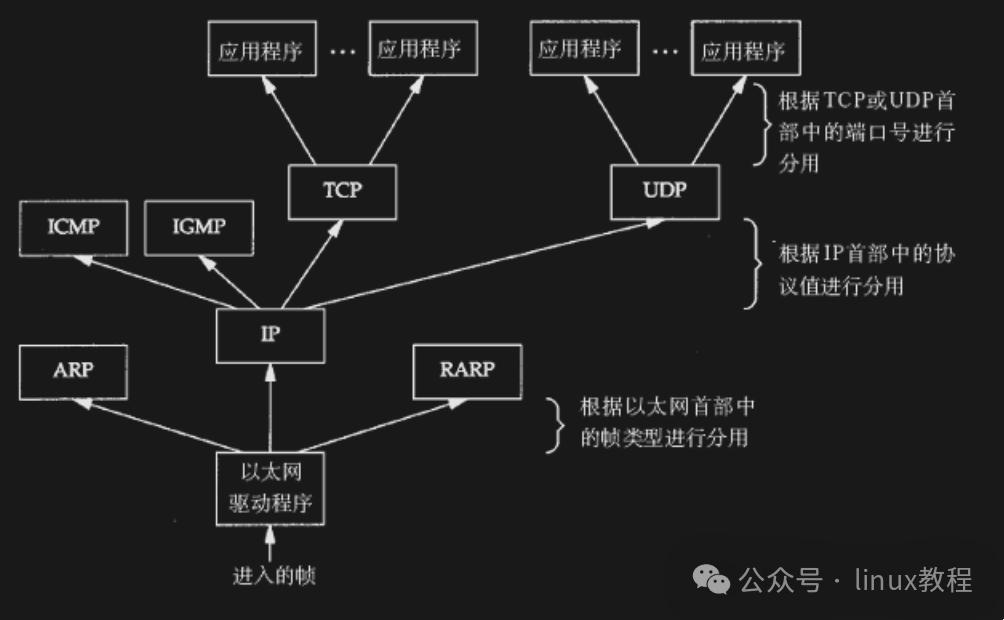
For example:
- The data link layer sees it is an IP protocol, so it hands the data over to the network layer;
- The network layer sees it is a TCP protocol, so it hands the data over to the transport layer;
- The transport layer sees it is an HTTP protocol, so it hands it over to the browser…
The entire process is like a courier delivering a package to the community entrance; the security guard sees it is Zhang San’s package and calls him to come down and pick it up.
Two Must-Solve Problems: The “Soul Questions” Every Protocol Must Face
No matter which layer of the protocol, whether TCP or UDP, IP or MAC address, you must answer two questions:
❓1. How to separate the header and payload from the message?
This requires apre-agreed format, for example:
- How long is the header?
- How long is the payload?
- How to calculate the offset?
With a unified format, you can correctly “slice” the data.
❓2. How to know who to hand the data over to?
This relies on theupper layer protocol fields, for example:
- The IP header has a field that tells you whether the upper layer is TCP or UDP;
- The TCP header also has fields that tell you the target port is 80 (HTTP), 443 (HTTPS), etc.;
This way, the operating system knows which application program to hand the data over to.
Part4Address Management: The Matters of IP and MAC
The two most important “IDs” in network communication are:IP Address and MAC Address. One is responsible for traveling far and wide, while the other handles local errands; understanding their differences and functions is crucial to truly grasp how data flies around the network!
IP Address: Who Are You? Where Are You From? Where Are You Going?
First, let’s get to know our most familiar network identifier —IP Address
-
How to Check: You can query the local IP address by enteringip -a in the terminal
-
Basic Definition: An IP address is a logical address used to uniquely identify network devices in the IP protocol
-
IPv4 Format:
-
32-bit binary number (4 bytes)
-
Commonly represented in dotted decimal format (e.g., 192.168.1.1)
-
Each decimal number corresponds to 1 byte (range 0-255)
Core Features
Has routing and addressing capabilities
Identifies communication endpoints
Usually remains fixed (except in cases like DHCP)
Detailed Explanation of MAC Address
-
Layer of Operation: Data Link Layer device identifier
-
Address Composition:
48-bit length (6 bytes)
Hexadecimal colon-separated representation (e.g., 08:00:27:03:fb:19)
Physical Characteristics
Hardcoded in the network card ROM
Generally unique worldwide (may repeat in virtual machines)
Some network cards support user modification
Transmission Characteristics:
Identifies the immediate transmission path of data frames
Changes with network hops
Reflects the “current hop” source and destination addresses
If the IP address is the destination address on the delivery slip, then the MAC address is the navigation hint in the courier’s hand: “Who to deliver to next”.
Thus, the MAC address changes at each hop because it only cares about “who I received it from and who I should forward it to”. It does not care about the entire journey, only the current stop.
Token Ring Network: The “Telephone Game” of Old Local Area Networks
Finally, let’s briefly mention the Token Ring Network, which, although now largely obsolete, was once a very classic method of local area network communication.
🔄 Its working principle is quite simple:
- All computers are connected in a logical or physical ring structure;
- Data transmission is controlled by a special signal called a “token”;
- Only the device that holds the token can send data;
- After sending, it releases the token for the next node to use.
This is somewhat like the “telephone game” we played as kids; you can only speak when it’s your turn. This mechanism avoids conflicts caused by multiple devices trying to send data simultaneously, but it is also inefficient and slow, leading to its replacement by Ethernet.
🎯 Summary
After reading this, you are already half a network veteran!
This is just the beginning; this wave of learning is merely thefirst door into the world of Linux networking. There are more high-energy contents waiting for you to challenge:
- Deeply understand TCP three-way handshake and four-way handshake, unveiling the mysteries of connection establishment and release;
- Explore the secrets of Socket programming, and write your own server;
- Learn about the network packet capture tool tcpdump, and see what your data packets have experienced;
- Study common protocols like ARP, ICMP, DNS, etc., to truly understand the world behind the network;
- You can even contribute to the source code of the Linux kernel network module, working with global developers to build the foundation of the next generation of the internet!
The path of technology has no end, only the continuous figures moving forward. May you continue to forge ahead in the future, carving out your own expressway in the world of Linux networking!
Previous Recommendations
[Big Company Standard] Linux C/C++ Backend Advanced Learning Path
Interviewer: If you ask about the TCP three-way handshake again, I will call the police!
Analysis of Meituan’s Trillion-Level KV Storage Architecture
Click below to follow 【Linux Tutorials】 to get programming learning paths, project tutorials, resume templates, big company interview questions in PDF format, big company interview experiences, programming communication circles, and more.