Recently, we encountered a project where the client’s network environment was unstable, leading to occasional packet loss and network jitter. This caused our software client to intermittently disconnect from the server, interrupting ongoing video conferences. This article takes this opportunity to explain in detail the heartbeat mechanism, packet loss retransmission mechanism, and other related content of the TCP/IP protocol stack, providing a reference for everyone.
1. Problem Overview
Although the underlying software module can automatically reconnect to the server after the network recovers, the meeting has already exited due to network issues, requiring a rejoin. Due to the client’s special network operating environment, network jitter occurs frequently, and the client requires that the meeting must remain active if the network recovers within 60 seconds, ensuring that the meeting process is not interrupted.
The client insists on implementing this special functionality. The project is nearing completion and is currently in the client trial phase. If this functionality is not implemented, the project will not pass acceptance, and the client will not pay.
Colleagues in the front office reported the current issues and project progress to the R&D department leadership, prompting an urgent discussion meeting to discuss a solution for maintaining the meeting for 60 seconds without disconnection. This involves two types of network connections: one is the TCP connection for transmission control signaling, and the other is the UDP connection for transmitting audio and video streams. The UDP connection is not a major issue; the main concern is the disconnection and reconnection of the TCP connection, which will be discussed below.
When network instability causes disconnection, it may be that the system’s TCP/IP protocol stack has detected network anomalies and has already disconnected the network at the protocol layer; or it may be that the heartbeat mechanism at the application layer has detected a network fault and disconnected from the server. For network anomalies detected by the system’s TCP/IP protocol stack, there are two possible situations: one is detected by the heartbeat mechanism of the TCP/IP protocol stack itself; the other is detected by the packet loss retransmission mechanism of the TCP connection.
For the application layer’s heartbeat detection mechanism, we can extend the timeout detection time. This article mainly discusses the heartbeat, packet loss retransmission, and connection timeout mechanisms of the TCP connection in the TCP/IP protocol stack. Upon detecting network anomalies, we can automatically initiate reconnection or trigger automatic reconnection through signaling, while the business module retains the meeting-related resources without releasing them. After the network recovers, it can continue to stay in the meeting, continue to receive audio and video streams, and perform operations during the meeting!
2. Heartbeat Mechanism of the TCP/IP Protocol Stack
2.1. ACK Mechanism in TCP
The three-way handshake process for establishing a TCP connection is as follows:
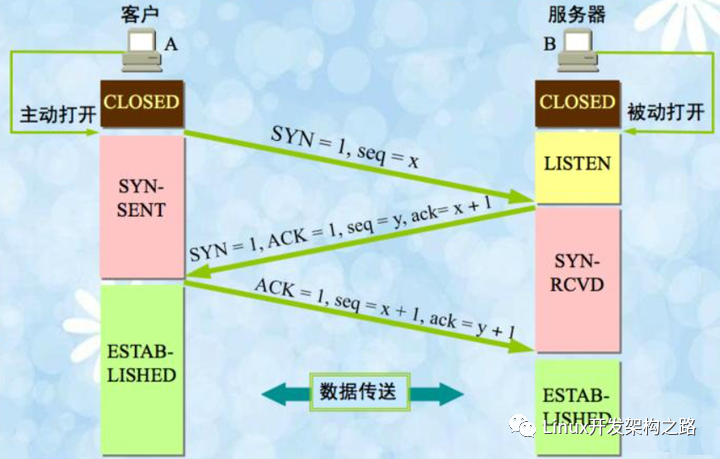
The reason TCP connections are considered reliable is that a connection must be established before sending data, and an ACK packet is sent back to indicate that the data packet has been received. For the data sender, if the data is sent but no ACK packet is received, it will trigger the packet loss retransmission mechanism.Whether during connection establishment or during data transmission after the connection is established, there are ACK packets, and the heartbeat packets of the TCP/IP protocol stack are no exception.
2.2. Explanation of the Heartbeat Mechanism of the TCP/IP Protocol Stack
The TCP/IP protocol stack has a default TCP heartbeat mechanism that is bound to the socket (TCP socket) and can enable the protocol stack’s heartbeat detection mechanism for a specified socket. By default, the protocol stack’s heartbeat mechanism is disabled for socket sockets, and it needs to be manually enabled to use it.In Windows, the default is to send a heartbeat packet every 2 hours. After the client program sends the heartbeat packet to the server, there are two possible scenarios:
1) When the network is normal: The server receives the heartbeat packet and immediately replies with an ACK packet. After the client receives the ACK packet, it waits for another 2 hours to send the next heartbeat packet. The interval for sending heartbeat packets is called keepalivetime, which is 2 hours by default in Windows and can be configured. If there is data interaction between the client and server within the 2-hour interval, the client will receive the server’s ACK packet, which also counts as a heartbeat packet, and the 2-hour interval will be reset. 2) When the network is abnormal: The server does not receive the heartbeat packet sent by the client and cannot reply with an ACK. The default timeout in Windows is 1 second. After 1 second, it will resend the heartbeat packet. If the ACK for the heartbeat packet is still not received, it will resend the heartbeat packet after another second. If the heartbeat packet is not received after sending 10 heartbeat packets, the system considers the network to be faulty, and the protocol stack will directly disconnect the connection. The timeout for not receiving the ACK for the heartbeat packet is called keepaliveinterval, which is 1 second by default in Windows and can be configured; the number of retries for not receiving the ACK for the heartbeat packet is called probe, which is fixed at 10 times in Windows and cannot be configured.
Therefore, the heartbeat mechanism of the TCP/IP protocol stack can also detect network anomalies, but under the default configuration, it may take a long time to detect unless the network anomaly occurs while waiting for a response after sending a heartbeat packet. In this case, if multiple heartbeat packets are resent without receiving an ACK response, the protocol stack will determine that the network has failed and actively close the connection.
2.3. Modifying the Default Heartbeat Parameters of the TCP/IP Protocol Stack
Enabling the default heartbeat mechanism of the TCP/IP protocol stack does not enable heartbeat monitoring for the entire system protocol stack but for a specific socket.After enabling the heartbeat mechanism, the heartbeat time parameters can also be modified. From the code perspective, first call setsockopt to enable the heartbeat monitoring mechanism for the target socket, and then call WSAIoctl to modify the default time parameters for heartbeat detection. The relevant code is as follows:
  SOCKET socket;
  // ......(中间代码省略)

  int optval = 1;
  int nRet = setsockopt(fd, SOL_SOCKET, SO_KEEPALIVE, (const char *)&optval,
                                  sizeof(optval));
  if (nRet != 0)
       return;

  tcp_keepalive alive;
  alive.onoff = TRUE;
  alive.keepalivetime = 10*1000;
  alive.keepaliveinterval = 2*1000;

  DWORD dwBytesRet = 0;
  nRet = WSAIoctl(socket, SIO_KEEPALIVE_VALS, &alive, sizeof(alive), NULL, 0,
                            &dwBytesRet, NULL, NULL);
  if (nRet != 0)
      return;
In the above code, the setsockopt function is first called with the SO_KEEPALIVE parameter to enable the heartbeat switch for the TCP connection, at which point the heartbeat parameters use the system’s default values. Next, the WSAIoctl function is called with the SIO_KEEPALIVE_VALS parameter, passing in the heartbeat parameter structure with the configured time values.Below is a detailed explanation of the heartbeat parameter structure tcp_keepalive (using Windows as an example):
1) keepalivetime: The default is to send a heartbeat keep-alive packet once every 2 hours. For example, after sending the first keep-alive packet, the next keep-alive packet will be sent after an interval of 2 hours. If there is data interaction during this period, it also counts as a valid keep-alive packet, and the next keep-alive packet will be sent based on the last data transmission time. 2) keepaliveinterval: The timeout for not receiving the ACK for the keep-alive packet is set to 1 second by default. If there is a network issue with the peer, after sending the first keep-alive packet, if the ACK is not received within 1 second, the second keep-alive packet will be sent. This continues until the 10th keep-alive packet is sent, and if the ACK is still not received, it is considered that the network is faulty. 3) probe: The number of probes is fixed at 10 times in Windows and cannot be modified.
MSDN’s explanation of network anomalies detected by the heartbeat mechanism is as follows:
If a connection is dropped as the result of keep-alives the error code WSAENETRESET is returned to any calls in progress on the socket, and any subsequent calls will fail with WSAENOTCONN.
When the keep-alive count reaches the limit and the connection is dropped, all ongoing socket interface calls will return the WSAENETRESET error code, and subsequent socket API function calls will return WSAENOTCONN.
3. The Heartbeat Mechanism in the libwebsockets Open Source Library Uses the TCP/IP Protocol Stack’s Heartbeat Mechanism
Previously, when using websocket in our product, we encountered issues where the TCP long connection was released by network devices due to the lack of a heartbeat mechanism.When our client program logs in, it connects to a registration server for a specific service, establishing a websocket long connection. This long connection remains active and is only used when the business module of that service is in use, allowing data interaction on that connection. After logging in, if there is no operation in that business module, this long connection remains idle, meaning there is no data interaction on that connection.As a result, during a recent test, an issue arose, and upon investigation, it was found that this long connection was closed by intermediate network devices due to prolonged inactivity. To resolve this issue, we set heartbeat parameters when initializing the websocket library, allowing the aforementioned websocket long connection to send heartbeat packets during idle times, ensuring that the long connection does not get closed due to inactivity.When we call the lws_create_context interface to create the websocket session context, there are fields in the structure parameter lws_context_creation_info for setting heartbeat parameters:
/**
 * struct lws_context_creation_info - parameters to create context with
 *
 * This is also used to create vhosts.... if LWS_SERVER_OPTION_EXPLICIT_VHOSTS
 * is not given, then for backwards compatibility one vhost is created at
 * context-creation time using the info from this struct.
 *
 * If LWS_SERVER_OPTION_EXPLICIT_VHOSTS is given, then no vhosts are created
 * at the same time as the context, they are expected to be created afterwards.
 *
 * @port: VHOST: Port to listen on... you can use CONTEXT_PORT_NO_LISTEN to
 * suppress listening on any port, that's what you want if you are
 * not running a websocket server at all but just using it as a
 * client
 * @iface: VHOST: NULL to bind the listen socket to all interfaces, or the
 * interface name, eg, "eth2"
 * If options specifies LWS_SERVER_OPTION_UNIX_SOCK, this member is
 * the pathname of a UNIX domain socket. you can use the UNIX domain
 * sockets in abstract namespace, by prepending an @ symbole to the
 * socket name.
 * @protocols: VHOST: Array of structures listing supported protocols and a protocol-
 * specific callback for each one. The list is ended with an
 * entry that has a NULL callback pointer.
 * It's not const because we write the owning_server member
 * @extensions: VHOST: NULL or array of lws_extension structs listing the
 * extensions this context supports. If you configured with
 * --without-extensions, you should give NULL here.
 * @token_limits: CONTEXT: NULL or struct lws_token_limits pointer which is initialized
 * with a token length limit for each possible WSI_TOKEN_***
 * @ssl_cert_filepath: VHOST: If libwebsockets was compiled to use ssl, and you want
 * to listen using SSL, set to the filepath to fetch the
 * server cert from, otherwise NULL for unencrypted
 * @ssl_private_key_filepath: VHOST: filepath to private key if wanting SSL mode;
 * if this is set to NULL but sll_cert_filepath is set, the
 * OPENSSL_CONTEXT_REQUIRES_PRIVATE_KEY callback is called
 * to allow setting of the private key directly via openSSL
 * library calls
 * @ssl_ca_filepath: VHOST: CA certificate filepath or NULL
 * @ssl_cipher_list: VHOST: List of valid ciphers to use (eg,
 * "RC4-MD5:RC4-SHA:AES128-SHA:AES256-SHA:HIGH:!DSS:!aNULL"
 * or you can leave it as NULL to get "DEFAULT"
 * @http_proxy_address: VHOST: If non-NULL, attempts to proxy via the given address.
 * If proxy auth is required, use format
 * "username:password@server:port"
 * @http_proxy_port: VHOST: If http_proxy_address was non-NULL, uses this port at
 * the address
 * @gid: CONTEXT: group id to change to after setting listen socket, or -1.
 * @uid: CONTEXT: user id to change to after setting listen socket, or -1.
 * @options: VHOST + CONTEXT: 0, or LWS_SERVER_OPTION_... bitfields
 * @user: CONTEXT: optional user pointer that can be recovered via the context
 * pointer using lws_context_user
 * @ka_time: CONTEXT: 0 for no keepalive, otherwise apply this keepalive timeout to
 * all libwebsocket sockets, client or server
 * @ka_probes: CONTEXT: if ka_time was nonzero, after the timeout expires how many
 * times to try to get a response from the peer before giving up
 * and killing the connection
 * @ka_interval: CONTEXT: if ka_time was nonzero, how long to wait before each ka_probes
 * attempt
 * @provided_client_ssl_ctx: CONTEXT: If non-null, swap out libwebsockets ssl
 * implementation for the one provided by provided_ssl_ctx.
 * Libwebsockets no longer is responsible for freeing the context
 * if this option is selected.
 * @max_http_header_data: CONTEXT: The max amount of header payload that can be handled
 * in an http request (unrecognized header payload is dropped)
 * @max_http_header_pool: CONTEXT: The max number of connections with http headers that
 * can be processed simultaneously (the corresponding memory is
 * allocated for the lifetime of the context). If the pool is
 * busy new incoming connections must wait for accept until one
 * becomes free.
 * @count_threads: CONTEXT: how many contexts to create in an array, 0 = 1
 * @fd_limit_per_thread: CONTEXT: nonzero means restrict each service thread to this
 * many fds, 0 means the default which is divide the process fd
 * limit by the number of threads.
 * @timeout_secs: VHOST: various processes involving network roundtrips in the
 * library are protected from hanging forever by timeouts. If
 * nonzero, this member lets you set the timeout used in seconds.
 * Otherwise a default timeout is used.
 * @ecdh_curve: VHOST: if NULL, defaults to initializing server with "prime256v1"
 * @vhost_name: VHOST: name of vhost, must match external DNS name used to
 * access the site, like "warmcat.com" as it's used to match
 * Host: header and / or SNI name for SSL.
 * @plugin_dirs: CONTEXT: NULL, or NULL-terminated array of directories to
 * scan for lws protocol plugins at context creation time
 * @pvo: VHOST: pointer to optional linked list of per-vhost
 * options made accessible to protocols
 * @keepalive_timeout: VHOST: (default = 0 = 60s) seconds to allow remote
 * client to hold on to an idle HTTP/1.1 connection
 * @log_filepath: VHOST: filepath to append logs to... this is opened before
 * any dropping of initial privileges
 * @mounts: VHOST: optional linked list of mounts for this vhost
 * @server_string: CONTEXT: string used in HTTP headers to identify server
 * software, if NULL, "libwebsockets".
 */
struct lws_context_creation_info {
	int port; 					/* VH */
	const char *iface; 			/* VH */
	const struct lws_protocols *protocols; 	/* VH */
	const struct lws_extension *extensions; 	/* VH */
	const struct lws_token_limits *token_limits; 	/* context */
	const char *ssl_private_key_password; 	/* VH */
	const char *ssl_cert_filepath; 		/* VH */
	const char *ssl_private_key_filepath; 	/* VH */
	const char *ssl_ca_filepath; 		/* VH */
	const char *ssl_cipher_list; 		/* VH */
	const char *http_proxy_address; 		/* VH */
	unsigned int http_proxy_port; 		/* VH */
	int gid; 					/* context */
	int uid; 					/* context */
	unsigned int options; 			/* VH + context */
	void *user; 					/* context */
	int ka_time; 					/* context */
	int ka_probes; 				/* context */
	int ka_interval; 				/* context */
#ifdef LWS_OPENSSL_SUPPORT
	SSL_CTX *provided_client_ssl_ctx; 	/* context */
#else /* maintain structure layout either way */
	void *provided_client_ssl_ctx;
#endif
	short max_http_header_data; 		/* context */
	short max_http_header_pool; 		/* context */
	unsigned int count_threads; 		/* context */
	unsigned int fd_limit_per_thread; 	/* context */
	unsigned int timeout_secs; 		/* VH */
	const char *ecdh_curve; 			/* VH */
	const char *vhost_name; 			/* VH */
	const char * const *plugin_dirs; 	/* context */
	const struct lws_protocol_vhost_options *pvo; 	/* VH */
	int keepalive_timeout; 			/* VH */
	const char *log_filepath; 		/* VH */
	const struct lws_http_mount *mounts; 	/* VH */
	const char *server_string; 		/* context */
	/* Add new things just above here ---^
	 * This is part of the ABI, don't needlessly break compatibility
	 *
	 * The below is to ensure later library versions with new
	 * members added above will see 0 (default) even if the app
	 * was not built against the newer headers.
	 */
	void *_unused[8];
};
The fields ka_time, ka_probes, and ka_interval are the heartbeat-related settings. The code for initializing the websocket context is as follows:
static lws_context* CreateContext()
{
    lws_set_log_level( 0xFF, NULL );
    lws_context* plcContext = NULL;

    lws_context_creation_info tCreateinfo;
    memset(&tCreateinfo, 0, sizeof tCreateinfo);

    tCreateinfo.port = CONTEXT_PORT_NO_LISTEN;
    tCreateinfo.protocols = protocols;
    tCreateinfo.ka_time = LWS_TCP_KEEPALIVE_TIME;
    tCreateinfo.ka_interval = LWS_TCP_KEEPALIVE_INTERVAL;
    tCreateinfo.ka_probes = LWS_TCP_KEEPALIVE_PROBES;
	tCreateinfo.options = LWS_SERVER_OPTION_DISABLE_IPV6;

    plcContext = lws_create_context(&tCreateinfo);

    return plcContext;
}
By reviewing the source code of the libwebsockets open-source library, it is known that the heartbeat set here uses the heartbeat mechanism of the TCP/IP protocol stack, as shown below:
LWS_VISIBLE int
lws_plat_set_socket_options(struct lws_vhost *vhost, lws_sockfd_type fd)
{
	int optval = 1;
	int optlen = sizeof(optval);
	u_long optl = 1;
	DWORD dwBytesRet;
	struct tcp_keepalive alive;
	int protonbr;
#ifndef _WIN32_WCE
	struct protoent *tcp_proto;
#endif

	if (vhost->ka_time) {
		/* enable keepalive on this socket */
		// First call setsockopt to enable sending heartbeat packets (setting) option
		optval = 1;
		if (setsockopt(fd, SOL_SOCKET, SO_KEEPALIVE,
						(const char *)&optval, optlen) < 0)
			return 1;

		alive.onoff = TRUE;
		alive.keepalivetime = vhost->ka_time*1000;
		alive.keepaliveinterval = vhost->ka_interval*1000;

		if (WSAIoctl(fd, SIO_KEEPALIVE_VALS, &alive, sizeof(alive),
						NULL, 0, &dwBytesRet, NULL, NULL))
			return 1;
	}

	/* Disable Nagle */
	optval = 1;
#ifndef _WIN32_WCE
	tcp_proto = getprotobyname("TCP");
	if (!tcp_proto) {
		lwsl_err("getprotobyname() failed with error %d\n", LWS_ERRNO);
		return 1;
	}
	protonbr = tcp_proto->p_proto;
#else
	protonbr = 6;
#endif

	setsockopt(fd, protonbr, TCP_NODELAY, (const char *)&optval, optlen);

	/* We are nonblocking... */
	ioctlsocket(fd, FIONBIO, &optl);

	return 0;
}
4. TCP/IP Packet Loss Retransmission Mechanism
If a network fault occurs while TCP data interaction is ongoing between the client and server, and the client sends a data packet but does not receive the server’s ACK due to the network fault, it will trigger the client’s TCP packet loss retransmission, which can also determine that a network anomaly has occurred.For TCP connections, if the client sends data to the server and does not receive the server’s ACK, it will trigger packet loss retransmission. The time interval for each retransmission will double, and when the number of retransmissions reaches the system limit (the default limit in Windows is 5 times, and in Linux, it is 15 times), the protocol stack will consider the network to be faulty and will directly close the corresponding connection.Therefore, when a network fault occurs during data interaction, the protocol stack can detect the network anomaly within seconds and will directly close the connection. The detailed description of the packet loss retransmission mechanism is as follows:
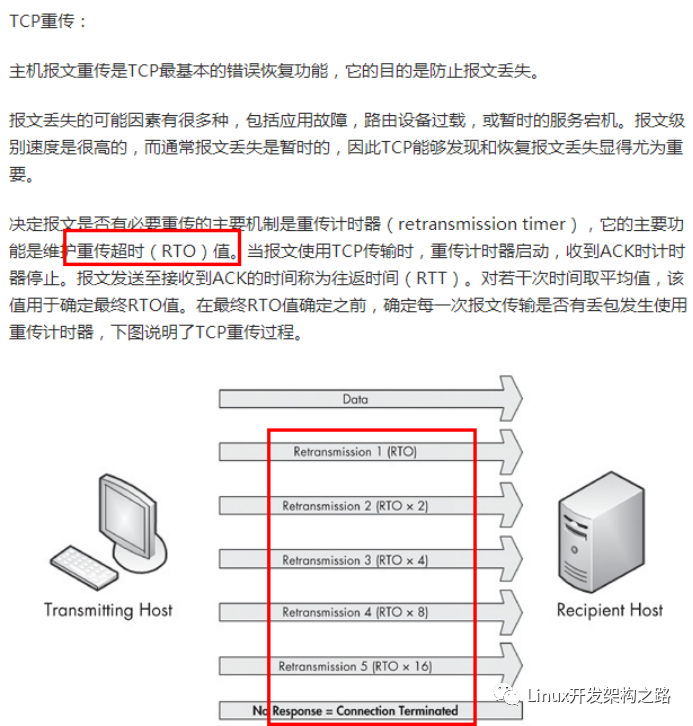
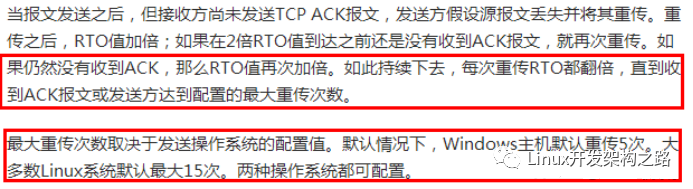
For the packet loss retransmission mechanism, you can check by plugging and unplugging the network cable. You can use Wireshark to capture packets. When quickly plugging and unplugging the network cable (first unplugging the cable, waiting a few seconds, and then plugging it back in), the operation commands sent to the server will be received due to packet loss retransmission.
5. Using Non-blocking Sockets and Select Interface to Implement Connect Timeout Control
5.1. Explanation of Connect and Select Interfaces on MSDN
For TCP sockets, we need to call the socket function connect to establish a TCP connection. Let’s first look at Microsoft’s MSDN description of the socket interface connect:
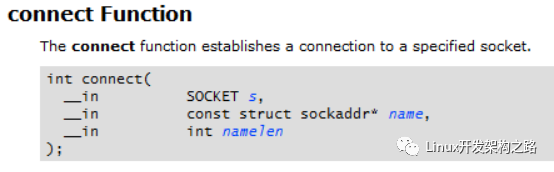
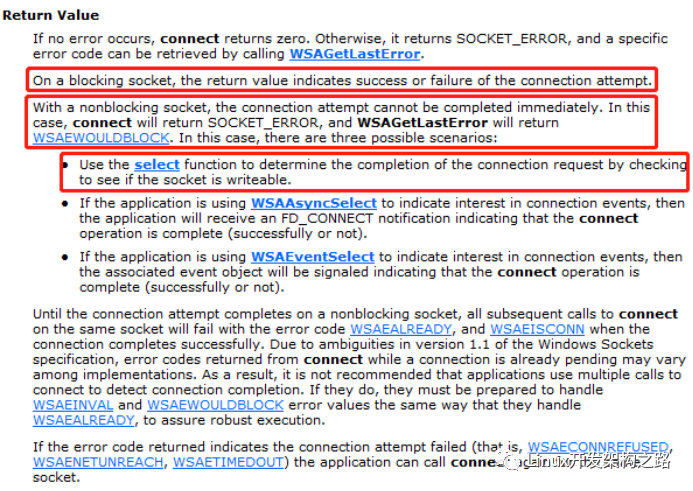

On a blocking socket, the return value indicates success or failure of the connection attempt.
For blocking sockets, the return value of connect can determine whether the connection was successful, with a return value of 0 indicating success.
With a nonblocking socket, the connection attempt cannot be completed immediately. In this case, connect will return SOCKET_ERROR, and WSAGetLastError will return WSAEWOULDBLOCK. In this case, there are three possible scenarios:

Use the select function to determine the completion of the connection request by checking to see if the socket is writable.
For non-blocking sockets, the connect call will return immediately, but the connection operation has not yet completed. The connect function returns SOCKET_ERROR, and for non-blocking sockets, this does not indicate failure. You need to call WSAGetLastError to get the LastError value after executing the connect function, which generally returns WSAEWOULDBLOCK:

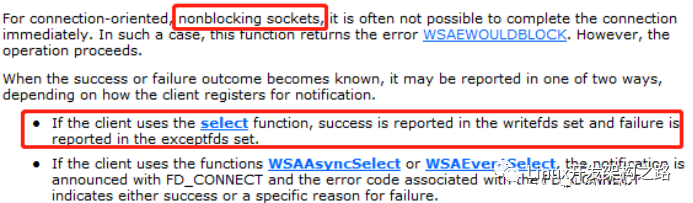
indicating that the connection is in progress. You can use the select interface to check whether the socket is writable (whether the socket is in the writefds set). If it is writable, it indicates that the connection is successful. If the socket is in the exceptfds set, it indicates that an exception has occurred, as shown below:
5.2. Using Non-blocking Sockets and Select to Implement Connection Timeout Control
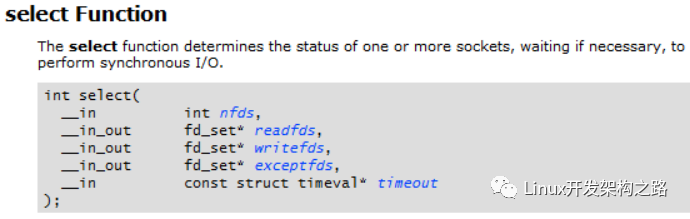
For blocking sockets, in Windows, if the remote IP and port are unreachable, it will block for 75 seconds before returning SOCKET_ERROR, indicating that the connection has failed. Therefore, when testing whether the remote IP and port can be connected, we do not use blocking sockets but rather non-blocking sockets, and then call select to add a connection timeout, achieving control over connection timeouts.
The select function returns 0 if it times out; if an error occurs, it returns SOCKET_ERROR. Therefore, when judging, you need to check the return value of select. If it is less than or equal to 0, the connection has failed, and the socket should be closed immediately. If the return value of select is greater than 0, this return value is the number of sockets that are ready, such as successfully connected sockets. We check whether the socket is in the writable set writefds. If it is in that set, it indicates that the connection is successful.
Based on the relevant descriptions on MSDN, we can roughly know how to implement connect timeout control. The relevant code is as follows:
bool ConnectDevice( char* pszIP, int nPort )
{
	// Create TCP socket
	SOCKET connSock = socket(AF_INET, SOCK_STREAM, 0);
    if (connSock == INVALID_SOCKET)
    {
		return false;
    }

	// Fill in IP and port
	SOCKADDR_IN devAddr;
	memset(&devAddr, 0, sizeof(SOCKADDR_IN));
	devAddr.sin_family = AF_INET;
	devAddr.sin_port = htons(nPort);
	devAddr.sin_addr.s_addr = inet_addr(pszIP);

	// Set the socket to non-blocking for the following select
	unsigned long ulnoblock = 1;
	ioctlsocket(connSock, FIONBIO, &ulnoblock);

	// Initiate connect, this interface returns immediately
	connect(connSock, (sockaddr*)&devAddr, sizeof(devAddr));

	FD_SET writefds;
	FD_ZERO(&writefds);
	FD_SET(connSock, &writefds);

    // Set connection timeout to 1 second
	timeval tv;
	tv.tv_sec = 1; // timeout 1s
	tv.tv_usec = 0;
	// The select function returns the total number of socket handles that are ready and contained
	// in the fd_set structures, zero if the time limit expired, or SOCKET_ERROR(-1) if an error occurred.
	if (select(0, NULL, &writefds, NULL, &tv) <= 0)
	{
		closesocket(connSock);
		return false; // timeout not connected, exit
	}

	ulnoblock = 0;
	ioctlsocket(connSock, FIONBIO, &ulnoblock);

	closesocket(connSock);
	return true;
}
Recently, many friends have been asking me for essential materials for programmers, so I dug out some treasures and am sharing them for free!
Scan the QR code on the poster to get it for free.