Chapter 9
Introduction to Renesas FSP Firmware Library
Accompanying Video for This Chapter
Introduction to Renesas FSP Firmware Library
https://www.bilibili.com/video/BV1Lp4y1n7oN/

9.1
Overview of Renesas FSP Library
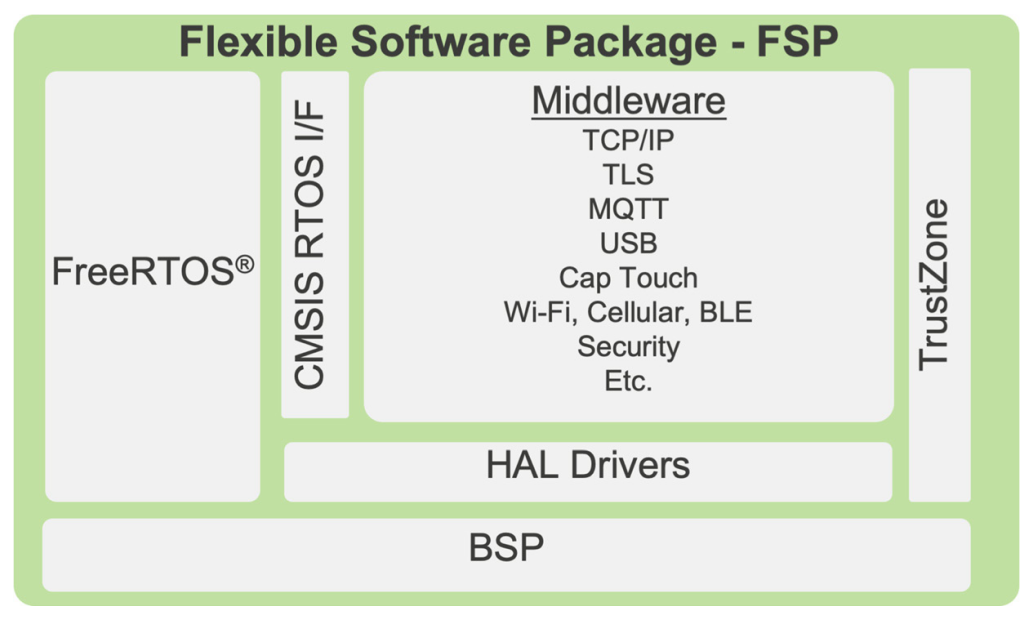
FSP stands for “Flexible Software Package”. It is designed to provide fast and efficient drivers and protocol stacks with low memory overhead. FSP integrates middleware protocol stacks, hardware abstraction layer (HAL) drivers independent of RTOS, and the basic board support package (BSP) drivers. FSP also supports FreeRTOS™ real-time operating system (RTOS).
The software architecture of FSP is shown in the figure below.
FSP is maintained and supported by Renesas, and developers can view or download the source code of FSP from the integrated development environment (e2s) or the FSP GitHub repository to gain a comprehensive understanding of FSP.(You can copy the link below into your browser or scan the QR code to view)
FSP GitHub Repository
https://github.com/renesas/fsp

Note
FSP is open-source software written in C99 (C language standard) and provides complete source code, but is limited to use with Renesas hardware.
9.2
Analysis of Renesas FSP Library Architecture
Below is a brief analysis of the architecture of the Renesas FSP library. Some concepts in this section may be difficult for beginners to understand; it is recommended to skim through and skip if necessary, as this will not affect the reading of subsequent chapters. For now, just aim to have a general understanding, and you can revisit this later for deeper insights.
9.2.1
FSP Library Hierarchical Structure
The figure below shows the hierarchical division of the FSP library, allowing us to intuitively see the software structure after the hierarchical division.
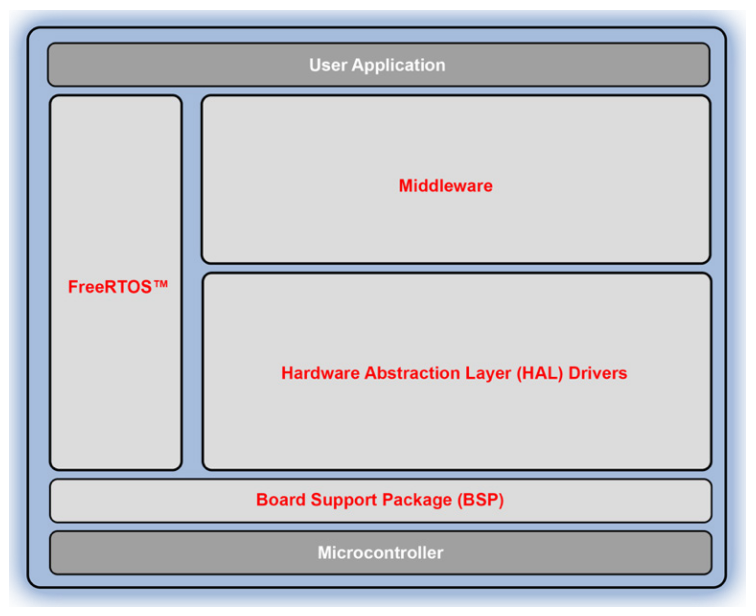
RA MCU
At the bottom layer are the RA series microcontroller hardware. The peripheral hardware among different series of RA microcontrollers is highly consistent and compatible, providing great convenience for software developers.
BSP
Above that is the Board Support Package (BSP). The BSP is at the bottom layer of the FSP software and serves as the functional foundation of FSP. The BSP is responsible for initializing the system after the MCU reset, allowing the program to execute and enter the main function, and providing other services for the upper layer software.
BSP function names start with R_BSP_, BSP macros start with BSP_, and data type definitions start with _bsp to distinguish them from other parts of FSP.
HAL
Above the BSP is the Hardware Abstraction Layer (HAL), which provides efficient device drivers for peripherals with low memory overhead, implementing easy-to-use interfaces that allow developers to avoid directly handling the microcontroller’s register set, making it easier to port software above the HAL layer across the entire RA product family. It is a collection of Modules, where each module is a driver for a peripheral available in the RA series microcontrollers (such as SPI, I2C, ADC), and their names start with r_. All these modules are essentially independent of RTOS. The HAL layer also includes key concepts such as “interfaces” and “instances”.
Functions in the HAL layer start with R_ and generally follow the format R_
Operating System and Middleware
The FSP library primarily supports FreeRTOS, which can be quickly configured through software. FreeRTOS is a very popular real-time operating system that supports multi-task scheduling, task notifications, queues, mutexes, semaphores, and software timers, with very low system overhead and memory usage, making it reliable for environments with limited memory resources that require real-time response handling.
Middleware sits between the HAL hardware abstraction layer and the user application layer, providing services to the application layer. The middleware supported by FSP includes: TCP/IP protocol stack, USB protocol stack, WiFi and Bluetooth BLE protocol stacks, capacitive touch, FAT file system, graphics library, encryption, etc. The naming format for FSP middleware functions is generally: RM_
Application Layer
This layer is the topmost layer of the FSP hierarchy, containing the user’s application code. Users access all functionalities of FSP through the intuitive, simple, and unified API interfaces provided by the lower layers of FSP, allowing them to write code that is easy to understand, maintain, and port in a very simple and direct manner.
9.2.2
FSP Library Project Structure
Now let’s take a look at what the structure of the FSP library project generated by the software looks like.
List 1: FSP Library Project Structure
Swipe left and right to view the complete content
Project├─ ra│ ├─ arm Contains ARM CMSIS code│ └─ fsp Contains the main body of the FSP library│ ├─ inc│ │ ├─ api FSP Interfaces (contains API definitions)│ │ └─ instances FSP Instances (instances of the interfaces)│ └─ src│ ├─ bsp BSP Layer (Board Support Package)│ │ ├─ cmsis Contains register definition files and startup files│ │ └─ mcu Contains BSP code│ └─ r_<module> FSP Modules (interfaces implemented by modules, providing common functionality)├─ ra_cfg Contains FSP library configuration (including BSP and HAL layer configuration)├─ ra_gen Contains user FSP configuration data (including clock, pins, various peripherals, interrupt vectors, etc.)├─ Debug/Release Contains intermediate files generated after compilation and final executable files└─ src└─hal_entry.c Contains the entry function hal_entry of the user's bare-metal application. When RTOS is not used, the hal_entry function is called by the C language main function, so its role is essentially equivalent to main</module>The structure of the FSP library project is actually very simple. We can divide the contents under “Project” into three parts:
-
The first part is the FSP library and its configuration, including the three folders ra, ra_cfg, and ra_gen, which are generated by the software.
-
The second part is the user code, which includes the src folder.
-
The third part is the compiled output files, which include the Debug or Release folders.
Thus, we do not need to deeply understand the architecture of the FSP library to get started with development, as we configure the FSP library through the software’s graphical interface (FSP configurator).
Warning
Note: Users should not edit any files generated by the software! Because every time the “Generate Project Content” button is clicked after configuring FSP, the software will automatically recreate these files, so any changes will be overwritten.
For readers who want to gain a deeper understanding of the FSP library, you can try reading its source code. Additionally, to clearly understand the architecture of the FSP library, it is important to grasp the following key concepts.
1. Modules:Modules can be peripheral drivers, pure software, or something in between, and they are the building blocks of FSP. Modules are typically independent units, but they may depend on other modules. Applications can be built by combining multiple modules to provide the desired functionality.
2. Module Instance:A single, independent instantiation of a module (module configuration). For example, a USB port may need to use two instances of the r_dmac module to transfer data back and forth between other ports; similarly, when an application needs to use two GPT timers, each timer is an instance of the r_gpt module.
3. Interfaces:Interfaces contain API definitions, and modules with similar functionalities can share these API definitions. Modules provide common functionality through these definitions. Modules using the same interface can be interchanged. An interface can be viewed as a contract between two modules, where both modules agree to collaborate using the information defined in the contract. Interfaces are just definitions and do not increase code size.
4. Instances:Interfaces specify the functionality provided, while instances actually implement these functionalities. Each instance is associated with a specific interface and uses enumerations, data structures, and API prototypes from the interface. This allows applications to swap instances as needed.
5. Stacks:The design approach adopted by the FSP architecture allows modules to be stacked together to work collaboratively, forming an FSP stack. This stacking process matches the functionality provided by one module with the functionality required by another. The stack consists of the top-level module and all its dependencies.
6. Application:The code owned and maintained by the user.
7. Callback Functions:These functions are called by interrupt service routines (ISRs) when events occur (e.g., when USB receives some data). Interrupt callback functions are part of the application, and if used in an interrupt, they should be kept as short as possible, as they will run within the ISR and can block other interrupts from executing.
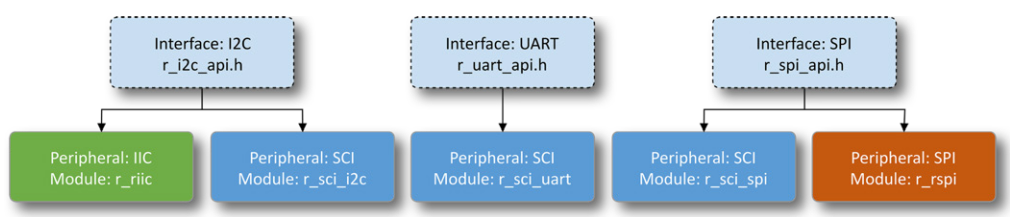
Regarding the concepts of interfaces and instances:Interfaces specify the functionality provided, while instances actually implement these functionalities. Each instance is associated with a specific interface and uses enumerations, data structures, and API prototypes from the interface. This allows applications using interfaces to swap instances as needed, saving a lot of time when changing code or peripherals. In the RA product family MCUs, some peripherals (e.g., IIC) will have a one-to-one mapping (only mapped to the IIC interface), while other peripherals (e.g., SCI) will have a one-to-many mapping (implementing three interfaces: IIC, UART, SPI). The mapping relationship is illustrated in the figure below.


Need Technical Support?
If you have any questions while using Renesas MCU/MPU products, you can identify the QR code below or copy the URL into your browser to access the Renesas Technical Forum for answers or online technical support.

https://community-ja.renesas.com/zh/forums-groups/mcu-mpu/
To be continued
Recommended Reading
Defining IO Initialization Structure – Practical Guide to Renesas RA Series FSP Library Development (21)

Writing Your Own Library: Building the Prototype of Library Functions – Practical Guide to Renesas RA Series FSP Library Development (20)

Winners Announced | Summer “Chip” Journey Knowledge Challenge Winners List Released