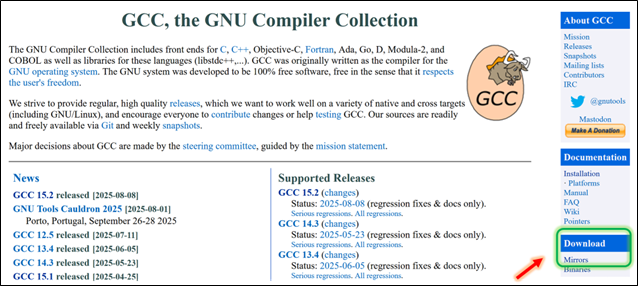
Log in to the GCC download page:
https://gcc.gnu.org/Click on the Mirrors in the Download section on the right
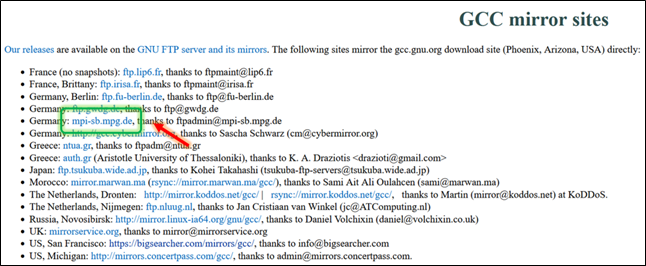
Select a suitable mirror address
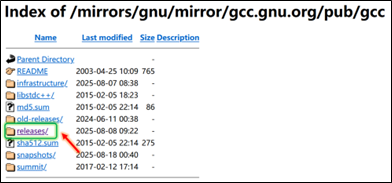
Select releases/
Scroll down to find and enter the gcc-15.2.0/ directory
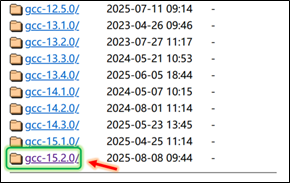
Click to download gcc-15.2.0.tar.xz (or gcc-15.2.0.tar.gz)
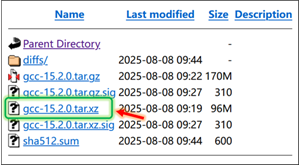
Upload the gcc-15.2.0.tar.xz file to the server
$ ls gcc-15.2.0.tar.xzUse the following command to extract the .tar.xz file, and wait patiently for the extraction to complete
$ tar -xvJf gcc-15.2.0.tar.xzEnter the extracted gcc-15.2.0 directory
$ cd gcc-15.2.0If the server is connected to the internet, execute
$ ./contrib/download_prerequisitesThis will automatically download the required dependencies
If the server cannot connect to the internet, enter the contrib directory to check the required dependencies
$ cd contrib$ cat download_prerequisitesYou will see the following required dependencies
gmp='gmp-6.2.1.tar.bz2'mpfr='mpfr-4.1.0.tar.bz2'mpc='mpc-1.2.1.tar.gz'isl='isl-0.24.tar.bz2'gettext='gettext-0.22.tar.gz'Log in to the gmp-6.2.1.tar.bz2 download page
https://gmplib.org/list-archives/gmp-announce/2020-November/000049.htmlClick to download the gmp-6.2.1.tar.bz2 file
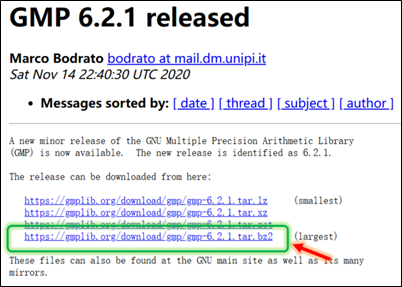
Log in to the mpfr-4.1.0.tar.bz2 download page
https://www.mpfr.org/mpfr-4.1.0/Click to download the mpfr-4.1.0.tar.bz2 file
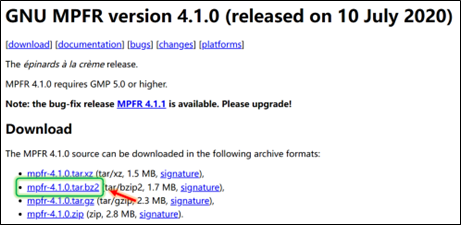
Log in to the mpc-1.2.1.tar.gz download page
https://www.multiprecision.org/mpc/download.htmlClick to download the mpc-1.2.1.tar.gz file
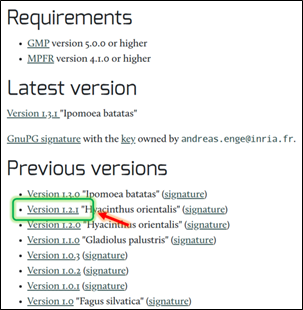
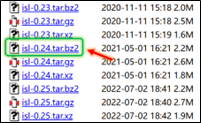
Log in to the isl-0.24.tar.bz2 download page
https://libisl.sourceforge.io/Scroll down to find the isl-0.24.tar.bz2 file and click to download
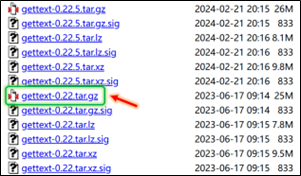
Log in to the gettext-0.22.tar.gz download page
https://ftp.gnu.org/pub/gnu/gettext/Scroll down to find the gettext-0.22.tar.gz file and click to download
Upload gmp-6.2.1.tar.bz2, mpfr-4.1.0.tar.bz2, mpc-1.2.1.tar.gz, isl-0.24.tar.bz2, gettext-0.22.tar.gz to the extracted gcc-15.2.0 directory
$ ls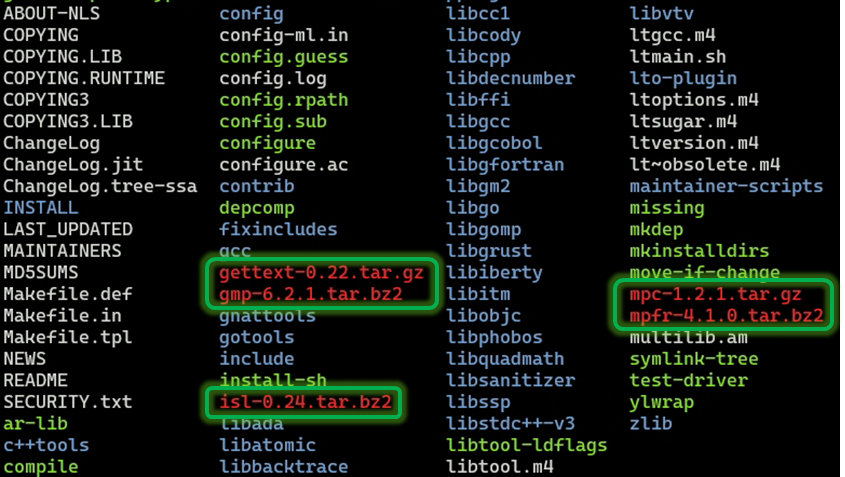
Extract the above files respectively
$ tar -jxvf gmp-6.2.1.tar.bz2$ tar -jxvf mpfr-4.1.0.tar.bz2$ tar -zxvf mpc-1.2.1.tar.gz$ tar -jxvf isl-0.24.tar.bz2$ tar -zxvf gettext-0.22.tar.gzCreate symbolic links and check
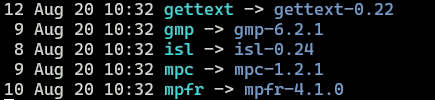
$ ln -sf gmp-6.2.1 gmp$ ln -sf mpfr-4.1.0 mpfr$ ln -sf mpc-1.2.1 mpc$ ln -sf isl-0.24 isl$ ln -sf gettext-0.22 gettext$ ls -l gmp mpfr mpc isl gettextYou can see the directories pointed to by the symbolic links
Configure the compilation directory
$ ./configure --prefix=/home/username/apps/gcc-15.2.0Or configure according to actual needs, such as
$ ./configure --prefix=/home/username/apps/gcc-15.2.0 --disable-multilib --enable-languages=c,c++,fortranStart compiling, be patient, and wait for the compilation to complete
$ make && make installYou can also use multiple cores for compilation
$ make -j4$ make installAfter installation, set the environment variables
export GCC_HOME=~/apps/gcc-15.2.0export PATH=$GCC_HOME/bin:$PATHexport LD_LIBRARY_PATH=$GCC_HOME/lib64:$LD_LIBRARY_PATHexport C_INCLUDE_PATH=$GCC_HOME/include:$C_INCLUDE_PATHexport CPLUS_INCLUDE_PATH=$GCC_HOME/include:$CPLUS_INCLUDE_PATHexport LIBRARY_PATH=$GCC_HOME/lib64:$LIBRARY_PATHUse the following command to check if the GCC compilation directory and version are correct
$ which gcc/home/username/apps/gcc-15.2.0/bin/gcc$ gcc --versiongcc (GCC) 15.2.0Copyright (C) 2025 Free Software Foundation, Inc.This is free software; see the source for copying conditions. There is NO warranty; not even for MERCHANTABILITY or FITNESS FOR A PARTICULAR PURPOSE.$ which g++/home/username/apps/gcc-15.2.0/bin/g++$ g++ --versiong++ (GCC) 15.2.0Copyright (C) 2025 Free Software Foundation, Inc.This is free software; see the source for copying conditions. There is NO warranty; not even for MERCHANTABILITY or FITNESS FOR A PARTICULAR PURPOSE.You can also create a check_gcc.sh script to test whether gcc has been successfully compiled and installed in the specified directory, while testing if C, C++, and Fortran can run successfully
#!/bin/bash
# This script checks if GCC has been successfully compiled and installed in the specified directory.# It verifies the existence of binaries, their executability, version matching, and performs a simple compilation test.# Usage: chmod u+x check_gcc.sh; ./check_gcc.sh# Author: Theoretical Computing Classroom# E-mail: [email protected]# Date: 2025-08-26
# Set the gcc compilation directoryGCC_INSTALL_DIR="$HOME/apps/gcc/gcc-15.2.0"
# Set the expected gcc versionEXPECTED_VERSION="15.2.0"
GCC_BIN="$GCC_INSTALL_DIR/bin/gcc"GXX_BIN="$GCC_INSTALL_DIR/bin/g++"GFORTRAN_BIN="$GCC_INSTALL_DIR/bin/gfortran"GOBJC_BIN="$GCC_INSTALL_DIR/bin/gobjc"
error_exit() {    echo "Error: $1" >&2    exit 1}
if [ ! -d "$GCC_INSTALL_DIR" ]; then    error_exit "gcc installation directory does not exist: $GCC_INSTALL_DIR"fi
if [ ! -f "$GCC_BIN" ]; then    error_exit "gcc binary file not found: $GCC_BIN"fi
if [ ! -f "$GXX_BIN" ]; then    error_exit "g++ binary file not found: $GXX_BIN"fi
if [ ! -f "$GFORTRAN_BIN" ]; then    error_exit "gfortran binary file not found: $GFORTRAN_BIN"fi
if [ ! -x "$GCC_BIN" ]; then    error_exit "gcc binary file is not executable: $GCC_BIN"fi
if [ ! -x "$GXX_BIN" ]; then    error_exit "g++ binary file is not executable: $GXX_BIN"fi
if [ ! -x "$GFORTRAN_BIN" ]; then    error_exit "gfortran binary file is not executable: $GFORTRAN_BIN"fi
ACTUAL_VERSION="$($GCC_BIN -dumpversion 2>/dev/null)"if [ $? -ne 0 ]; then    error_exit "Unable to get gcc version information (may not be compiled correctly)"fi
if [ "$ACTUAL_VERSION" = "$EXPECTED_VERSION" ]; then    echo "gcc $ACTUAL_VERSION has been successfully compiled and installed in the specified directory."else    error_exit "Version mismatch! Compiled: $EXPECTED_VERSION, Actual: $ACTUAL_VERSION"fi
TEMP_DIR=$(mktemp -d)cd "$TEMP_DIR" || error_exit "Unable to enter temporary directory"
echo "Testing C compiler..."cat > test.c << 'EOF'#include <stdio.h>int main() {    printf("Hello from gcc %s\n", __VERSION__);    return 0;}EOF
if "$GCC_BIN" -o test test.c 2>/dev/null; then    ./test    echo "C compilation test passed!"else    error_exit "C compilation test failed!"fi
echo "Testing C++ compiler..."cat > test.cpp << 'EOF'#include <iostream>int main() {    std::cout << "Hello from g++ " << __VERSION__ << std::endl;    return 0;}EOF
if "$GXX_BIN" -o test_cpp test.cpp 2>/dev/null; then    ./test_cpp    echo "C++ compilation test passed!"else    error_exit "C++ compilation test failed!"fi
echo "Testing Fortran compiler..."cat > test.f90 << 'EOF'program test    implicit none    print '(a)', 'Hello from gfortran'end program testEOF
if "$GFORTRAN_BIN" -o test_fortran test.f90 2>/dev/null; then    ./test_fortran    echo "Fortran compilation test passed!"else    error_exit "Fortran compilation test failed!"fi
cd /tmp || exit 0rm -rf "$TEMP_DIR"echo "Testing completed!"exit 0
Grant executable permissions to the check_gcc.sh script and run the script
$ chmod u+x check_gcc.sh$ ./check_gcc.shYou will get the following output
gcc 15.2.0 has been successfully compiled and installed in the specified directory. Testing C compiler...Hello from gcc 15.2.0C compilation test passed! Testing C++ compiler...Hello from g++ 15.2.0C++ compilation test passed! Testing Fortran compiler...Hello from gfortranFortran compilation test passed! Testing completed!Previous Content
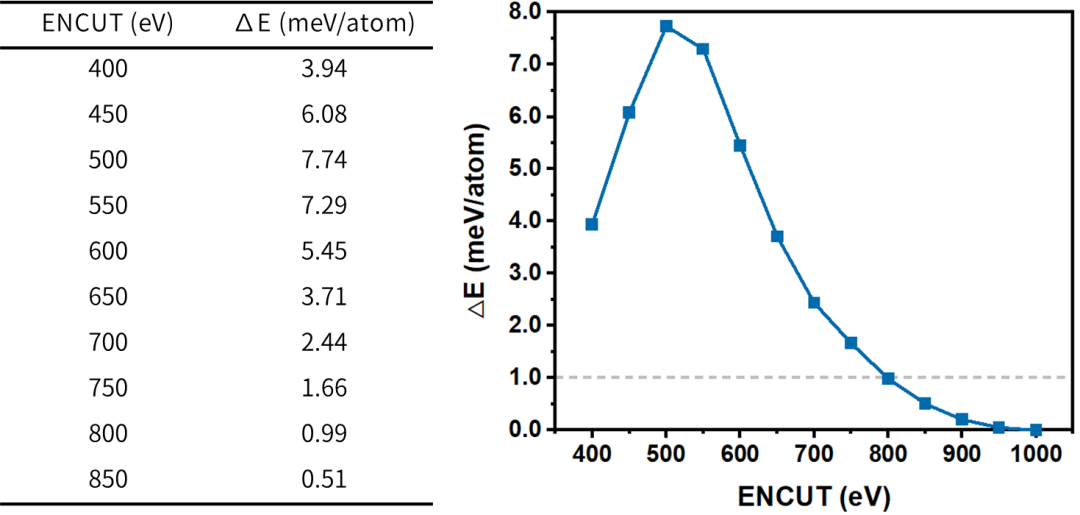
Testing Calculation of Truncation Energy – A Case Study of Diamond
→ Click the link: Input File | Detailed Interpretation
Electrical Property Calculation
▎Calculation of Born Effective Charge in Crystals – A Case Study of BaZrO₃
→ Click the link: Input File | Detailed Interpretation
▎Calculation of Born Effective Charge in Crystals – A Case Study of BaZrO₃ (II)
→ Click the link: Input File | Detailed Interpretation
 ▎Calculation of Electronic Band Structure in Crystals – A Case Study of ZnO→ Click the link: Input File | Detailed Interpretation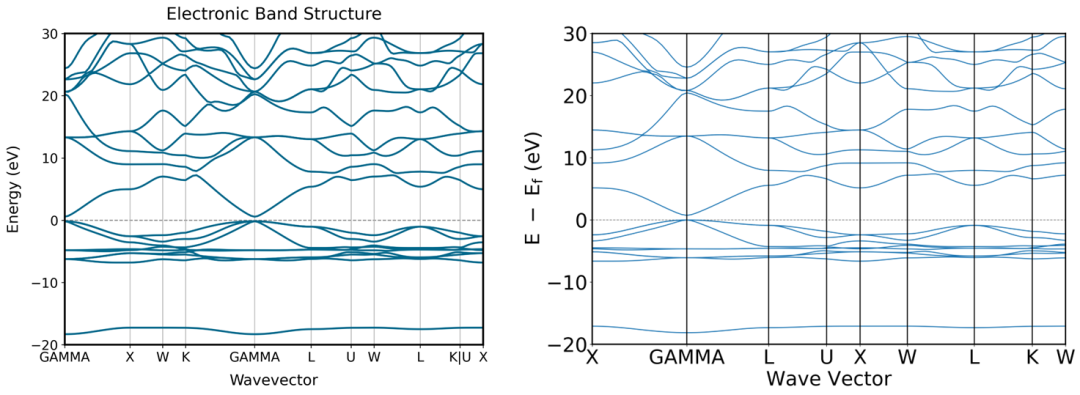
Linux Computing Environment and Programs
▎oneAPI Installation – A Case Study of oneAPI Base Toolkit 2025.2.0
→ Click the link: oneAPI Base Toolkit 2025.2.0
▎oneAPI Installation – A Case Study of oneAPI HPC Toolkit 2025.2.0
→ Click the link: oneAPI HPC Toolkit 2025.2.0
▎Anaconda Installation – A Case Study of Anaconda3-2025.06-0-Linux-x86_64
→ Click the link: Anaconda3-2025.06-0-Linux-x86_64
▎Miniconda Installation – A Case Study of Miniconda3 py313_25.5.1-1
→ Click the link: Miniconda3 py313_25.5.1-1
▎VASP Installation – A Case Study of Compiling VASP 6.1.0 Using oneAPI 2023.2.0
→ Click the link: oneAPI 2023.2.0 Compiling VASP 6.1.0
▎VASP Installation – A Case Study of Compiling VASP 6.1.0 with Fixed Lattice Basis Vector Optimization Using oneAPI 2023.2.0
→ Click the link: oneAPI 2023.2.0 Compiling VASP 6.1.0 with Fixed Lattice Basis Vector OptimizationThis public account will update slowly from time to time, with various tutorials published in the form of case studies. Thank you for your attention!