Content from: Programmer Lao Liao https://space.bilibili.com/3494351095204205
Chapter 1: C++ Memory Model and Object Lifecycle
1.1 Memory Segmentation: Stack, Heap, Global/Static Storage Area, Constant Area
The memory layout of a C++ program is typically divided into several areas, understanding them is crucial for writing efficient and safe code.
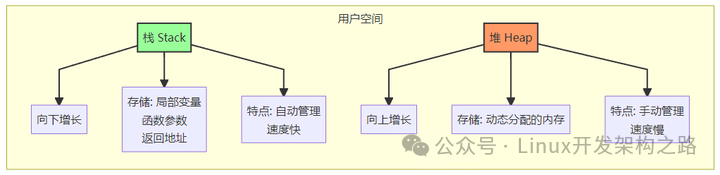

Stack
-
Stored Content: Local variables, function parameters, return addresses, etc.
-
Management Method: Automatically allocated and released by the compiler
-
Characteristics: LIFO (Last In First Out) structure, fast allocation speed, limited memory size
-
Growth Direction: Grows towards lower address direction
Heap
-
Stored Content: Dynamically allocated memory (new/malloc)
-
Management Method: Manually allocated and released by the programmer
-
Characteristics: Relatively slow allocation speed, larger memory space, prone to fragmentation
-
Growth Direction: Grows towards higher address direction
Global/Static Storage Area
-
Stored Content: Global variables, static variables (static)
-
Management Method: Allocated at the start of the program, released at the end of the program
-
Characteristics: Divided into.data segment (initialized) and.bss segment (uninitialized)
Constant Area
-
Stored Content: String constants, const global variables
-
Management Method: Read-only area, released at the end of the program
-
Characteristics: Attempting to modify will cause a segmentation fault
Interview Question 1.1.1 【Tencent – Backend Development – 2025】
Question:Please explain which memory area each variable in the following code is stored in and why.
#include <iostream>const int g_const = 10;          // Constant Areaint g_var = 20;                  // .data segmentstatic int s_var = 30;           // .data segmentchar* p_str = "Hello";           // p_str in .data segment, "Hello" in Constant Area
void memory_layout_demo() {    static int local_s_var = 40; // .data segment    int local_var = 50;          // Stack    const int local_const = 60;  // Stack
    int* heap_var = new int(70); // heap_var in Stack, pointing to Heap memory    char arr[] = "World";        // Stack (array allocated on Stack)
    std::cout << "g_const: " << &g_const << std::endl;    std::cout << "g_var: " << &g_var << std::endl;    std::cout << "s_var: " << &s_var << std::endl;    std::cout << "p_str: " << &p_str << " -> " << (void*)p_str << std::endl;    std::cout << "local_s_var: " << &local_s_var << std::endl;    std::cout << "local_var: " << &local_var << std::endl;    std::cout << "local_const: " << &local_const << std::endl;    std::cout << "heap_var: " << &heap_var << " -> " << heap_var << std::endl;    std::cout << "arr: " << &arr << std::endl;
    delete heap_var;}
int main() {    memory_layout_demo();    return 0;}// Compile and run: g++ -std=c++11 memory_layout.cpp -o memory_layout
Reference Answer:
-
g_const: Stored in Constant Area, as it is a const global constant
-
g_var: Stored in .data segment, initialized global variable
-
s_var: Stored in .data segment, static global variable
-
p_str: Pointer itself in .data segment, points to string “Hello” in Constant Area
-
local_s_var: Stored in .data segment, static local variable
-
local_var: Stored in Stack, ordinary local variable
-
local_const: Stored in Stack, const local variable
-
heap_var: Pointer itself in Stack, pointing to memory address in Heap
-
arr: Stored in Stack, array allocated on Stack
1.2 Object Construction and Destruction Process (Including VPTR Initialization Timing)
The lifecycle of an object includes three stages: construction, usage, and destruction. Understanding this process is crucial to avoid resource leaks and undefined behavior.
Construction Process
-
Memory Allocation: Allocating memory space for the object on Stack or Heap
-
Initializing Virtual Table Pointer: If the class has virtual functions, first initialize vptr to point to the correct virtual function table
-
Calling Base Class Constructor: Call the base class constructor in inheritance order
-
Initializing Member Variables: Initialize member variables in declaration order
-
Executing Constructor Body: Execute the code in the constructor body
Destruction Process
-
Executing Destructor Body: Execute the code in the destructor body
-
Calling Member Destructors: Destruct member variables in reverse declaration order
-
Calling Base Class Destructors: Call the base class destructors in reverse inheritance order
-
Resetting Virtual Table Pointer: Set vptr to nullptr or point to the base class virtual table
-
Releasing Memory: Release the memory space occupied by the object
VPTR Initialization Timing
The virtual table pointer (vptr) is initialized at the very beginning of the constructor, which is why calling virtual functions in the constructor does not exhibit polymorphism.
#include <iostream>
class Base {public:    Base() {        std::cout << "Base constructor" << std::endl;        // At this point, vptr points to Base's virtual table        virtual_func(); // Call Base::virtual_func()    }
    virtual void virtual_func() {        std::cout << "Base virtual_func" << std::endl;    }
    virtual ~Base() {        std::cout << "Base destructor" << std::endl;        // At this point, vptr points to Base's virtual table        virtual_func(); // Call Base::virtual_func()    }};
class Derived : public Base {public:    Derived() {        std::cout << "Derived constructor" << std::endl;        // At this point, vptr points to Derived's virtual table        virtual_func(); // Call Derived::virtual_func()    }
    void virtual_func() override {        std::cout << "Derived virtual_func" << std::endl;    }
    ~Derived() override {        std::cout << "Derived destructor" << std::endl;        // At this point, vptr still points to Derived's virtual table        virtual_func(); // Call Derived::virtual_func()    }};
void vptr_init_demo() {    Derived d;    // Construction order: Allocate memory -> Initialize vptr -> Base constructor -> Derived constructor    // Destruction order: Derived destructor -> Base destructor -> Reset vptr -> Release memory}
// Compile and run: g++ -std=c++11 vptr_init.cpp -o vptr_init
Interview Question 1.2.1 【ByteDance – Infrastructure – 2025】
Question:Why does calling virtual functions in constructors and destructors not exhibit polymorphism? Please explain from the perspective of vptr initialization timing.
Reference Answer:
In the constructor, vptr initialization occurs before the constructor body is executed. When the base class constructor is executed, vptr points to the base class’s virtual function table, so the virtual function called is the base class version. Even though subsequent derived class constructors will reset vptr to point to the derived class’s virtual function table, the polymorphic mechanism has not been fully established during the execution of the base class constructor.
Similarly, in the destructor, after the derived class destructor has finished executing, vptr will be reset to point to the base class’s virtual function table, and when the base class destructor calls a virtual function, it can only call the base class version.
This is a safety mechanism to ensure that virtual functions are not called on uninitialized or already destroyed derived class members during the incomplete state of object construction and destruction.
1.3 In-Depth Understanding of RAII: From Concept to Best Practices
RAII (Resource Acquisition Is Initialization) is one of the most important programming concepts in C++, binding resource management to the lifecycle of objects.
The Core Idea of RAII
-
Resource Acquisition is Initialization: Acquire resources in the constructor
-
Resource Release is Destruction: Release resources in the destructor
-
Exception Safety: Resources are correctly released even if an exception occurs
Typical Applications of RAII
-
Smart Pointers (std::unique_ptr, std::shared_ptr)
-
File Operations (std::fstream)
-
Lock Management (std::lock_guard, std::unique_lock)
-
Memory Management (Custom Memory Pool)
-
Database Connections
#include <iostream>#include <memory>#include <mutex>#include <fstream>
// 1. Smart Pointer - Memory Managementvoid smart_pointer_demo() { std::unique_ptr<int> ptr(new int(42)); // No need to manually delete, automatically released when going out of scope}
// 2. Lock Management - Mutex Automatically Releasedstd::mutex mtx;
void lock_guard_demo() { std::lock_guard<std::mutex> lock(mtx); // Critical section code // Automatically releases lock when going out of scope}
// 3. File Operations - File Automatically Closedvoid file_operation_demo() { std::ofstream file("test.txt"); file << "Hello, RAII!" << std::endl; // File automatically closes when going out of scope}
// 4. Custom RAII Class - Database Connection Managementclass DatabaseConnection {public: DatabaseConnection() { std::cout << "Acquiring database connection..." << std::endl; // Simulate acquiring database connection }
void execute(const std::string& query) { std::cout << "Executing query: " << query << std::endl; }
~DatabaseConnection() { std::cout << "Releasing database connection..." << std::endl; // Simulate releasing database connection }};
void database_demo() { DatabaseConnection db; db.execute("SELECT * FROM users"); // Automatically releases database connection when going out of scope}
// 5. RAII and Exception Safetyvoid exception_safe_demo() { DatabaseConnection db; // db will be correctly released regardless of whether an exception occurs throw std::runtime_error("Something went wrong!"); // Even if an exception is thrown, db's destructor will be called}
int main() { std::cout << "=== Smart Pointer Demo ===" << std::endl; smart_pointer_demo();
std::cout << "\n=== Lock Guard Demo ===" << std::endl; lock_guard_demo();
std::cout << "\n=== File Operation Demo ===" << std::endl; file_operation_demo();
std::cout << "\n=== Database Demo ===" << std::endl; database_demo();
std::cout << "\n=== Exception Safety Demo ===" << std::endl; try { exception_safe_demo(); } catch (const std::exception& e) { std::cout << "Caught exception: " << e.what() << std::endl; }
return 0;}// Compile and run: g++ -std=c++11 raii_demo.cpp -o raii_demoInterview Question 1.3.1 【Baidu – Intelligent Driving – 2025】
Question:Please implement a simple RAII wrapper class to manage memory allocated with malloc, ensuring that memory does not leak.
#include <iostream>#include <cstdlib>
class MallocRAII {public: // Constructor, allocates memory of specified size explicit MallocRAII(size_t size) : ptr_(malloc(size)) { if (!ptr_) { throw std::bad_alloc(); } std::cout << "Allocated " << size << " bytes at " << ptr_ << std::endl; }
// Get raw pointer void* get() const { return ptr_; }
// Overload -> operator for easy access void* operator->() const { return ptr_; }
// Disable copy MallocRAII(const MallocRAII&) = delete; MallocRAII& operator=(const MallocRAII&) = delete;
// Allow move MallocRAII(MallocRAII&& other) noexcept : ptr_(other.ptr_) { other.ptr_ = nullptr; }
MallocRAII& operator=(MallocRAII&& other) noexcept { if (this != &other) { free(ptr_); ptr_ = other.ptr_; other.ptr_ = nullptr; } return *this; }
// Destructor, releases memory ~MallocRAII() { if (ptr_) { std::cout << "Freeing memory at " << ptr_ << std::endl; free(ptr_); } }
private: void* ptr_;};
void malloc_raii_demo() { try { MallocRAII memory(100); // Allocate 100 bytes // Use memory int* data = static_cast<int*>(memory.get()); data[0] = 42;
std::cout << "Data: " << data[0] << std::endl;
// Automatically releases memory when going out of scope } catch (const std::bad_alloc& e) { std::cerr << "Memory allocation failed: " << e.what() << std::endl; }}
int main() { malloc_raii_demo(); return 0;}// Compile and run: g++ -std=c++11 malloc_raii.cpp -o malloc_raiiScoring Points:
-
Allocate memory in the constructor, release memory in the destructor
-
Handle allocation failure (throw exception)
-
Disable copy constructor and copy assignment (avoid double free)
-
Provide move semantics support
-
Provide a method to access the raw pointer
-
Guarantee exception safety
Chapter Summary:
This chapter delves into the C++ memory model and object lifecycle management, which are fundamental for writing efficient and safe C++ code. Understanding memory segmentation can help optimize program performance, understanding the object construction and destruction process can prevent resource leaks, and mastering the RAII concept can lead to more robust code.
These concepts are not only high-frequency topics in interviews but also core concepts that must be mastered in actual development. In the following chapters, we will continue to explore other important features of C++.
For those who need the content of the following chapters, you can watch the video to obtain the complete learning document, link: https://www.bilibili.com/video/BV1JWp8zZE88/
Chapter 2: Type System and Type Inference
Chapter 3: In-Depth Analysis of Object-Oriented Programming
Chapter 4: Exception Handling and Safety
Chapter 5: Basics of Overloading and Templates
Chapter 6: Move Semantics and Perfect Forwarding
Chapter 7: Smart Pointers and Resource Management
Chapter 8: Lambda Expressions and Function Objects
Chapter 9: In-Depth Analysis of STL Containers and Algorithms
Chapter 10: Template Metaprogramming and Advanced Generics
Chapter 11: Basics of Concurrent Programming
Chapter 12: Memory Model and Atomic Operations
Chapter 13: System-Level Programming and Performance Optimization
Chapter 14: Core Features of C++17
Chapter 15: Overview of New Features in C++20/23