Strings are ubiquitous elements in C++ development, essential for everything from user input to network transmission. While strings may seem simple, they are fraught with numerous details and pitfalls that can easily catch developers off guard.Issues like buffer overflows and memory leaks can be extremely difficult to diagnose once they occur, often arising from inadvertent mistakes. Even seasoned coders should not take this lightly. Today, we will explore some practical applications of strings in C++.
C-Style Strings
For programmers familiar with C, it is advantageous that C++ also supports C-style strings. To briefly review, a C string is essentially a wrapper around a character array, with the most typical definition being<span>char str[] = "hello";</span>, where each array element stores a character, and the end of the string is marked by a “\0” character.
C-style strings require a series of string handling functions to operate, which are declared in the <span><cstring></span> header file in C++.
#include <cstring>
#include <stdio.h>
int main() {
    char dest[10];
    char src[20] = "this is a long string";
    strcpy(dest, src); // Dangerous! Buffer overflow
    printf("%s\n", dest);
    return 0;
}
Termination Character Trap: Forgetting to add or accidentally overwriting<span>'\0'</span> can lead to functions like strlen() and strcpy() reading out of bounds. For example,<span>char str[5] = "hello";</span> will become a “dangerous string” with no “end” since the array length is exactly equal to the string length (excluding the termination character).
C-style strings rely entirely on manual memory management, with major issues including:
- Buffer Overflow occurs when using strcpy(buffer, longString) if the buffer capacity is insufficient.
- Simple Functionality does not allow direct operations like concatenation or assignment using operators such as + or =.
- Complex End Marker Management: Handling the “\0” marker requires exceptional care, as some functions like strlen do not count it, and it is easy to overlook or overwrite during copying, resulting in a string with no endpoint.
C++ String ClassIn modern C++, C-style strings are generally no longer used. C++ provides the string class specifically for handling string-type data (requiring the inclusion of the<string> header file). It encapsulates C-style strings, with the underlying string actually being a dynamically growing character array, so you don’t have to worry about‘\0’, nor do you need to manage memory manually, and it comes with a plethora of useful methods.Let’s look at some basic usage examples below.
#include <string>
#include <iostream>
using namespace std;
int main() {
    // 1. Define strings
    string s1; // Empty string
    string s2 = "hello"; // Directly assign C-style string
    string s3(5, 'a'); // 5 'a's, result is "aaaaa"
    // 2. Concatenation: more convenient than strcat
    s1 = s2 + " world"; // Concatenate directly with +, no need to worry about memory
    s1 += "!"; // Append, result is "hello world!"
    cout << "After concatenation: " << s1 << endl; // Outputs hello world!
    // 3. Length: both size() and length() can be used, size() is recommended (STL container unified interface)
    cout << "Length: " << s1.size() << endl; // Outputs 12 (excluding '\0')
    // 4. Accessing characters: the difference between [] and at()
    cout << "First character: " << s1[0] << endl; // Outputs 'h', out of bounds does not throw an exception (dangerous)
    cout << "Third character: " << s1.at(2) << endl; // Outputs 'l', out of bounds throws an exception (safe)
    // Pitfall example: [] out of bounds will crash, at() can catch errors
    try {
        s1.at(100); // Out of bounds, throws out_of_range exception
    } catch (out_of_range& e) {
        cout << "Error: " << e.what() << endl; // Catches exception, program does not crash
    }
    return 0;
}
From the example, we can see that the usage of string class objects is quite similar to C-style strings, such as initialization and accessing via subscripts, and they can also be directly output using cout. This is achieved through operator overloading in the string class.Of course, the string class overloads many constructors, and there are other forms of initialization as shown in the image below, but the commonly used ones are just the few above.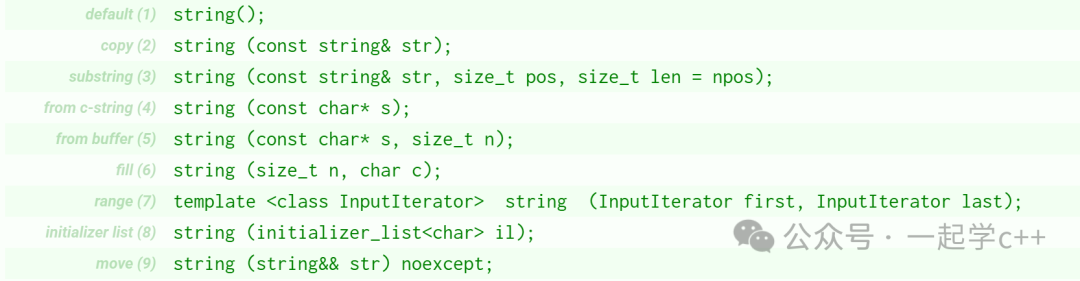
<span>string</span> class provides many member functions to manipulate strings, here are some commonly used member functions:
<span>size()</span>returns the length of the string.<span>empty()</span>checks if the string is empty.- append() appends content to the end of the string.
<span>substr()</span>retrieves a substring.<span>find()</span>finds the position of a substring within the main string.<span>replace()</span>replaces certain characters in the string.- insert() inserts content at a specified position.
- clear() clears the string.
- compare() compares if two strings are equal.
- c_str() returns a C-style string with a terminating ‘\0’.
Each member function’s specific usage can be looked up separately, but due to space limitations, we will not list them all here. However, it is important to mention the c_str() method:<span>c_str()</span> returns a pointer whose lifetime is tied to the string object. If the string is modified (e.g., through <span>+=</span> or <span>append</span> operations), the original pointer may become a “dangling pointer”, and accessing it will lead to errors, so it must be retrieved again:
std::string s = "old";
const char* p = s.c_str(); // Initial pointer is valid
s += "new"; // Modifying the string may invalidate p
p = s.c_str(); // Retrieve pointer again to ensure safety
It is important to remember that the pointer returned by <span>c_str()</span> is only for reading; directly casting it (e.g., <span>const_cast<char*>(s.c_str())</span>) and then modifying it can easily lead to program crashes.Core Features of the String Class and Memory Management
The core feature of the string class is its automatic memory management capability, which can automatically resize based on the string’s length. Additionally, modern compilers implementShort String Optimization (SSO): when the string length is small, characters are stored directly in the object’s stack space, avoiding costly heap memory allocation. This can be seen in the example below.
int main(){
    std::string short_str = "123456789"; // 9 characters, triggers SSO
    std::string long_str(32, 'x');       // 32 characters, heap storage
    auto print_addr = [](const std::string& s) {
        std::cout << "Object address: " << (void*)&s                   << " | Data address: " << (void*)s.c_str() << '\n';
    };
    print_addr(short_str); // Addresses are adjacent (directly stored in stack)
    print_addr(long_str);  // Addresses differ (indirectly stored in heap)
}
Output results

The specific length varies depending on the compiler and platform; for example, on my Windows VS Code, this size is 16.
To understand string’s memory management, it is also essential to distinguish between two core concepts:Capacity and Size (length). The former represents the total amount of physical memory allocated, while the latter is the actual number of valid characters stored. This can be likened to a “cup”: size is how much water is currently in it, while capacity is how much water the cup can hold. This is quite similar to the vector container.
Frequent automatic resizing can lead tomemory reallocation and data copying, which is a performance bottleneck for operations like string concatenation. The reserve(n) method can preallocate at least n characters of capacity, avoiding multiple resizes:
// Without using reserve: may trigger multiple resizes
std::string str1;
for (int i = 0; i < 50; ++i) {
    str1 += 'a';
}
// Using reserve: allocate all at once
std::string str2;
str2.reserve(100); // Preallocate capacity for 100 characters
for (int i = 0; i < 50; ++i) {
    str2 += 'a'; // No resizing, directly append
}
Pitfall Tips:
- reserve only changes capacity, not the actual character count; while resize directly modifies size, if n exceeds the original size, it will fill the new space with ‘\0’, and at the same time, capacity will also increase.
- Accessing an uninitialized empty string directly via subscript will trigger an error; space must first be allocated using reserve/resize or by using push_back to append.
Conversion Between String Class and C-Style StringsC++ allows<span>const char*</span><span> to</span><code><span>std::string</span> implicit conversion, meaning you can directly pass string literals (like<span>"C-style"</span>) to functions that accept<span>std::string</span> parameters, and vice versa. For example:
void process_string(std::string str) { /* ... */ }
process_string("C-style"); // Implicitly converts to std::string temporary object
However, this conversion hides theoverhead of temporary objects: each call creates a temporary instance of<span>std::string</span><span>, which can lead to performance loss in high-frequency scenarios (like loop calls).</span><span> More dangerously, users may overlook this conversion, leading to subsequent memory management issues. Consider the following example:</span><pre><code class="language-c">#include <string>
#include <cstring>
void process_data(const char* data) {
// Use data pointer to access string...
}
int main() {
std::string str = "temporary string";
const char* c_ptr = str.c_str(); // Get C-style pointer
str += " extended"; // Implicitly triggers memory reallocation, original c_ptr points to old memory
//process_data(c_ptr); // Dangerous! c_ptr is now dangling, accessing freed memory
c_ptr = str.c_str(); // Correct, retrieve pointer again
process_data(c_ptr);
return 0;
}<span>Here, the pointer returned by </span><code><span>str.c_str()</span> may become invalid after modifying <span>str</span>, as string resizing may lead to memory reallocation, causing the old pointer to point to freed memory. However, it is easy to forget this and continue using the pointer, leading to memory access errors.
C++11 Raw String Literals
The most troublesome aspect of C-style strings is the “escape characters”—for example, writing a Windows pathC:\Users\test must be written as“C:\\Users\\test”; writing a multi-line SQL statement also requires\n or concatenation, which is very hard to read.
C++11 introduced raw strings that perfectly solve this problem, with the syntaxR”(string)”, where the content inside the parentheses is output as is, without escaping. For example:
#include <stdio.h>
int main() {
    // 1. Path does not need escaping
    const char path[] = R"(C:\Users\test\code)";
    printf("%s\n", path); // Directly outputs C:\Users\test\code
    // 2. Multi-line string does not need concatenation
    const char sql[] = R"(        SELECT id, name         FROM user         WHERE age > 18    )";
    printf("SQL:%s\n", sql); // Preserves newlines and spaces, outputs as is
    // 3. Special characters can be written directly
    const char quote[] = R"(He said "I'm a C++ developer!")";
    printf("%s\n", quote); // Outputs He said "I'm a C++ developer!"
    return 0;
}
If the content happens to include” )”, you can add a “delimiter” to the raw string, such asR”delimiter(content)delimiter”, as long as the delimiter does not repeat:
const char special[] = R"abc(This is a "(test)")abc";
cout << special << endl; // Outputs This is a "(test)"
The delimiter in the above example is abc, and the string between “abc(” and “)abc” will be output as is.
Raw strings are often used for writing configuration file paths, multi-line logs, and regular expressions.
String Formatting
String formatting is an important application of strings, and there are differences between traditional styles and the new methods introduced in modern C++ standards. Let’s take a look.
The traditional C-style formatting scheme always faces the dual dilemma of “safety and efficiency.” Taking C-style sprintf as an example, its most fatal flaw is that itcompletely relies on the developer to manually match format strings with parameter types:
// Dangerous! Type mismatch leads to runtime error
char buffer[100];
sprintf(buffer, "%s", 42); // Treats integer 42 as a string pointer
sprintf also requires developers to manually manage the size of the target buffer, which is nearly disastrous in dynamic string scenarios. Even using improved versions like sscanf or snprintf does not completely avoid the risk of buffer overflow. This practice has basically been abandoned in C++ development.
C++ standard stream operations eliminate the hassle of manually matching types, but the syntax is verbose and has poorer performance:
// Verbose stream operation syntax
std::cout << "Name: " << name << ", Age: " << age << ", Score: " << score << std::endl;
<span>Before C++20, string formatting generally relied on third-party libraries like FMT, etc.</span>
C++20 std::format’s Revolutionary Improvement
C++20 introduced the std::format modern formatting scheme, referred to as “Python-style formatting comes to C++”, which fundamentally changes the way C++ handles string formatting. It provides a more modern, safer, and flexible formatting method.
Core Features:
- Type Safety checks format specifiers against parameter types at compile time.
- Intuitive Syntax uses
<span>{}</span>instead of obscure<span>%d</span>/<span>%f</span>. - Performance Leap floating-point formatting speed is 10 times that of snprintf.
- Flexible Control allows fine-grained control over alignment, padding, precision, etc., through format specifiers.
<span>std::format</span> syntax follows the<span>[[fill]align][sign][0][width][.precision][type]</span> pattern, where each part has the following meanings:
-
fill: Optional, specifies the fill character for alignment. For example,
<span>{:=^10}</span>where<span>=</span>is the fill character. -
align: Optional, specifies the alignment (
<span><</span>for left alignment,<span>></span>for right alignment,<span>^</span>for center alignment). -
sign: Optional, specifies how to display the sign of numbers (
<span>+</span>means always show the sign,<span>-</span>means show the sign only for negative numbers). -
0: Optional, if a width is specified, this option indicates to fill with zeros. For example,
<span>{:08d}</span>formats the number to at least 8 digits wide, padding with 0 where necessary. -
width: Optional, specifies the minimum width. If the value is shorter than this width, it will be padded according to alignment and fill rules.
-
.precision: Optional, specifies the number of decimal places or the maximum length of the string, etc. For example,
<span>{:.2f}</span>indicates to keep two decimal places. -
type: Optional, specifies the type conversion method for the value (e.g.,
<span>d</span>for decimal integers,<span>f</span>for floating-point numbers, etc.).
Taking the classic right-alignment example<span>{:*>10}</span> as an example, <span>*</span> is the fill character, <span>></span> indicates right alignment, and <span>10</span> specifies the width, combining to achieve the effect of “filling to a width of 10 characters and right-aligning”. Let’s look at some basic usage examples below.
#include <format>    // Must include this header
#include <cstdio>
#include <string>
#include <iostream>
int main() {
    std::string result = std::format(
        "Name: {:<10} Age: {:03d} Score: {:.2f}",
        "Alice", 25, 95.5
    );
    std::cout << result << std::endl;
    return 0;
}
Output

In the above code, <span>{:<10}</span> achieves left alignment with a width of 10 characters, <span>{:03d}</span> fills with 0 to make a 3-digit integer, and <span>{:.2f}</span> keeps two decimal places.
Now let’s look at some common formatting controls.
double price = 19.9;
// 1. Specify decimal places: {:.2f} indicates to keep 2 decimal places
string price_str = format("Price: {:.2f} yuan", price);
cout << price_str << endl; // Outputs: Price: 19.90 yuan
// 2. Specify width and alignment: {:>10} indicates right alignment, total width 10
string right_align = format("Right aligned: {:>10}", price);
cout << right_align << endl; // Outputs: Right aligned:      19.9
// 3. Left alignment + padding: {:<10#} indicates left alignment, total width 10, fill with # in blank spaces
string left_align = format("Left aligned: {:<10#}", price);
cout << left_align << endl; // Outputs: Left aligned: 19.9#######
format’s formatting control syntax is very similar to Python’s str.format(), supporting a rich set of formatting options while being highly readable, making it the recommended approach for modern C++ formatting control.
Conclusion: Best Practices for Modern C++ Strings
Modern C++ standards have provided us with sufficiently useful string handling methods, and fully utilizing these features can greatly simplify the complexity of string operations. Here are some basic principles summarized:
- When storing strings, prefer using std::string and abandon traditional C-style strings.
- For formatting needs, prefer using std::format instead of traditional printf or I/O streams, but ensure compiler support (GCC 11+, Clang 14+, MSVC 19.3+); in older environments, the fmt library can be used as an alternative.
- When dealing with multi-line text or strings containing special characters, use C++11 raw string literals to simplify escape logic.
- Prioritize using reserve to preallocate space to optimize string concatenation performance.
- Raw string literals are ideal for handling complex texts like JSON/XML.