|
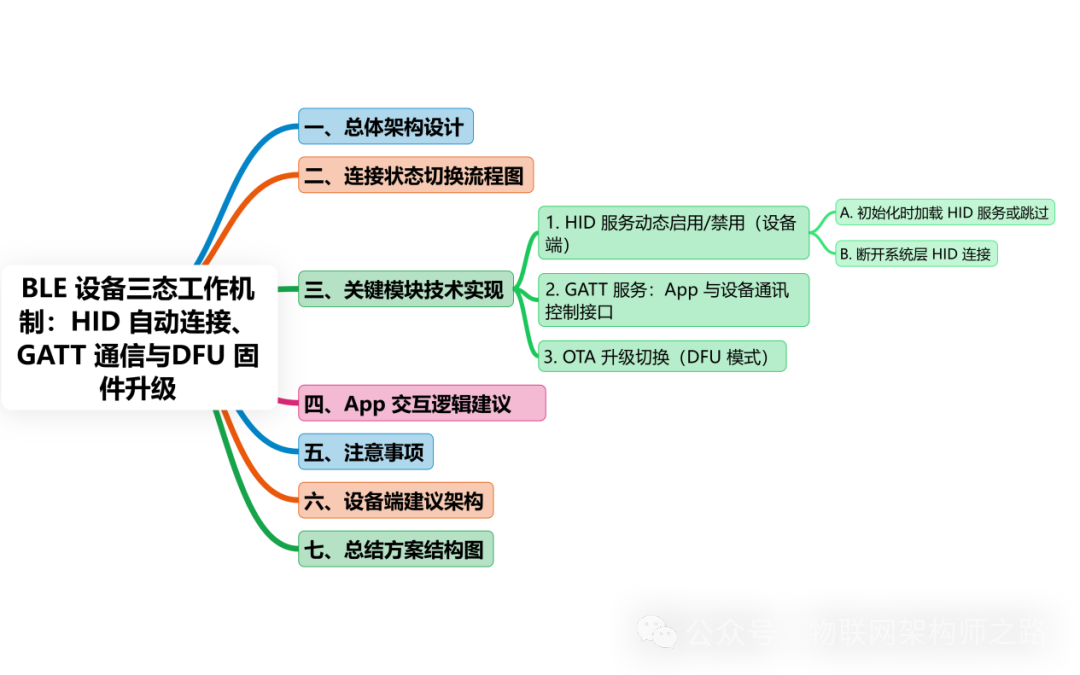
In smart padlocks, the design of switching between BLE HID + GATT + OTA/DFU protocols is a common multi-protocol multiplexing solution suitable for low-power smart devices, requiring flexible switching between HID input, standard BLE service communication (such as GATT), and OTA firmware upgrades. |
Design Objective:A three-state working mechanism of BLE HID + GATT + DFU, controlled by an app to enable and disable HID, while supporting proximity auto-connection, app wake-up (only supports Android), connection state switching, and firmware upgrades.
The following is a complete design analysis, switching logic, and system implementation recommendations.
1. Overall Architecture Design
1. System Module Role Division
|
Module |
Description |
|
BLE HID Profile |
Provides input interaction with mobile/iOS/macOS (such as auto-connection, simulated key presses, touch input) |
|
BLE GATT Profile |
Provides a dedicated data communication channel for the padlock (such as authentication, unlock commands, status reporting) |
|
OTA/DFU Module |
Provides firmware upgrade capability under BLE (nRF OTA, ESP OTA, DFU Service) |
2. Protocol Architecture Design
|
Mode |
Purpose |
Bluetooth Protocol |
Features |
|
Quick Proximity Connection |
Wake up the device, auto-connect |
BLE + HID Profile |
iOS/Android can auto-connect and display connection status (system settings – mobile Bluetooth list display) |
|
Application Communication |
App opens and controls the device |
GATT Custom Service |
Supports network configuration, unlocking, status reporting |
|
OTA Upgrade |
Firmware update |
DFU OTA Dedicated Service |
Must disconnect existing connection and reconnect |
2. Connection State Switching Flowchart
|
Plain Text Prerequisite: Set HID on/off in the app. The following is the flowchart for the enabled HID 【1】Proximity Broadcast (Enable HID)─────┐ ↓ (System auto-connect) 【2】System Layer BLE HID Connection ↓ (Open App) 【3】App Connects GATT】───→ GATT Handshake (Authentication, Control) ↓ (App sets to disable HID) 【4】Disable HID and Disconnect】←──── Device disconnects system BLE HID connection ↓ Only retain App GATT communication ↓ (App triggers upgrade) 【5】Restart and Switch to DFU】────→ Enter OTA Broadcast → DFU Connection → Upgrade Complete ↓ Restart back to broadcast state. |
3. Key Module Technical Implementation
1. Dynamic Enable/Disable of HID Service (Device Side)
•Supports App control to enable or disable BLE HID service
•Implementation Method:
A. Load HID service during initialization or skip
The device side maintains a non-volatile flag (such as Flash flag):
|
C bool isHIDEnabled = read_setting_from_flash(); if (isHIDEnabled) { ble_add_hid_service(); // Register HID service } |
The App writes the disable_hid command via GATT → saves the flag → restarts the device.
B. Disconnect System Layer HID Connection
•The peripheral calls GAP disconnect:
|
C esp_ble_gap_disconnect(remote_bda); |
•This will disconnect the BLE HID connection on iOS/Android, but will not affect GATT.
2. GATT Service: App and Device Communication Control Interface
•Defines the following GATT Characteristics:
|
Characteristic |
Type |
Purpose |
|
auth_control |
write |
Authentication/Unlock Command |
|
hid_toggle |
write |
Toggle HID flag (restarts after writing) |
|
dfu_request |
write |
Request to switch to DFU mode |
3. OTA Upgrade Switching (DFU Mode)
•Upon receiving dfu_request, immediately:
○Store DFU flag to Flash
○Call power-off/restart interface
○At startup, check DFU flag, jump to OTA bootloader
ESP32 Example:
|
C write_flag(DFU_MODE); esp_restart(); // Restart |
nRF Example:
|
C sd_power_gpregret_set(BOOTLOADER_DFU_START); NVIC_SystemReset(); |
4. App Interaction Logic Recommendations
|
Scenario |
App Operation |
|
Proximity Auto-Connection (HID) |
App is awakened (only Android can actively wake up, iOS does not support) |
|
After App Opens |
Actively scan to connect to GATT service |
|
User Disables HID Function |
Write to GATT: disable_hid=true, device disconnects HID |
|
User Upgrades Firmware |
Write to GATT: enter_dfu=true, device restarts in DFU mode |
5. Precautions
|
Item |
Description |
|
System Limitations |
The app cannot actively disconnect BLE HID; the device side must actively disconnect |
|
Broadcast Strategy |
Broadcast HID UUID when HID is enabled; switch to DFU UUID when entering DFU mode |
|
Privacy Design |
HID enabled can serve as proximity identification, GATT controls actual security transactions (such as unlocking) |
|
Multiple Phone Exclusive Connection |
Can maintain a unique connection by binding App ID in the broadcast or authenticating after GATT communication |
6. Recommended Architecture on Device Side
|
C main.c ├── ble_init() │ ├── check_hid_flag() │ ├── add_hid_service() // Dynamic loading │ ├── add_gatt_services() ├── gatt_event_handler() │ ├── on_hid_toggle() │ ├── on_dfu_request() │ ├── on_auth() ├── dfu.c / bootloader.c ├── enter_dfu_mode() ├── reset_to_ota_bootloader() |
7. Summary of Solution Structure Diagram
|
Plain Text ┌─────Proximity Connection─────┐ │[HID Broadcast + Pairing]│ └────────┬────────┘ ↓ (Open App) [App Connects GATT] ↓ (Switch) ┌────App Closes HID────┐ │Write hid_flag to disable │ └────────┬─────────┘ ↓ (Disconnect HID) Only retain GATT communication ↓ App Requests DFU Upgrade ↓ DFU Mode Broadcast ↓ OTA Complete → Restart ↓ GATT Reset |