Introduction
Camera accessories are an important part of the photography process. They may seem unrelated to photography, and it is possible to take photos without them, but in actual usage scenarios, these accessories play a critical role. For example, a spare battery can extend shooting time, and a UV filter can protect the lens, etc.
This article is aimed at beginners in photography and those purchasing a camera for the first time. It will provide a simple introduction and recommendation for some commonly used camera accessories, helping everyone avoid pitfalls, understand, and make purchases.
Table of Contents
1. Necessary Accessories
-
1.1 Spare Battery
-
1.2 Memory Card and Card Reader
2. Optional Accessories
-
2.1 Camera Cleaning Tools
-
2.2 Lens Cleaning Paper
-
2.3 Lens Hood
-
2.4 UV Filter
-
2.5 Camera Bag
-
2.6 Tripod
-
2.7 Shutter Release Cable
1. Necessary Accessories
Strictly speaking, camera lenses are also considered accessories, but due to the extensive content, this article will not discuss them separately. The necessary accessories listed here are those that 99% of camera users will equip themselves with, generally including spare batteries, memory cards, card readers, etc.
1.1 Spare Battery
The role of a spare battery goes without saying. When purchasing a camera, the specifications often indicate battery life parameters, such as:


Note: The battery life of a DSLR camera is very high when using the optical viewfinder for shooting, but if you review each shot using the LCD display, the battery life will decrease significantly.
In real shooting scenarios, the battery’s endurance can be affected by factors such as “environment,” “operation,” and “battery lifespan.” The actual endurance may deviate from the theoretical values. If you need to use the camera for an extended period or are going out, it is recommended to equip at least one spare battery for emergencies. Unlike smartphones, cameras generally do not support charging while shooting.
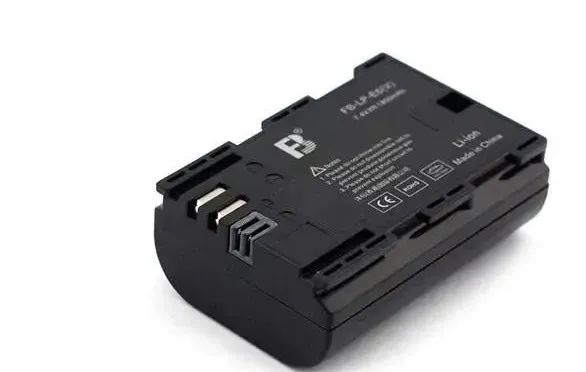
When equipping a camera battery, be careful about the model to avoid purchasing the wrong one. The model is also described in the corresponding camera specifications. You can also ask customer service for help, for example:

When choosing a battery, the main concerns are:
1. Should I buy the original manufacturer’s battery or a third-party battery? What are the differences?
If your budget allows, it is definitely better to buy the original manufacturer’s battery, which has a high quality guarantee and compatibility with the camera. However, some manufacturers do not sell them in their official flagship stores, making them hard to find. Third-party batteries can also be used normally, but there may be slight discrepancies in battery life and power level display compared to the original.
1.2 Memory Card
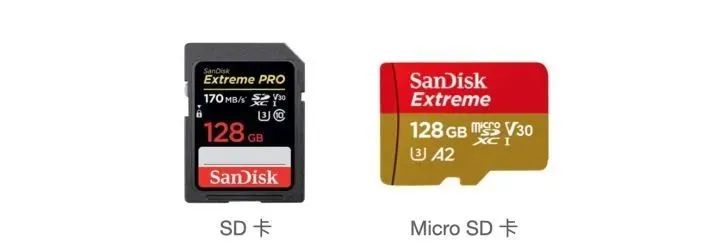
Camera memory cards are primarily divided into three types: SD cards, Micro SD cards, and CFexpress cards. Currently, SD cards and Micro SD cards are the most commonly used types.
-
SD cards are currently the most widely used type in mirrorless and DSLR cameras, from entry-level to high-end, almost every DSLR and mirrorless camera supports SD cards.
-
Micro SD cards are smaller SD cards, also known as TF cards, typically used in earlier smartphones, drones, action cameras, and other small devices.
-
CFexpress is a new type of memory card that has been released in recent years, similar in size to SD cards but offers better performance and speed, with a significantly higher price compared to SD cards. Some high-end cameras come with dual card slots, one of which is for CFexpress cards.
For most photography enthusiasts, SD cards are generally used.
What are the effects of using an incompatible memory card?
-
The camera’s maximum burst shooting count is very low, and it can only shoot a few frames before failing.
-
Unable to shoot high-spec videos. The camera supports 4K/60P, but it just won’t work.
-
Frequent “BUSY” messages during shooting.
-
Slow photo transfer speeds.
So how do you choose a suitable memory card? Generally, focus on these two parameters: “read speed” and “write speed.” Different read and write speeds can result in price differences between two memory cards of the same capacity.
The speed class of a memory card is usually indicated on the card surface, as shown in the image:
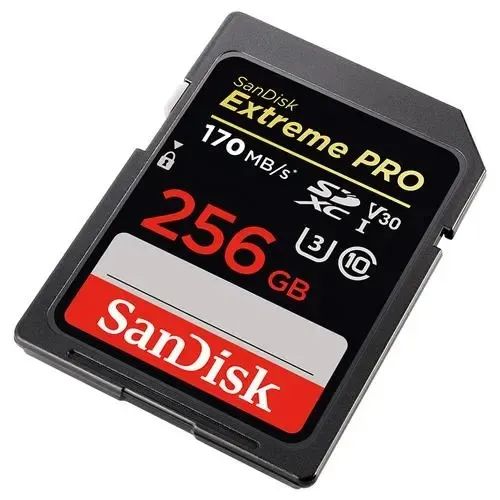
Explanation of the labels in the image:
-
1-170 MB/s indicates the maximum read speed of the memory card.
-
2 – V30, where V represents the video speed class of this card, and 30 is the sustained write speed of 30MB/s. V30 indicates that this card’s minimum sustained speed is 30MB/s, which is crucial for those shooting videos.
-
3 – I, represents the type of SD card, with I indicating UHS-I cards and II indicating UHS-II cards. Most cameras on the market support UHS-I slots, but not all camera slots support UHS-II, so be careful when purchasing.
-
4 – U3, where U indicates the UHS speed class, and U3 represents a minimum write speed of 30MB/s. Currently, there are only two options for speed classes: U1 and U3, where U1 represents a minimum write speed of 10MB/s. Memory cards below 10MB/s will not have a U label, so pay attention when purchasing.
-
5 – C10, where C is an early speed grade indicator, and C10 indicates a minimum write speed of 10MB/s. Generally, those with a U1 label will also have a C10 label, so the C label does not need special attention. Memory cards below C10 are not recommended for use in cameras.
How do you know what memory card is suitable for your camera?
Different cameras have different requirements for write speeds. A convenient rule of thumb is: for a camera body below 10K with 24 million pixels, equipping a U1 level memory card can meet basic shooting scenarios. For camera bodies above 10K, it is recommended to equip a U3 level memory card.
If shooting video, you need to calculate the bitrate of the camera’s recorded video, which is usually indicated in the camera’s recording parameters, for example:

Application formula: bitrate/8 gives the required sustained write speed of the memory card (V class). For example, if the bitrate is 4K/30P 120Mbps, the required sustained write speed is 15 MB/s (120/8). Thus, V10 (10MB/s) will not meet the requirement, while V30 will, so a V30 class SD card is needed.
For those shooting videos, it is recommended to start with a V30/U3 memory card.
What should you pay attention to when purchasing a memory card?
-
Memory cards have a lifespan, so before performing operations on the images or videos on the card, it is best to copy them out first. Avoid operating directly on the card, as it will slow down the speed and significantly consume the lifespan of the memory card.
-
Due to technical reasons, the capacity of the memory card can affect its speed. If the camera has high write speed requirements, it is recommended to purchase a single memory card with a capacity of 128GB or higher.
-
If you have to choose between buying one 512GB memory card or four 128GB memory cards, I recommend buying four 128GB cards. Multiple memory cards can make your data more independent, preventing loss due to a single card failure. Additionally, using four cards in rotation will extend their lifespan.
Which memory cards are recommended?
The mainstream SD card brands currently include SanDisk, Kingston, Lexar, etc. Here I recommend SanDisk memory cards, as they are a giant in the memory card industry and lead the development of memory cards. SanDisk offers good quality and reputation at relatively affordable prices.
What about card readers?
Once you have a memory card, you need a card reader to transfer the data from the card to your computer. Some computers come with an SD card slot, so check if your computer has the corresponding slot before use. If you are using a computer with an SD card slot (like a MacBook), you may not need to buy a card reader.
The quality of the card reader should not be too low, or it won’t meet the maximum speed of the memory card, making even the best card useless. Therefore, I recommend purchasing a high-speed card reader with a USB 3.0 interface to ensure speed can be maximized. 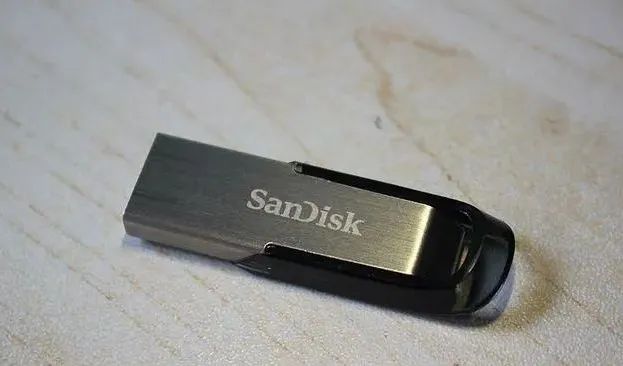
If your budget allows, you can choose a SanDisk card reader (supporting UHS-II), which will provide a speed boost when used with SanDisk memory cards.
2. Optional Accessories
2.1 Camera Cleaning Tools
Camera cleaning tools are also essential items for cameras, with many varieties available. For most non-professional users, I recommend preparing just these three items:
-
Air Blower – Used to clean dust off the camera body and lens.
-
Lens Pen – Used to clean dust, sand, and some easily removable marks from the lens. Some stubborn marks require lens cleaning paper, as referenced below.
-
Screen Cleaning Cloth – Used to clean the camera body and screen.
I do not recommend buying the 10-in-1 cleaning kits, as many tools included are unnecessary or optional. For general photography enthusiasts, the most commonly used items are air blowers, lens pens, and lens cleaning paper. 
Everyone knows how to use air blowers and cleaning cloths. One thing to note about the lens pen is that when using the brush end, ensure that there is no moisture on the lens. Gently sweep away the dust. When using the carbon tip end, do not apply too much pressure; slowly wipe away the stains on the lens.
Please be cautious when purchasing CMOS sensor cleaning tools (cleaning solutions). CMOS sensors are very sensitive and should not be compared to regular electronic device screens. It is advisable to avoid cleaning them unless necessary; a simple air blower will suffice. Non-professionals are not recommended to clean CMOS sensors themselves, as careless operation can lead to damage.
2.2 Lens Cleaning Paper
In addition to camera cleaning tools, lens cleaning paper can also clean the lens and is specifically designed for lens cleaning. It can be used directly on the front and rear elements of the lens or UV filter to clean stains, dust, sand, fingerprints, and various marks, providing better results than eyeglass cloths or lens pens. This is especially necessary when traveling or shooting in extreme environments.
2.3 Lens Hood
A lens hood is an accessory attached to the camera lens that blocks harmful light. It is one of the most commonly used photography accessories. Without a lens hood, harmful light may pass through the lens and affect the image, leading to ghosting, halos, and flare, especially in backlit shots or when there are many light sources. Additionally, a lens hood can provide some protection for the lens.
In short, a lens hood is an indispensable accessory. I recommend equipping even entry-level kit lenses with a lens hood.
What should you pay attention to when purchasing a lens hood?
-
The diameter, petal shape, and material of the lens hood can all affect image quality differently. Different lenses have different designs, so generally, a lens will have a corresponding lens hood. Even if the diameter is the same, it is not advisable to use a lens hood from another lens.
-
When purchasing a lens hood, it is best to specify the exact model of the lens to avoid purchasing the wrong lens hood.
What are the recommendations?
If your budget allows, you can purchase the original manufacturer’s lens hood, which guarantees quality. Third-party lens hoods are also acceptable, but avoid purchasing unbranded lens hoods, as they may not match the original shape and will not effectively block light. 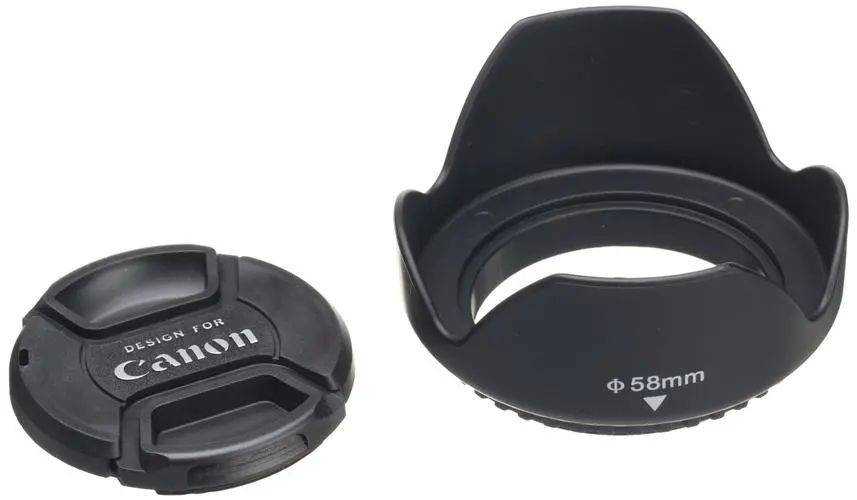
Note: Before purchasing a lens hood, be sure to consult customer service to confirm compatibility with your lens.
2.4 UV Filter
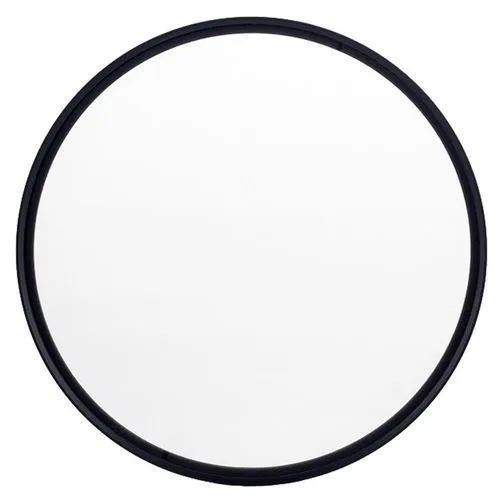
A UV filter is a type of filter used on lenses, primarily for lens protection.
According to the encyclopedia, a UV filter (UltraViolet filter) can enhance image quality (for film and CCD cameras), but since most cameras on the market today use CMOS sensors, they are not affected by ultraviolet light. Therefore, UV filters are only used for lens protection and cannot enhance image quality. In fact, the quality of the UV filter can have a slight impact on image quality (usually imperceptible).
UV filters are generally used to protect the lens coating from damage due to accidental drops or impacts, or from dust and moisture. You can choose to equip one based on the price of your lens; generally, if the lens price is > 1000, or if you enjoy traveling and often shoot in rainy or windy conditions, I recommend equipping a UV filter.
What should you pay attention to when purchasing a UV filter?
-
UV filters also have size requirements corresponding to the lens diameter, so pay attention to the matching diameter when purchasing.
2.5 Camera Bag
A camera bag is a major tool for carrying a camera. Some may ask if a regular backpack or handbag can be used. Of course, it can, provided that the bag carrying the camera does not get bumped or mixed with other items, and it should not be shaken violently, as cameras are quite delicate and can easily be damaged if not carried properly.
Camera bags are safer and more convenient than regular bags, and they come in both shoulder and backpack styles, featuring thicker inner layers to cushion against movement during travel. They also provide multiple pockets for storing lenses, ensuring that the body, lenses, batteries, and memory cards are stored separately and safely.
What should you pay attention to when purchasing a camera bag?
-
Camera bags are also designed for specific types of cameras. Some mirrorless camera bags may only fit smaller mirrorless bodies, while DSLRs may not fit. Therefore, pay attention to the size of the body compartment to ensure it fits your camera body.
Camera Bag Recommendations
There are not too many specific recommendations for bags; there are regular, original, and high-end bags. Everyone has different preferences, so choose according to your personal taste. 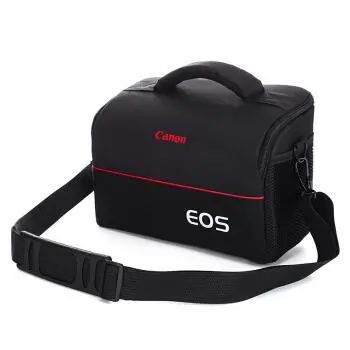
2.6 Tripod
A tripod is a support structure used to stabilize a camera. It is called a tripod because it has three legs and is used in photography scenarios that require camera stability, such as “landscape,” “portrait,” “still life,” “product,” and “humanistic” photography. It is essential for shooting star trails, flowing water (silky, wispy, misty), flowing clouds, night scenes, and macro photography. A tripod enhances shooting capabilities by allowing us to stabilize the camera at the desired shooting position and prevents blurriness during long exposure shots. 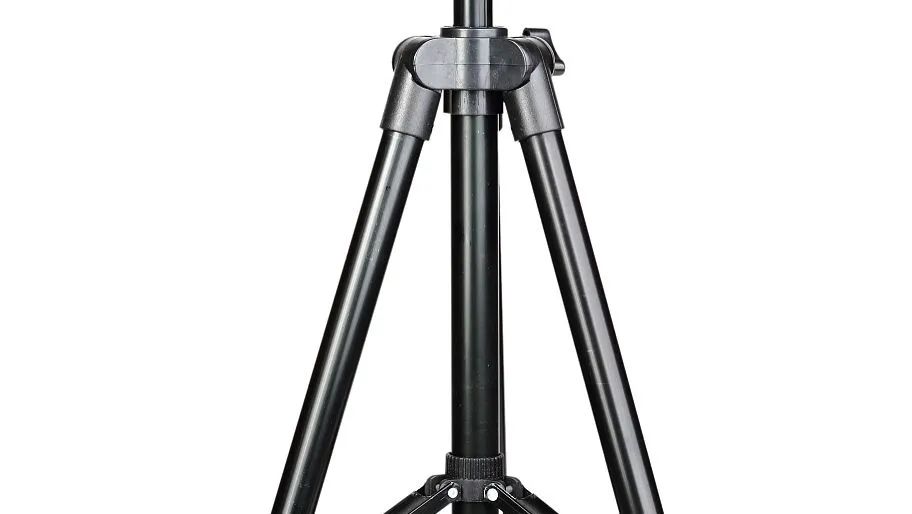
Tripods are mainly categorized by material into aluminum alloy and carbon fiber. Aluminum alloy tripods are slightly heavier, while carbon fiber ones are lighter and more portable, thus more expensive.
They can also be classified by leg diameter into 32mm, 28mm, 25mm, and 22mm. The larger the diameter, the stronger the weight-bearing capacity.
Additionally, tripods can be classified by the number of leg sections, such as 3-section, 4-section, or 5-section tripods. Generally, fewer sections provide better stability, but the portability may be compromised.
Aside from these main classifications, tripods can also be categorized by whether they have a reversible leg or a central axis, but we won’t go into detail here. Interested readers can refer to relevant materials.
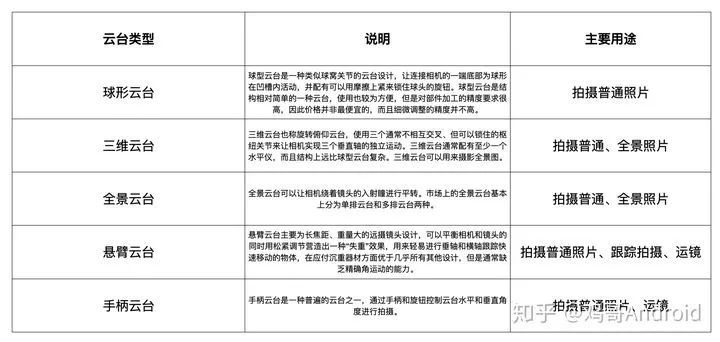
Of course, besides the tripod itself, the most important aspect is the head on the tripod. Often, a tripod can be equipped with different heads, each serving different purposes. Here’s a brief list:
What should you pay attention to when purchasing a tripod/head?
There are many brands and types of tripods available. If you are unsure, pay attention to the following points when choosing:
-
Material: Currently, the best option is carbon fiber, which is lightweight and durable (you don’t have to worry about it being too light and being blown away by the wind; tripods usually have hooks to hang weights). Aluminum alloy and aluminum-magnesium alloys are also good options, with only slightly more weight.
-
Weight capacity: Different tripods have different weight limits. When purchasing a tripod, carefully check if the weight capacity meets the total weight of your camera and lens. Generally, users do not exceed 6 KG. If you have a lens with a focal length of 200mm or more or heavy accessories, you may need to consider a model with a higher weight capacity.
-
Height: Different tripods can support different maximum and minimum heights. Some may require disassembly and reassembly to achieve maximum height. If you need to shoot from a high or low position, pay attention to the height parameters.
-
Head: Generally, a tripod can be paired with different heads. It is recommended that ordinary amateur photographers use ball heads or pan heads, as they are easy to operate and powerful enough to meet daily needs. Pan heads can also be used for panning in video shooting.
-
Size/Weight: Tripods often need to be carried to different shooting locations, so portability and size are crucial. If you need to travel with it, try to choose a smaller tripod.
2.7 Shutter Release Cable
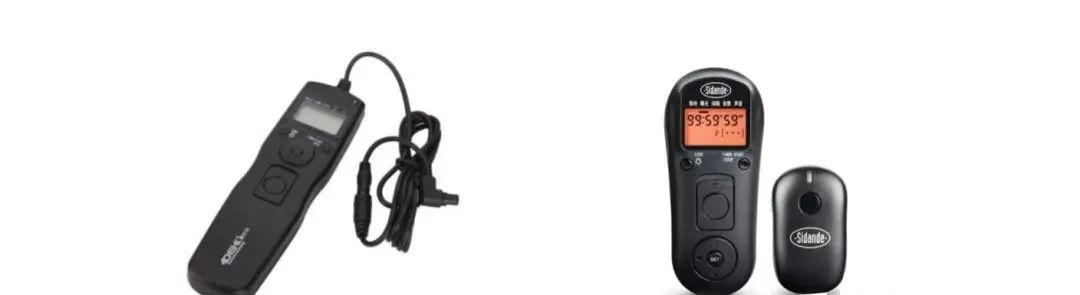
A shutter release cable, as the name suggests, is a remote control cable for the shutter. The simple way to use it is to press the button on the remote end of the shutter release cable to control the camera’s exposure and shooting. It is commonly used for “remote shooting,” “B door exposure” (custom exposure time), “interval shooting,” and “timelapse photography.” If you have any of these shooting scenarios, I recommend equipping a shutter release cable. When taking long-exposure photos, using a shutter release cable can control the camera’s shooting without causing vibrations from touching the camera surface, preventing the image from blurring. Generally, a shutter release cable is used in conjunction with a tripod.
Shutter release cables come in two types: wired and wireless, as shown here:
What should you pay attention to when purchasing a shutter release cable?
-
If remote control is needed, you can choose a wireless shutter release cable; otherwise, a wired shutter release cable will suffice.
-
The shutter release cable is also related to the camera brand, so be sure to check if the shutter release cable interface is compatible with your camera body. It is advisable to consult customer service before purchasing.

Drone Photography Equipment “Daiwen Digital”“Official WeChat Account: dwsm88”
Physical Store Address:
Daiwen Digital Canon Specialty Store – 418 Baiyan Road (next to Taixing Computer City)
Club Address:
418 Baiyan Road – Basement Level 1 (Edison Comprehensive Experience Store)
Contact Numbers: 18723717788
15978951568
85782121
Taobao Store Address: Search “Xinyihao Trading” directly in the store
Link-https://shop106375422.taobao.com/shop/view_shop.htm?tracelog=twddp&user_number_id=559382619