
Welcome to the 【Ultimate Programmer】 WeChat public account 【Knowledge Repository】, specially customized for everyone《Qt C++ Architect》 Series–Qt Project Practical Application Issue 121:This issue will focus on a practical and challenging technical topic–【C++17 Features and Qt Framework: High-Performance Cross-Platform Programmer’s Scientific Calculator】.Whether you are a beginner who has just mastered the Qt cross-platform framework and Linux C/C++ backend server development, or a developer who wants to delve into the research of C/C++ system architecture, this technology will open a door to deep learning, enhancing your technical development and architecture design capabilities, meeting the technical requirements of enterprise-level development positions. Wishing everyone success in their studies.
【Development Environment】: Win10/11 x64, Qt version 6.5;
📢 Daily sharing of high-quality open-source projects and high-paying technical programming content!
【Follow the UP Master and join theQQGroup】: 895876809 Download project source code (for research and study).
1: 【Project】🚀 Running Results
1: Initialization Interface
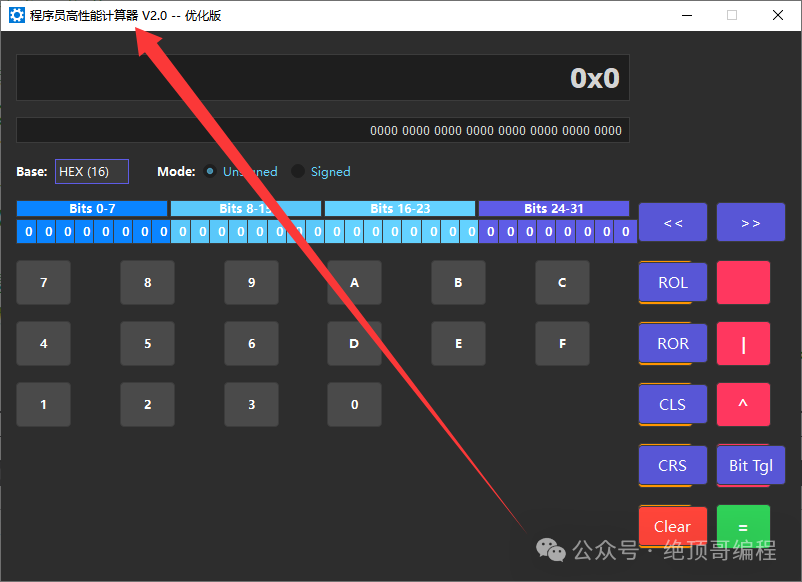
2: Test Base Conversion
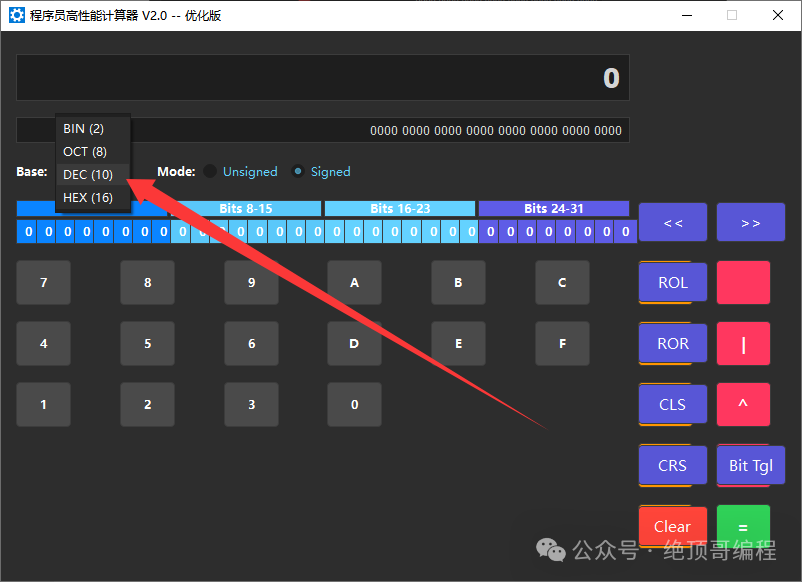
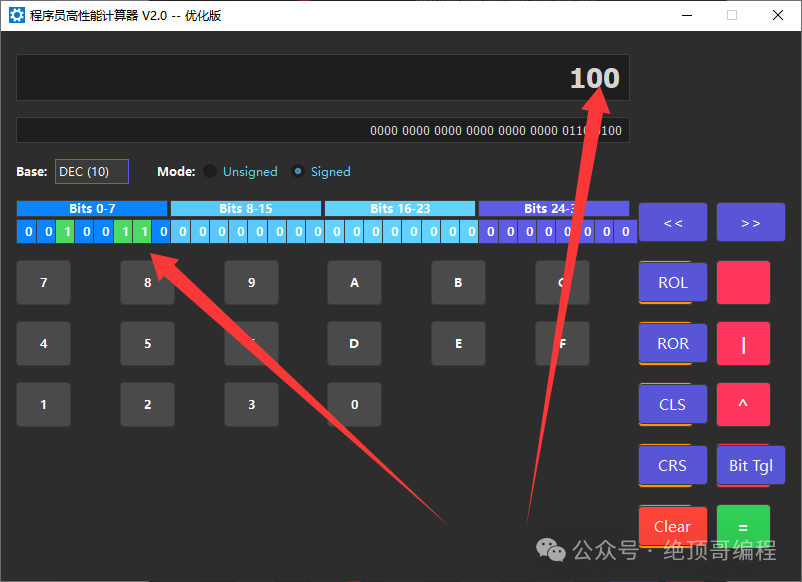
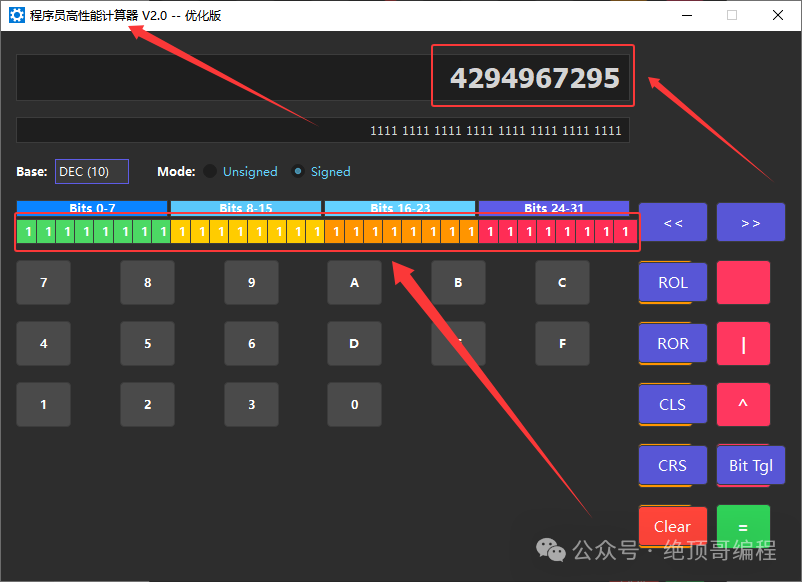
3: Complex Number Conversion Test: 4294967295
4: Left Shift 1 Bit (Decimal 25)
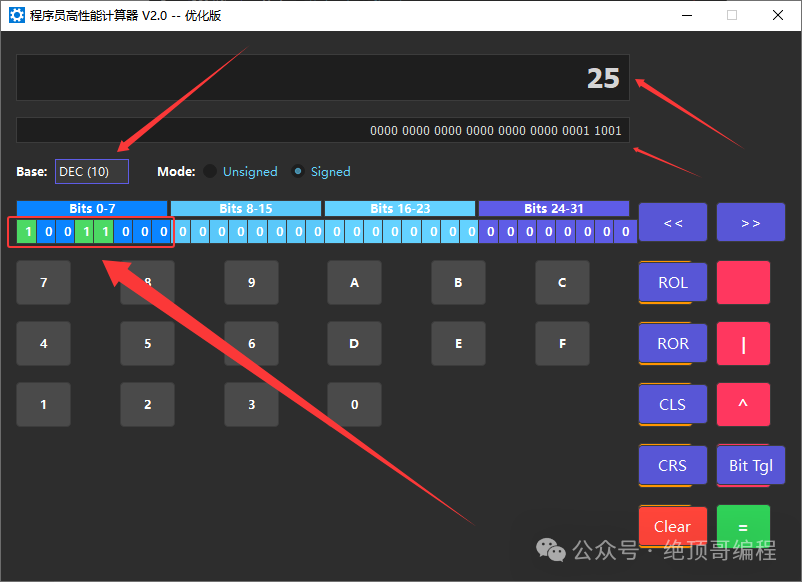
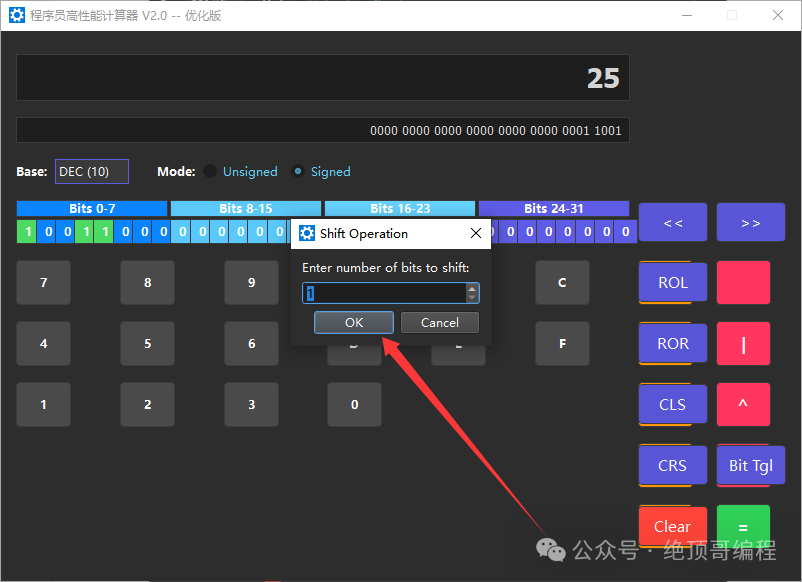
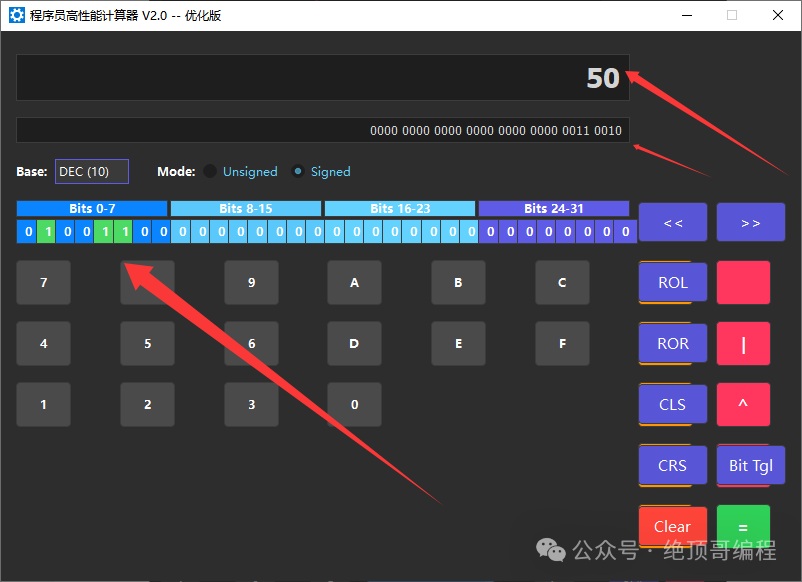 The remaining functions can be operated by everyone.
2: 【Project】🏗️ Project Overview and Features
A professional calculator supporting binary, octal, decimal, hexadecimal conversion and advanced bitwise operations
1: 🔢 Multi-Base Conversion
- BIN (Binary) – 0b11111111
-
OCT (Octal) – 0377
-
DEC (Decimal) – 255
-
HEX (Hexadecimal) – 0xFF
-
Real-time conversion – Automatically synchronously displayed while inputting
2: ⚡ High-Performance Computation
- Arithmetic Operations: + – * / %(Addition, Subtraction, Multiplication, Division, Modulus)
-
Bitwise Logical Operations: & | ^ ~(AND, OR, XOR, NOT)
-
Shift Operations: << >>(Left Shift, Right Shift)
-
Bit Rotation: ROL ROR(Circular Left Shift, Circular Right Shift)
-
Signed/Unsigned Mode Switching
3: 🎯 Real-time Bit Visualization
- 32-bit binary display – Each bit’s status is clearly visible
-
Grouped Highlighting – Grouped by 8 bits for easy reading
-
Interactive Bit Operations – Click to flip any bit
-
Color Coding – Different colors for different bit groups
4: Technical Implementation
【Architecture Design】
-
Single Responsibility Principle** – Each function focuses on a single task
-
Modular Design** – Separation of UI settings, calculation logic, and event handling
-
Object-Oriented** – Complete class encapsulation and interface design
【Key Technologies】
-
Qt Framework – Cross-platform UI and event handling
-
C++17 – Modern C++ features and performance optimizations
-
Bitwise Operations – Efficient binary operations
-
Event-Driven – Responsive user interaction
【Design Patterns】
-
Observer Pattern – UI state synchronization updates
-
Strategy Pattern – Different strategies for base handling
-
Factory Pattern – UI component creation and configuration
3: 【Project】📋 Source Code Analysis
1: main.cpp File
/*************************************************************************** * File Name: main.cpp * Program Version: V2.0 High-Performance Optimized Version * Creation Date: January 2025 * Last Modified: January 2025 * * Function Description: Entry point for the programmer's high-performance calculation tool * * Main Functions: * 1. Initialize Qt application environment * 2. Configure dark theme interface style * 3. Create and display calculator main window * 4. Start Qt event loop * * Performance Optimization Features: * - Streamlined program entry for quick startup * - Optimized theme configuration to reduce UI rendering overhead * - Clear code structure for easier maintenance * * Design Philosophy: * - Single Responsibility: Only responsible for program startup and theme configuration * - Module Separation: UI logic is completely handled by the Calculator class * - High Cohesion and Low Coupling: Minimize coupling with business logic * * Author Information: Vico * Technical Support: QQ Group ***************************************************************************/#include "calculator.h" // Header file for the main calculator class#include <QApplication> // Qt application base class#include <QPalette> // Qt palette class for theme configuration#include <QStyleFactory> // Qt style factory class/** * @brief Main entry function of the program * @param argc Number of command line arguments * @param argv Command line argument array * @return Program exit code (0 indicates normal exit) * * Function Execution Flow: * 1. Create QApplication instance, initialize Qt environment * 2. Set Fusion style for a modern appearance * 3. Configure dark theme palette to protect programmer's eyesight * 4. Create Calculator instance and display window * 5. Start Qt event loop to begin responding to user interactions * * Performance Optimization Explanation: * - Using Fusion style, performs well across platforms * - Dark theme reduces screen brightness, lowering power consumption * - Streamlined startup process for quick usability */int main(int argc, char *argv[]) { // ======================================= // Create Qt application instance // ======================================= QApplication app(argc, argv); // ======================================= // Configure modern dark theme - User experience optimization // ======================================= /** * Reason for choosing Fusion style: * - Good cross-platform consistency, uniform performance on Windows/Linux/macOS * - Excellent rendering performance, supports hardware acceleration * - Well-adapted dark theme * - Relatively low memory usage */ app.setStyle(QStyleFactory::create("Fusion")); /** * Dark theme color scheme design: * - Main background color: Dark gray (45,45,45) - Eye-friendly and not too dark * - Text color: White - Ensures contrast and readability * - Input area background: Darker gray (30,30,30) - Highlights display * - Button background: Medium gray (60,60,60) - Clear hierarchy * - Highlight color: Blue - Complies with modern UI design standards */ QPalette darkPalette; darkPalette.setColor(QPalette::Window, QColor(45, 45, 45)); // Window background color darkPalette.setColor(QPalette::WindowText, Qt::white); // Window text color darkPalette.setColor(QPalette::Base, QColor(30, 30, 30)); // Input box background color darkPalette.setColor(QPalette::AlternateBase, QColor(45, 45, 45)); // Alternate row background color darkPalette.setColor(QPalette::ToolTipBase, Qt::white); // Tooltip background color darkPalette.setColor(QPalette::ToolTipText, Qt::white); // Tooltip text color darkPalette.setColor(QPalette::Text, Qt::white); // Normal text color darkPalette.setColor(QPalette::Button, QColor(60, 60, 60)); // Button background color darkPalette.setColor(QPalette::ButtonText, Qt::white); // Button text color darkPalette.setColor(QPalette::BrightText, Qt::red); // Bright text (error prompt) darkPalette.setColor(QPalette::Link, QColor(42, 130, 218)); // Link color darkPalette.setColor(QPalette::Highlight, QColor(42, 130, 218)); // Selected highlight color darkPalette.setColor(QPalette::HighlightedText, Qt::black); // Selected text color app.setPalette(darkPalette); // Apply dark theme palette // ======================================= // Create and display calculator main window // ======================================= Calculator calculator; // Create Calculator instance (automatically initializes UI) calculator.show(); // Display main window // ======================================= // Start Qt event loop // ======================================= /** * app.exec() starts the main event loop of Qt: * - Handles user input events (mouse, keyboard) * - Handles window drawing and update events * - Handles timer and network events * - Returns only when the program exits */ return app.exec();}2: calculator.h File
/*************************************************************************** * File Name: calculator.h * Program Version: V2.0 High-Performance Optimized Version * Creation Date: January 2025 * Last Modified: January 2025 * * Project Description: Programmer's high-performance calculator * Supports binary, octal, decimal, hexadecimal multi-base conversion * Provides arithmetic operations, bitwise operations, shifts, rotations, and other advanced functions * Fully supports keyboard and shortcut operations * * Functional Features: * - Multi-base calculation (BIN/OCT/DEC/HEX) * - Signed/unsigned integer operations * - Real-time bit display and visualization * - Bit operations (left shift, right shift, rotate, flip) * - Arithmetic operations (+, -, *, /, %) * - Bitwise logical operations (&, |, ^, ~) * - Full keyboard support and shortcuts * - High-performance optimized algorithms * * Performance Optimizations: * - Static caching mechanism reduces redundant calculations * - Memory pre-allocation optimization * - Inline function optimization for critical paths * - Batch UI updates reduce redraws * - Compile-time constant optimizations * * Technical Features: * - Developed based on Qt5/6 framework * - Implemented with C++17 standard * - Modular design * - Object-oriented programming * * Author Information: Vico * Contact Information: QQ Group ***************************************************************************/#ifndef CALCULATOR_H#define CALCULATOR_H// Qt framework header files - Core UI components#include <QWidget> // Main window base class#include <QGridLayout> // Grid layout manager#include <QLineEdit> // Text input control#include <QPushButton> // Button control#include <QComboBox> // Drop-down list control#include <QRadioButton> // Radio button control#include <QButtonGroup> // Button group manager#include <QLabel> // Label control#include <QInputDialog> // Input dialog#include <QHBoxLayout> // Horizontal layout manager#include <QKeyEvent> // Keyboard event handling#include <QShortcut> // Shortcut key support#include <QString> // Qt string class// C++ standard library header files#include <cmath> // Math functions#include <bitset> // Bitset operations#include <climits> // Numeric limits constants/** * @class Calculator * @brief Main class for the programmer's high-performance calculation tool * * This is a multi-base calculator designed specifically for programmers, supporting conversions and calculations between binary, octal, decimal, * and hexadecimal, while providing rich bitwise operation features. * * Main Features: * - Supports real-time conversion and display of 4 bases (BIN/OCT/DEC/HEX) * - Provides arithmetic operations (+,-,*,/,%) and bitwise operations (&,|,^,~) * - Supports left shift, right shift, circular shifts, and other bit operations * - 32-bit integer visualized bit display * - Signed and unsigned number mode switching * - Full keyboard shortcut support * - Highly optimized performance algorithms */class Calculator : public QWidget { Q_OBJECTpublic: /** * @brief Constructor * @param parent Parent window pointer, default is nullptr * * Initializes the calculator interface, sets the default value to hexadecimal unsigned mode, * creates all UI components and establishes signal-slot connections. */ explicit Calculator(QWidget *parent = nullptr);private slots: /** * @brief Digit button click slot function * Handles click events for 0-9 and A-F digit buttons, validating input based on the current base */ void digitClicked(); /** * @brief Arithmetic operator button click slot function * Handles click events for +, -, *, /, % operator buttons */ void operatorClicked(); /** * @brief Bitwise operator button click slot function * Handles click events for &, |, ^, ~ bitwise operator buttons */ void bitwiseOperatorClicked(); /** * @brief Equals button click slot function * Executes pending calculation operation and displays the result */ void equalClicked(); /** * @brief Clear button click slot function * Clears the current input value while retaining calculation state */ void clearClicked(); /** * @brief Clear All slot function * Resets the calculator to its initial state, clearing all data */ void clearAllClicked(); /** * @brief Base switch slot function * Responds to changes in the base selection box, updating the display format */ void changeBase(); /** * @brief Signed/Unsigned mode switch slot function * Switches between signed and unsigned 32-bit integer modes */ void toggleSigned(); /** * @brief Update display slot function * Refreshes the main display area and bit display area content */ void updateDisplay(); /** * @brief Shift operation slot function * Handles left shift (<<) and right shift (>>) operations, supporting arithmetic right shift and logical right shift */ void shiftClicked(); /** * @brief Bit flip operation slot function * Flips the bit value at the specified position (0 becomes 1, 1 becomes 0) */ void toggleBitClicked(); /** * @brief Circular shift operation slot function * Handles circular left shift (ROL) and circular right shift (ROR) operations */ void rotateClicked();private: // =========================================== // UI component member variables // =========================================== QLineEdit *display; ///< Main display area, shows current value QLineEdit *bitDisplay; ///< Bit display area, shows 32-bit binary representation QPushButton *digitButtons[16]; ///< Digit button array (0-9,A-F) QPushButton *operatorButtons[10]; ///< Operator button array (+,-,*,/,%,&,|,^,~,=) QPushButton *bitwiseButtons[8]; ///< Bit operation button array (<<,>>,ROL,ROR,CLS,CRS,BitTgl,Clear) QComboBox *baseSelector; ///< Base selection drop-down box QRadioButton *signedButton; ///< Signed mode radio button QRadioButton *unsignedButton; ///< Unsigned mode radio button QLabel *bitLabels[32]; ///< 32 bit labels, visual display of each bit // =========================================== // Calculation state member variables // =========================================== quint32 currentValue; ///< Current value (32-bit unsigned integer) quint32 storedValue; ///< Stored operand QString pendingOperator; ///< Pending operator int currentBase; ///< Current base (2,8,10,16) bool isSigned; ///< Whether it is signed mode bool waitingForOperand; ///< Whether waiting for operand input // =========================================== // Operator enumeration constants // =========================================== /** * @brief Operator type enumeration * Defines all supported operation types */ enum Operator { OP_ADD, ///< Addition operation OP_SUB, ///< Subtraction operation OP_MUL, ///< Multiplication operation OP_DIV, ///< Division operation OP_MOD, ///< Modulus operation OP_AND, ///< Bitwise AND operation OP_OR, ///< Bitwise OR operation OP_XOR, ///< Bitwise XOR operation OP_NOT, ///< Bitwise NOT operation OP_LSHIFT, ///< Left shift operation OP_RSHIFT ///< Right shift operation }; // =========================================== // Core calculation functions // =========================================== /** * @brief Execute calculation operation * @param operand Operand * @param operation Operation type (-1 indicates using the pending operator) * @return Whether the calculation was successful (returns false on errors like division by zero) * * This is the core calculation function of the calculator, handling all arithmetic and bitwise operations, * including error detection (such as division by zero) and result range limits (32-bit). */ bool calculate(quint32 operand, int operation); /** * @brief Format number display (original version) * @param value Value to format * @return Formatted string * * Formats the value into a display string based on the current base and sign mode. * Note: This function is retained for compatibility, actual use is formatNumberOptimized. */ QString formatNumber(quint32 value) const; /** * @brief Update bit display area * * Highly optimized bit display update function, using the following optimization techniques: * - Direct bit operations to generate strings, avoiding QString::number overhead * - Caching style strings to reduce repeated creation * - Only updating UI when state changes, reducing redraw times * - Memory pre-allocation optimization */ void updateBitDisplay(); // =========================================== // High-performance inline optimization functions // =========================================== /** * @brief Circular left shift operation (inline optimization) * @param value Value to shift * @param positions Number of positions to shift * @return Result after shifting * * Efficient 32-bit circular left shift implementation, using bit operations to avoid loops. */ inline quint32 rotateBitsLeft(quint32 value, int positions) const; /** * @brief Circular right shift operation (inline optimization) * @param value Value to shift * @param positions Number of positions to shift * @return Result after shifting * * Efficient 32-bit circular right shift implementation, using bit operations to avoid loops. */ inline quint32 rotateBitsRight(quint32 value, int positions) const; /** * @brief Validate number's validity in specified base (inline optimization) * @param digit Number to validate * @param base Base radix * @return Whether the number is valid * * Quickly validates whether the input number is within the valid range for the current base. */ inline bool isDigitValidForBase(int digit, int base) const; /** * @brief Optimized number formatting function * @param value Value to format * @return Formatted string * * Compared to the original formatNumber, this function uses a lookup table for optimization, * reducing conditional branches and improving formatting performance. */ QString formatNumberOptimized(quint32 value) const; // =========================================== // UI setup functions - Modular design // =========================================== /** * @brief Set up main user interface * * Main UI initialization function, creates layout and calls various sub-module setup functions. * Adopts a modular design for easier maintenance and expansion. */ void setupUI(); /** * @brief Set up control area (base and sign selection) * @param mainLayout Main layout pointer * * Creates base selection drop-down box and signed/unsigned radio button group. */ void setupControlArea(QGridLayout *mainLayout); /** * @brief Set up bit label display area * @param mainLayout Main layout pointer * * Creates 32 bit labels and group titles, providing visual display of bits. * Uses color coding to distinguish different byte groups. */ void setupBitLabels(QGridLayout *mainLayout); /** * @brief Set up digit button area (0-9,A-F) * @param mainLayout Main layout pointer * * Creates 16 digit buttons, supporting complete hexadecimal input. * Buttons are arranged in a standard calculator layout. */ void setupDigitButtons(QGridLayout *mainLayout); /** * @brief Set up operator button area * @param mainLayout Main layout pointer * * Creates arithmetic operator and bit operator buttons, using color coding to distinguish function types. */ void setupOperatorButtons(QGridLayout *mainLayout); /** * @brief Set up bit operation button area * @param mainLayout Main layout pointer * * Creates advanced bit operation buttons for shifting, rotating, clearing, etc. */ void setupBitwiseButtons(QGridLayout *mainLayout); /** * @brief Set up keyboard shortcuts * * Configures a complete shortcut key system, including: * - Ctrl+1/2/3/4: Base switching * - Ctrl+S/U: Signed/unsigned switching * - Ctrl+Left/Right: Shift operations * - ESC: Clear all, Del/Backspace: Clear */ void setupShortcuts();protected: /** * @brief Keyboard event handling function (override) * @param event Keyboard event pointer * * Handles keyboard input, supporting: * - Direct input of digits and hexadecimal characters * - Operator keyboard input * - Function key (ESC, Del, etc.) operations * * Provides a complete keyboard operation experience, allowing all calculations to be completed without a mouse. */ void keyPressEvent(QKeyEvent *event) override;};#endif // CALCULATOR_HDue to space limitations, please follow the UP Master and join the group to download the project source code for research and study.