
Lesson 3: Input and Output – The Program’s “Listening” and “Speaking”
Dear programming adventurers, welcome back to the Hardcore C++ knowledge galaxy!
In the last lesson, we learned to use the “variable” memory box to store data. Today, we will teach the program to learn how to **”listen” and “speak”** – allowing it to receive the information we input and also to output information to us! Are you ready to converse with the program?🚀

📌 Core Knowledge Sphere (C++): Input and Output
1. Output Information: cout << “Hello!” << endl;
Imagine the program as a little robot, how would you make it “speak” to you?
In C++, we use the <span>cout</span> command to make it talk:
cout << "你好,我是C++小助手!" << endl;<span>cout</span>: Abbreviation for C++ Output, meaning “output”.<span><<</span>: Like a pipeline for data flow, transporting the information on the right to the screen.<span>"你好..."</span>: The specific content you want the program to say, enclosed in double quotes.<span>endl</span>: Abbreviation for End Line, indicating “new line”, just like pressing the enter key after finishing a sentence.
Try it out:
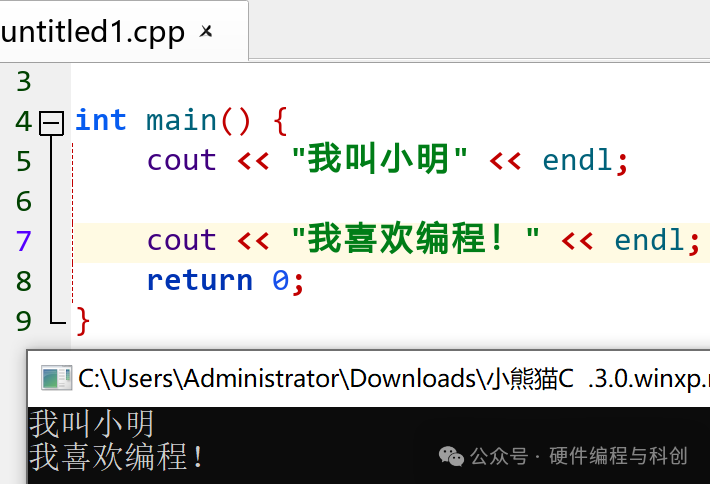
cout << "我叫小明" << endl;
cout << "我喜欢编程!" << endl;
The screen will display:
2. Input Information: cin >> age;
Now, we want the program to “listen” to us, meaning it should receive the data we input.
In C++, we use the <span>cin</span> command:
int age;
cin >> age;<span>cin</span>: Abbreviation for C++ Input, meaning “input”.<span>>></span>: Like a pipeline flowing from the keyboard to the variable.<span>age</span>: The memory box we created earlier, now able to store the input data.
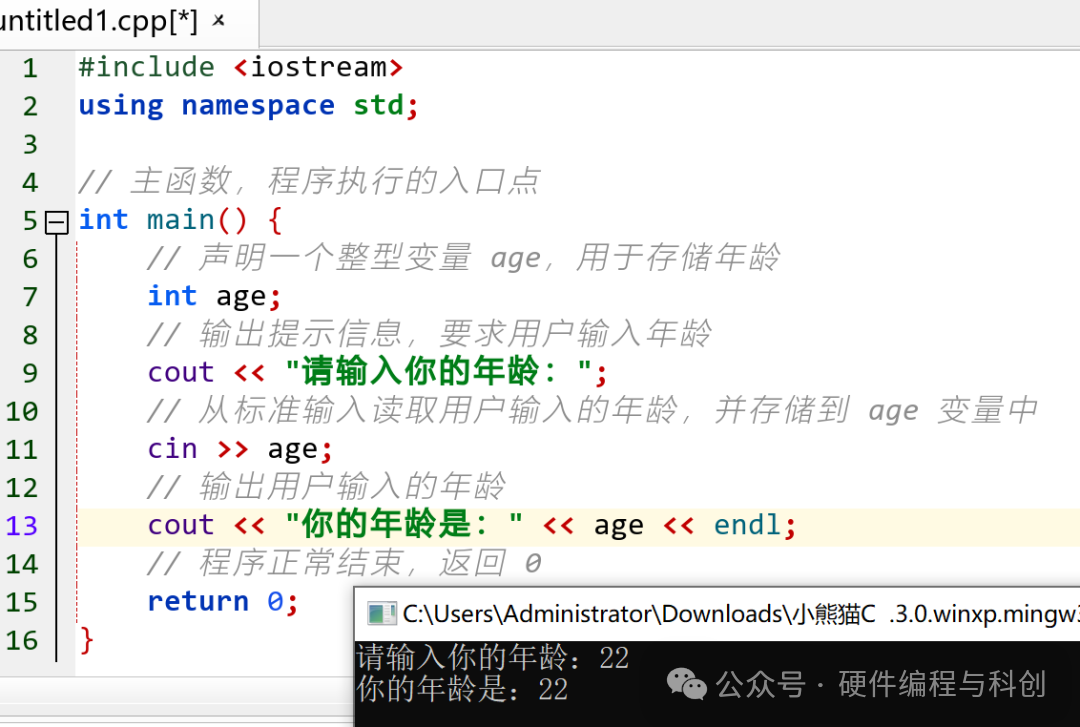
Complete Example:
#include <iostream>
using namespace std;
// Main function, the entry point of the program
int main() {
    // Declare an integer variable age to store age
    int age;

    // Output prompt asking the user to input age
    cout << "请输入你的年龄:";

    // Read the user's input age from standard input and store it in the age variable
    cin >> age;

    // Output the user's input age
    cout << "你的年龄是:" << age << endl;

    // Program ends normally, returning 0
    return 0;
}
The program will first ask for your age, and after you input a number and press enter, it will repeat what you said!
3. endl: The New Line Assistant
<span>endl</span>helps move the cursor to the next line, making the output neater.- You can also use
<span>"\n"</span>as a substitute for<span>endl</span>, with the same effect:
// Include input-output stream header file for using cin and cout for input and output operations
#include <iostream>

// Use standard namespace to avoid writing std:: every time
using namespace std;

// Main function, the entry point of the program
int main() {
	// Output string to console, where \n is a newline character, indicating a line break here
	// This line of code will output two lines of text: First line and Second line
	cout << "第一行\n第二行";

	// Program ends normally, returning 0 indicates success
	return 0;
}
【Knowledge Sphere Adventure】 Time’s Up!
Having learned about input and output, let’s traverse to other spheres and see what wonderful friends “listening” and “speaking” have in the broader universe of knowledge!
a. 【Programming English】
- cout: C++ Output, output.You can remember it as:Computer OUTput → Computer output.
- cin: C++ Input, input.Remember it as:Computer INput → Computer input.
- endl: End Line, new line.Just like when we finish a paragraph in an essay, we need to “change a line”.
b. 【Historical References】
Gutenberg’s Printing Press
In the 15th century, Germany’s Gutenberg independently invented and perfected a printing system based on metal movable type, which had a revolutionary impact on Europe and the world thereafter. However, it should be clarified that movable type printing was first invented by Bi Sheng of the Northern Song Dynasty in China.
You can imagine <span>cout</span><span> as </span><strong><span>a printing press in the digital world</span></strong><span>: </span>
- Gutenberg printed books,
- while we use
<span>cout</span>to output information, the program’s “speech” to the world!
Insight: Output is about making thoughts visible and disseminated. Your program can also “print” its own digital world!
c. 【Hands-On Creation】
Write a “Fun Self-Introduction” Program
Now, please write a program that can “listen” to you introduce yourself and then “speak” an interesting self-introduction!
Example Code:
#include <iostream>
using namespace std;

int main() {
    string name, hobby, dream;

    cout << "请输入你的名字:";
    cin >> name;

    cout << "请输入你的爱好:";
    cin >> hobby;

    cout << "请输入你的梦想:";
    cin >> dream;

    cout << "\n 自我介绍 " << endl;
    cout << "我叫" << name << ",我喜欢" << hobby << ",我的梦想是" << dream << "!" << endl;

    return 0;
}
Running Effect:
请输入你的名字:小萌
请输入你的爱好:画画
请输入你的梦想:成为画家

 自我介绍
我叫小萌,我喜欢画画,我的梦想是成为画家!
Lesson Summary
<span>cout</span>is the program’s “mouth”, used to output information.<span>cin</span>is the program’s “ear”, used to receive input.<span>endl</span>or<span>"\n"</span>is used to create new lines, making the output neater.- Through English, history, and hands-on practice, we understood the significance of “input and output” in the digital world.
Congratulations, you can now make the program “listen” to you and also make it “speak” what you want to express!
Next Lesson Preview
In the next lesson, we will learn more members of data types:
- to store decimals:
<span>double</span> - to store text:
<span>string</span>
Our “memory box” family is about to expand!🎒🔍
 |
 |
Follow to stay on track
Article Tags: #ChildrenProgramming #C++ #ProgrammingThinking #InterdisciplinaryLearning #HandsOnProgramming #HardcoreC++