2 Data and Statements
1. Data
Programs consist of code and data, and they operate on data. The properties that describe a variable include scope, linkage, and storage type. These three properties determine the variable’s availability (whether it can be called) and its lifecycle.
1.1 Basic Data Types
In C language, there are only four data types: integer, floating-point, pointer, and aggregate types (data and structures). All other types are derived from these four basic types.
1.1.1 Integer Family
Integer types include character, short integer, and long integer, each of which has signed and unsigned versions.
A variable type is a mold for allocating memory; memory is actually allocated only after a variable is defined using the variable type.
Basic Types
1. Character Type
Although the purpose of designing char type variables is to hold character values, characters are essentially small integer values.
<span>signed signed unsigned unsigned</span>
<span>char</span> 1 byte
2. Integer Type
<span>signed signed unsigned unsigned</span>
<span>short</span> Short Integer 2 bytes
<span>int</span> Integer 4 bytes
<span>long</span> Long Integer 8 bytes
Command line mode: copy, cut, paste, undo, etc.
<span>long long</span> Long Long Integer 8 bytes
3. (Real Type) Floating Point Type
<span>float</span> Single Precision Float 4 bytes
<span>double</span> Double Precision Float 8 bytes
4. Enumeration Type
<span>enum</span> Enumeration Type 4 bytes Explained in advanced C course
Pointer Type
Using pointers requires operators to obtain a variable’s address or value.
Basic Type Identifier List
int *b The asterisk is actually part of the expression *b and is only relevant to this identifier.
On a 32-bit system, pointers occupy 4 bytes; on a 64-bit system, pointers occupy 8 bytes.
char *short *long *double *void *
Constructed Types
1. Array Type
<span>char [3]</span>
<span>short [3]</span>
<span>int [4]</span>
<span>long long [4]</span>
<span>double [3]</span>
2. Structure Type
<span>struct</span> Explained in advanced C course
3. Union Type
<span>union</span> Explained in advanced C course
Void Type
void
1.2 Defining Variables
Variable Definition Format
Specifier (one or more) Declaration expression list (variables or functions): Specifiers contain keywords that indicate the basic type of the declared identifier, and they are also used to change the default storage type and scope of the identifier.
<variable type> variable name;
Variable Naming Conventions
-
Variable names can only consist of numbers, letters, and underscores, but cannot start with a number.
_abc
a12
a_bc
a%5ta011_
a*b1abc -
Variable names cannot duplicate any of the 32 keywords in C language.
char int;32 Keywords in C Language
signed unsigned char short int long float double enum struct union void 12
if else switch case default break continue do while goto return for 12
auto register const extern static volatile 6
typedef sizeof 2
-
When defining variables, the name should indicate its purpose.
int money;
Variable name rules:
int zhangsan_money; // Convention in Linux systems
int ZhanSanMoney; // Corporate development, camel case naming
Examples of Variable Definitions
-
1.
Defining a character type variable
<span>char a;</span><span>a = 1;</span>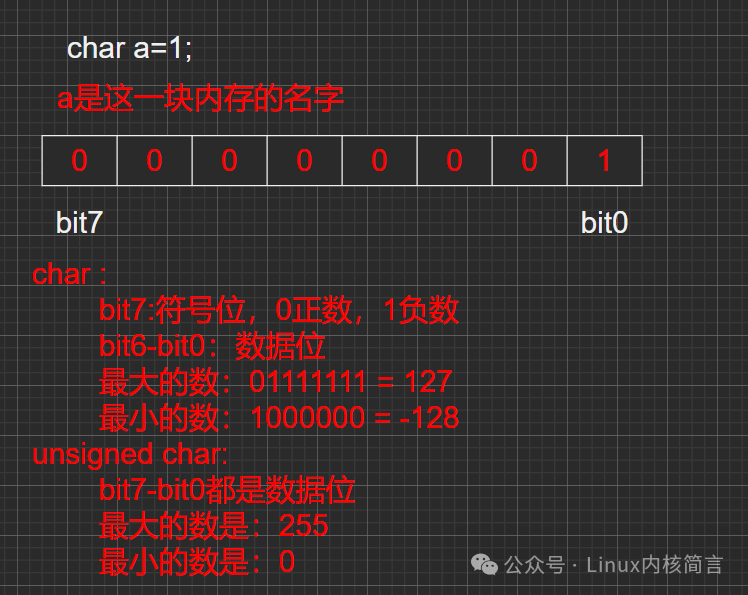
-
Defining an integer type variable
<span>int b=2;</span>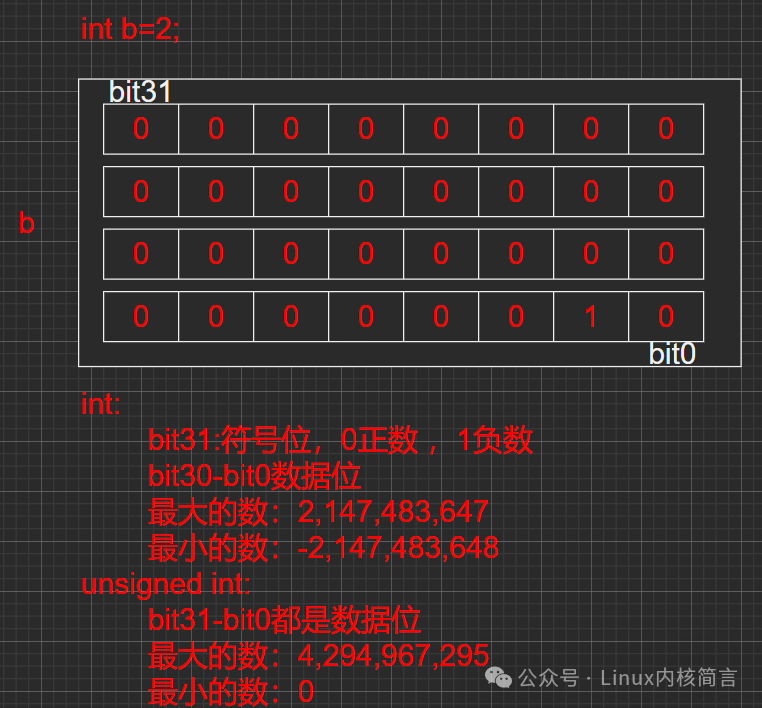
1.3 Constants
Character Constants
Character constants can be viewed using<span>man ascii</span>.
‘\n’ or ‘\012’ or ‘\xa’ newline character, value is 10
‘0’ character 0, value is 48
‘\0’ value is 0
‘A’ uppercase letter A, value is 65
‘a’ lowercase letter a, value is 97
Integer Constants
123
0b110110
07732
0xfca89
Real Constants
3.14
6.782
34.2e-2 = 0.342
6.98E2 = 698.0
String Constants
There is no string type in C language; strings can be stored using character arrays (char [20]), with a hidden ‘\0’ at the end.
“hello world”
“The weather is nice today!”
Identifier Constants
#define N 5
1.4 Examples Related to Variables
#include <stdio.h>
#define N 5
int main(int argc, const char *argv[])
{
    //1. Define a character type variable
    char a = 'A';  //65 = 0b0100 0001
    //2. Define an integer type variable
    short b = 20;  //20 = 0b0000 0000 0001 0100

    int c=0x83;    //0x83 = 0b0000 0000 0000 0000
                   //         0000 0000 1000 0011

    long d=073210; //073210 = 0000 0000 0000 0000
                   //         0000 0000 0000 0000
                   //         0000 0000 0000 0000
                   //         0111 0110 1000 1000
    short e=0b10101100; // 0b 0000 0000  1010 1100
    long long k=N; //k=5
    //3. Real type
    float f=3.14;
    double t=6.789e-3;


    return 0;
}
2. Base Conversion
2.1 Decimal
Decimal: Numbers that carry over at ten
123 456 -379
2.2 Binary
Binary (0b): Numbers that carry over at two
0b101011
0b0101001
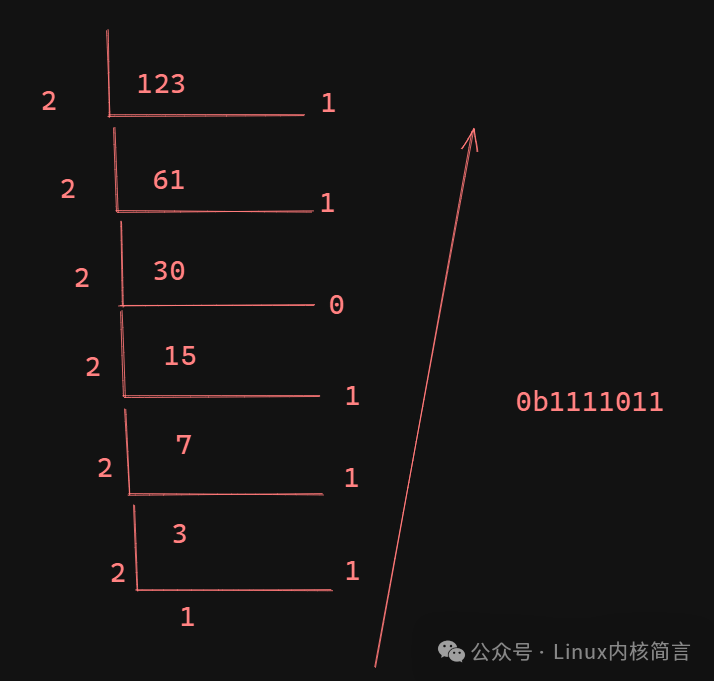
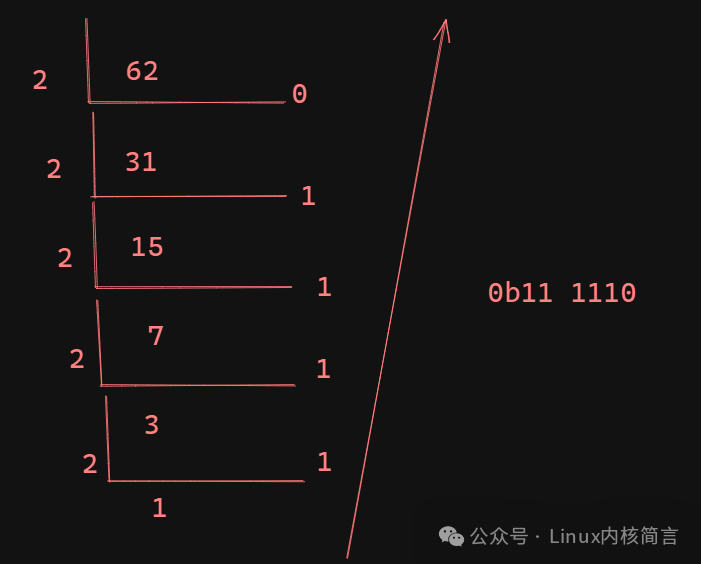
Decimal to Binary:
123: 0b1111011
62: 0b11 1110
Binary to Decimal:
0b101 1011 = <span>1*2^6+1*2^4+1*2^3+1*2^1+1*2^0</span> = 64+16+8+2+1 = 91
0b110 0110: = 64 + 32+4+2 = 102
2.3 Octal
Octal (0): Numbers that carry over at eight
0664
0775
Octal to Binary: (One octal digit can be split into three binary digits)
0664: 0b110 110 100
0775: 0b111 111 101
Octal to Decimal:
0664 = <span>6*8^2+6*8^1+4*8^0</span> = 436
0775= <span>7*8^2+6*7^1+5*8^0</span> = 509
2.4 Hexadecimal
Hexadecimal (0x): Numbers that carry over at sixteen
0 1 2 3 4 5 6 7 8 9 a b c d e f0xfac
0x123
0xff
Hexadecimal to Binary: (One hexadecimal digit can be split into four binary digits)
0xfac = 0b1111 1010 1100
0x123 = 0b0001 0010 0011
0xff = 0b1111 1111
Hexadecimal to Octal:
0xfac = 0b111 110 101 100 = 07654
0x123 = 0b000 100 100 011 = 0443
0xff = 0b11 111 111 = 0377
Hexadecimal to Decimal:
0xfac = <span>15*16^2+10*16^1+12*16^0</span> = 4,012
0x123 = <span>1*16^2+2*16^1+3*16^0</span> = 291
0xff = <span>15*16^1+15*16^0</span> = 255
3. Source Code, One’s Complement, and Two’s Complement
When storing data in calculations, it is stored in the form of two’s complement. The source, one’s complement, and two’s complement of a positive number are the same as the number itself.
Source to One’s Complement: The sign bit remains unchanged, and the other bits are inverted.
One’s Complement to Two’s Complement: Add 1 to the one’s complement.
int a=-5;The source of a is: 0x8000 0005
The one’s complement of a is: 0xFFFF FFFA
The two’s complement of a is: 0xFFFF FFFB (the form stored in memory)
short b=-20;The source of b is: 0x8014
The one’s complement of b is: 0xFFEB
The two’s complement of b is: 0xFFEC