Source: Reprinted with permission from Development Skills Cultivation (ID: kfngxl)
Author: Zhang Yanfei (allen)
It has been a while since I last updated an article, as I have been accumulating knowledge about GPUs. Once I have enough material, I will share it with everyone. Today, I will continue to share with you the underlying principles of Linux memory.
In the article “From the Underlying Principles of Process Stack Memory to Segmentation Fault Errors,” we introduced the Linux process stack. Today, we will discuss the implementation principles of the thread stack.
The reason for discussing the thread stack separately is that there are significant differences in implementation between the thread stack and the process stack.
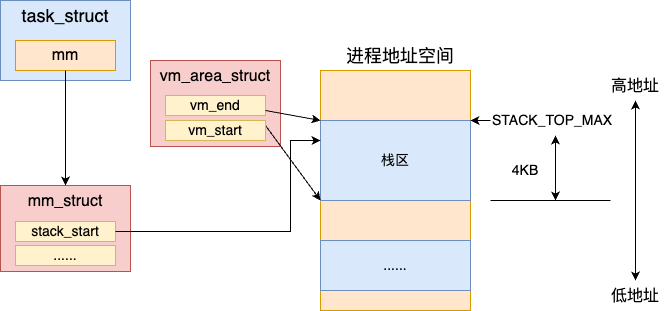
To review, the Linux process stack is a dedicated stack area represented in the address space. This area is created when the process is loaded.
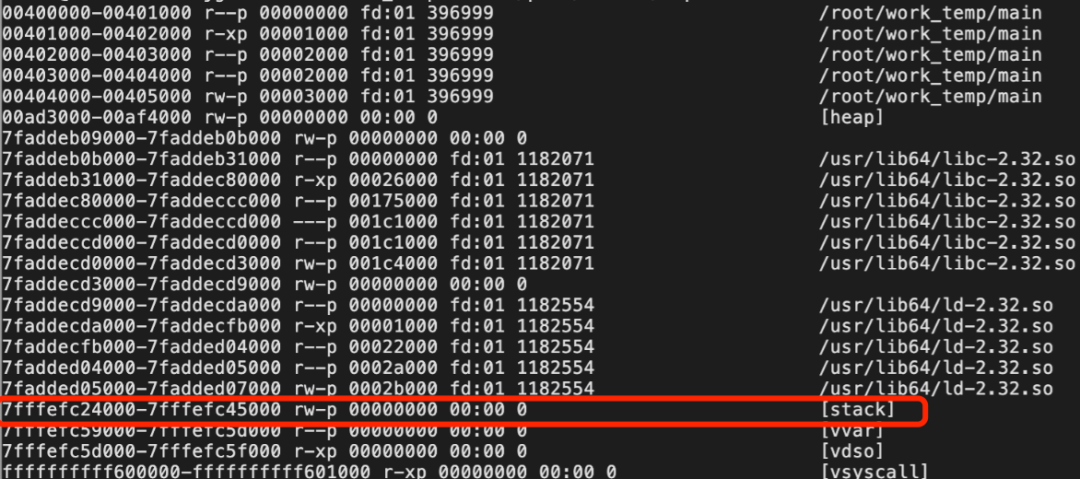
We can view this special virtual address space using <span>cat /proc/{pid}/maps</span>.
In the article “Discussing the Relationship and Differences Between Threads and Processes in Linux,” we learned about the thread creation process. Threads share the same address space as the process that created them, meaning all threads under the same process use the same memory.
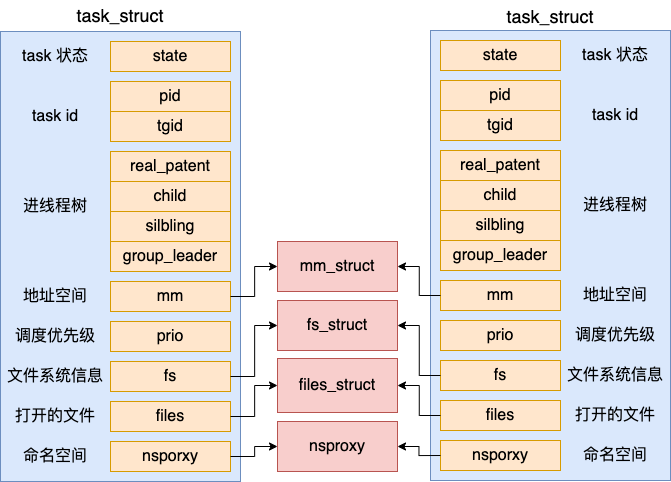
For multithreaded programs, sharing heap memory resources is not an issue. However, the stack area must be independent. Each thread needs its own stack space to maintain independent execution. When multiple threads are called in parallel, they will independently execute push and pop operations on their stacks. If they all used the default stack area in the process address space, multithreading would become chaotic.
Therefore, the thread stack has its own unique implementation method, which we will explore in depth today.
The Story of NPTL
In the Linux kernel, there is actually no concept of threads. The native clone system call in the kernel only supports creating lightweight processes that share the address space and other resources with the parent process.
The early LinuxThreads project aimed to simulate thread support in user space. Unfortunately, this method had many drawbacks, especially in signal handling, scheduling, and inter-process synchronization primitives. Additionally, this thread model did not conform to the POSIX standard.
To improve LinuxThreads, it was clear that two aspects needed to be addressed: providing support in the kernel and rewriting the thread library. Later, two projects were initiated to improve Linux threads: IBM’s NGPT – Next-Generation POSIX Threads and Red Hat’s NPTL – Native POSIX Thread Library. IBM abandoned NGPT in 2003, leaving only NPTL in the effort to improve LinuxThreads.
Now, when we use pthread_create to create threads in Linux, we are actually using NPTL. Therefore, when we later show you the thread source code, you will see that many of the source files are located in the nptl directory.
For more on this story, you can refer to this classic article: http://cs.uns.edu.ar/~jechaiz/sosd/clases/extras/03-LinuxThreads%20and%20NPTL.pdf. It details the development process of LinuxThreads and NPTL.
Implementation of Linux Threads
To understand Linux threads clearly, it is essential to recognize that the implementation of Linux threads consists of two parts.
-
The first part is the user-space glibc library. The pthread_create function we call to create threads is implemented in the glibc library.Note that the glibc library runs entirely in user space and is not part of the kernel source code..
-
The second part is the kernel-space clone system call. The kernel can create lightweight user processes that share the memory address space with the parent process through the clone system call. We discussed this part in detail in the article “Discussing the Relationship and Differences Between Threads and Processes in Linux.”
The thread stack we are discussing today is actually executed in the first part – the user-space glibc library. We will revisit the source code of the pthread_create function in the glibc library to demonstrate the principles of thread stack memory.
The pthread_create function calls __pthread_create_2_1.
//file:nptl/pthread_create.c
int
__pthread_create_2_1 (...)
{
 ...

//2.1 Define thread object
struct pthread *pd;

//2.2 Determine stack space size
//2.3 Allocate user stack
 err = ALLOCATE_STACK (iattr, &pd);
 ...

//Create user process
 err = create_thread (pd, iattr, STACK_VARIABLES_ARGS);
}
In this function, ALLOCATE_STACK is first called to allocate the thread stack for the user. Then, create_thread is called to invoke the kernel’s clone system call to create the thread. For the process of creating threads with clone, refer to the article “Discussing the Relationship and Differences Between Threads and Processes in Linux.”
2.1 struct pthread
Before looking at how ALLOCATE_STACK allocates stack memory, we need to discuss the core data structure of threads, struct pthread.
As mentioned earlier, thread resources are divided into two parts: kernel resources, such as the kernel object task_struct representing lightweight processes, and user-space memory resources, which include the thread stack.
The data structure for the user resources is struct pthread. It stores relevant information about the thread, including the thread stack. Each pthread object uniquely corresponds to one thread.
//file:nptl/descr.h
struct pthread
{
 pid_t tid;
 ......

 //Thread stack memory
 void *stackblock;
 size_t stackblock_size;
}
The tid object in the pthread structure stores the thread’s ID value. The stackblock points to the thread stack memory, and stackblock_size indicates the size of the stack memory area.
2.2 Determining Stack Space Size
After understanding struct pthread, let’s see how ALLOCATE_STACK allocates stack memory. ALLOCATE_STACK is a macro that ultimately calls the allocate_stack function.
//file:nptl/allocatestack.c
static int
allocate_stack (const struct pthread_attr *attr, struct pthread **pdp,
  ALLOCATE_STACK_PARMS)
{
 //Determine stack space size
 size = attr->stacksize ?: __default_stacksize;

 //Allocate stack memory
 ...
}
If the user specifies the stack size, the specified value is used. If not specified, the determined size <span>__default_stacksize</span> is used. In the init.c file, I found the process of setting the value of __default_stacksize.
//file:nptl/init.c
void __pthread_initialize_minimal_internal (void){
 //Determine default stack memory size
 if (getrlimit (RLIMIT_STACK, &limit) != 0
    || limit.rlim_cur == RLIM_INFINITY){
  __default_stacksize = ARCH_STACK_DEFAULT_SIZE;
 } else if (limit.rlim_cur < PTHREAD_STACK_MIN){
  __default_stacksize = PTHREAD_STACK_MIN;
 } else {
  __default_stacksize = (limit.rlim_cur + pagesz - 1) & -pagesz;
 }
}
This code logic first handles the case where ulimit is not configured or is configured incorrectly.
If ulimit is not configured or is configured to be infinite, then the configured size is ARCH_STACK_DEFAULT_SIZE (32 MB).
If the user mistakenly configures it too small, it may cause the program to fail to run normally, so the glibc library will also provide a minimum size of PTHREAD_STACK_MIN (16384 bytes).
The definitions of these two macros are as follows:
//file:/usr/include/limits.h
#define PTHREAD_STACK_MIN   16384

//file:nptl/sysdeps/ia64/pthreaddef.h
#define ARCH_STACK_DEFAULT_SIZE (32 * 1024 * 1024)
In the case of a reasonable ulimit configuration, the obtained configuration value is aligned and used directly.
2.3 Allocating User Stack
After determining the stack space size, we can start allocating memory.
//file:nptl/allocatestack.c
static int
allocate_stack (const struct pthread_attr *attr, struct pthread **pdp,
  ALLOCATE_STACK_PARMS)
{
 size = attr->stacksize ?: __default_stacksize;
 ......

struct pthread *pd;
 pd = get_cached_stack (&size, &mem);
if (pd == NULL){
  mem = mmap (NULL, size, prot,
        MAP_PRIVATE | MAP_ANONYMOUS | ARCH_MAP_FLAGS, -1, 0);

  pd = (struct pthread *) ((((uintptr_t) mem + size - coloring
        - __static_tls_size)
        & ~__static_tls_align_m1)
       - TLS_PRE_TCB_SIZE);
  pd->stackblock = mem;
  pd->stackblock_size = size;
  ......
}

//Add to the global used stack list
 list_add (&pd->list, &stack_used);
 ...
}
Before allocating stack memory, it first attempts to obtain a cached block through get_cached_stack to avoid frequent memory allocation and deallocation. We will ignore this logic for now.
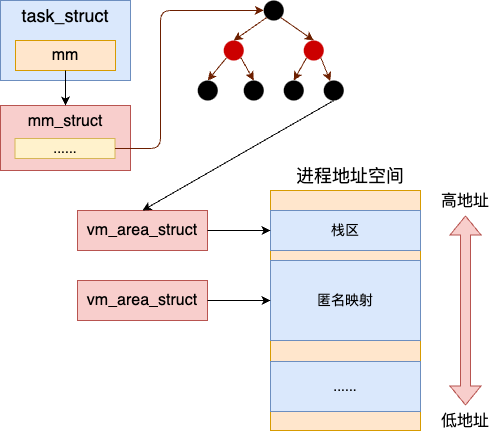
Assuming no cache is obtained, it directly uses the mmap system call to allocate a block of anonymous page memory. This is the difference between thread stack memory and process stack memory; the process stack directly uses the stack created when the process starts, while the thread uses mmap to allocate memory in user space.
Next, let’s take a brief look at how glibc uses this memory.
After allocating memory, the mem pointer points to the low address of the new memory. By calculating the high address space using mem and size, and through complex address reservation strategies, such as alignment, the struct pthread is placed on top.
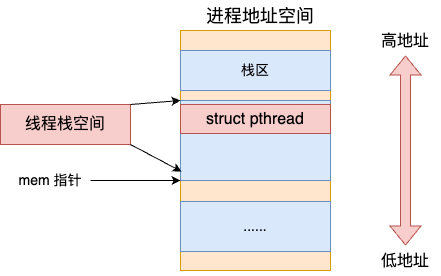
Thus, the thread stack memory serves two purposes: one is to store the thread stack object struct pthread, and the other is to actually serve as the thread stack memory.
2.4 Releasing the Stack
In glibc, each thread performs a common operation at the end stage, which is to release the stack memory of the finished threads. During the thread termination phase (while the thread is still alive), glibc removes its memory block from stack_used and places it into the stack_cache linked list.
Conclusion
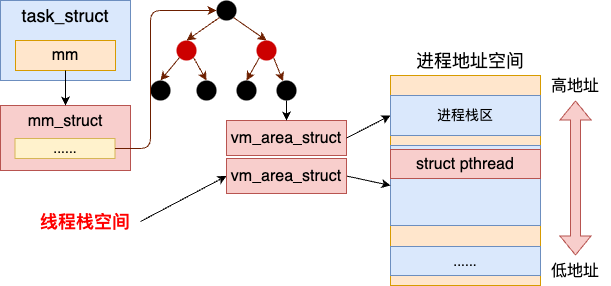
Each thread needs to have an independent stack to ensure that there are no conflicts during concurrent scheduling. However, the default stack in the process address space is shared among multiple task_structs, so threads must manage their stacks independently through mmap.
The thread library in glibc in Linux is actually the nptl thread. It consists of two parts of resources. The first part manages the user-space thread object struct pthread and the independent thread stack in user space. The second part consists of kernel objects such as task_struct and address space in the kernel. The relationship between the process stack and the thread stack is shown in the diagram below.
With this stack memory, the local variables you allocate in your code now have a place to reside.
#include <stdio.h>
void funcA()
{
 int n = 0;
 ...
}
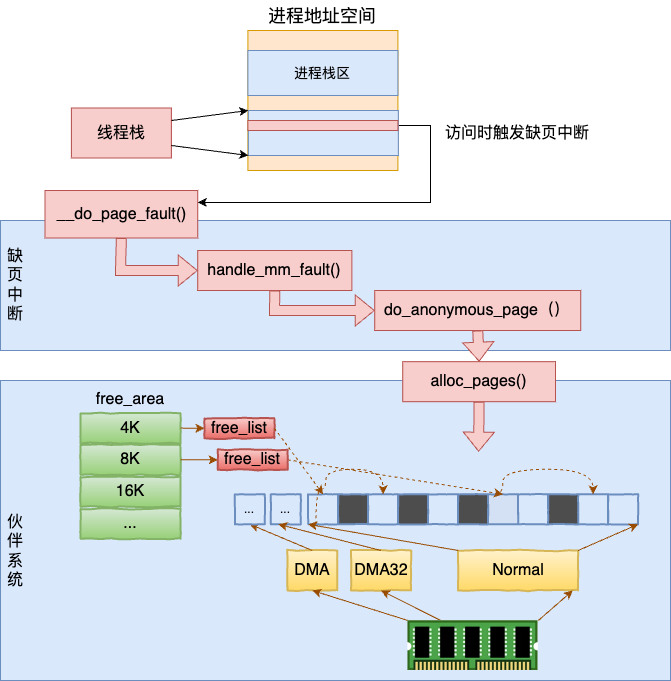
Of course, this article has discussed the thread stack address space for a long time, still focusing on the virtual address space without involving the allocation and access of physical memory. The actual physical memory is still allocated during a page fault when accessed, and during the page fault, it is allocated through the buddy system.