A Shell is a command interpreter responsible for receiving user input commands and passing them to the operating system kernel for execution. Common shells include Bash (Bourne Again Shell), Zsh, and Ksh, with Bash being the default shell for most Linux distributions. A Shell script is a series of shell commands written in text form, saved as a file, and can be interpreted and executed by the shell. It is similar to a batch file (.bat) in Windows, but is more powerful and flexible.

To create a Shell script, you first need to create a new text file and specify the interpreter on the first line. Typically, you use #!/bin/bash (known as “shebang”) to tell the system that the script should be interpreted by Bash.
For example, create a script named hello.sh:
#!/bin/bash
echo "Hello, Linux World!"
After saving, you need to grant the file executable permissions:
chmod +x hello.sh
Then run the script with ./hello.sh to see the output: “Hello, Linux World!”.
A typical Shell script contains the following parts:
- Shebang line: Specifies the interpreter path.
- Comments: Start with
#to explain the functionality of the code. - Variable definitions: For example,
name="Alice", referenced as$nameor${name}. - Control structures: Include conditional statements (if/else), loops (for/while), etc.
- Function definitions: Can encapsulate repetitive logic to enhance code reusability.
- Command execution: Calls system commands or external programs.
For example, here is a script with parameters and conditional statements:
#!/bin/bash
if [ $# -eq 0 ]; then
    echo "Please provide a username as an argument."
    exit 1
fi

echo "Hello, $1! The current time is: \\$(date)"
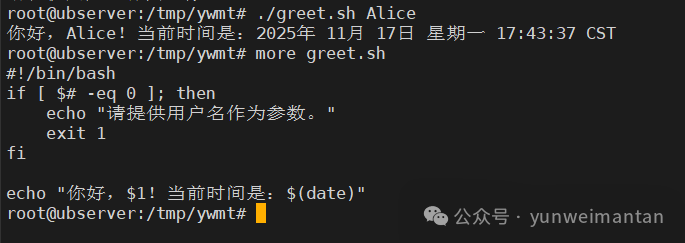
Running ./greet.sh Alice will output a welcome message along with the current time.