Today we will learn about how the C language is transformed into an executable file through the compilation process, and what happens at each stage of the transformation.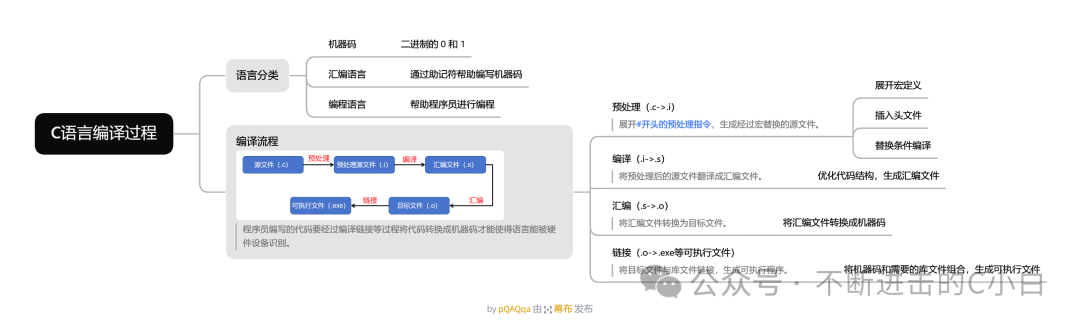
Language Classification
Before we begin, we need to have a general understanding of the development of computer programming languages.
Since the birth of computers, the development of programming languages has roughly gone through three stages: machine code, assembly language, and now high-level programming languages such as C, C++, and Python.
Machine code, which we are familiar with, consists of binary 0s and 1s, the language that machines can recognize.
Assembly language helps early programmers develop machine code by adding mnemonics.
Programming languages, like the ones mentioned earlier, each have their own areas of expertise, assisting programmers in developing various functionalities.
The C language, which is the main topic today, is fundamentally different from other programming languages. As a compiled language, C can be directly recognized and executed by the computer’s CPU; whereas other interpreted languages, like Java, need to be transformed and then translated line by line by an interpreter for the CPU to execute.
To put it metaphorically, C language is like two Chinese people communicating directly, while other interpreted languages are like needing a translation device to communicate with foreigners. In comparison, C language, which can communicate directly with the CPU, has a higher execution efficiency, which is why C is generally the language used in embedded systems.
Compilation Process
The following diagram illustrates the compilation process of C language on Windows systems.
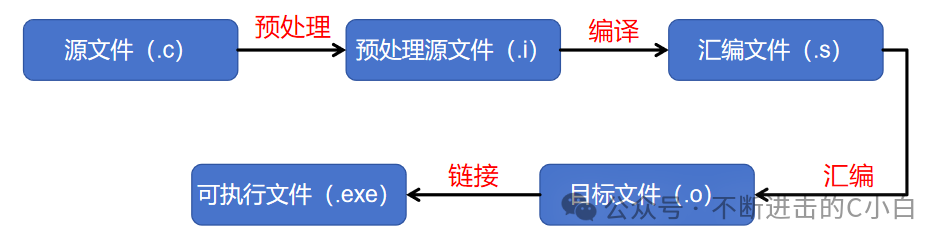
1. Preprocessing: Processes preprocessor directives starting with #, generating a source file after macro replacement. (.c->.i)
During this process, the compiler performs the following actions:
Macro expansion: All instances of macros will be replaced with the content of the macro definition;
Header file inclusion: Header files included with include will be replaced with the code within that header file at that position;
Conditional compilation replacement: Selectively retaining and removing code based on conditional compilation.
2. Compilation: Translates the preprocessed source file into an assembly file. (.i->.s)
During this process, the compiler optimizes the code structure to improve execution efficiency. For example, the code structure taken by switch statements varies under different conditions.
3. Assembly: Converts the assembly file into an object file. (.s->.o)
During this process, all source files involved in the compilation under the project complete the transformation into machine code.
4. Linking: Links the object files with library files to generate an executable program. (.o->.exe and other executable files)
At this step, all the machine code files transformed earlier, along with the necessary library files, are combined to form a complete program that can be executed.