Cross-Compiling GDB Tool
The Allwinner T113 is a processor designed for embedded applications, belonging to Allwinner Technology’s T series product line. This chip features a dual-core Cortex-A7 CPU architecture, with a clock speed of up to 1.2GHz, integrates an ARM Mali400 MP2 GPU, and supports 1080p video encoding and decoding, making it suitable for low-power scenarios such as industrial control, smart homes, and the Internet of Things.
Development work cannot be done without debugging tools. I am not accustomed to using gdbserver; I prefer to run gdb directly on the board, which requires cross-compiling gdb to run on the board.
Download GDB Source Code
Download the GDB source package from the GNU website. It is recommended to use a stable version to ensure compatibility; I am using version 10.2. You can download it using the following command:
wget https://ftp.gnu.org/gnu/gdb/gdb-10.2.tar.gz
tar xzf gdb-10.2.tar.gz
cd gdb-10.2
../gdb-7.9/configure     CC=arm-htnice-linux-gnueabihf-gcc --enable-static     CFLAGS="-g -O2 -I /home/users/xxx/code/gdb/termcap"     LDFLAGS="-L/home/users/wuwei/xxx/gdb/termcap"     --prefix=`pwd`/install     --target=arm-htnice-linux-gnueabihf     --host=arm-htnice-linux-gnueabihf     --program-prefix=arm-htnice-linux-gnueabihf

make
Since gdb depends on the termcap library, I specified the path for termcap above.
Resolving Compilation Errors
During the compilation process, the following errors were reported:
In file included from ../../gdb-10.2/gdbserver/gdb_proc_service.h:22,
                 from ../../gdb-10.2/gdbserver/linux-low.h:27,
                 from ../../gdb-10.2/gdbserver/linux-aarch32-low.cc:21:
../../gdb-10.2/gdbserver/../gdbsupport/gdb_proc_service.h:179:12: error: ‘ps_get_thread_area’ was not declared in this scope; did you mean ‘target_thread_name’?
  179 | PS_EXPORT (ps_get_thread_area);
      |            ^~~~~~~~~~~~~~~~~~
../../gdb-10.2/gdbserver/../gdbsupport/gdb_proc_service.h:177:51: note: in definition of macro ‘PS_EXPORT’
  177 |   __attribute__((visibility ("default"))) typeof (SYM) SYM
      |                                                   ^~~
../../gdb-10.2/gdbserver/../gdbsupport/gdb_proc_service.h:182:12: error: ‘ps_lgetfpregs’ was not declared in this scope; did you mean ‘ps_lgetregs’?
  182 | PS_EXPORT (ps_lgetfpregs);
      |            ^~~~~~~~~~~~~
../../gdb-10.2/gdbserver/../gdbsupport/gdb_proc_service.h:177:51: note: in definition of macro ‘PS_EXPORT’
  177 |   __attribute__((visibility ("default"))) typeof (SYM) SYM
      |                                                   ^~~
../../gdb-10.2/gdbserver/../gdbsupport/gdb_proc_service.h:184:12: error: ‘ps_lsetfpregs’ was not declared in this scope; did you mean ‘ps_lgetfpregs’?
  184 | PS_EXPORT (ps_lsetfpregs);
      |            ^~~~~~~~~~~~~
../../gdb-10.2/gdbserver/../gdbsupport/gdb_proc_service.h:177:51: note: in definition of macro ‘PS_EXPORT’
  177 |   __attribute__((visibility ("default"))) typeof (SYM) SYM
      |                                                   ^~~
make[2]: *** [Makefile:542:linux-aarch32-low.o] error 1
make[2]: Leaving directory “/home/users/xxxx/code/gdb/gdbserver”
make[1]: *** [Makefile:10001:all-gdbserver] error 2
make[1]: Leaving directory “/home/users/xxxx/code/gdb/”
Solution: Add the following code in Ygdb-10.2\gdbsupport\gdb_proc_service.h:
// Add missing declarations
EXTERN_C_PUSH
extern ps_err_e ps_get_thread_area(struct ps_prochandle*, lwpid_t, int, psaddr_t*);
extern ps_err_e ps_lgetfpregs(struct ps_prochandle*, lwpid_t, prfpregset_t*);
extern ps_err_e ps_lsetfpregs(struct ps_prochandle*, lwpid_t, const prfpregset_t*);
EXTERN_C_POP
#endif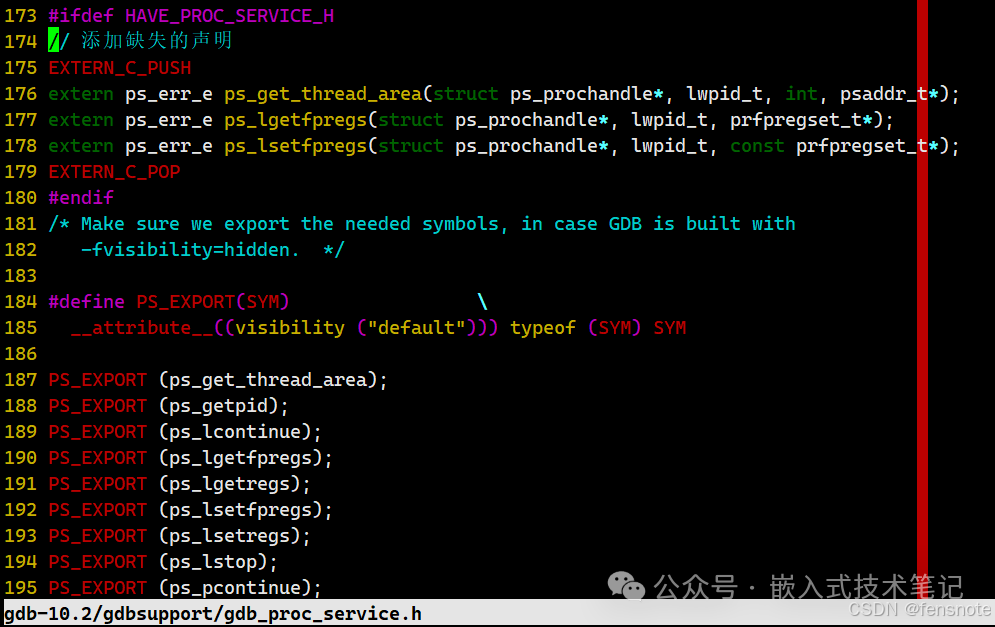
Verifying Cross-Compilation Results
Copy the generated GDB binary file to the Allwinner T113 development board and run it to check if it works properly:
./gdb testAfter starting the program with “r”, the test program runs normally. Then, set a breakpoint using “b”, and it stops, indicating that gdb is functioning correctly.