Click the above“Embedded and Linux Matters”
Select“Pin/Star the Official Account”
Welfare and valuable content delivered first-hand
This article collects a lot of experiences and methods. Applying these experiences and methods can help us optimize C language code in terms of execution speed and memory usage.
Introduction
In a recent project, we needed to develop a lightweight JPEG library that runs on mobile devices without guaranteeing high image quality. During this process, I summarized some methods to make the program run faster. In this article, I have gathered some experiences and methods.
Applying these experiences and methods can help us optimize C language code in terms of execution speed and memory usage.
Although there are many guidelines for C code optimization, there is little knowledge about optimization related to compilation and the programming machine you are using.
Typically, to make your program run faster, the amount of code may need to increase. The increase in code size may adversely affect the complexity and readability of the program. This is not acceptable when writing programs for small devices like mobile phones and PDAs, which have many memory usage constraints.
Therefore, our motto during code optimization should be to ensure that both memory usage and execution speed are optimized.
Statement
In fact, in my project, I used many optimization methods for ARM programming (the project is based on the ARM platform) and also utilized many methods found online. However, not all methods mentioned in articles work well. Therefore, I have summarized and collected useful and efficient methods. Additionally, I modified some of these methods to make them applicable to all programming environments, not just limited to ARM environments.
Where to Use These Methods?
This point is crucial; all discussions are meaningless without it. The most important aspect of program optimization is identifying the areas that need optimization, specifically which parts or modules of the program run slowly or consume a lot of memory. Only when all parts of the program have been optimized can the program execute faster.
The parts of the program that run the most, especially those methods that are repeatedly called within internal loops, should be optimized.
For an experienced programmer, identifying the parts of the program that need optimization is often straightforward. Moreover, there are many tools available to help us identify the areas that need optimization. I have used the built-in performance tool profiler in Visual C++ to find the places in the program that consume the most memory.
Another tool I have used is Intel’s Vtune, which can also effectively detect the slowest parts of the program. In my experience, internal or nested loops and calls to third-party libraries are usually the main causes of slow program execution.
Integer Types
If we know that an integer is non-negative, we should use unsigned int instead of int. Some processors handle unsigned integers much more efficiently than signed integers (this is a good practice and also helps with self-documenting code).
Therefore, in a tight loop, the best way to declare an int variable is:
register unsigned int variable_name;
Remember, integer operations are faster than floating-point operations and can be executed directly by the processor without the need for an FPU (Floating Point Unit) or floating-point operation libraries.
Although this does not guarantee that the compiler will use registers to store variables, nor does it guarantee that the processor will handle unsigned integers more efficiently, this is generally applicable to all compilers.
For example, in a calculation package, if we need the result to be accurate to two decimal places, we can multiply it by 100 and convert it to a floating-point number as late as possible.
Division and Modulus
In standard processors, for both numerator and denominator, a 32-bit division requires 20 to 140 cycles. The time consumed by the division function includes a constant time plus the time consumed for each bit of division.
Time (numerator / denominator) = C0 + C1 * log2 (numerator / denominator)
     = C0 + C1 * (log2 (numerator) - log2 (denominator)).
For ARM processors, this version requires 20 + 4.3N cycles. This is a costly operation and should be avoided whenever possible. Sometimes, multiplication expressions can be used as a substitute for division.
For example, if we know that b is positive and b * c is an integer, then (a / b) > c can be rewritten as a > (c * b). If we are sure that the operands are unsigned, using unsigned division is better since it is more efficient than signed division.
Merging Division and Modulus
In some scenarios, both division (x/y) and modulus (x%y) operations are needed. In this case, the compiler can return both the quotient and the remainder by calling the division operation once. If both the quotient and the remainder are needed, we can write them together as follows:
int func_div_and_mod (int a, int b)
{
    return (a / b) + (a % b);
}
Division and Modulus by Powers of Two
If the divisor in the division is a power of 2, we can optimize the division better. The compiler uses shift operations to perform the division. Therefore, we should set the divisor to be a power of 2 whenever possible (for example, 64 instead of 66). And remember, unsigned integer division is more efficient than signed integer division.
typedef unsigned int uint;

uint div32u (uint a)
{
     return a / 32;
}
int div32s (int a)
{
    return a / 32;
}
Both of the above divisions avoid directly calling the division function, and unsigned division uses fewer machine instructions. Signed division requires more time to execute due to the need to shift to 0 and negative numbers.
An Alternative Method for Modulus
We use the modulus operator to provide arithmetic modulus. However, sometimes we can use an if statement to perform the modulus operation. Consider the following two examples:
uint modulo_func1 (uint count)
{
    return (++count % 60);
}

uint modulo_func2 (uint count)
{
    if (++count >= 60)
        count = 0;
    return (count);
}
Prefer using the if statement over the modulus operator because the if statement executes faster. Note that the new version of the function only works correctly when we know the input count is between 0 and 59.
Using Array Indexing
If you want to assign a character value that represents a certain meaning to a variable, you might do it like this:
switch ( queue )
{
    case 0 :   letter = 'W';
        break;
    case 1 :   letter = 'S';
        break;
    case 2 :   letter = 'U';
        break;
}
Or like this:
if ( queue == 0 )
    letter = 'W';
else if ( queue == 1 )
    letter = 'S';
else  letter = 'U';
A more concise and faster method is to use array indexing to get the value from a character array. As follows:
static char *classes="WSU";
letter = classes[queue];
Global Variables
Global variables will never be located in registers. Using pointers or function calls can directly modify the value of global variables. Therefore, the compiler cannot cache the value of global variables in registers, which requires additional (often unnecessary) reads and writes when using global variables. Thus, we do not recommend using global variables in critical loops.
If a function uses global variables excessively, a better practice is to copy the value of the global variable to a local variable so that it can be stored in registers. This method only applies when the global variable will not be used by any function we call. An example is as follows:
int f(void);
int g(void);
int errs;
void test1(void)
{
    errs += f();
    errs += g();
}
void test2(void)
{
    int localerrs = errs;
    localerrs += f();
    localerrs += g();
    errs = localerrs;
}
Note that test1 must load and store the value of the global variable errs on every increment operation, while test2 stores localerrs in registers and only requires one machine instruction.
Using Aliases
Consider the following example:
void func1( int *data )
{
    int i;
    for(i=0; i<10; i++)
    {
        anyfunc( *data, i);
    }
}
Although *data may never be changed, the compiler does not know that the anyfunc function will not modify it, so the program must read it from memory every time it is used. If we know that the value of the variable will not change, we should code as follows:
void func1( int *data )
{
    int i;
    int localdata;
    localdata = *data;
    for(i=0; i<10; i++)
    {
        anyfunc (localdata, i);
    }
}
This provides conditions for the compiler to optimize the code.
Variable Lifetime Splitting
Since registers in processors are of fixed length, the storage of numeric variables in registers is limited.
Some compilers support “live-range splitting,” meaning that in different parts of the program, a variable can be allocated to different registers or memory.
The lifetime of a variable begins with its last assignment and ends with its last use before the next assignment. During its lifetime, the variable’s value is valid, meaning the variable is alive. Between different lifetimes, the variable’s value is not needed, meaning the variable is dead.
This allows registers to be used by other variables, enabling the compiler to allocate more variables to registers.
The number of variables needing register allocation must exceed the number of different variable lifetimes in the function. If the number of different variable lifetimes exceeds the number of registers, some variables must be temporarily stored in memory. This process is called splitting.
The compiler first splits the most recently used variables to reduce the overhead caused by splitting. Methods to prevent variable lifetime splitting include:
- Limit the number of variable uses: This can be achieved by keeping expressions in functions simple and small, avoiding the use of too many variables. Splitting larger functions into smaller, simpler functions can also yield good results.
- Use register storage for frequently used variables: This allows us to inform the compiler that the variable is frequently used and should be prioritized for storage in registers. However, in some cases, such variables may still be split out of registers.
Variable Types
C compilers support basic types: char, short, int, long (including signed and unsigned), float, and double. Using the correct variable type is crucial as it can reduce the size of code and data and significantly increase program performance.
Local Variables
We should avoid using char and short types for local variables whenever possible. For char and short types, the compiler needs to reduce the local variable to 8 or 16 bits on each assignment. This is called signed extension for signed variables and zero extension for unsigned variables.
These extensions can be achieved by left-shifting the register by 24 or 16 bits and then right-shifting the same number of bits based on the signed flag, which consumes two machine instruction operations (zero extension for unsigned char types only consumes one machine instruction).
Using int and unsigned int types for local variables can avoid such shifting operations. This is particularly important for operations that load data into local variables and then process the values of those local variables. Regardless of whether the input/output data is 8-bit or 16-bit, it is worth considering them as 32-bit.
Consider the following three functions:
int wordinc (int a)
{
    return a + 1;
}
short shortinc (short a)
{
    return a + 1;
}
char charinc (char a)
{
    return a + 1;
}
Although the results are the same, the first code snippet runs faster than the latter two.
Pointers
We should use references to pass structured data whenever possible, meaning using pointers; otherwise, the data will be copied onto the stack, which reduces program performance. I have seen a program that passed very large structured data by value, which could have been better accomplished with a simple pointer.
Functions accept pointers to structured data as parameters. If we are sure not to change the value of the data, we need to define the content pointed to by the pointer as constant. For example:
void print_data_of_a_structure (const Thestruct  *data_pointer)
{
    ...printf contents of the structure...
}
This example informs the compiler that the function will not change the value of the external parameter (using const modifier) and does not need to read it every time it is accessed. At the same time, it ensures that the compiler restricts any modifications to the read-only structure, thus providing additional protection for the structured data.
Pointer Chains
Pointer chains are often used to access structured data. For example, the commonly used code is as follows:
typedef struct { int x, y, z; } Point3;
typedef struct { Point3 *pos, *direction; } Object;

void InitPos1(Object *p)
{
   p->pos->x = 0;
   p->pos->y = 0;
   p->pos->z = 0;
}
However, this code must repeatedly call p->pos for each operation because the compiler does not know that p->pos->x and p->pos are the same. A better approach is to cache p->pos into a local variable:
void InitPos2(Object *p)
{
   Point3 *pos = p->pos;
   pos->x = 0;
   pos->y = 0;
   pos->z = 0;
}
Another method is to include Point3 type data directly in the Object structure, which completely eliminates the need for pointer operations on Point3.
Conditional Execution
Conditional execution statements are mostly used in if statements and also when using relational operators (<, ==, >, etc.) or boolean expressions (&&, !, etc.) to compute complex expressions. For code snippets that include function calls, conditional execution is ineffective because the return value of the function will be destroyed.
Therefore, keeping if and else statements as simple as possible is very beneficial, as this allows the compiler to focus on processing them. Relational expressions should be written together.
The following example demonstrates how the compiler can use conditional execution:
int g(int a, int b, int c, int d)
{
   if (a > 0 && b > 0 && c < 0 && d < 0)
   //  grouped conditions tied up together//
      return a + b + c + d;
   return -1;
}
Since the conditions are grouped together, the compiler can process them collectively.
Boolean Expressions and Range Checks
A common boolean expression is used to check whether a variable is within a certain range, for example, checking whether a graphical coordinate is within a window:
bool PointInRectangelArea (Point p, Rectangle *r)
{
   return (p.x >= r->xmin && p.x < r->xmax &&
                      p.y >= r->ymin && p.y < r->ymax);
}
There is a faster method: x>min && x<max can be transformed into (unsigned)(x-min)<(max-min). This is particularly beneficial when min equals 0. The optimized code is as follows:
bool PointInRectangelArea (Point p, Rectangle *r)
{
    return ((unsigned) (p.x - r->xmin) < r->xmax &&
   (unsigned) (p.y - r->ymin) < r->ymax);

}
Boolean Expressions and Zero Comparisons
The processor’s flags are set after comparison instruction operations. The flags can also be rewritten by basic arithmetic and bare-metal instructions such as MOV, ADD, AND, and MUL. If a data instruction sets the flags, the N and Z flags will also be set as if comparing the result with 0. The N flag indicates whether the result is negative, and the Z flag indicates whether the result is 0.
In C language, the N and Z flags in the processor are associated with the following instructions: signed relational operations x<0, x>=0, x==0, x!=0; unsigned relational operations x==0, x!=0 (or x>0).
Each time a relational operator is called in C code, the compiler will issue a comparison instruction. If the operator is one of those mentioned above, the compiler will optimize out the comparison instruction. For example:
int aFunction(int x, int y)
{
   if (x + y < 0)
      return 1;
  else
     return 0;
}
Using the above judgment method as much as possible can reduce the number of comparison instructions called in critical loops, thereby reducing code size and improving code performance. C language does not have the concept of borrow and overflow bits, so it is impossible to directly use borrow flags C and overflow flags V without assembly. However, the compiler supports borrowing (unsigned overflow), for example:
int sum(int x, int y)
{
   int res;
   res = x + y;
   if ((unsigned) res < (unsigned) x) // carry set?  //
     res++;
   return res;
}
Lazy Detection Development
In statements like if(a>10 && b=4), ensure that the first part of the AND expression is most likely to yield a result quickly (or is computed earliest and fastest), so that the second part may not need to be executed.
Using switch() Instead of if…else…
For multiple conditional judgments involving if…else…else…, for example:
if( val == 1)
    dostuff1();
else if (val == 2)
    dostuff2();
else if (val == 3)
    dostuff3();
Using switch may be faster:
switch( val )
{
    case 1: dostuff1(); break;

    case 2: dostuff2(); break;

    case 3: dostuff3(); break;
}
In if() statements, if the last statement hits, all previous conditions need to be tested and executed once. Switch allows us to avoid extra testing. If if…else… statements must be used, place the most likely to execute at the front.
Binary Interrupts
Use binary methods to interrupt code instead of letting the code pile up in a line; do not do it like this:
if(a==1) {
}
elseif(a==2) {
}
elseif(a==3) {
}
elseif(a==4) {
}
elseif(a==5) {
}
elseif(a==6) {
}
elseif(a==7) {
}
elseif(a==8)
{
}
Use the following binary method instead:
if(a<=4) {
    if(a==1)     {
    }  elseif(a==2)  {
    }  elseif(a==3)  {
    }  elseif(a==4)   {

    }
}
else
{
    if(a==5)  {
    } elseif(a==6)   {
    } elseif(a==7)  {
    } elseif(a==8)  {
    }
}
Or like this:
if(a<=4)
{
    if(a<=2)
    {
        if(a==1)
        {
            /* a is 1 */
        }
        else
        {
            /* a must be 2 */
        }
    }
    else
    {
        if(a==3)
        {
            /* a is 3 */
        }
        else
        {
            /* a must be 4 */
        }
    }
}
else
{
    if(a<=6)
    {
        if(a==5)
        {
            /* a is 5 */
        }
        else
        {
            /* a must be 6 */
        }
    }
    else
    {
        if(a==7)
        {
            /* a is 7 */
        }
        else
        {
            /* a must be 8 */
        }
    }
}
Compare the two case statements:
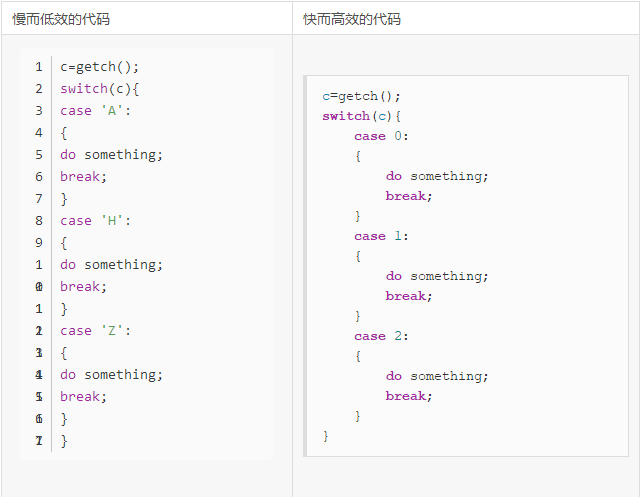
Switch Statement vs Lookup Table
Switch is applicable in the following scenarios:
- Calling one or more functions
- Setting variable values or returning a value
- Executing one or more code snippets
If there are many case labels, using a lookup table can accomplish the first two scenarios of switch more efficiently. For example, the following two methods of converting strings:
char * Condition_String1(int condition) {
switch(condition) {
     case0: return"EQ";
     case1: return"NE";
     case2: return"CS";
     case3: return"CC";
     case4: return"MI";
     case5: return"PL";
     case6: return"VS";
     case7: return"VC";
     case8: return"HI";
     case9: return"LS";
     case10: return"GE";
     case11: return"LT";
     case12: return"GT";
     case13: return"LE";
     case14: return"";
     default: return0;
  }
}

char * Condition_String2(int condition) {
   if ((unsigned) condition >= 15) return0;
      return
      "EQ\0NE\0CS\0CC\0MI\0PL\0VS\0VC\0HI\0LS\0GE\0LT\0GT\0LE\0\0" +
       3 * condition;
}
The first program requires 240 bytes, while the second only requires 72 bytes.
Loops
Loops are a common structure in most programs; most of the program’s execution time occurs in loops, so it is worthwhile to focus on optimizing loop execution time.
Loop Termination
If not careful, writing loop termination conditions can lead to additional overhead. We should use loops that count down to zero and simple loop termination conditions. Simple termination conditions consume less time. Consider the two programs that calculate n! The first implementation uses an incrementing loop, while the second uses a decrementing loop.
int fact1_func (int n)
{
    int i, fact = 1;
    for (i = 1; i <= n; i++)
      fact *= i;
    return (fact);
}

int fact2_func(int n)
{
    int i, fact = 1;
    for (i = n; i != 0; i--)
       fact *= i;
    return (fact);
}
The second program, fact2_func, is more efficient than the first.
Faster for() Loops
This is a simple yet effective concept. Typically, we write for loop code like this:
for( i=0; i<10; i++){ ... }
i loops from 0 to 9. If we do not mind the order of the loop counter, we can write it like this:
for( i=10; i--; ) { ... }
The reason this is faster is that it can process the value of i more quickly—the test condition is: is i non-zero? If so, decrement the value of i. For the above code, the processor needs to compute “is i minus 10 non-negative? If so, increment i and continue.”
Simple loops can make a significant difference. This way, i decrements from 9 to 0, and such loops execute faster.
The syntax here is a bit strange, but it is indeed valid. The third statement in the loop is optional (an infinite loop can be written as for(;;)). The following code has the same effect:
for(i=10; i; i--){ }
Or even further:
for(i=10; i!=0; i--){ }
Here we need to remember that the loop must terminate at 0 (so if looping from 50 to 80, this will not work), and the loop counter is decrementing. Code with incrementing loop counters does not enjoy this optimization.
Merging Loops
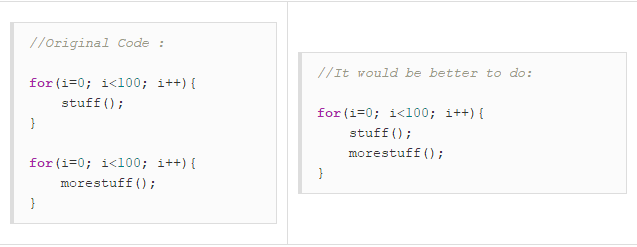
Function Loops
There is always a certain performance overhead when calling functions. Not only does the program pointer need to change, but the variables used need to be pushed onto the stack and new variables allocated. To improve program performance, there are many optimizations that can be made at the function level while keeping the code readable and the size manageable.
If a function is called frequently within a loop, then incorporate the loop into the function to reduce repeated function calls. The code is as follows:
for(i=0 ; i<100 ; i++)
{
    func(t,i);
}
-
-
-
void func(int w,d)
{
    lots of stuff.
}
Should be changed to:
func(t);
-
-
-
void func(w)
{
    for(i=0 ; i<100 ; i++)
    {
        //lots of stuff.
    }
}
Loop Unrolling
Simple loops can be unrolled for better performance, but at the cost of increased code size. After unrolling, the loop count should decrease, resulting in fewer code branches. If the number of loop iterations is only a few, the loop can be fully unrolled to eliminate the overhead of looping.
This can make a significant difference. Loop unrolling can provide considerable performance savings because the code does not need to check and increment the value of i on every loop. For example:
Compilers typically unroll simple, fixed-iteration loops like the one above. However, the following code:
for(i=0;i< limit;i++) { ... }
The code (Example 1) is clearly longer than the one written using loops but is more efficient. The block-size value set to 8 is for testing purposes; as long as we repeat the same number of times for “loop-contents,” it will yield good results.
In this example, the loop condition is checked every 8 iterations instead of every time. Since the number of iterations is unknown, it is generally not unrolled. Therefore, unrolling loops as much as possible can yield better execution speed.
//Example 1

#include<STDIO.H>

#define BLOCKSIZE (8)

void main(void)
{
int i = 0;
int limit = 33;  /* could be anything */
int blocklimit;

/* The limit may not be divisible by BLOCKSIZE,
 * go as near as we can first, then tidy up.
 */
blocklimit = (limit / BLOCKSIZE) * BLOCKSIZE;

/* unroll the loop in blocks of 8 */
while( i < blocklimit )
{
    printf("process(%d)\n", i);
    printf("process(%d)\n", i+1);
    printf("process(%d)\n", i+2);
    printf("process(%d)\n", i+3);
    printf("process(%d)\n", i+4);
    printf("process(%d)\n", i+5);
    printf("process(%d)\n", i+6);
    printf("process(%d)\n", i+7);

    /* update the counter */
    i += 8;
}

/*
 * There may be some left to do.
 * This could be done as a simple for() loop,
 * but a switch is faster (and more interesting)
 */

if( i < limit )
{
    /* Jump into the case at the place that will allow
     * us to finish off the appropriate number of items.
     */

    switch( limit - i )
    {
        case7 : printf("process(%d)\n", i); i++;
        case6 : printf("process(%d)\n", i); i++;
        case5 : printf("process(%d)\n", i); i++;
        case4 : printf("process(%d)\n", i); i++;
        case3 : printf("process(%d)\n", i); i++;
        case2 : printf("process(%d)\n", i); i++;
        case1 : printf("process(%d)\n", i);
    }
}
}
Counting Non-Zero Bits
By continuously left-shifting, extracting, and counting the lowest bit, Example Program 1 efficiently checks how many non-zero bits are in an array. Example Program 2 is loop unrolled four times and then optimized by merging the four shifts into one. Frequently unrolling loops can provide many optimization opportunities.
//Example - 1

int countbit1(uint n)
{
int bits = 0;
while (n != 0)
  {
    if (n & 1) bits++;
    n >>= 1;
   }
return bits;
}

//Example - 2

int countbit2(uint n)
{
   int bits = 0;
   while (n != 0)
   {
      if (n & 1) bits++;
      if (n & 2) bits++;
      if (n & 4) bits++;
      if (n & 8) bits++;
      n >>= 4;
   }
   return bits;
}
Breaking Loops Early
Typically, loops do not need to execute fully. For example, if we are searching for a special value from an array, once found, we should break the loop as early as possible. For example, the following loop searches for -99 among 10,000 integers.
found = FALSE;
for(i=0;i<10000;i++)
{
    if( list[i] == -99 )
    {
        found = TRUE;
    }
}

if( found )
    printf("Yes, there is a -99. Hooray!\n");
The above code works correctly, but it requires the loop to execute completely regardless of whether we have already found the number. A better method is to terminate the search as soon as we find the number.
found = FALSE;
for(i=0; i<10000; i++)
{
    if( list[i] == -99 )
    {
        found = TRUE;
        break;
    }
}
if( found )
    printf("Yes, there is a -99. Hooray!\n");
If the data being searched is at position 23, the program will execute 23 times, saving 9977 iterations.
Function Design
Designing small and simple functions is a good practice. This allows registers to perform optimizations such as register variable allocation, making it very efficient.
Performance Overhead of Function Calls
The performance overhead of function calls is minimal for the processor, accounting for only a small portion of the performance overhead of function execution. There are certain limitations on the parameters passed to function variable registers. These parameters must be integer-compatible (char, shorts, ints, and floats occupy one word) or less than four words in size (including doubles and long longs that occupy two words).
If the parameter limit is four, the fifth and subsequent words will be stored on the stack. This incurs additional overhead for loading parameters from the stack during function calls.
Consider the following code:
int f1(int a, int b, int c, int d) {
   return a + b + c + d;
}

int g1(void) {
   return f1(1, 2, 3, 4);
}

int f2(int a, int b, int c, int d, int e, int f) {
return a + b + c + d + e + f;
}

int g2(void) {
return f2(1, 2, 3, 4, 5, 6);
}
The fifth and sixth parameters in function g2 are stored on the stack and loaded in function f2, incurring additional storage overhead for two parameters.
Reducing Function Parameter Passing Overhead
Methods to reduce function parameter passing overhead include:
- Ensure that functions use fewer than four parameters whenever possible. This way, parameters will not be stored on the stack.
- If a function requires more than four parameters, ensure that the value of the later parameters is worth more than the cost of storing them on the stack.
- Pass references to parameters using pointers instead of passing the parameter structure itself.
- Place parameters in a structure and pass the structure by pointer to the function, reducing the number of parameters and improving readability.
- Avoid using long type parameters that occupy two words whenever possible. For programs requiring floating-point types, avoid using double as it also occupies two words.
- Avoid having function parameters present in both registers and on the stack (known as parameter splitting). Current compilers do not handle this situation efficiently: all register variables will also be placed on the stack.
- Avoid variable-length arguments. Variable-length argument functions place all parameters on the stack.
Leaf Functions
A function that does not call any other functions is called a leaf function. In the following applications, nearly half of the function calls are to leaf functions. Since there is no need to perform storage and retrieval of register variables, leaf functions are efficient on any platform.
The performance overhead of reading register variables is very small compared to the work done by leaf functions that use four or five register variables. Therefore, try to write frequently called functions as leaf functions.
The number of function calls can be checked using some tools. Here are some methods to compile a function as a leaf function:
- Avoid calling other functions, including those that call C library functions (such as division or floating-point operation functions).
- Use the __inline modifier for short functions.
Inline Functions
Inline functions disable all compilation options. Using the __inline modifier causes the function to be directly replaced by its body at the call site. This makes function calls faster but increases code size, especially when the function itself is large and called frequently.
__inline int square(int x) {
   return x * x;
}

#include <MATH.H>

double length(int x, int y){
    return sqrt(square(x) + square(y));
}
The benefits of using inline functions are as follows:
- No function call overhead. The function call site is directly replaced by the function body, so there is no performance overhead such as reading register variables.
- Smaller parameter passing overhead. Since variables do not need to be copied, the overhead of passing parameters is smaller. If the parameters are constants, the compiler can provide better optimization.
The drawback of inline functions is that if they are called many times, the code size can become large. This mainly depends on the size of the function itself and the number of calls.
It is wise to use inline only for important functions. If used properly, inline functions can even reduce code size: function calls generate some machine instructions, but using the optimized inline version may generate fewer machine instructions.
Using Lookup Tables
Functions can often be designed as lookup tables, which can significantly improve performance. The accuracy of lookup tables is lower than that of typical calculations, but this does not matter for general programs.
Many signal processing programs (for example, modem demodulation software) use many computationally intensive sin and cos functions. For real-time systems, precision is not particularly important, and sin and cos lookup tables may be more appropriate. When using lookup tables, try to place similar operations into the lookup table, as this is faster and saves storage space compared to using multiple lookup tables.
Floating Point Operations
Although floating-point operations are time-consuming for all processors, we still need to use them when implementing signal processing software. When writing floating-point operation programs, keep the following points in mind:
- Floating-point division is slow. Floating-point division is twice as slow as addition or multiplication. By using constants, division can be converted to multiplication (for example, x=x/3.0 can be replaced with x=x*(1.0/3.0)). The division of constants is computed during compilation.
- Use float instead of double. Float type variables consume better memory and registers and are more efficient due to lower precision. If precision is sufficient, use float whenever possible.
- Avoid using transcendental functions. Transcendental functions, such as sin, exp, and log, are implemented through a series of multiplications and additions (using precision extension). These operations are at least ten times slower than typical multiplications.
- Simplify floating-point operation expressions. The compiler cannot apply optimizations used for integer operations to floating-point operations. For example, 3*(x/3) can be optimized to x, while floating-point operations will lose precision. Therefore, if the result is known to be correct, it is necessary to perform manual floating-point optimizations as needed.
However, the performance of floating-point operations may not meet the performance requirements of specific software. In this case, the best approach may be to use fixed-point arithmetic. When the range of values is small enough, fixed-point arithmetic operations are more precise and faster than floating-point operations.
Other Tips
Generally, space can be exchanged for time. If you can cache frequently used data instead of recalculating it, this can lead to faster access. For example, sine and cosine lookup tables, or pseudo-random numbers.
- Avoid using ++ and – in loops. For example: while(n–) {}, this can sometimes be difficult to optimize.
- Reduce the use of global variables.
- Unless declared as global variables, use static modifiers for variables for file-level access.
- Use one-word size variables (int, long, etc.) whenever possible, as using them (instead of char, short, double, bit fields, etc.) may run faster on the machine.
- Avoid recursion. Recursion may be elegant and simple, but it requires too many function calls.
- Avoid using the sqrt function in loops, as calculating square roots is very performance-consuming.
- One-dimensional arrays are faster than multi-dimensional arrays.
- Compilers can optimize within a file—avoid splitting related functions into different files; if they are placed together, the compiler can handle them better (for example, using inline).
- Single-precision functions are faster than double-precision ones.
- Floating-point multiplication is faster than floating-point division—use val*0.5 instead of val/2.0.
- Addition operations are faster than multiplication—use val+val+val instead of val*3.
- The put() function is faster than printf(), but less flexible.
- Use #define macros to replace commonly used small functions.
- Binary/unformatted file access is faster than formatted file access because the program does not need to convert between human-readable ASCII and machine-readable binary. If you do not need to read the contents of the file, save it as binary.
- If your library supports the mallopt() function (for controlling malloc), try to use it. The MAXFAST setting can significantly improve performance for functions that call malloc many times. If a structure needs to be created and destroyed multiple times within a second, try setting the mallopt options.
Finally, and most importantly—turn on the compiler optimization options! It seems obvious, but it is often forgotten when products are released. The compiler can optimize the code at a lower level and perform specific optimizations for the target processor.
Original text:http://www.codeceo.com/article/c-high-performance-coding.html
end
Previous Recommendations
Essential Reading for Embedded Linux
Recommended Learning Path for Embedded Systems
A Reader’s Clear Logic in Questioning
Successful Transition from Mechanical to Embedded Systems
A Reader’s Experience in Audio and Video Direction during Autumn Recruitment


Scan to add me on WeChat
Join the technical exchange group


Share

Collect

Like

Looking