Configuring Proxmox VE Management IP on Traditional Linux Bridge
1. Use Case
This method is generally used in scenarios where the PVE host has a single network card, and the VMs on the host need to implement custom VLAN tags, with the host’s network card connected to the switch’s TRUNK port. However, it is more recommended to configure the Proxmox VE management IP on a VLAN-aware Linux Bridge for convenience and simplicity, which can be managed via the web interface.
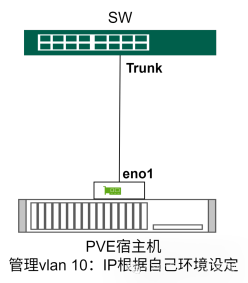
2. Implementation Method
1. Set Up PVE Network
Edit the network configuration file using sudo nano /etc/network/.
auto lo
iface lo inet loopback
iface eno1 inet manual
iface eno1.10 inet manual

auto vmbr0v10
iface vmbr0v10 inet static
address 10.100.10.28
netmask 255.255.255.0
gateway 10.100.10.1
bridge_ports eno1.10
bridge_stp off
bridge_fd 0

auto vmbr0
iface vmbr0 inet manual
bridge_ports eno1
bridge_stp off
bridge_fd 0
2. Restart Network Services to Apply Changes
sudo systemctl restart networking3. Set Switch Port to Trunk (Example with Huawei Switch)
interface GE1/0/12
description ##To SERVER TEST##
port link-type trunk
port trunk allow-pass vlan all
4. VM Network Configuration
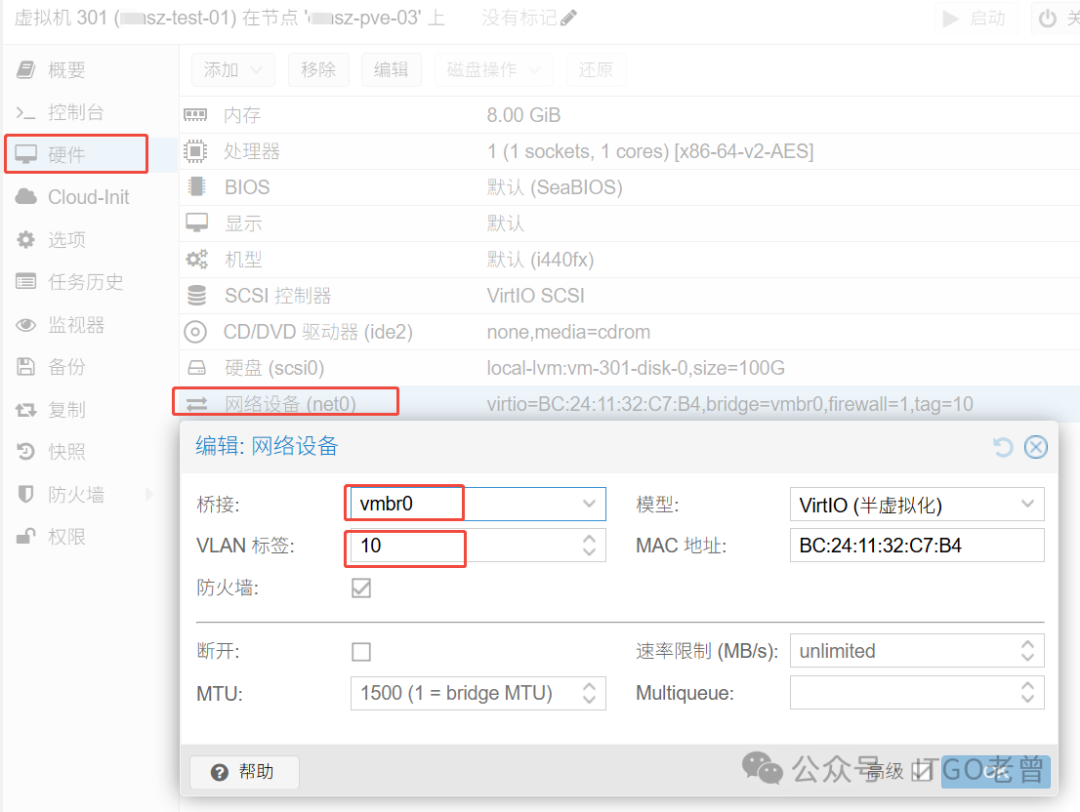
Edit the VM’s network device to bridge to vmbr0 and specify the corresponding VLAN tag to achieve flexible VLAN settings for the VM.
This is the complete configuration method for Configuring Proxmox VE Management IP on Traditional Linux Bridge. For more information, please scan the QR code to join the community.