In the previous article, we discussed running DualSPHysics in a Docker container, where we installed a precompiled version. To gain a deeper understanding of how DualSPHysics simulates two-phase flow of gas and liquid at a lower level, I need to install a debuggable version, which requires compiling from source.
There were quite a few pitfalls. I started the installation last night and only completed it by noon today.
This compilation is specifically for the source code of the gas-liquid two-phase flow.
Pitfalls in Compiling DualSPHysics from Source
Cannot Use a Too New Version of GCC
First, the program for gas-liquid two-phase flow was written by Mokos et al. in 2015-2016, at which time the GCC version was only around 5.
Additionally, the source code is located in the <span>src_mphase/DSPH_v4.0_LiquidGas</span> directory, and DualSPHysics is only at version 4.0, which is significantly different from the latest version 5.4.
Finally, we can verify this with the dependency library <span>libjformatfiles2_64.a</span>, as we can see from the following command that this static library was compiled with GCC version 4.4.
objdump -s --section=.comment src_mphase/DSPH_v4.0_LiquidGas/lib/linux_gcc/libjformatfiles2_64.a

In archive src_mphase/DSPH_v4.0_LiquidGas/lib/linux_gcc/libjformatfiles2_64.a:

JFormatFiles2.o:     file format elf64-x86-64

Contents of section .comment:
 0000 00474343 3a202847 4e552920 342e342e  .GCC: (GNU) 4.4.
 0010 37203230 31323033 31332028 52656420  7 20120313 (Red
 0020 48617420 342e342e 372d3136 2900      Hat 4.4.7-16).
Based on this, if we compile with a newer version of GCC, we will likely encounter errors or warnings. My Linux system is CentOS 7, and I directly used the system’s default GCC version 4.8.5, which is also the default version for many older Linux systems.
The Original CMakeLists.txt Fails to Compile
The <span>src_mphase/DSPH_v4.0_LiquidGas/source/CMakeLists.txt</span> downloaded from the internet in the DualSPHysics 5.4 Full Package seems to be incorrect, as it always fails to compile on my machine. Moreover, the errors are quite obvious. For example, there are two lines in CMakeLists.txt:
LINK_DIRECTORIES(${CMAKE_CURRENT_SOURCE_DIR})
...
target_link_libraries(dualsphysics4cpu jxml_64 jformatfiles2_64 jsphmotion_64 jwavegen_64)
However, there are no such static libraries in the directory where CMakeLists.txt is located, and the libraries <span>../lib/linux_gcc</span> contain only <span>libjxml_64.a</span> and <span>libjsphmotion_64.a</span>. Therefore, compiling with this will result in errors about missing static libraries. We need to change <span>LINK_DIRECTORIES(${CMAKE_CURRENT_SOURCE_DIR})</span> to <span>LINK_DIRECTORIES(${CMAKE_CURRENT_SOURCE_DIR} ${CMAKE_CURRENT_SOURCE_DIR}/../lib/linux_gcc)</span>.
However, <span>../lib/linux_gcc</span> does not contain <span>libjxml_64.a</span> and <span>libjsphmotion_64.a</span>, which still leads to missing static library errors. At the same time, there are <span>JXml.cpp</span> and <span>JSphMotion.cpp</span> in the directory where CMakeLists.txt is located. These two files have not been compiled.
Continuing to look at the source code directory, there are even bigger oversights, such as <span>JPartDataHead.cpp</span> not appearing in CMakeLists.txt, but it is used in other source files. This will lead to undefined reference errors even if the previous issues are resolved.
I asked AI for help for a long time but couldn’t resolve it. This morning, I looked at <span>src/source/CMakeLists.txt</span> and suddenly realized. There are three lines in it:
set(OBJXML JXml.cpp tinystr.cpp tinyxml.cpp tinyxmlerror.cpp tinyxmlparser.cpp)
set(OBJSPHMOTION JMotion.cpp JMotionData.cpp JMotionList.cpp JMotionMov.cpp JMotionObj.cpp JMotionPos.cpp JDsMotion.cpp)
...
add_executable(DualSPHysics5.4CPU_linux64 ${OBJXML} ${OBJSPHMOTION} ${OBCOMMON} ...)
At this point, I realized that xml and sphmotion should not appear in <span>target_link_libraries</span>, but should appear in <span>add_executable</span>, and then I can also add <span>JPartDataHead.cpp</span> in the <span>add_executable</span>.
The Original CMakeLists.txt Cannot Specify CMAKE_BUILD_TYPE
This is a minor issue that can be resolved by adding a few lines of instructions.
Below is the complete CMakeLists.txt (I removed the GPU part because I only need to know how it runs on the CPU, and GCC 4.8.5 is not very compatible with my CUDA 12.4):
cmake_minimum_required(VERSION 2.8)

PROJECT(DualSPHysics)

if(NOT CMAKE_BUILD_TYPE)
    set(CMAKE_BUILD_TYPE Release CACHE STRING "Choose the type of build (Debug or Release)" FORCE)
    set_property(CACHE CMAKE_BUILD_TYPE PROPERTY STRINGS "Debug" "Release" "RelWithDebInfo" "MinSizeRel")
endif()
message(STATUS "Build type: ${CMAKE_BUILD_TYPE}")

set(OBJ_XML JXml.cpp tinystr.cpp tinyxml.cpp tinyxmlerror.cpp tinyxmlparser.cpp)
set(OBJ_SPHMOTION JMotion.cpp JMotionMov.cpp JMotionObj.cpp JMotionPos.cpp JSphMotion.cpp)
set(
    OBJ_BASIC main.cpp Functions.cpp FunctionsMath.cpp JArraysCpu.cpp JBinaryData.cpp JCellDivCpu.cpp JCfgRun.cpp JException.cpp
    JLog2.cpp JObject.cpp JPartDataBi4.cpp JPartFloatBi4.cpp JPartOutBi4Save.cpp JPartsOut.cpp JPartDataHead.cpp JRadixSort.cpp JRangeFilter.cpp
    JReadDatafile.cpp JSaveDt.cpp JSpaceCtes.cpp JSpaceEParms.cpp JSpaceParts.cpp JSpaceProperties.cpp JSph.cpp JSphAccInput.cpp
    JSphCpu.cpp JSphDtFixed.cpp JSphVisco.cpp randomc.cpp JTimeOut.cpp
)
set(OBJ_CPU_SINGLE JCellDivCpuSingle.cpp JSphCpuSingle.cpp JPartsLoad4.cpp)

if(CMAKE_CXX_COMPILER_ID STREQUAL "GNU")
    message("Using libraries for gcc")
    LINK_DIRECTORIES(${CMAKE_CURRENT_SOURCE_DIR} ${CMAKE_CURRENT_SOURCE_DIR}/../lib/linux_gcc)
endif()

find_package(OpenMP)

if (OPENMP_FOUND)
  set (CMAKE_C_FLAGS "${CMAKE_C_FLAGS} ${OpenMP_C_FLAGS}")
  set (CMAKE_CXX_FLAGS "${CMAKE_CXX_FLAGS} ${OpenMP_CXX_FLAGS}")
endif()

add_executable(dualsphysics4cpu ${OBJ_XML} ${OBJ_SPHMOTION} ${OBJ_BASIC} ${OBJ_CPU_SINGLE})

install(TARGETS dualsphysics4cpu DESTINATION ${CMAKE_CURRENT_SOURCE_DIR}/../../EXECS)

if(CMAKE_CXX_COMPILER_ID STREQUAL "GNU")
  target_link_libraries(dualsphysics4cpu jformatfiles2_64 jwavegen_64)
  set_target_properties(dualsphysics4cpu PROPERTIES COMPILE_FLAGS "-O3")
endif()
Compilation
My version is GCC 14.2.0, and the system GCC version is 4.8.5. To use the system version, I need to specify the corresponding flags:
cd src_mphase/DSPH_v4.0_LiquidGas/source
mkdir build
cd build
CC=/usr/bin/gcc CXX=/usr/bin/g++ cmake -DCMAKE_BUILD_TYPE=DEBUG ..
make -j
After compilation, use the following command to check if debugging is possible:
readelf -S dualsphysics4cpu | grep -i debug

  [29] .debug_aranges    PROGBITS         0000000000000000  00341692
  [30] .debug_info       PROGBITS         0000000000000000  003448b2
  [31] .debug_abbrev     PROGBITS         0000000000000000  008a1ff6
  [32] .debug_line       PROGBITS         0000000000000000  008bce1b
  [33] .debug_str        PROGBITS         0000000000000000  0095d517
  [34] .debug_loc        PROGBITS         0000000000000000  009d6968
  [35] .debug_ranges     PROGBITS         0000000000000000  0149d56a

gdb ./dualsphysics4cpu

GNU gdb (GDB) 16.3
Copyright (C) 2024 Free Software Foundation, Inc.
License GPLv3+: GNU GPL version 3 or later <http://gnu.org/licenses/gpl.html>
This is free software: you are free to change and redistribute it.
There is NO WARRANTY, to the extent permitted by law.
Type "show copying" and "show warranty" for details.
This GDB was configured as "x86_64-pc-linux-gnu".
Type "show configuration" for configuration details.
For bug reporting instructions, please see:
<https://www.gnu.org/software/gdb/bugs/>.
Find the GDB manual and other documentation resources online at:
    <http://www.gnu.org/software/gdb/documentation/>.

For help, type "help".
Type "apropos word" to search for commands related to "word"...
Reading symbols from ./dualsphysics4cpu...
Generating Input Files for dualsphysics4cpu
To understand how the <span>dualsphysics4cpu</span> program is used, we first look at <span>examples/mphase_liquidgas/01_DamBreak/xCaseDambreak_LiquidGas_linux64_CPU.sh</span>, noting the following lines of code:
export name=CaseDambreak_LiquidGas
export dirout=${name}_out

# "executables" are renamed and called from their directory

export dirbin=../../../bin/linux
export LD_LIBRARY_PATH=${LD_LIBRARY_PATH}:${dirbin}
export gencase="${dirbin}/GenCase_linux64"
export dualsphysicscpu="${dirbin}/DualSPHysics4.0_LiquidGasCPU_linux64"
...
if [ -e ${dirout} ]; then rm -r ${dirout}; fi
mkdir ${dirout}
if [ $? -ne 0 ] ; then fail; fi

# CODES are executed according to the selected parameters of execution in this testcase

${gencase}${name}_Def ${dirout}/${name} -save:all
if [ $? -ne 0 ] ; then fail; fi

${dualsphysicscpu}${dirout}/${name}${dirout} -svres
if [ $? -ne 0 ] ; then fail; fi
In simpler terms, this means that we first need to create a subdirectory in the case directory, named after the case with <span>_out</span> appended. Then we use GenCase to read <span>${name}_Def.xml</span> and output <span>${name}.xml</span> into the subdirectory. Finally, we execute dualsphysicscpu, with the input file being <span>${name}.xml</span> from the subdirectory, the output directory being <span>${dirout}</span>, and the optional parameter being <span>-svres</span>. The meaning of this optional parameter is explained in <span>doc/help/DualSPHysics4.0_LiquidGas_Help.out</span>, which indicates that it generates a log file of the run.
Now, following its instructions, we will generate the input files required by dualsphysicscpu step by step:
cd examples/mphase_liquidgas/01_DamBreak/
mkdir CaseDambreak_LiquidGas_out
../../../bin/linux/GenCase_linux64 ./CaseDambreak_LiquidGas_Def ./CaseDambreak_LiquidGas_out/CaseDambreak_LiquidGas -save:all
Configuring VSCode
Add <span>.vscode/launch.json</span> in the root directory of DualSPHysics:
{
    "version": "0.2.0",
    "configurations": [
        {
            "name": "(gdb) debug",
            "type": "cppdbg",
            "request": "launch",
            "program": "${workspaceFolder}/src_mphase/DSPH_v4.0_LiquidGas/source/build/dualsphysics4cpu",
            "args": [
                "${workspaceFolder}/examples/mphase_liquidgas/01_DamBreakJSM/CaseDambreak_LiquidGas_out/CaseDambreak_LiquidGas",
                "${workspaceFolder}/examples/mphase_liquidgas/01_DamBreakJSM/CaseDambreak_LiquidGas_out",
                "-svres"
            ],
            "stopAtEntry": false,
            "cwd": "${workspaceFolder}/src_mphase/DSPH_v4.0_LiquidGas/source/build",
            "environment": [],
            "externalConsole": false,
            "MIMode": "gdb",
            "preLaunchTask": "compile",
            "setupCommands": [
                {
                    "description": "Enable pretty-printing for gdb",
                    "text": "-enable-pretty-printing",
                    "ignoreFailures": true
                }
            ],
            "miDebuggerPath": "/usr/bin/gdb"
        }
    ]
}
Now, set a breakpoint in any source code and start debugging:
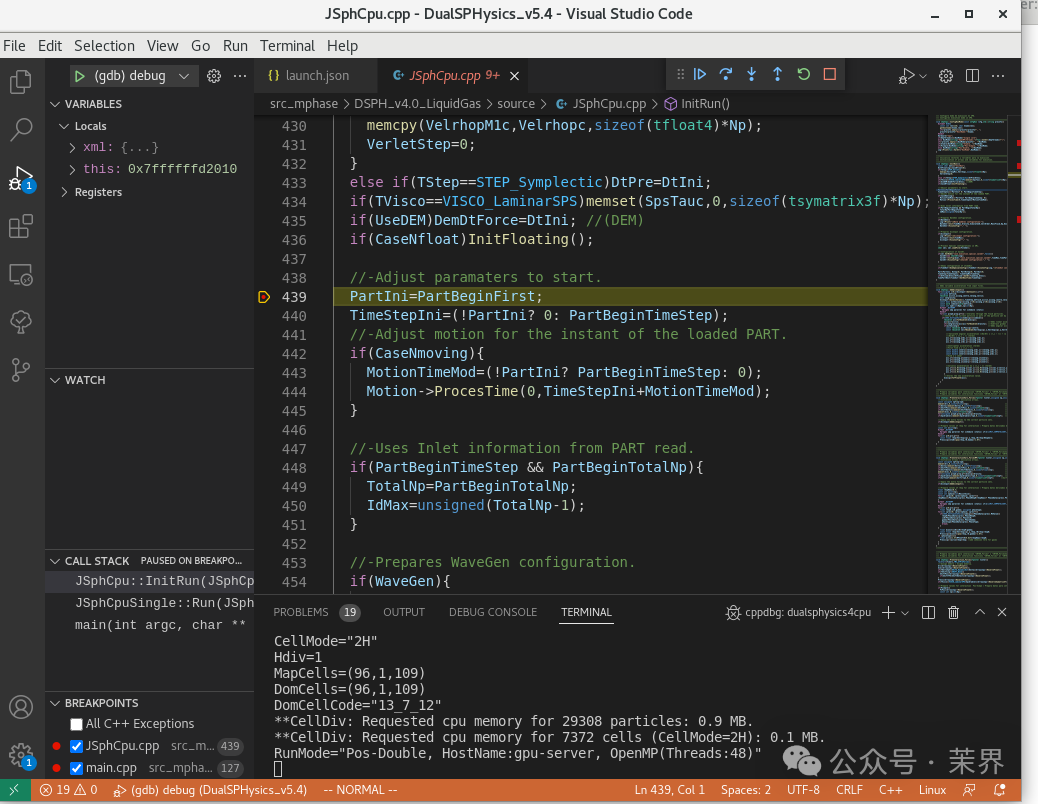
Mission accomplished!